e(fx)clipse 1.1 – New features – API to restart your e4 app on startup

A very common thing for RCP applications is to present a Login-Dialog to the user. The proposed way of doing this in e4 applications is by using a Lifecycle-Hook which looks something like this in your e4+SWT-RCP:

public class StartupHook {
  @PostContextCreate
  public void startUp() {
    // show your login dialog

    if( ! <check-if-abort> ) {
      System.exit(0);
    }
  }
}

and yes System.exit(0) is the only way in e4+SWT – the boostrap code does not check a return value. We had discovered this missing API already in e(fx)clipse 1.0.0 and allowed you to return a boolean value to indicate that the boot process should stop and the application to shutdown gracefully so you wrote something like this:

public class StartupHook {
  @PostContextCreate
  public Boolean startUp() {
    // show your login dialog

    if( ! <check-if-abort> ) {
      return Boolean.FALSE;
    }

    return Boolean.TRUE;
  }
}

API to restart your e4 app on startup

So while the initial API solved the most common usecase it is falling short for more advanced stuff like automatically updating your application in the StartupHook and restarting the OSGi-Framework afterwards (yes I know technically this is not needed in OSGi but for the sake of laziness many apps do it like this!).

e(fx)clipse 1.1.0 addresses this problem by introducing an enumeration org.eclipse.fx.ui.services.restart.LifecycleRV with the following options:

  • CONTINUE : Continue with the boot process
  • SHUTDOWN : Shutdown the application
  • RESTART : Restart the application
  • RESTART_CLEAR_STATE : Restart the application with a cleared persisted state
public class StartupHook {
  @PostContextCreate
  public LifecycleRV startUp() {
    // check update
    if( <check-if-updated> ) {
      return LifecycleRV.RESTART;
    }

    // show your login dialog

    if( ! <check-if-abort> ) {
      return LifecycleRV.SHUTDOWN;
    }

    return LifecycleRV.CONTINUE;
  }
}

Please note that the feature of restarting is also available at later times using org.eclipse.fx.ui.services.restart.RestartService.

Both APIs are documented in our wiki-recipes who are a great resource to learn about all the advanced features of e(fx)clipse runtime.

Posted in e(fx)clipse | Tagged | 2 Comments

e(fx)clipse 1.1 – New features – Improved internationalization support – tooling

In the last blog I showed the runtime components we added to make it easier for you to localize your applications. In the following blog I’ll show you the tooling support we added.

Improved internationalization support – tooling

I’ve already stated in other posts that one of the strengths of e(fx)clipse is that tooling and runtime are developed side by side while you can use all runtime stuff without the Eclipse IDE using Eclipse as the development environment makes your life much easier.

If we recap the runtime blog post our suggested set of files needed are:

  1. One class file to hold the translation values (MyMessages)
    public class MyMessages {
       public String mySimpleMessage;
    }
    
  2. One class file giving you access to translation methods so that you can use method references or create suppliers (MyMessagesRegistry) – at “worst” you need to write 3 methods per property
    @Creatable
    public class MyMessagesRegistry {
      // ...
      public String myAmountMessage() {
        return getMessages().myAmountMessage;
      }
     
      @Inject
      NumberFormatter numberFormatter;
     
      public String myAmountMessage(Number amount) {
         Map<String,Object> data =
           Collections.singletonMap("amount", amount);
         Map<String,Formatter<?>> formatters =
           Collections.singletonMap("number",numberFormatter);
         return MessageFormatter.create(
             data::get, formatters::get ).apply(myAmountMessage());
      }
     
      public Supplier<String> myAmountMessage_supplier(Number amount) {
        return () -> myAmountMessage(amount);
      }
    }
    
  3. 1 – n Property files e.g. for every language you want to support
    # ...
    myAmountMessage = The final amount is ${amount,number,#,##0.00}
    

“Quite a bit of work to write and keep up to date” i hear you saying and you are right! So we need to improve, right? In an ideal world we’d have 1 file holding all the informations and generate all files from it!

So we need some special language which allows us to collect all information in one file – or put differently a DSL!

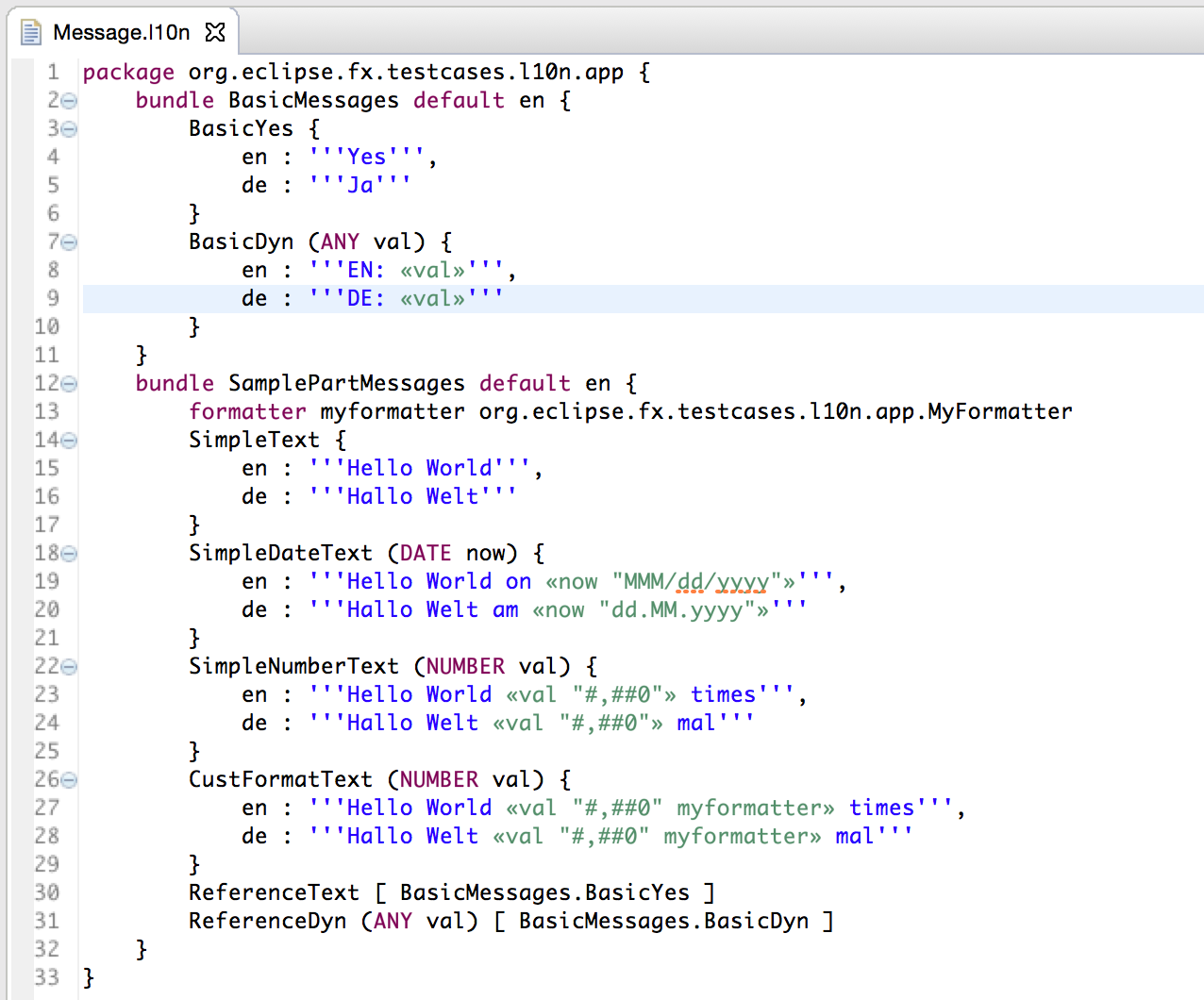
So look at this
l10n

which generates

package org.eclipse.fx.testcases.l10n.app;

/*
 * Do not modify - Auto generated from Message.l10n
 */
public class SamplePartMessages {
  public String SimpleText;
  public String SimpleDateText;
  public String SimpleNumberText;
  public String CustFormatText;
}
package org.eclipse.fx.testcases.l10n.app;

/*
 * Do not modify - Auto generated from Message.l10n
 */
@org.eclipse.e4.core.di.annotations.Creatable
public class SamplePartMessagesRegistry 
  extends org.eclipse.fx.core.text.AbstractTextRegistry<SamplePartMessages> {

  @javax.inject.Inject
  private org.eclipse.fx.core.text.NumberFormatter _number;

  @javax.inject.Inject
  private org.eclipse.fx.core.text.DateFormatter _date;

  @javax.inject.Inject
  private org.eclipse.fx.testcases.l10n.app.MyFormatter 
    cust_myformatter;

  @javax.inject.Inject
  public void updateMessages(@org.eclipse.e4.core.services.nls.Translation SamplePartMessages messages) {
    super.updateMessages(messages);
  }

  public String SimpleText() {
    return getMessages().SimpleText;
  }

  public String SimpleDateText() {
    return getMessages().SimpleDateText;
  }

  public String SimpleDateText(java.util.Date now) {
    java.util.Map<String,Object> dataMap = new java.util.HashMap<>();
    dataMap.put("now",now);
    java.util.Map<String,org.eclipse.fx.core.text.Formatter<?>> formatterMap = new java.util.HashMap<>();
    formatterMap.put("-date",_date);
    return org.eclipse.fx.core.text.MessageFormatter.create(dataMap::get,formatterMap::get).apply( SimpleDateText() );
  }

  public java.util.function.Supplier<String> SimpleDateText_supplier(java.util.Date now) {
    return () -> SimpleDateText(now);
  }

  public String SimpleNumberText() {
    return getMessages().SimpleNumberText;
  }

  public String SimpleNumberText(Number val) {
    java.util.Map<String,Object> dataMap = new java.util.HashMap<>();
    dataMap.put("val",val);
    java.util.Map<String,org.eclipse.fx.core.text.Formatter<?>> formatterMap = new java.util.HashMap<>();
    formatterMap.put("-number",_number);
    return org.eclipse.fx.core.text.MessageFormatter.create(dataMap::get,formatterMap::get).apply( SimpleNumberText() );
  }

  public java.util.function.Supplier<String> SimpleNumberText_supplier(Number val) {
    return () -> SimpleNumberText(val);
  }

  public String CustFormatText() {
    return getMessages().CustFormatText;
  }

  public String CustFormatText(Number val) {
    java.util.Map<String,Object> dataMap = new java.util.HashMap<>();
    dataMap.put("val",val);
    java.util.Map<String,org.eclipse.fx.core.text.Formatter<?>> formatterMap = new java.util.HashMap<>();
    formatterMap.put("myformatter",cust_myformatter);
    return org.eclipse.fx.core.text.MessageFormatter.create(dataMap::get,formatterMap::get).apply( CustFormatText() );
  }

  public java.util.function.Supplier<String> CustFormatText_supplier(Number val) {
    return () -> CustFormatText(val);
  }
}

and SamplePartMessages.properties

#
# Do not modify - Auto generated from Message.l10n
#
SimpleText = Hello World
SimpleDateText = Hello World on ${now,-date,MMM/dd/yyyy}
SimpleNumberText = Hello World ${val,-number,#,##0} times
CustFormatText = Hello World ${val,myformatter,#,##0} times

and SamplePartMessages_de.properties

#
# Do not modify - Auto generated from Message.l10n
#
SimpleText = Hallo Welt
SimpleDateText = Hallo Welt am ${now,-date,dd.MM.yyyy}
SimpleNumberText = Hallo Welt ${val,-number,#,##0} mal
CustFormatText = Hallo Welt ${val,myformatter,#,##0} mal

Before wrapping up let me close with a feature I often thought about myself when doing localizations. One often wants to share general strings in the UI like yes, no, … and translate them only once (see the BasicMessage-Bundle definition) which would require you to use something like this in your UI

public class MyPart {
  @Inject
  MyMessagesRegistry messageRegistry;

  @Inject
  BasicMessagesRegistry basicRegistry;

  @PostConstruct
  void init(BorderPane p) {
    Label l = new Label();
    messageRegistry.register(...);

    Button b = new Button();
    basicRegistry.register(...);
  }
}

What an overhead 2 registries, … wouldn’t it be much nicer if we could reuse messages from the Basic-Bundle in the My-Bundle? So have I been thinking as well so you can write something like this in your l10n-DSL-File

l10-ref

which leads to the following MyMessagesRegistry

package org.eclipse.fx.testcases.l10n.app;

/*
 * Do not modify - Auto generated from Message.l10n
 */
@org.eclipse.e4.core.di.annotations.Creatable
public class SamplePartMessagesRegistry extends org.eclipse.fx.core.text.AbstractTextRegistry<SamplePartMessages> {

  // ...

  @javax.inject.Inject
  private org.eclipse.fx.testcases.l10n.app.BasicMessagesRegistry bundle_BasicMessages;

  // ...

  public String ReferenceText() {
    return bundle_BasicMessages.BasicYes();
  }

  public String ReferenceDyn() {
    return bundle_BasicMessages.BasicDyn();
  }

  public String ReferenceDyn(Object val) {
    return bundle_BasicMessages.BasicDyn(val);
  }

  public java.util.function.Supplier<String> ReferenceDyn_supplier(Object val) {
    return () -> ReferenceDyn(val);
  }
}
Posted in e(fx)clipse | Tagged | 6 Comments

e(fx)clipse 1.1 – New features – Improved internationalization support

e(fx)clipse 1.1.0 is released in less than a week so I’ll once more go through the enhancements and features we developed in the 1.1 timeframe.

Improved internationalization support

As part of this release we’ve added a first set of runtime APIs makeing it easier to develop localized applications. The following APIs are now available to you:

  • AbstractTextRegistry: allows you to connect localization receivers (most likely your UI-Control) and the localization provider so that they update automatically when flipping the language
  • Formatter: a set of formatters for numbers, java.util.Date and java.time.TemporalAccessor who automatically update to the current application locale
  • MessageFormatter: Allows you to do similar things to java.text.MessageFormat but is a bit more powerful 😉

AbstractTextRegistry

Let’s look at first into AbstractTextRegistry and its usage – I won’t go in the technical details how we reached at this API because this has already been discussed in another blog post.

The first thing you need is a class holding your translation texts:

public class MyMessages {
   public String mySimpleMessage;
}

And a properties file named MyMessages.properties (and for each language you want to support another one e.g. MyMessages_de.properties, …)

mySimpleMessage = This is a simple message

And another class which is a subclass of AbstractTextRegistry

@Creatable
public class MyMessagesRegistry extends AbstractTextRegistry<MyMessages> {
  public String mySimpleMessage() {
     return getMessages().mySimpleMessage;
  }

  @Inject
  public void updateMessages(MyMessages messages) {
    super.updateMessages(messages);
  }
}

And then the final useage in your UI is as simple as:

public class MyUIPart {
   @Inject
   MyMessagesRegistry r;

   @PostConstruct
   public void createUI(BorderPane p) {
     Label l = new Label();
     r.register(l::setText, r::mySimpleMessage);
   }
}

Formatter

Another thing you often need in your application are formatters e.g. to format numbers, dates, … so we’ve create a basic interface

public class Formatter<T> {
  public String format(T object, String format);
}

and added some useful basic implementation DateFormatter, NumberFormatter and TemporalAccessorFormatter and you can get access to them through dependency injection

public class MyUIPart {
   @Inject
   NumberFormatter numberFormatter;

   @PostConstruct
   public void createUI(BorderPane p) {
     Label l = new Label();
     l.setText(numberFormatter.format(20_000, "#,##0.00"));
   }
}

MessageFormatter

While the above formatters allow you to format single objects like dates, numbers, … this one allows you format messages similar to what you are used from java.text.MessageFormat but there are some difference who make it a lot for powerful.

public class MyUIPart {
   @Inject
   NumberFormatter numberFormatter;

   @PostConstruct
   public void createUI(BorderPane p) {
     Label l = new Label();
     String message = "The final amount is ${amount,number,#,##0.00}";
     
     Map<String,Object> data = 
       Collections.singletonMap("amount", 20_000);
     Map<String,Formatter<?>> formatters = 
       Collections.singletonMap("number",numberFormatter);

     l.setText(
       MessageFormatter.create( 
         data::get, formatters::get ).apply(message) );
   }
}

So you notice we are not using indices like in MessageFormat but a key and the other difference is that you are free to add formatters as you need them to do more complex things.

Let the 3 APIs work together for the common good

So while the APIs alone already provide some benefits over the lower level JDK APIs their real power can be seen when you let them work together.

If we come back to our initial AbstractTextRegistry stuff we often have stored in our translation texts something like this:

# ...
myAmountMessage = The final amount is ${amount,number,#,##0.00}

which results in another field in MyMessages

public class MyMessages {
  // ...
  public String myAmountMessage;
}

and 3! more methods in MyMessagesRegistry

@Creatable
public class MyMessagesRegistry {
  // ...
  public String myAmountMessage() {
    return getMessages().myAmountMessage;
  }

  @Inject
  NumberFormatter numberFormatter;

  public String myAmountMessage(Number amount) {
     Map<String,Object> data = 
       Collections.singletonMap("amount", amount);
     Map<String,Formatter<?>> formatters = 
       Collections.singletonMap("number",numberFormatter);
     return MessageFormatter.create( 
         data::get, formatters::get ).apply(myAmountMessage());
  }

  public Supplier<String> myAmountMessage_supplier(Number amount) {
    return () -> myAmountMessage(amount);
  }
}

which result in your UI code looking like this

public class MyUIPart {
   @Inject
   MyMessagesRegistry r;
   
   @PostConstruct
   public void createUI(BorderPane p) {
     Label l = new Label();
     r.register(l::setText, r.myAmountMessage_supplier(20_000));
   }
}

That’s it for the first runtime feature, the next blog post will show you how you can make Eclipse generate all the localization artifacts for you from a single resource instead of writing them by hand.

Posted in e(fx)clipse | Tagged | 6 Comments

Busy JavaFX Autumn a head – EclipseCon Europe & Democamps & e(fx)clipse 1.1.0

In the Eclipse space autumn is a very busy time of the year because of

but not for me this year. No EclipseCon Europe 2014 (and most likely no EclipseCon NA 2015), no Democamps Autumn 2014 – just family! Our 2nd daughter is due mid/end of November so no traveling for me in the weeks to come.

Anyways I’ve gone through the program of EclipseCon and it’s nice to see multiple talks dealing with JavaFX and e(fx)clipse so if you have a chance to be there make sure you don’t miss them:

I’m sure those guys are building cool stuff with the help or by using e(fx)clipse!

It’s not easy as an opensource project to know who is using it and what they are building, that’s why I enjoy conferences so much! Anyways if you are one of those – get in touch with us so that we can add your project to our reference page.

In case you are building commercial and business critical application think about commercial support or fund features you are missing. Currently there are 110 open tickets (most of them are feature requests) who request things like SceneBuilder integration, MinMax Support for e4+JavaFX applications, … . I think about funding their implementation and/or contribute them

We – the e(fx)clipse team – are busy fixing the last bugs/features for the 1.1.0 release which is happing in about 2 weeks and will bring some cool new APIs like the one I presented last week

Posted in e(fx)clipse | 1 Comment

Effeciently dealing with @Translations in an e4 app with the help of Java8

In my JavaOne application i showed how one can flip the language of a running e4+JavaFX application on the fly using the new support available from the e4 framework using the @Translation-Annotation.

Generally speaking the advised way of doing translations is like this in case you don’t need to support language fliping on the fly:

  • Create a Messages-Java-Class like this
    public class Messages {
      public String MyLabel;
    }
    
  • Get access to the translations like this:

    public class MyUI {
      @Inject
      @Translation
      Messages messages;
    
      @PostConstruct
      void init(BorderPane parent) {
        Label l = new Label();
        l.setText(messages.MyLabel);
      }
    }
    

In case you want your application to support dynamic language flipping (take care a language flip does not only affect labels, you also need to update formats, …) the situation gets a bit more complex.

public class MyUI {
  private Messages messages;

  private Label l;

  @Inject
  public void applyMessages(@Translation Messages messages) {
    this.messages = messages;
    if( l != null ) {
      l.setText(messages.MyLabel);
    }
  }

  @PostConstruct
  void init(BorderPane parent) {
    l = new Label();

    applyMessages(messages);
  }
}

If you have many labels fields you see that you create a big amount of fields you remember because of the language switching.

If you start analyzing the situation you realize that you only remember the Label instance to call the setText(String) method or more generically speaking something that follows the Java8 interface Consumer<String> so you could write in Java8

public class MyUI {
  private Messages messages;

  private Consumer<String> text;

  @Inject
  public void applyMessages(@Translation Messages messages) {
    this.messages = messages;
    if( text != null ) {
      text.accept(messages.MyLabel);
    }
  }

  @PostConstruct
  void init(BorderPane parent) {
    Label l = new Label();
    text = l::setText

    applyMessages(messages);
  }
}

The situation for the String extraction fairly similar instead of directly access it you could abstract this using a Supplier<String> from Java8.

public class MyUI {
  private Messages messages;

  private Consumer<String> text;
  private Supplier<String> textProvider;

  @Inject
  public void applyMessages(@Translation Messages messages) {
    this.messages = messages;
    if( text != null ) {
      text.accept(textProvider.get());
    }
  }

  @PostConstruct
  void init(BorderPane parent) {
    Label l = new Label();
    text = l::setText
    textProvider = () -> messages.MyLabel;

    applyMessages(messages);
  }
}

You might say: Well now you have 2 fields instead of 1 so what’s the point? The point is the applyMessages only knows about Consumer & Supplier, the method and fields access has been abstracted away and so we can make it generic.

public class MyUI {
  private Messages messages;

  private Map<Consumer<String>, Supplier<String>> translations = new HashMap<>();

  @Inject
  public void applyMessages(@Translation Messages messages) {
    this.messages = messages;
    for( Entry<Consumer<String>, Supplier<String>> e : translations.entrySet() ) {
      e.getKey().accept(e.getValue().get());
    }
  }

  private void register(Consumer<String> c, Supplier<String> s) {
    c.accept(s.get());
    translations.put(c,s);
  }

  @PostConstruct
  void init(BorderPane parent) {
    Label l = new Label();
    register(l::setText, () -> messages.MyLabel);
  }
}

This is already very good but writing this all time is also a bit tedious, right? That’s why e(fx)clipse core-runtime (which means even if you are using e4+SWT you can make use of it!) provides you a base class which uses exactly that pattern. So this is the final solution which remove all the translation flipping clutter from your view code.

  • Create a class named MessageRegistry like this:
    @Creatable
    public class MessageRegistry<Messages> extends org.eclipse.fx.core.di.AbstractMessageRegistry {
        @Inject
        public void updateMessages(@Translation Messages messages) {
            super.updateMessages(messages);
        }
     
        // Optional provide method to access current message
        public String MyLabel() {
            return getMessages().MyLabel;
        }
    }
    
  • Use it in your view like this:

    @Inject
    MessageRegistry r;
     
    @PostConstruct
    void init(BorderPane parent) {
        Label l = new Label();
     
        // if you opted to NOT add the MyLabel() method
        r.register(l::setText, (m) -> m.MyLabel); 
     
        // if you opted to have a MyLabel() method
        r.register(l::setText, r::MyLabel);
    }
    
Posted in e(fx)clipse, e4 | 6 Comments

e4 on JavaFX and OpenDolphin

Being at JavaOne you learn about new technologies and the first thing when learning about something new is trying to integrate the technology into e4 on JavaFX.

This time it’s OpenDolphin I learned about and hacked this morning support to integrate open dolphin into your e4 apps which turned out to be really easy. All you need is:

  • OSGified OpenDolphin Libs including its dependencies
  • Extra Bundle which will provide you a ClientDolphin instance you can fetch from the the DI container

I’ve pushed both of them to a new github project and afterwards it’s nothing more than create a Part-POJO like this:

public class MyDolphinView {
  @Inject
  ClientDolphin clientDolphin;

  @PostConstruct
  void init(BorderPane p) {
    // Default OpenDolphin+JavaFX Code
  }
}

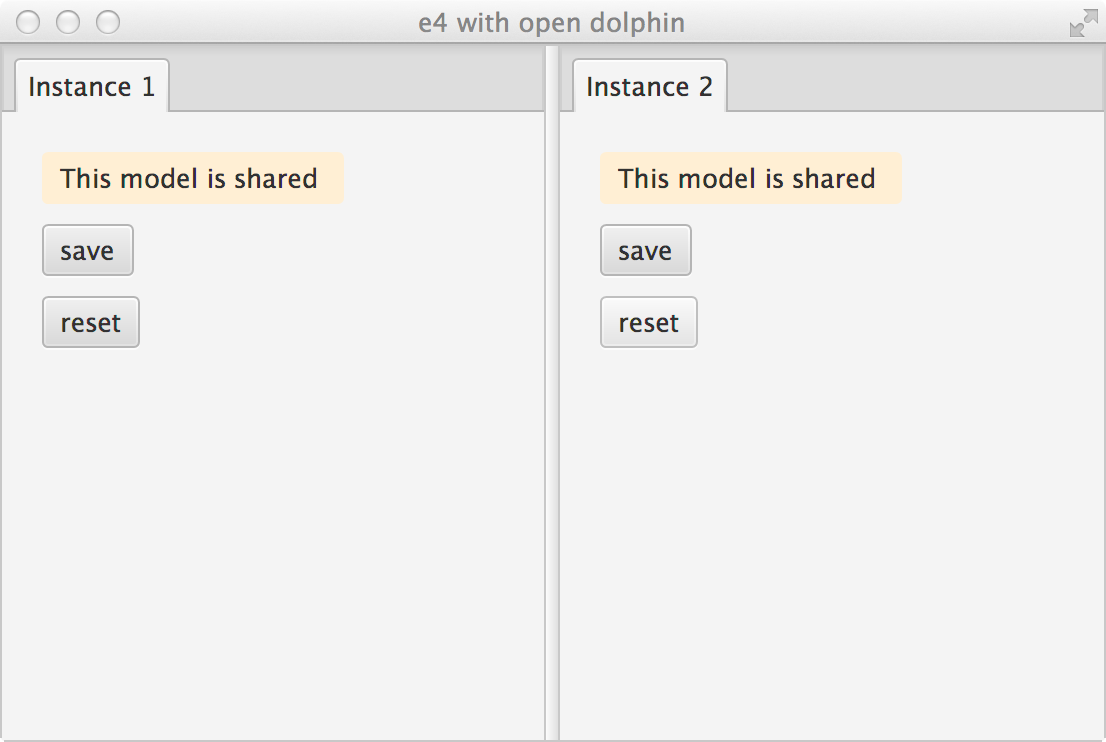
I’ve also checked in a little demo app (you need to run the demo server you can get from the open-dolphin project) which when run looks like this:
sampleopend

Posted in e(fx)clipse | 3 Comments

JavaOne 2014 – Having fun with Lego & JavaFX 3d

More Lego elements

While I learned last week that there’s a difference between Hands-On-Lab and Tutorial at JavaOne I’ve already prepared all the content for Developing JavaFX RCP with the Eclipse4 Application Platform so I will slightly change my plan and provide you a walk through how to develop an application similar the one at the end of this post – if you want you can even follow a long because I’ll post the source codes before the tutorial.

In my last post I described in short that we made up a DSL to define lego bricks and assemble bigger buildings from it – we really had so much fun with and so we added some more extra features to the DSL.

First we modeled (in freecat) a door frame brick:

2_door

Afterwards we defined a new model type – until then we only had bricks who completely followed the lego raster – and named them mounted parts. An example of such a mounted part is the door which is mounted on to the door frame.

2_door_mounted

– we left the door a bit open in this screenshot by setting the y-angle to 160 instead of 180.

Now that’s it for the moment on the definition side, we’ll comeback later to it once more.

The viewer

Having now all the 3d models we need a viewer for none developers. We’ll develop such an application as part of our tutorial at JaveOne but a bit more involved version can be seen in this video.

This is an application developed using e4 + e(fx)clipse JavaFX renderers and other e(fx)clipse opensource components, while in the case it showing our lego 3d model it could be ANY 3d model from engines to your smart-home setup – I’ll talk a bit about this app in the JavaFX at Eclipse.org talk where I also talk about the lego language, DSLs and JavaFX, Testing JavaFX, … .

Add some interactivity

When we had added this mounted stuff, we immediately had the idea to let those mounted parts modify their state while shown in the 3d model viewer in the e4 application above, so we added the possibility to define actions in the DSL (support is not completely ready and needs some more changes to support everything).

For our door we defined 2 actions like this:

2_door_actions

If we now load the FXML-Model once more things like this will happen (turn on sound on your computer to get the full effect)

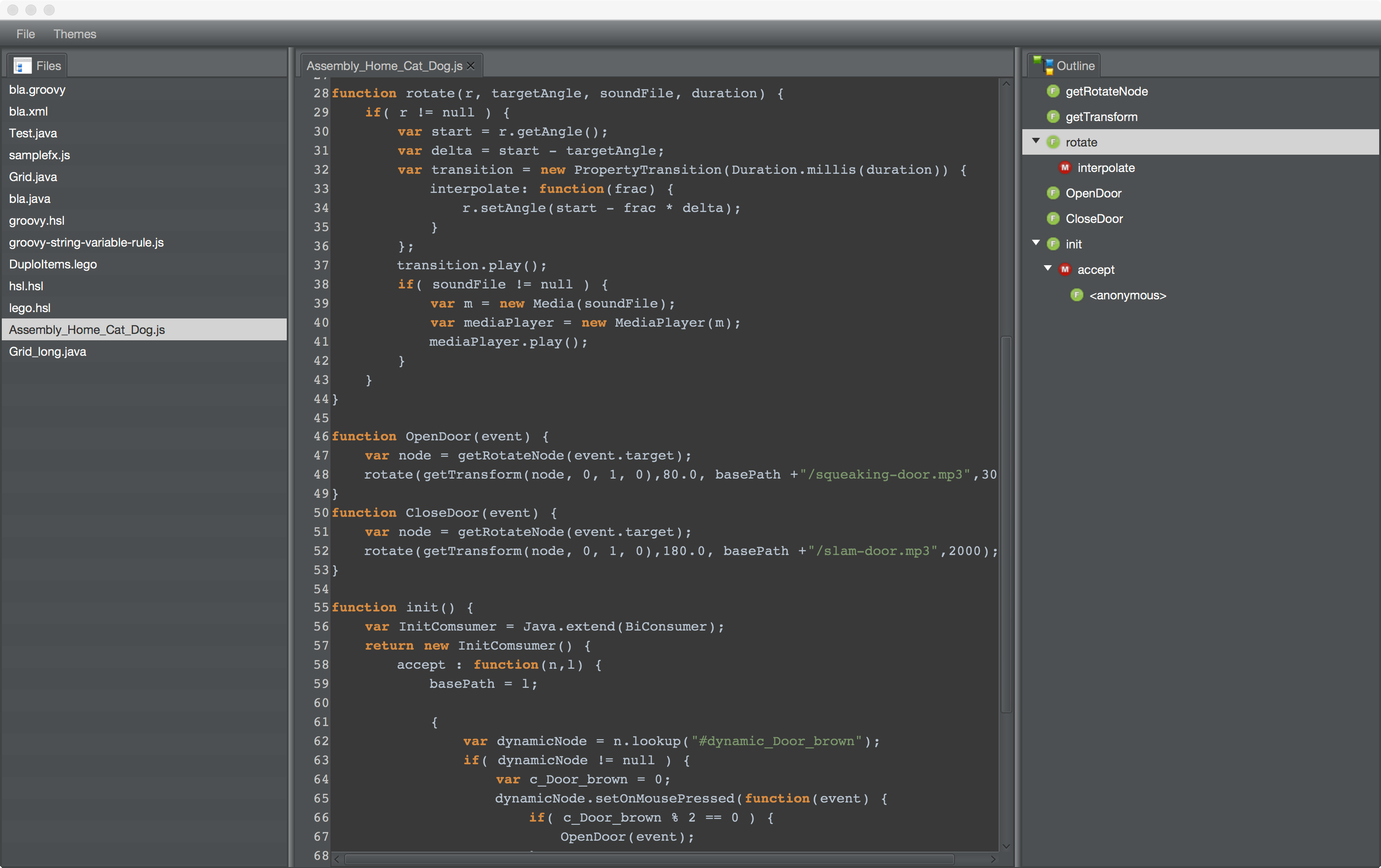
The trick is that while the 3d Viewer itself is only able to display 3 models and animate them it knows nothing about those actions we are encoding the logic in a JavaScript file we are naming equal to the FXML-File and when the FXML-File is loaded through a service fire up Nashorn, load the JavaScript file and we are ready to go. The JavaScript file we are generating looks similar to this one:

var Media 		= Java.type("javafx.scene.media.Media");
var MediaPlayer = Java.type("javafx.scene.media.MediaPlayer");
var Transition 	= Java.type("org.eclipse.fx.ui.animation.BaseTransition");
var Consumer 	= Java.type("java.util.function.Consumer");
var Duration 	= Java.type("javafx.util.Duration");

var PropertyTransition = Java.extend(Transition);
		
		
function getRotateNode(node) {
	return node.getParent().getParent();
}
		
function getTransform(node,x,y,z) {
	for( var i = 0; i < node.getTransforms().size(); i++ ) {
		var t = node.getTransforms().get(i);
		if( t.getClass().getSimpleName().equals("Rotate") ) {
			if( t.getAxis().getX() == x 
				&& t.getAxis().getY() == y
				&& t.getAxis().getZ() == z ) {
				return t;
			}
		}
	}
	return null;
}

function rotateY(node, targetAngle, soundFile, duration) {
	var r = getTransform(node, 0, 1, 0);
	if( r != null ) {
		var start = r.getAngle();
		var delta = start - targetAngle;
		var transition = new PropertyTransition(Duration.millis(duration)) {
			interpolate: function(frac) {
				r.setAngle(start - frac * delta);
			}
		};
		transition.play();
		if( soundFile != null ) {
			var m = new Media(soundFile);
			var mediaPlayer = new MediaPlayer(m);
			mediaPlayer.play();
		}
	} 
}
		
function doorOpen(event) {
	var node = getRotateNode(event.target);
	rotateY(node,80.0,"file:/Users/tomschindl/git/elementary/sample/lego/3d/squeaking-door.mp3",3000);
}

function doorClose(event) {
	var node = getRotateNode(event.target);
	rotateY(node,180.0,null,3000);
}

function init() {
	var InitComsumer = Java.extend(Consumer);
	return new InitComsumer() {
		accept : function(n) {
			var dynamic = n.lookup("#dynamic_1");
			dynamic.setOnMousePressed(doorOpen);
		}
	};
}

init();

I need to clean up the sources of the Lego-Language (e.g. removal of absolute paths, …) a bit before pushing it to our github account but you can clone the repo from there already.

Posted in e(fx)clipse | Leave a comment

JavaOne 2014 – Visualize your DSL – Building 3d Lego models with Xtext and JavaFX

JavaOne 2014 is not too far ahead and because I’m doing 2 session:

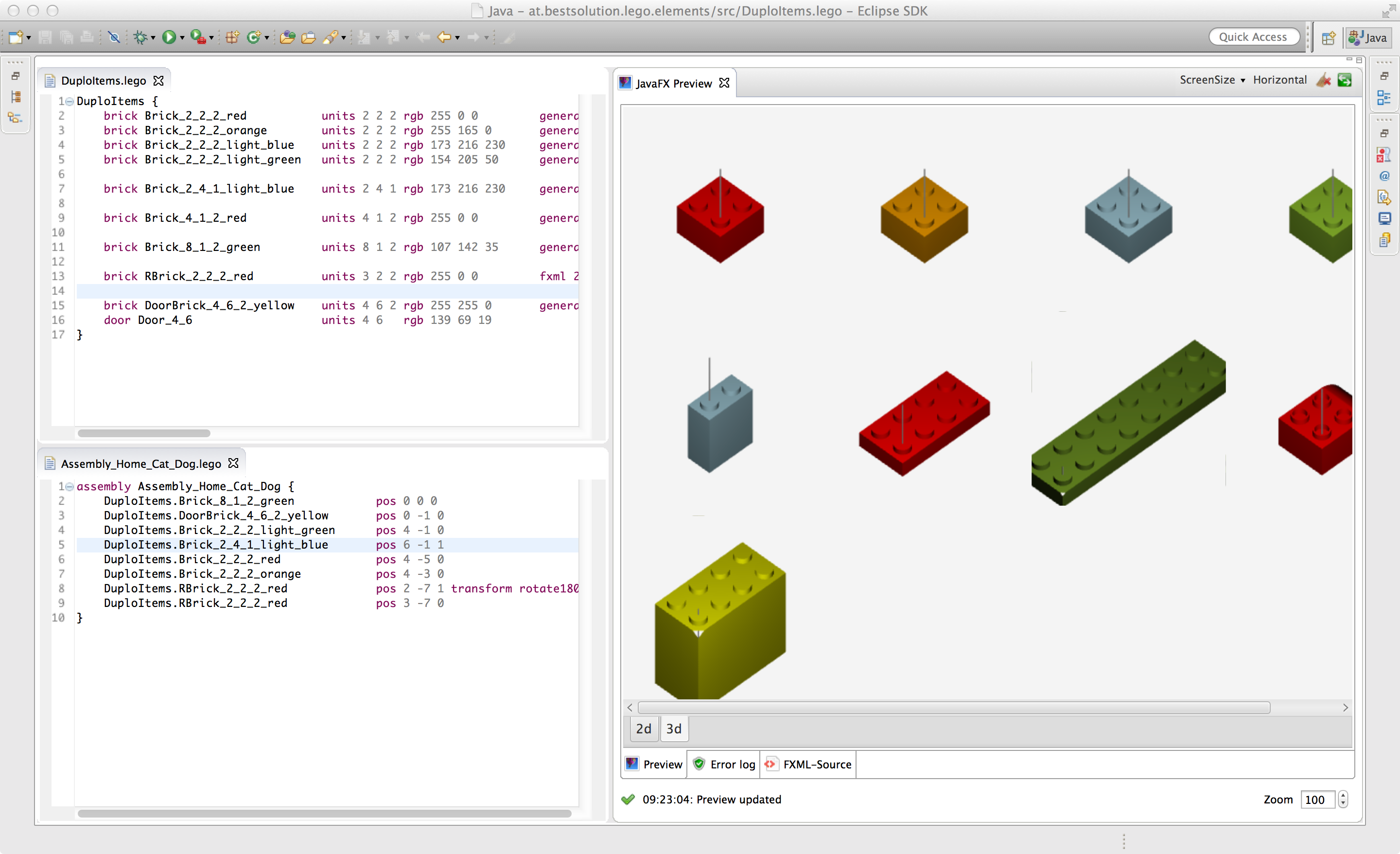
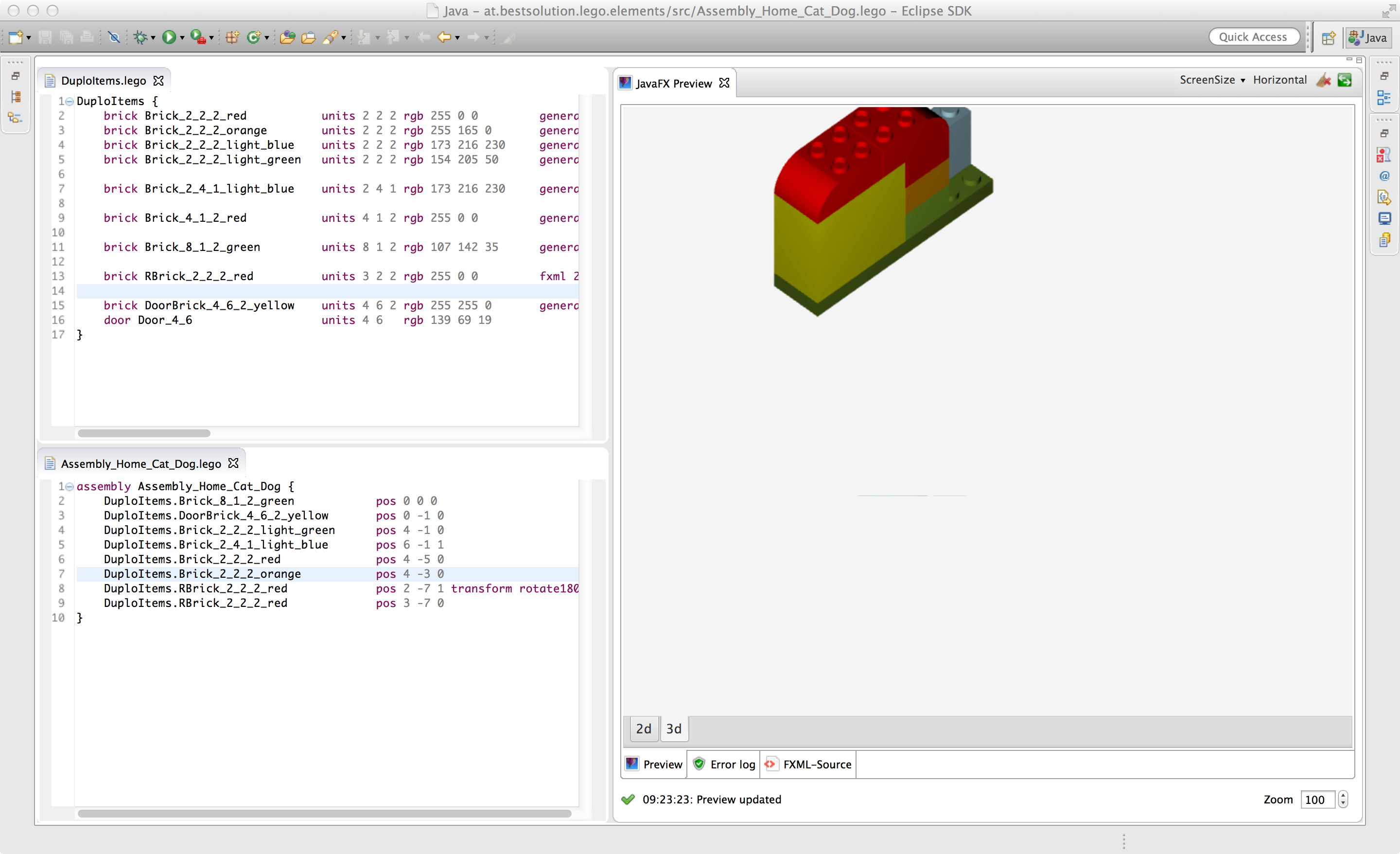
I’ve been busy working on show cases and the demo application. The demo application visualizes 3d objects of any kind, I thought a nice and not too complex example are structures built from lego bricks. Naturally one can create Lego 3d models using any 3d modeling software but for someone like me who is not using them on a daily base this is a bit cumbersome and I’m faster using a DSL who allows me to those in a textual editor inside my IDE and so I defined a DSL who allows me to define lego bricks and mix and match them to create bigger structures.

Definition Lego DuploTm Bricks:
lego_bricks

Definition of a Lego DuploTm structure:
lego_assembly

The reality:
Foto

The really interesting thing in this regard is that to create a visual representation of the editor content (the editors are on the left hand side of the Eclipse IDE screenshots) is that all that needs to be done is to contribute an adapter into your IDE which adapts your editor (must not be xtext based) and provide an FXML representation of the editors content.

For the above editors this looks like this:

The adapter for the xtext-editor:

package at.bestsolution.lego.ui.preview;

import java.net.URL;
import java.util.Collections;
import java.util.List;

import org.eclipse.core.resources.IFile;
import org.eclipse.core.resources.ResourcesPlugin;
import org.eclipse.core.runtime.Path;
import org.eclipse.emf.common.util.URI;
import org.eclipse.fx.ide.ui.editor.IFXMLProviderAdapter;
import org.eclipse.ui.IEditorPart;
import org.eclipse.xtext.resource.XtextResource;
import org.eclipse.xtext.ui.editor.XtextEditor;
import org.eclipse.xtext.util.concurrent.IUnitOfWork;

import at.bestsolution.lego.lego.Model;
import at.bestsolution.lego.ui.internal.LegoActivator;

import com.google.inject.Injector;

public class FXMLProviderAdapter implements IFXMLProviderAdapter {
	private XtextEditor editor;
	
	public FXMLProviderAdapter(XtextEditor editor) {
		this.editor = editor;
	}

	@Override
	public IEditorPart getEditorPart() {
		return editor;
	}
	
	@Override
	public String getPreviewFXML() {
		return editor.getDocument().readOnly(new IUnitOfWork<String, XtextResource>() {

			@Override
			public String exec(XtextResource resource) throws Exception {
				Injector injector = LegoActivator.getInstance().getInjector("at.bestsolution.lego.Lego");
				PreviewGenerator generator = injector.getInstance(PreviewGenerator.class);
				return generator.generatePreview((Model) resource.getContents().get(0)).toString();
			}
			 
		});
	}
		
	@Override
	public String getPreviewSceneFXML() {
		return null;
	}

	@Override
	public List<String> getPreviewCSSFiles() {
		return Collections.emptyList();
	}

	@Override
	public String getPreviewResourceBundle() {
		return null;
	}

	@Override
	public List<URL> getPreviewClasspath() {
		return Collections.emptyList();
	}

	@Override
	public IFile getFile() {
		return editor.getDocument().readOnly(new IUnitOfWork<IFile, XtextResource>() {

			@Override
			public IFile exec(XtextResource resource) throws Exception {
				URI uri = resource.getURI();
				Path structureFilePath = new Path(uri.toPlatformString(true));
				IFile f = ResourcesPlugin.getWorkspace().getRoot().getFile(structureFilePath);
				if( f.exists() ) {
					return f;
				}
				return null;
			}
			
		});
	}
}

The adapter factory registered inside the Eclipse IDE:

package at.bestsolution.lego.ui.preview;

import org.eclipse.core.runtime.IAdapterFactory;
import org.eclipse.fx.ide.ui.editor.IFXMLProviderAdapter;
import org.eclipse.fx.ide.ui.editor.IFXPreviewAdapter;
import org.eclipse.xtext.ui.editor.XtextEditor;

public class FXMLAdapterFactory implements IAdapterFactory {

	@Override
	public Object getAdapter(Object adaptableObject, Class adapterType) {
		if((adapterType == IFXMLProviderAdapter.class || adapterType == IFXPreviewAdapter.class) && adaptableObject instanceof XtextEditor ) {
			XtextEditor editor = (XtextEditor) adaptableObject;
			if( "at.bestsolution.lego.Lego".equals(editor.getLanguageName()) ) {
				return new FXMLProviderAdapter(editor);
			}
		}
		return null;
	}

	@Override
	public Class[] getAdapterList() {
		return new Class[]{IFXMLProviderAdapter.class, IFXPreviewAdapter.class};
	}

}
<?xml version="1.0" encoding="UTF-8"?>
<?eclipse version="3.0"?>
<plugin>
  <!-- .... -->
  <extension
        point="org.eclipse.core.runtime.adapters">
     <factory
            adaptableType="org.eclipse.xtext.ui.editor.XtextEditor"
            class="at.bestsolution.lego.ui.preview.FXMLAdapterFactory">
         <adapter
               type="org.eclipse.fx.ide.ui.editor.IFXPreviewAdapter">
         </adapter>
         <adapter
               type="org.eclipse.fx.ide.ui.editor.IFXMLProviderAdapter">
         </adapter>
      </factory>
  </extension>
  <!-- .... -->
</plugin>
Posted in e(fx)clipse, Eclipse | 5 Comments

e(fx)clipse 1.0 released

The release

I’m happy to announce the 1.0 release of e(fx)clipse tooling and runtime. I’ve already introduced the most interesting new features in the last 2 weeks

… but there are many many other small improvements, bugfixes, … .

We resolved more the 100 Bug/Feature-Tickets, started to see commercial adoption of our runtime and a vibrant community who started contributing back fixes, filed world class bug reports.

As with any release I’d like to thank some people/organizations:

  • BestSolution.at for sponsoring the development
  • External contributors like Christoph Keimel & Sun Volland for their excellent contributions to the runtime platform
  • the OpenJFX-Team to fix bugs affecting e(fx)clipse and accept contributions so that we could implement missing features

The final bits are in place for you to consume:

Sponsoring

I hope you all enjoy the work we’ve done and continue to provide in the next releases to come. Still we could need some help: You might consider sponsoring the project, so that we can provide the services you are used to and provide a reliable tooling & runtime platform you can build your business applications on.

For more information on sponsoring and the packages available take a look at http://efxclipse.bestsolution.at/sponsoring.html or if you need commercial support see http://efxclipse.bestsolution.at/services.html.

Posted in Announcements, e(fx)clipse | Tagged | 16 Comments

e(fx)clipse 1.0 – New Features – Consume Non-OSGi-Artifacts from a maven repository

e(fx)clipse 1.0.0 is just around the corner and scheduled to be released on August 15th, while we are polishing the final bits, the Eclipse IP-Team checks our IP-Log, … .

I’d like to introduce you the new and exiting features that we worked on in the last months since we released 0.9.0 in February.

Blog series

Other posts in this series are:

Consume Non-OSGi-Artifacts from a maven repository

All of our runtime artifacts are OSGi-Bundles and we publish them as a p2 repository (in future I also plan to publish an OBR but that’s something for 1.1) nevertheless some of them do not require OSGi at all and can be used in plain JavaFX applications so we decided to publish them as well to a Nexus-Repository so that you can consume the following artifacts (including all dependencies) from there:

  • org.eclipse.fx.ui.panes: Additional layout panes you know from SWT
  • org.eclipse.fx.ui.controls: Adds some custom controls we’ve developed like e.g. a TabPane who supports Drag and Drop, the StyledText control and some more addons
  • org.eclipse.fx.core.fxml: Holds some addons needed when you are using our FXML to Java translator
  • org.eclipse.fx.core.databinding: Integration layer between Eclipse Databinding and JavaFX-Properties
  • org.eclipse.fx.ui.animation: Some basic animations, nothing fancy but a nice addon for your applications
  • org.eclipse.fx.ui.databinding: Integration between Eclipse Databinding and JavaFX UI Components

Useage is fairly simple all you need to do is to add the efxclipse-Nexus repository to your pom.xml, e.g. to make use of our additional layout panes all you need to to is:

<project xmlns="http://maven.apache.org/POM/4.0.0" ....>
  <repositories>
    <repository>
      <id>eclipse-nexus</id>
      <url>https://repo.eclipse.org/content/repositories/efxclipse-snapshots</url>
      <snapshots><enabled>true</enabled></snapshots>
    </repository>
  </repositories>

  <!-- ... -->
  <dependencies>
    <dependency>
      <artifactId>org.eclipse.fx.ui.panes</artifactId>
      <groupId>org.eclipse.fx</groupId>
      <version>1.0.0-SNAPSHOT</version>
    </dependency>
  </dependencies>

</project>
Posted in e(fx)clipse | Tagged | 9 Comments