Automated Eclipse Project creation and deployment (for JavaFX)

Our believe is that the best runtime techology is meaningless without proper tooling support so if you’ve ever developed an Eclipse Plug-in to allow easier adoption of a runtime technology you might have faced the same problem I’m facing with e(fx)clipse.

The runtime platform I deeply care about is e(fx)clipsee4 on JavaFX and we are providing beside specialized editors for CSS and FXML, a set of wizards who allow people to bootstrap a complete e4 on JavaFX project setup but we don’t stop at the project stub creation like the SWT tooling currently does but generate a some more projects and artifacts.

Whenever I write a wizard who does such a project setup I’m getting tired of how complex and not understandable my code looks like although all it does is to setup a folder structure and generate the content of some files (e.g. MANIFEST.MF, plugin.xml , … ).

The last time I wrote a wizard like this it drove me so crazy that I decided that something has to done to make the process of generating intelligent code structures (I know there is this PDE-Template stuff but frankly I really hate that and want something much more dynamic) more streamlined.

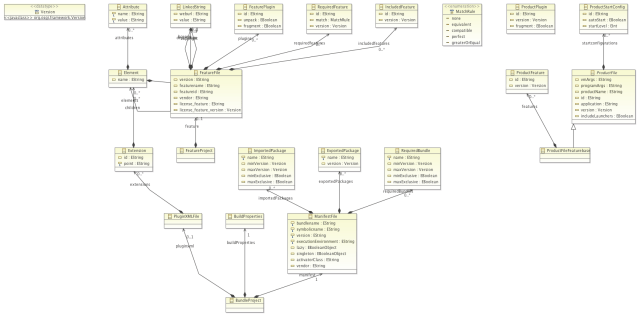
The first thing I did was to develop a Meta-Model for the most important resource elements.
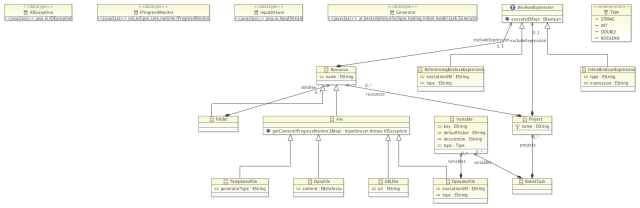
RobotTask

BundleProject

So one can use it programmatically like this:

// ... wizard setup
public boolean performFinish() {
  Bundle b = FrameworkUtil.getBundle(getClass());
  BundleContext ctx = b.getBundleContext();
  ServiceReference<RRobot> ref = ctx.getServiceReference(RRobot.class);
  final RRobot r = ctx.getService(ref);

  final RobotTask task = TaskFactory.eINSTANCE.createRobotTask();
  task.getProjects().add(
    createBundleProject(
      projectPage.getProjectName(),
      contentPage.getData().getId(),
      ((AbstractFieldData)contentPage.getData()).getExecutionEnvironment(),
      contentPage.getData().getVersion(),
      configPage.getProductName(),
      configPage.isMavenTycho()
    )
  );

  // the rest of the setup

  WorkspaceModifyOperation w = new WorkspaceModifyOperation() {

    @Override
    protected void execute(IProgressMonitor monitor) throws CoreException, InvocationTargetException, InterruptedException {
      r.executeTask(monitor, task, new HashMap<String, Object>());
    }
  };
			
  getContainer().run(true, true,w);
}

So far so good but even this code it gets really noisy and hard to understand. To reduce noise and describe the problem domain in a concise format, Xtext – a framework to develop DSLs – is a perfect match. This short screencast shows the DSL in action.

The first part of the video shows the DSL and Resource-Robot in action but the 2nd part is not less interesting for the people developing JavaFX application. The roboter generates a project structure including all artifacts needed to package up the final application for submission e.g. to the Mac App Store in future.

The DSL and robot are part of the e(fx)clipse project but they can be installed on theirown in any Eclipse IDE >= 3.7.2.

Posted in e(fx)clipse | 2 Comments

Animating the JavaFX PieChart a bit

I’m with a customer this week in Swiss doing a workshop on e4. Tomorrow is the last day and well most likely will at least take a short look how they can integrate JavaFX 2.x into their e4-SWT applications e.g. to show charts.

I just coded up a small example of a PieChart and thought it might be nice show case for JavaFX animations to let the pie slice move out a bit when hovering. I’m not really good at all the math stuff so I searched the internet a found this nice JavaFX 1.x tutorial and adopted it to JavaFX 2.0. I didn’t spend too much time on reading the API so maybe I’m doing things completely wrong but here’s the result in a short screencast.

The real magic is in the translation calcuation inside the MouseOverListener which looks like this:

static class MouseHoverAnimation implements EventHandler<MouseEvent> {
  static final Duration ANIMATION_DURATION = new Duration(500);
  static final double ANIMATION_DISTANCE = 0.15;
  private double cos;
  private double sin;
  private PieChart chart;

  public MouseHoverAnimation(PieChart.Data d, PieChart chart) {
    this.chart = chart;
    double start = 0;
    double angle = calcAngle(d);
    for( PieChart.Data tmp : chart.getData() ) {
      if( tmp == d ) {
         break;
      }
      start += calcAngle(tmp);
    }

    cos = Math.cos(Math.toRadians(0 - start - angle / 2));
    sin = Math.sin(Math.toRadians(0 - start - angle / 2));
  }

  @Override
  public void handle(MouseEvent arg0) {
    Node n = (Node) arg0.getSource();

    double minX = Double.MAX_VALUE;
    double maxX = Double.MAX_VALUE * -1;
			
    for( PieChart.Data d : chart.getData() ) {
      minX = Math.min(minX, d.getNode().getBoundsInParent().getMinX());
      maxX = Math.max(maxX, d.getNode().getBoundsInParent().getMaxX());
    }

    double radius = maxX - minX;
    TranslateTransitionBuilder.create().toX((radius *  ANIMATION_DISTANCE) * cos).toY((radius *  ANIMATION_DISTANCE) * sin).duration(ANIMATION_DURATION).node(n).build().play();
  }
		
  private static double calcAngle(PieChart.Data d) {
    double total = 0;
    for( PieChart.Data tmp : d.getChart().getData() ) {
      total += tmp.getPieValue();
    }
			
    return 360 * (d.getPieValue() / total); 
  }
}

The sample sources are published as part of the e(fx)clipse repo in a sample project.

Posted in Uncategorized | 5 Comments

JavaFX shader language JSL or writing an editor for a language you don’t know

This is just a very short post on how cool I think Xtext is so to implement an editor for a DSL. The JavaFX team released this week a DSL to author shaders for OpenGL and DirectX named JSL (announcement post).

Yesterday I had to break out of standard work for a minute (infact it was about an hour) and took their antlr-grammer and translated it to Xtext (more or less a c&p task) and horray!

The grammer needs some refinements (look at the enormous outline!) but that’s something to look into later on.

Posted in e(fx)clipse | 2 Comments

fxpackager for JavaFX-OSGi-Apps

When creating RCP applications using SWT the product-Export allows you to create a native launcher artifact. The problem with this native artifact is that on OS-X this native launcher and JavaFX don’t like each other.

JavaFX is all about a nice user experience, so not having a native launcher is a problem for people building applications on top of the technologies provided by our e(fx)clipse project.

The real problem although is that if you want to get into e.g. the mac appstore you need to ship a native installer – for mac a dmg – which includes everything you need to run (including the JRE!).

The conclusion of those 2 points above is: We need to fix this

For none OSGi-JavaFX application Oracle ships a small utility to create:

  • A native launcher experience
  • A native installer for your target platform

Today I took a stab on it and finally managed to package up my FX-IDE using the fxpackager using a combination of maven-tycho and ant.

I’ve pushed the build stuff to the fx-ides github-repo. The useage of the fxpackager can be seen in the build.xml file.

Posted in e(fx)clipse | 2 Comments

EclipseCon JavaFX Demo App Videos

At EclipseCon Europe 2012 I’ve presented some demo applications written on top of JavaFX 2 and Eclipse techologies developed in the e(fx)clipse project.

e4 on JavaFX

This small applications shows how easy it is to theme e4 JavaFX apps, how one can integrate multimedia content like videos and use animations to switch between perspectives.

fx ide

This sample shows how to use JavaFX 2.x and Eclipse techologies (JDT,Orion) and e(fx)clipse parts to develop your a very minimal IDE. In contrast to the last videos I’ve now added warning and error marker support.

I’m currently at a download size of about 11MB.

fx43 desktop

fx43 is the code name for a JavaFX application which is written to run in fullscreen and to host small apps one can launch to take the full space of the screen. It shows how nice it is to install new applications on the fly.

If you are interested in e(fx)clipse, what you can do with it inconjunction with Eclipse (e.g. e4) join our forum or get in touch with BestSolution.at

Posted in e(fx)clipse | 6 Comments

EclipseCon Europe 2012 Slides

For those who have attended my EclipseCon Talks on JavaFX and Eclipse. You can get access to my slides from here:

  • JavaFX, OSGi and e4: slides
  • e(fx)clipse – Eclipse Tooling for JavaFX 2: slides

There are videos recorded from the talk and but I don’t have an URL to point you too yet. I expect that to take some time until those get published. I hope you found my talks inspiring on what can be done using JavaFX and Eclipse techologies like e4, Equinox, … .

Posted in e(fx)clipse | Leave a comment

Eclipse Techs on steroids

If you liked this blog post you’ll really enjoy watching this short screen cast showing how top notch Java-Technlogies from Eclipse (e4, orion, JDT-Core) and Oracle (JavaFX) can work together seemlessly.

I had to tweak the orion ContentAssistent-Code a bit to get nice auto-completion with icons & multiple-colors. It has be really easy to fix this in the JavaScript code.

There are other things I’d like to change in the orions proposal stuff so I guess I’ll have to update to the latest and greatest Orion code base and bug the orion team with some pull requests.

Doug – next to get working is CDT-Core and autocomplete 😉

Posted in e(fx)clipse | 5 Comments

J1 talk on e(fx)clipse

For those who are interested in the slides I used today presenting e(fx)clipse tooling and runtime at JavaOne. You can grab the slides here.

Hope you enjoyed it.

Posted in Talks & Conferences | Leave a comment

e(fx)clipse 0.1.1 released

I’m pleased to announce that e(fx)clipse 0.1.1 is released just before leaving to JavaOne. Let’s jump directly to list of new features

Distros

I’ve update the 4.2 distro to latest 4.2.1 builds and update all other plugins (Subclipse 1.8.16, GEF 3.8.1, WST 3.4.1, Xtext 2.3.1) in the 3.8 and 4.2 distro to the latest available builds, so the distro will hold the same bundles as the one released with Juno SR1 in the next few days.

Tooling

Our company decided that we are donateing some of our employees time to work on e(fx)clipse opensource stuff. In this release they started working on tooling stuff. So there’s a bunch of cool new features

Build-Tooling

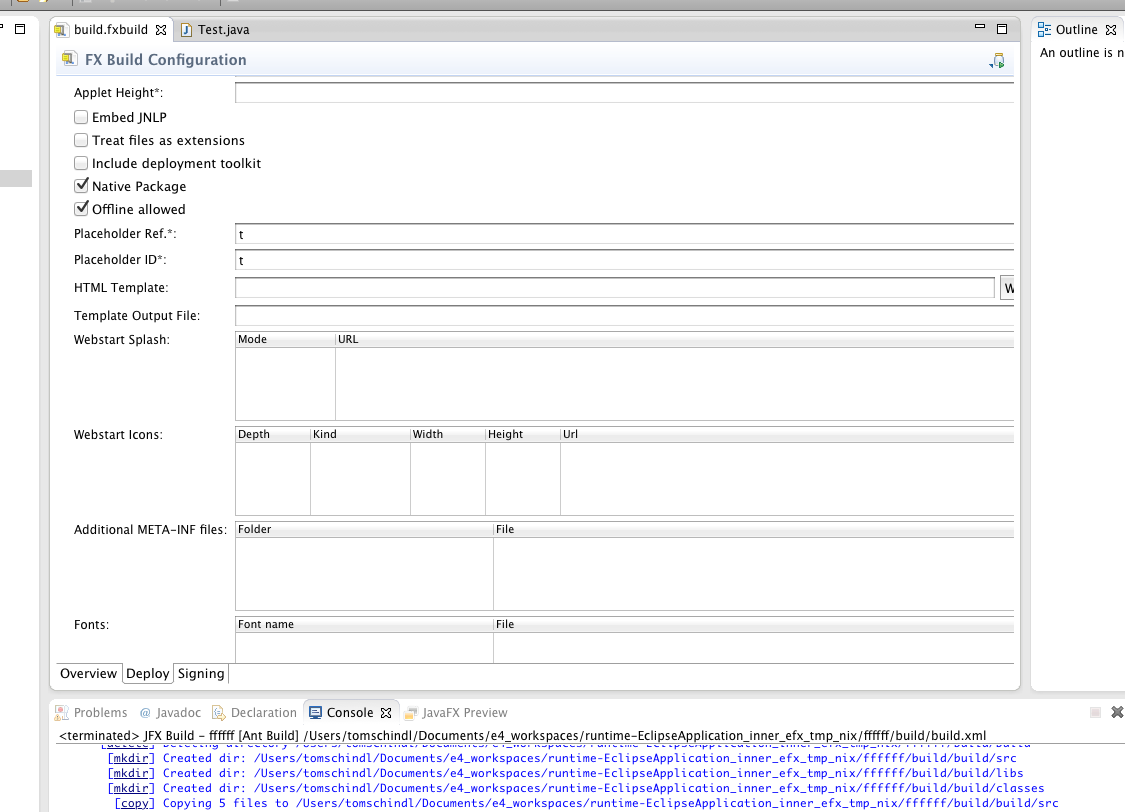
We now have a new fxbuild-File editor which provides support for all features of javafx ant tasks. We have switched the storage from a plain properties file to an XML one which is backed by an EMF-Ecore model.

Old build.fxbuild files should be converter automatically when opened for the first time.

CSS

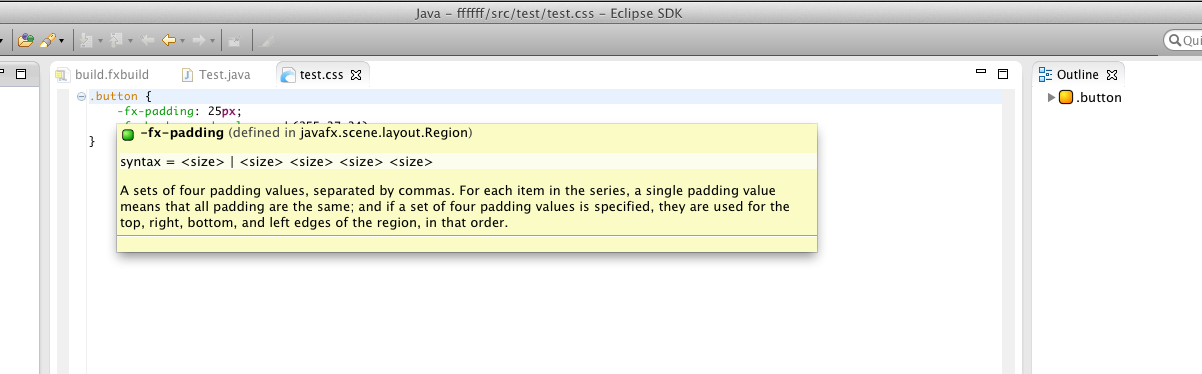
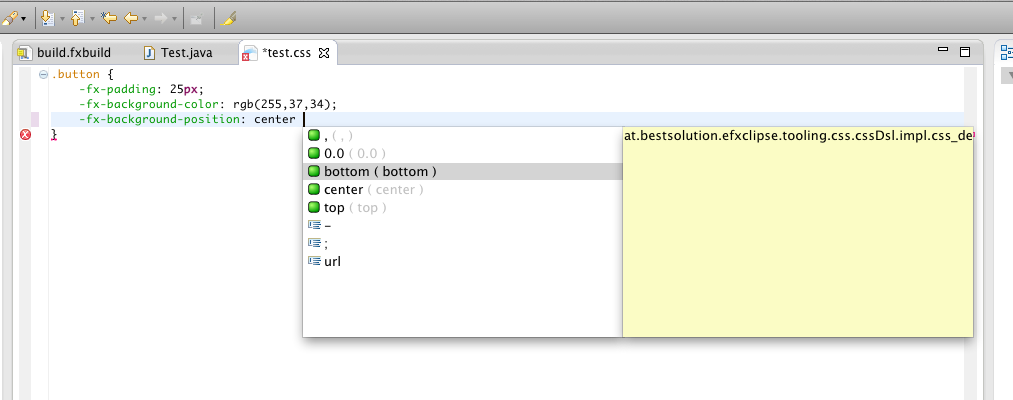
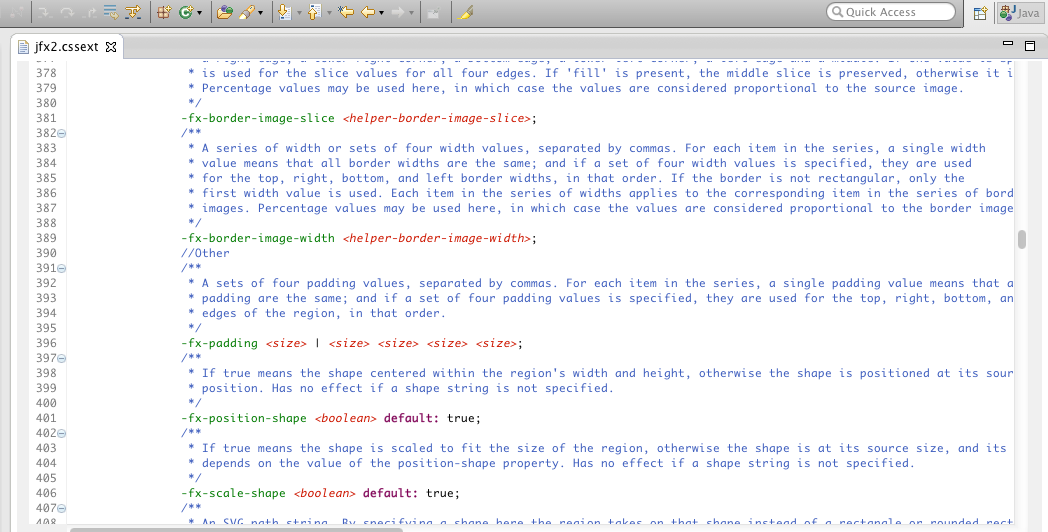
This area got a lot of love in this release (and will continue in the next ones as well). To provide people meaningful Hover-Tooltips, autocompletion and validation we decided at the begining of the cycle that we need a structural representation of properties and their values so that we can use them. At the moment the only reference is a HTML-File which looks like it is hand-crafted. So we developed our own structural language to collect those informations and use it to

  1. Present Documentation
  2. Provide content proposals

The language we use define the possible elements, attributes and values is named and itself looks very similar to what you see in the CSS and FX-CSS specs.

We’ll continue in 0.2.0 implement validation on top this infrastructure and improve the auto-completion which has some rough edges here and there.

FXGraph and FXML

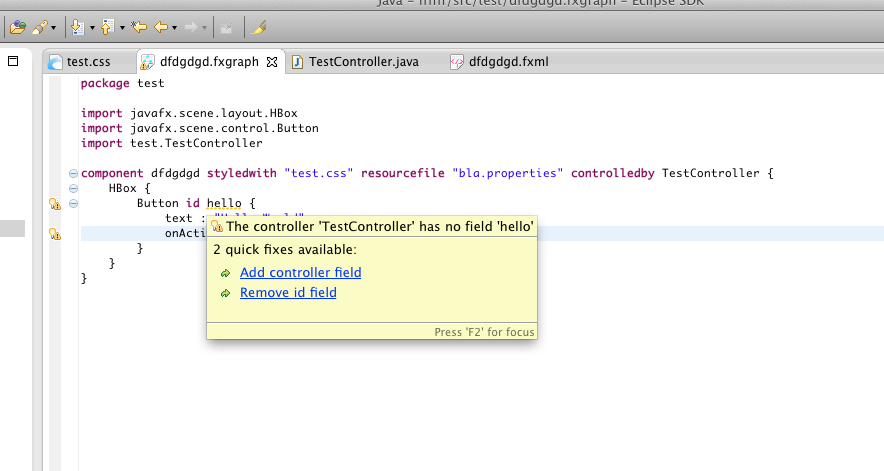
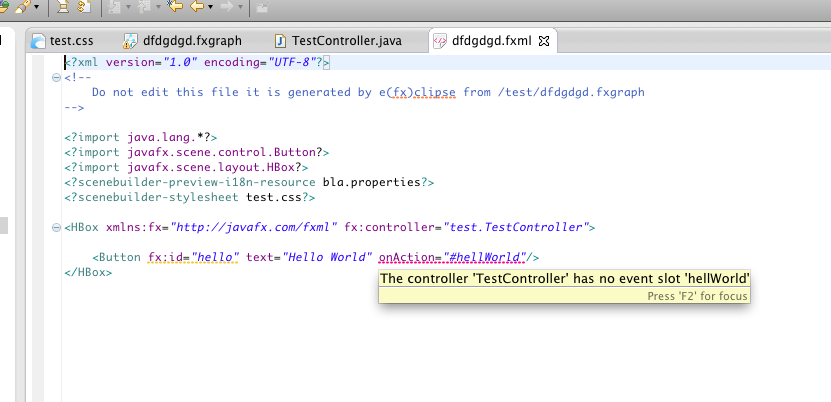
Both of them now validate the fx:id and controller methods you assign and provide you with warnings and errors in case something is not correct.

  1. FXGraph Errors/Warnings
  2. FXML Errors/Warnings
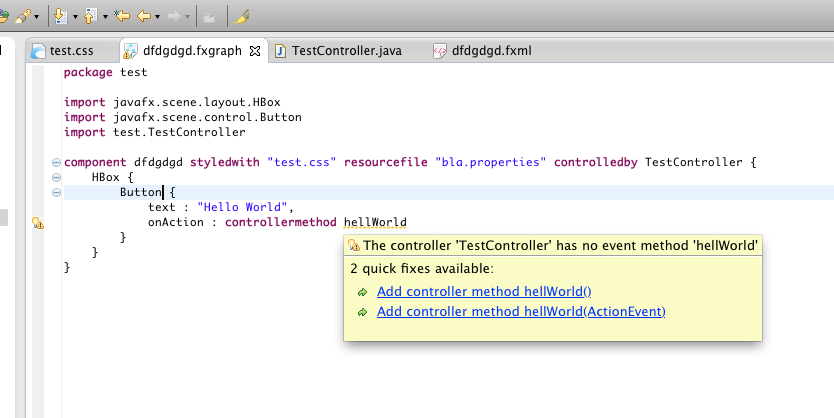
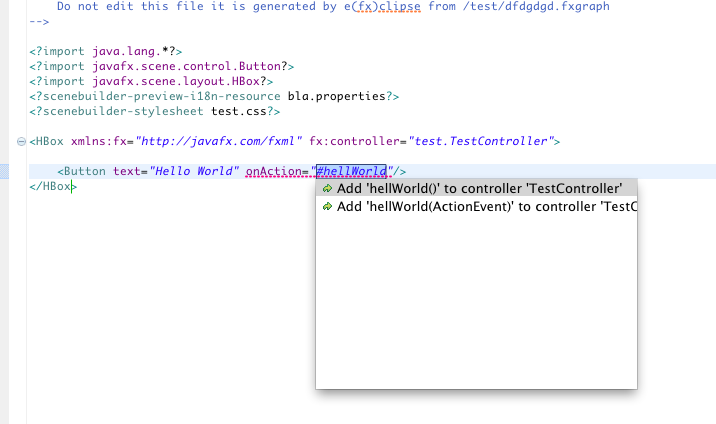
    1. The editors not only show the warning and errors but they also provide quick fixes

      1. FXGraph
      2. FXML

      JavaFX library detection

      I’ve decided to remove the different possibilities to locate the javafxrt.jar but instead we’ll make JDK7u7 the minimum version because this one includes javafx. Oracle will in future ship JavaFX 8.0 not as a seperate download and even more important JavaFX 8 will use new Java8 features so you won’t be able to use it with another Java-Version anyways.

      You are still free to build applications for JDK6 (by setting the compiler compilance to Java6) on windows where JavaFX is supported but you need to use JDK7 for development.

      In conjunction with the NOT shiping of a separate JavaFX a major problem for people is that the JavaDoc is not found in a central place but e(fx)clipse would fall back to JavaFX website which will fail if you have no internet access. The JavaFX team provides an extra download for the JavaFX Javadoc and e(fx)clipse will try to locate it in the following directories:

      1. The Projects %JDK_home%/docs/api
      2. Your Home-Directory where the javafx-api-%JDK_CONTAINER_NAME%/docs/api – the JDK_CONTAINER_NAME is the one you set for the JDK in your eclipse configuration

        Which means for projects who are connected to JDK_7 the path is JDK_7/docs/api.

      e4 JavaFX Tooling

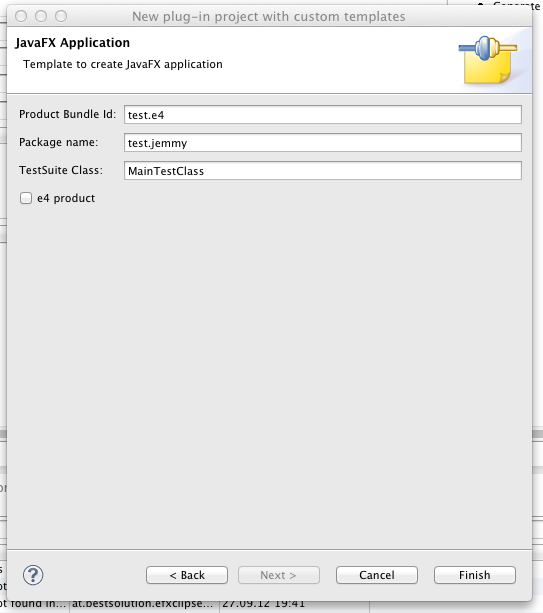
      To make bootstraping a Jemmy JUnit-Test infrastructure for your OSGi and e4 JavaFX project as simple as possible there’s a new wizard provide to you.

      I’ve blogged in more detail about the support in this post.

      Research

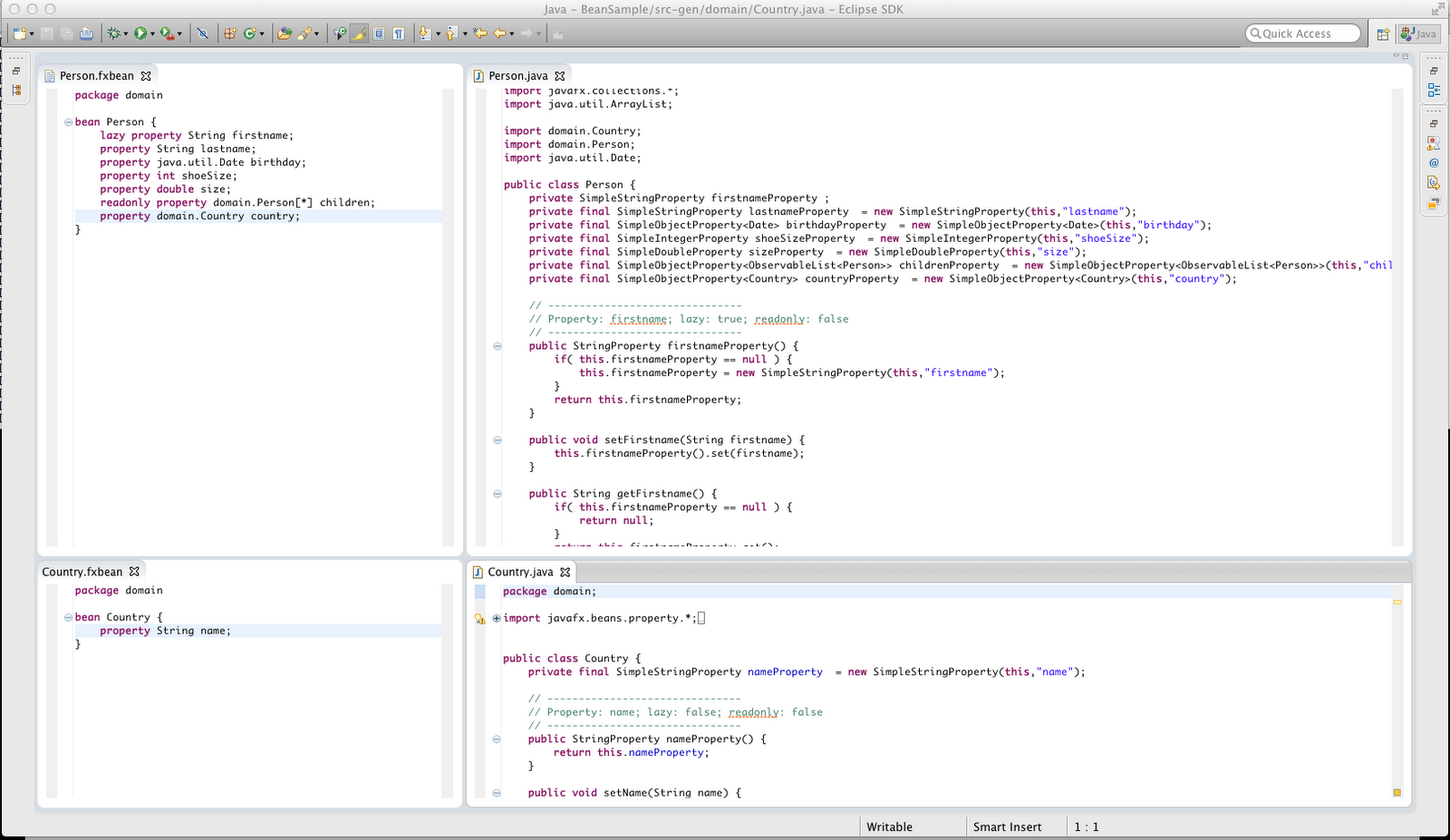
      Inspired by a forum thread I spend a few hours prototyping a JavaFX-Bean definition language to remove the boilerplate code.

      I won’t proceed in this area for now but if some community member is interested in proceeding with what I already defined I’m happy to help her/him to get started and pull in changes to the e(fx)clipse git repo.

      Runtime

      Jemmy Runtime Support

      A lot of time has been invested in understanding how to make Jemmy run in an OSGi environment, repackaging and patching it and finally providing the base OSGi-Bootstrap code which launches the application and Jemmy.

      I’ve blogged about this in more detail in this post. We also have a basic understanding how we can integrate this into maven-tycho and will most like provide for CI in the next release.

      e4 on JavaFX

      My biggest working area in this release cycle was on writing a production ready rendering engine for e4 using JavaFX. I’m very satisfied with the result. From my point of view the engine is ready to be used and provides 95% of what you get from the SWT one. Things I’ve not yet implemented are:

      • Support for MArea
      • Drag and Drop
      • Min/Max of support

      Because I don’t have big applications like the Eclipse SDK to test the renderers I’m quite sure I missed something here and there but I’m able to fix most problems with in minutes because of the very clean code base.

      I’m happy to say that there are the first commerical adopters using e4 on JavaFX to develop applications so I hope others will follow this and make e4 on JavaFX the first technology people will take a look when writing modular desktop applications with JavaFX. If you need to help to start BestSolution.at offers onsite workshops and remote support.

      JavaFX and OSGi

      I already described above that the tooling requires JDK7u7 now. I decided that the same is the best for the OSGi-Runtime support. Starting with this release e(fx)clipse (Equinox) OSGi-Support will only detect JavaFX inside your JRE. It does NOT support to ship JavaFX with your application. In Java8 JavaFX will be on the bootclasspath anyways so all we need then is an fragment for the system.bundle (this will probably also happen in one of the next Java7 updates).

      JavaOne

      I’ll be on JavaOne next week and present:

      1. e(fx)clipse: Eclipse Tooling and Runtime for JavaFX
      2. Eclipse 4.x: A Major Upgrade of Eclipse

      If you are at JavaOne or want to discuss Eclipse 4, e(fx)clipse

Posted in e(fx)clipse | 11 Comments

e4 on JavaFX and JemmyFX

Upon request on the e(fx)clipse forum I’ve invested time for upcoming e(fx)clipse release to allow JUnit-Testing e4 JavaFX applications using Jemmy and JemmyFX.

The thing that took most of my time was to understand how Jemmy works and can be started in an OSGi-Env (on MacOS-X it is even harder because there the Jemmy-Robot is executed in a Sub-Process) but I’ve managed to get everything up and running.

After having managed to get everything up and running I’ve spend yesterdays night to add a tooling wizards to bootstrap a Jemmy Test Suite and today I recorded a video

Next on my Jemmy list is to provide a Classpath-Library so that none e4, none OSGi-User can write Jemmy-Tests for their applications as easy as those OSGi lunatics can do with the next nightly build.

Once this is done – I should maybe take a look at http://jnario.org/ and if it make writing JUnit-Tests for FX application easier. So many things to explore and work on 😉

Posted in Uncategorized | 7 Comments