A week at e4 – Themeing in e4

Core Work-Items

Themeing in e4 is done using CSS like Declarative Syntax. The latest nightly builds introduce an extension point which allows people to define and contribute CSS-Files to make up a theme from different css-Files.
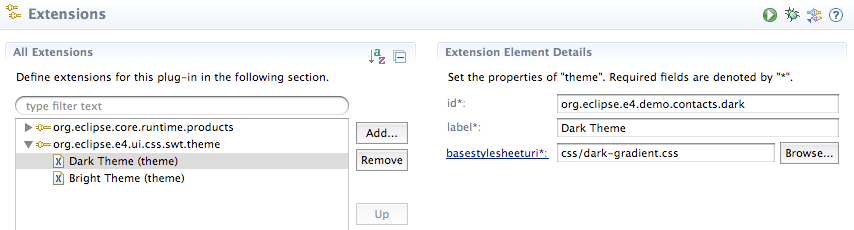
So now plugin-developers can contribute stylesheets which hold CSS-Definitions (classes, …) they use in their UI-Bundles. One of the interesting things in this sense is that even the latest 3.6 builds can make use of the CSS themeing support (an example is my Workbench-Modeleditor which now runs unmodified in 3.6).

The extension point is used to make up a theme in a declarative manner but IThemeManager is also registered in the OSGi-Service registry and can be access by client code e.g. to switch the UI-Theme on the fly.

In 3.x e.g. like this:

public class CSSViewPart extends ViewPart {
  private static final String CSS_CLASS_KEY = "org.eclipse.e4.ui.css.CssClassName"; //$NON-NLS-1$

  @Override
  public void createPartControl(Composite parent) {
    Bundle b = FrameworkUtil.getBundle(getClass());
    BundleContext ctx = b.getBundleContext();
    ServiceReference ref = ctx.getServiceReference(IThemeManager.class.getName());

    IThemeManager mgr = (IThemeManager) ctx.getService(ref);
    final IThemeEngine engine = mgr.getEngineForDisplay(parent.getDisplay());
    // ...
  }
}

In e4 you’d better use simply @Inject to even get the theme engine bound to the workbench instance:

public class CSSView {
  @Inject
  private IThemeManager manager;

  @Inject
  private IThemeEngine engine;
}

An example CSS-File could look like this:

.h2 {
	color: white;
    font-size: 20pt;
}

.container {
    background-color: gradient radial #575757 #101010 60%;
}

and the Java-Code to use it

final Composite p = new Composite(parent, SWT.NONE);
p.setData(CSS_CLASS_KEY, "container");
p.setBackgroundMode(SWT.INHERIT_DEFAULT);
p.setLayout(new GridLayout(2, false));

Label l = new Label(p, SWT.NONE);
l.setData(CSS_CLASS_KEY, "h2");
l.setText("This is a headline");
l.setLayoutData(new GridData(SWT.FILL, SWT.DEFAULT, false, false, 2, 1));

engine.applyStyles(p, true); // Apply the CSS-Instructions of the current active theme

The last line applies the current theme CSS-Information on all elements below the given widget.

Switching between themes is quite easy using:

engine.setTheme("org.eclipse.e4.demo.contacts.dark");

Which makes the 3.x ViewPart look like this with a radial black gradient:
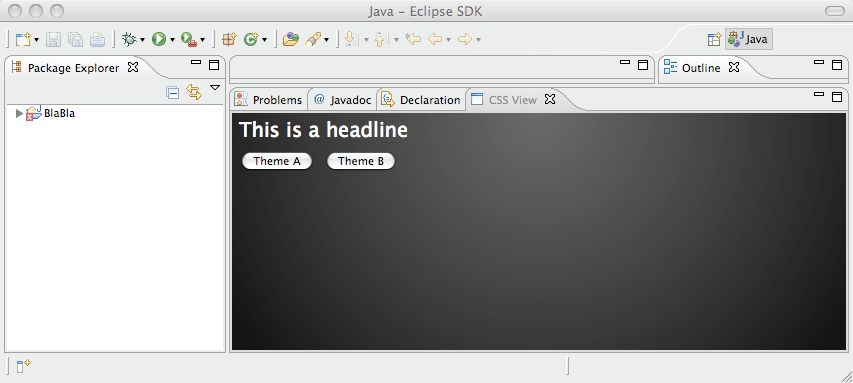
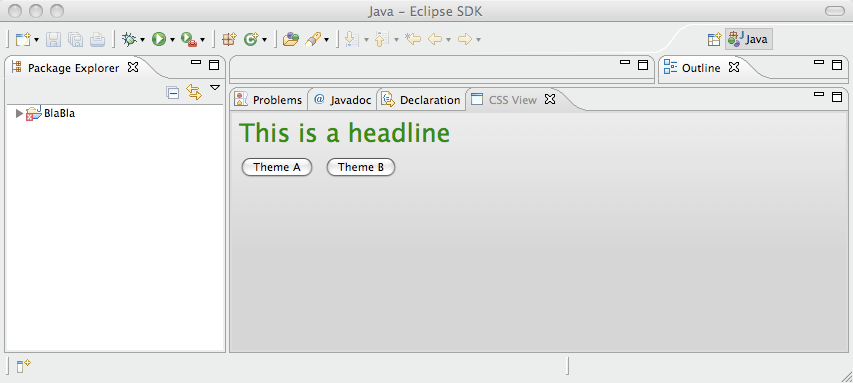
or a bright one:
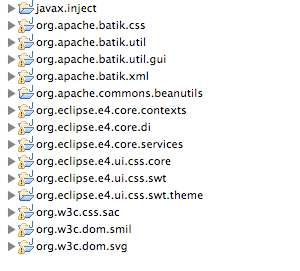
The currently needed plug-ins from e4 and orbit are:
Model Editor

I started refactoring some code so that model modification can be run using the e4-CommandService. Beside that I added support for Main-Menu creation and fixed some other small things.

Update: Added description how to use the IThemeEngine, …

Posted in A week at e4, e4 | 13 Comments

A week at e4 – Branch, Tweak, Break and Adjust

Today I thought it would nice to do a summary about the things happing at e4 I’m part of. The headline for this week could be:

“Branch, Tweak, Break and Adjust – Lock the e4-Workbench-Model so that people won’t be broken until 4.0”

Core Work-Items

So what happened: Short before EclipseCon we started collecting proposals and feedback from people what they’d like to see changed in the EMF-Workbench-Model for the release of Eclipse 4.0 (see the PMC-Announcement). Like most stuff in Eclipse the discussion happened in the public (Bugzilla on bug 305586, the e4-dev-mailing-list, and IRC).

It was a really lively discussion at a very highlevel but I think the final result is not a compromise (which happens very often if multiple experts from different domains have to draw a conclusion) but a model which has the functionality it needs to have to address different usecases.

Defining and agreeing on the model was a team and e4-community effort but this was only half of the work the e4-committer team had to do because once we aggreed that we are all satisfied with the model we had to port over all our code. We are already quite late for this changes so putting CVS-HEAD in an unstable state was out of question.

So Eric Moffatt, Paul Webster, Remy Suen and me opened branches and adjusted the workbench code there until all our test-suites, example applications and the e4-workbench running on the compat-layer have been back in shape. This work started Thursday morning Ottawa time and was finished Friday Ottawa Lunch-Time and was as said a multi-continental teameffort coordinated on IRC. Here are the lines where we coordinated our merge commits:

[19:09:34] <paulweb515> OK tests are done
[19:10:02] <paulweb515> Hmmm, we should be ready to commit in about 10 minutes
[19:10:03] <tomschindl> merged too
[19:10:15] <paulweb515> OK, emoffatt's just got one error that he needs to deal with
[19:10:18] <tomschindl> I can check in whenever you want
[19:10:29]  about 10 minutes
[19:10:35] <tomschindl> ok
[19:10:35] <paulweb515> we're sooo close :-)
[19:11:54] <tomschindl> i'm off for dinner for 10 minutes
[19:12:56] <rcjsuen> 10 minute dinner
[19:12:57] <rcjsuen> that's as fast as me
[19:18:06] <emoffatt> paulweb515: ready (I'll do the SeparatorRenderer against HEAD after :)
[19:21:54] <tomschindl> done
[19:22:17] <tomschindl> can we commit?
[19:22:27] <yarthorn> That really was ten minutes!
[19:22:31] <tomschindl> paulweb515: does the count down :-)
[19:22:36] <paulweb515> OK
[19:22:38] <paulweb515> let's do it
[19:22:46] <paulweb515> commit away, and then ACK here
[19:23:56] <tomschindl> commit is done
[19:24:07] <emoffatt> kk
[19:24:27] <paulweb515> committed

Please note that it really took me exactly 10 Minutes to have dinner – no second more no second less 🙂

Model-Tooling

Since M5 my custom workbench editor is part of the release and besides adjusting to the model changes I fixed some minor things (like NLS and stuff like this) but now that the model work is done I can once more concentrate on the editor and implement missing features. So I expect to add more features to it until next week.

Time I spent on e4

Many people at EclipseCon asked me how much time I spent on Eclipse and because I was interested by myself here are the stats I collected for the last weeks:

Description Hours Total
In the morning while going by bus to work 0.25 1.25
Every day after work 3 – 5 20
on weekend 6 – 8 7
Summary / Week 28.25 h

It’s quite an impressive number. I restarted working on e4 in March which means I spent 5 weeks (EclipseCon and short holiday in between) on e4 which is a total of 141.25 h.

How long will I invest this time? Not sure – what you see above is not really a peak in my Eclipse investment but I guess the average I spent on Eclipse stuff. I’m still trying to move some of this spare time work back to my day time job but currently it’s impossible to do so because people are not used to pay for someone doing Eclipse Opensource work for the benefit of the complete Eclipse Platform Stack (Beside naturally the compan(y/ies) who employee the Platform Team).

Things I’m going to work on next in e4 are (order by priority):

  • Model Editor improvements – Finish support for missing elements, add model documentation,
  • Model-Contributions – Fix the current contribution system and my top priority: I’d like to contribute programmatically to the model
  • DI and Tooling – One of the most important things from the tooling side but too much for me to work in my spare time
  • CSS – Start discussion on how to contribute to CSS and how to make it work in a 3.x workbench (my current hack is so dirty I can’t even tell you)
Posted in A week at e4, e4 | 2 Comments

Eclipse Databinding 3.5.2 for GWT

I’ve just updated the Eclipse-Databinding port for GWT to the patch level of Eclipse 3.5.2.

Posted in Databinding, GWT, UFaceKit | Leave a comment

e4 – Tooling WorkbenchModelEditor part of I-Builds

Starting with yesterdays I-Builds (starting with I20100317-1055) the first part of the upcoming tooling support for e4 is part of the e4-SDK. I this blog post I’ll discuss some of the features this first version is coming with and how I implemented the editor.

Features

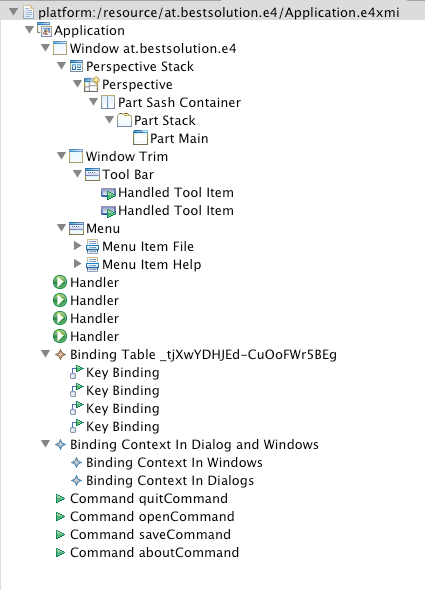
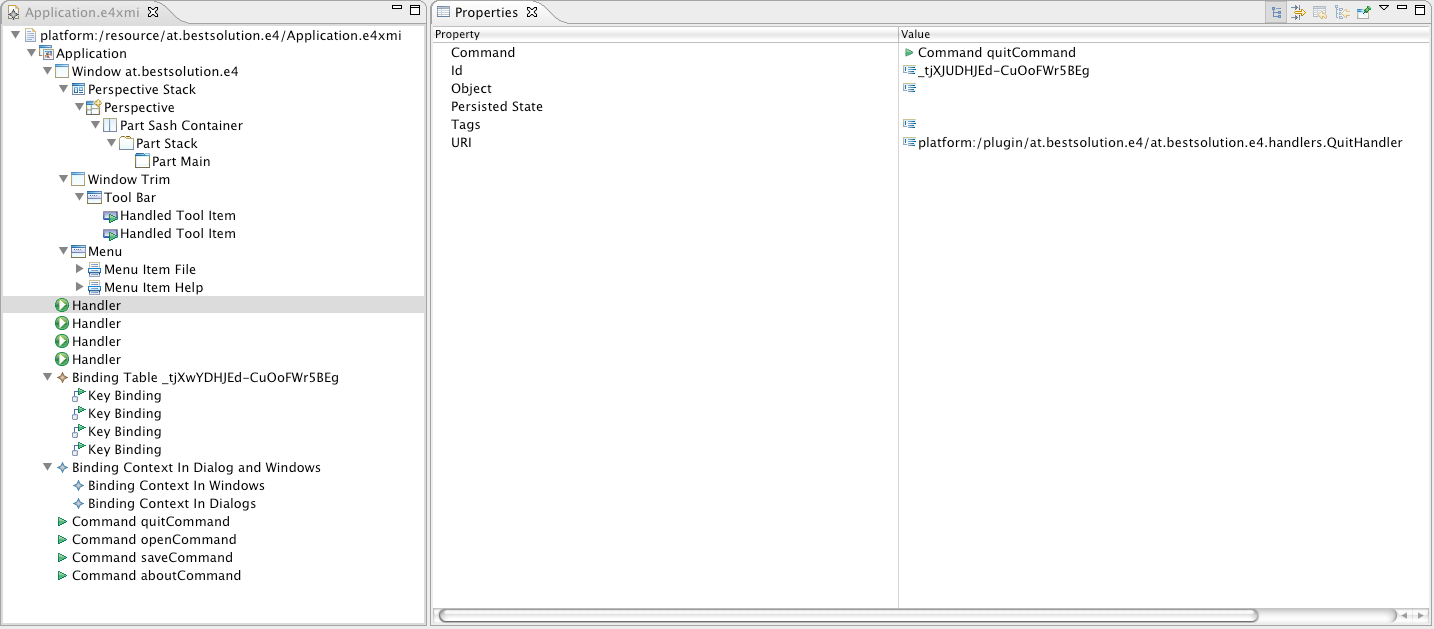
  • Advanced hierachical view (with better grouping) compared to the default EMF-Editor

    Model Editor


    EMF Editor

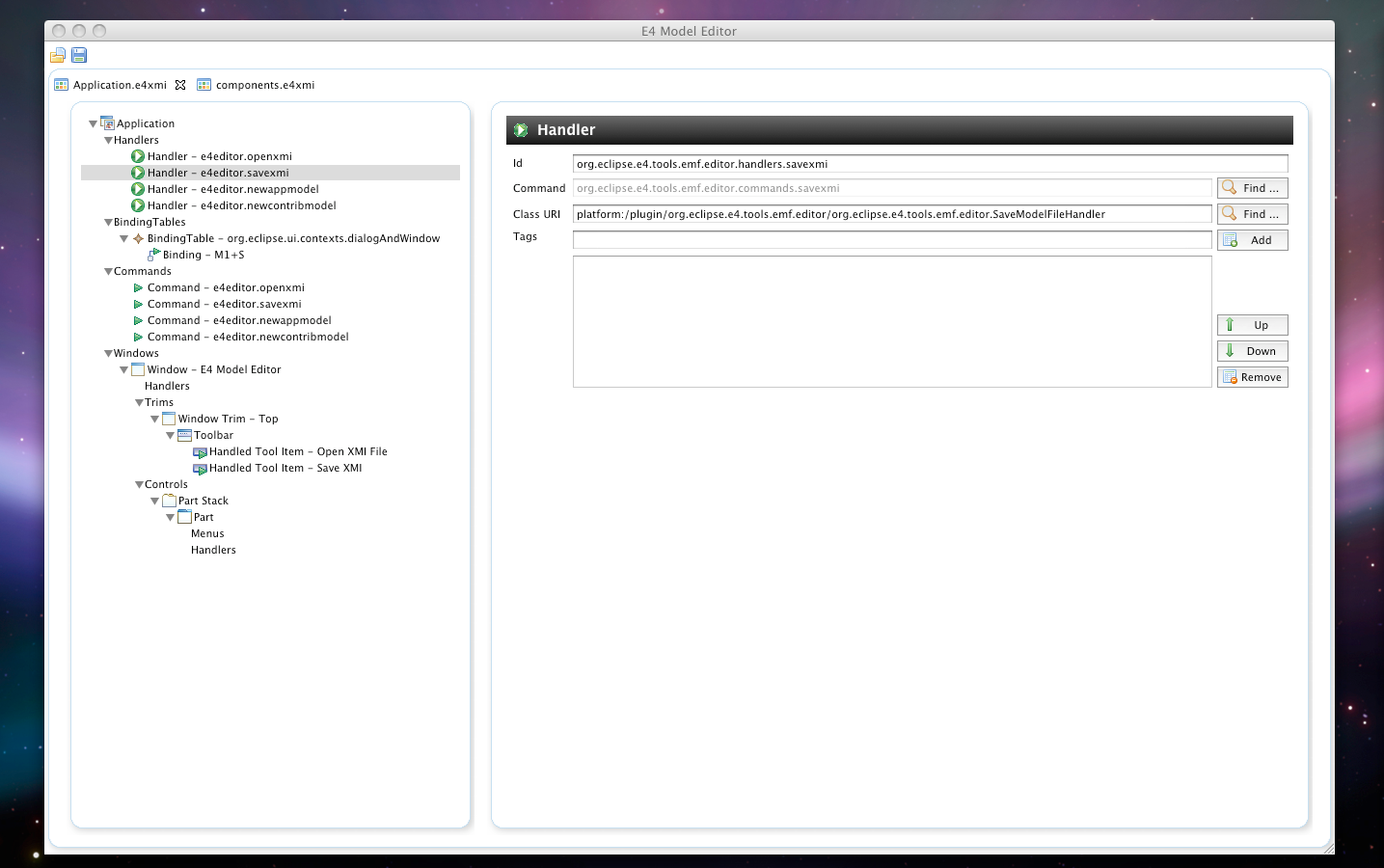
  • Nice looking Form-UI giving you a better editing feature than working with the Properties-View (at least in my opinion)

    Model Editor


    EMF Editor

  • Standalone Mode as “native” e4 Application
  • e4-SDK Integration (finally you could even run it in an unmodified 3.6-IDE)
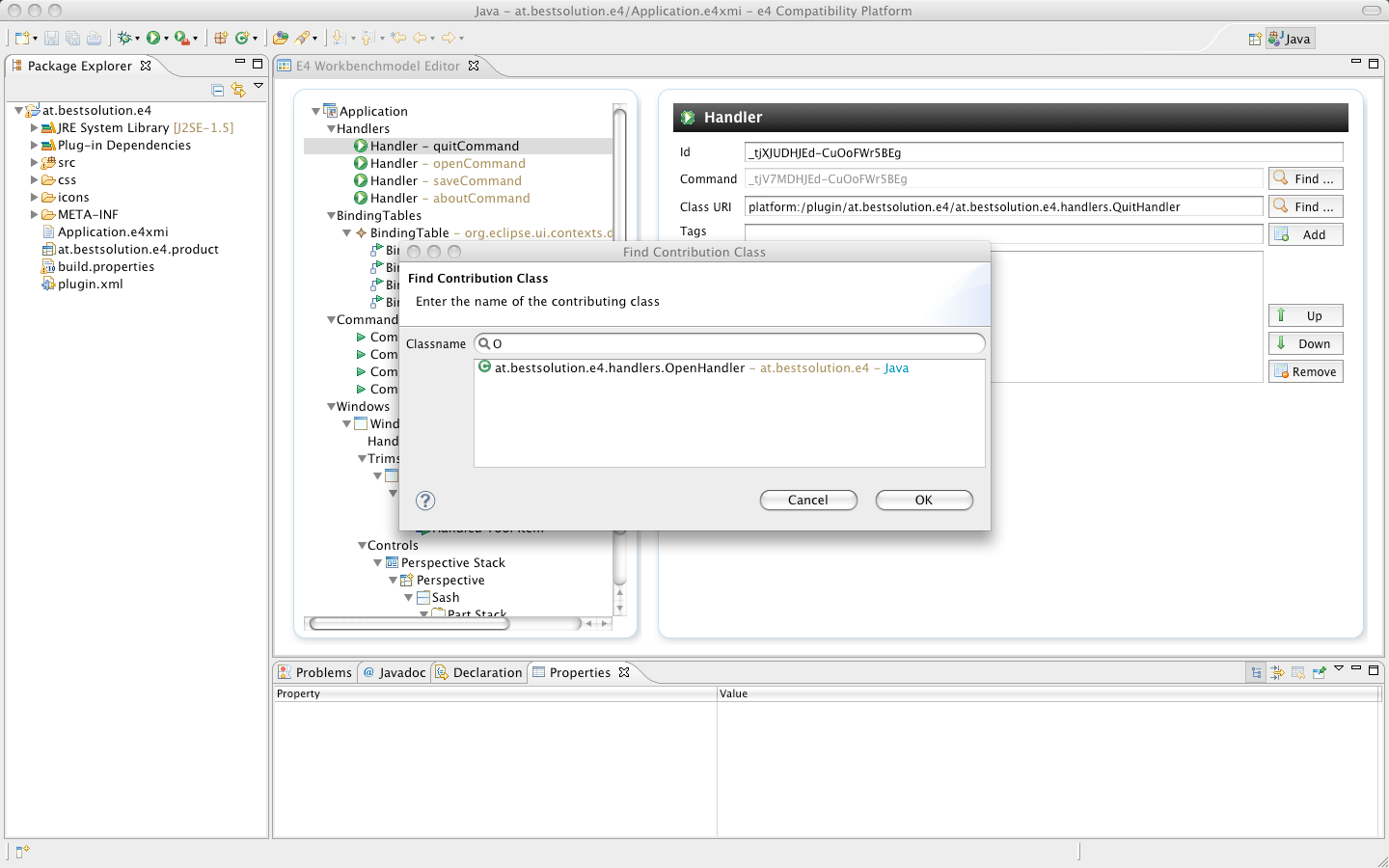
    • Support for Class-Lookups in your Workspace to construct the contribution uri
    • Full integration into Editor lifecycle (undo/redo/save)

How is this implemented

First of all I had to decide whether I wanted to use some generated UI or writing in from scratch. I decided to write something completely my own because:

  • I didn’t wanted to pull in one more technology like EEF
  • I’m not very familiar with them and I was not sure I can implement (yet to implement) advanced features I’d like to add

So the technologies I used are:

  • Eclipse Databinding (the Core and JFace-Part of it)
  • EMF Databinding
  • EMF-Edit stuff for undo/redo

The decision I had to draw is how to split things up so that they can get part of a “native” e4 application (=application not running the compat layer) and plug into the e4-SDK. So I created 3 bundles:

  • org.eclipse.e4.tools.emf.ui – Holds the main Editor-UI but doesn’t deal with integration into an application
  • org.eclipse.e4.tools.emf.editor – Holds an e4 Application integrating the Editor-UI into it
  • org.eclipse.e4.tools.emf.editor3x – Holds an EditorPart which holds the Editor-UI (and hacks the CSS-Support into 3.x)

The last thing I did was provide the org.eclipse.e4.tools.emf.ui the possibility to get contribution for the Contribution look ups through DS so that org.eclipse.e4.tools.emf.ui didn’t e.g. get a dependency on JDT, PDE, … . Adding such a contribution is not more than to contribute an OSGi-Service which implements the following interface:

public interface IClassContributionProvider {
  public interface ContributionResultHandler {
    public void result(ContributionData data);
  }

  public void findContribution(Filter filter, ContributionResultHandler handler);
}

The implementation for JDT looks like this and is currently part of the org.eclipse.e4.tools.emf.editor3x bundle but I’ll probably move it to an extra one after EclipseCon. Beside that I’m not an PDE/JDT expert so I’m happy if someone could suggest a better way to find the Contributing-Bundle for the given class.

public class PDEClassContributionProvider implements IClassContributionProvider {
  private SearchEngine searchEngine;
  public PDEClassContributionProvider() {
    searchEngine = new SearchEngine();
  }
	
  @SuppressWarnings("restriction")
  public void findContribution(final Filter filter,  final ContributionResultHandler handler) {
    IJavaSearchScope scope = PDEJavaHelper.getSearchScope(filter.project);

    char[] packageName = null;
    char[] typeName = null;
    String currentContent = filter.namePattern;
    int index = currentContent.lastIndexOf('.');

    if (index == -1) {
      typeName = currentContent.toCharArray();
    } else if ((index + 1) == currentContent.length()) {
      typeName = "".toCharArray();
      packageName = currentContent.substring(0, index).toCharArray();
    } else {
      typeName = currentContent.substring(index + 1).toCharArray();
      packageName = currentContent.substring(0, index).toCharArray();
    }

    TypeNameRequestor req = new TypeNameRequestor() {
      public void acceptType(int modifiers, char[] packageName, char[] simpleTypeName, char[][] enclosingTypeNames, String path) {
        String cName = new String(simpleTypeName);
        String pName = new String(packageName);
        String content = pName + "." + cName; 
				
        IResource resource = filter.project.getWorkspace().getRoot().findMember(path);

        //TODO Find a PDE service that gives us this information
        if( resource != null ) {
          IProject project = resource.getProject();
          IFile f = project.getFile("/META-INF/MANIFEST.MF");

          if( f != null && f.exists() ) {
            try {
              InputStream s = f.getContents();
              BufferedReader r = new BufferedReader(new InputStreamReader(s));
              String line;
              while( (line = r.readLine()) != null ) {
                if( line.startsWith("Bundle-SymbolicName:") ) {
                int start = line.indexOf(':');
                int end = line.indexOf(';');
                ContributionData data = new ContributionData(line.substring(start+1,end).trim(), content, "Java", null);
                handler.result(data);
                break;
              }
            }
          } catch (CoreException e) {
            e.printStackTrace();
          } catch (IOException e) {
            e.printStackTrace();
          }
        }
      }
    }
  };

  try {
    searchEngine.searchAllTypeNames(
      packageName, 
      SearchPattern.R_EXACT_MATCH, 
      typeName, 
      SearchPattern.R_PREFIX_MATCH, 
      IJavaSearchConstants.CLASS, 
      scope, 
      req, 
      IJavaSearchConstants.WAIT_UNTIL_READY_TO_SEARCH, null);
  } catch (JavaModelException e) {
    e.printStackTrace();
  }
}

Summary

Please note that the editor is far from being finished and there is also support missing for features (the most important one is the main-menu which I hope to fix today) and the code is not tested, documented, internationalized, … . Anyways it would be nice if you’d give it a try and report enhancements, bugs, using the following URL.

Posted in e4 | 5 Comments

e4 – Workbench (Model) Tooling

I’ve started to work on some tooling to make e4 consumable for the average developer. The first thing I’m concentrating on is tooling for the workbench model.

The key points are:

  • Run in 3.x
  • Run native in e4-Workbench (without the need of a compat layer)
  • Run native in e4-Running-Workbench for Live-Editing
  • Extensible by Workbench-Extenders to register their editors

The current editor state looks like this:

The screen shots show a running Standalone ModelEditor implemented as an e4-application. Until EclipseCon I expect to have a first alpha version for 3.x and the e4-M4-SDK.

Because we are at it: Together with Lars, Kai I’m delivering a tutorial (e4 – Anatomy of an e4-Application) at EclipseCon on writing e4-Applications so if you are interested in e4 make sure to show up at the tutorial.

If you are interested in the code and follow my progress you can checkout the code from CVS and/or subscribe to the following bug.

Posted in e4 | 2 Comments

It’s release time – QxWT 1.0.1.0 and GRaphael 1.3.1.0

QxWT 1.0.1.0

At the start of the year I promised to release Version 1.0.1.0 of QxWT at the end of Febuary and doing releases on time is one of the most important things so that people can start to trust into your project. You can download the released code from the project release website or directly through this link.

This release comes with the following major features:

  • Full support for Qooxdoo-Databinding
  • Advanced GWT-Features to e.g. Subclass JSNI-Wrappers and overload JavaScript methods in Java
  • Integration into the qooxdoo-Toolchain to create optimized JavaScript
  • Many bugfixes and not wrapped methods in 1.0.0.1
  • Integration of GRaphael to create advanced graphics, animations and charts ontop of SVG and VML using Raphael

The following features beside bugfixes are planned for the next release due in the end of April:

  • Wrapper:
    • Integrate into GWT-UI-Binder by allowing to adapt QxWT-Widgets
    • Integrate into GWT-RPC-Services
  • Eclipse-Tooling
    • Add Project Creation Support to easy setup a QxWT-Project
    • Add Support to control qooxdoo-Toolchain and create a deployable Application

GRaphael 1.3.1.0

To get support for advanced grapics and animation support I started writing a JSNI-Wrapper for Raphael. QxWT comes with an addon module which provides direct integration of GRaphael into QxWT-Applications. The wrapper is in it’s early stage and the API in the flow.

The current usage in QxWT looks like this:

QxRaphaelWidget widget = new QxRaphaelWidget(200, 200) {
  @Override
  protected void init(RPaper paper) {
    RElement el = paper.image("/image.png", 50, 50, 100, 100);
    el.attr( new RAttribute("opacity", "0"));
    el.animate(1000, new RAttribute("opacity", "1.0"));				
  }
};

Which creates an image whose opacity attribute is animated from 0 – 1.0 in 1 second, advanced transitions, gradients and much more are possible as well. You can download the released code from the project release website or or directly through this link.

A real world example

To show the potential of all this technologies I’m working on a real world example which simply allows a user to manage Photos, create Online-Presentations and in future also create printable PDF-Files (e.g. a calender, photo-album, …).

Posted in Announcements, GRaphael, QxWT | 2 Comments

QxWT 1.0.1.0 – Realworld Demo

Tomorrow I’ll release QxWT 1.0.1.0 as I promised at the start of the year. To show people the power of QxWT and what can be achieved by using it, in conjunction with Eclipse-Tools like EMF and Teneo, I wrote an example application on the last 2 weekends.

First of all using all those OpenSource-Technologies together to create an application is simply fun. It’s been a long time since i worked with Hibernate but with Teneo, I really only needed know EMF and learn to use 2 or 3 JPA-APIs to query for stuff. This shows something I told many people already. EMF is not only useable in RCP-Application, it doesn’t even depend on OSGi. I used it at the backend for the Hibernate integration in an ordinary Jetty-Servlet-Container.

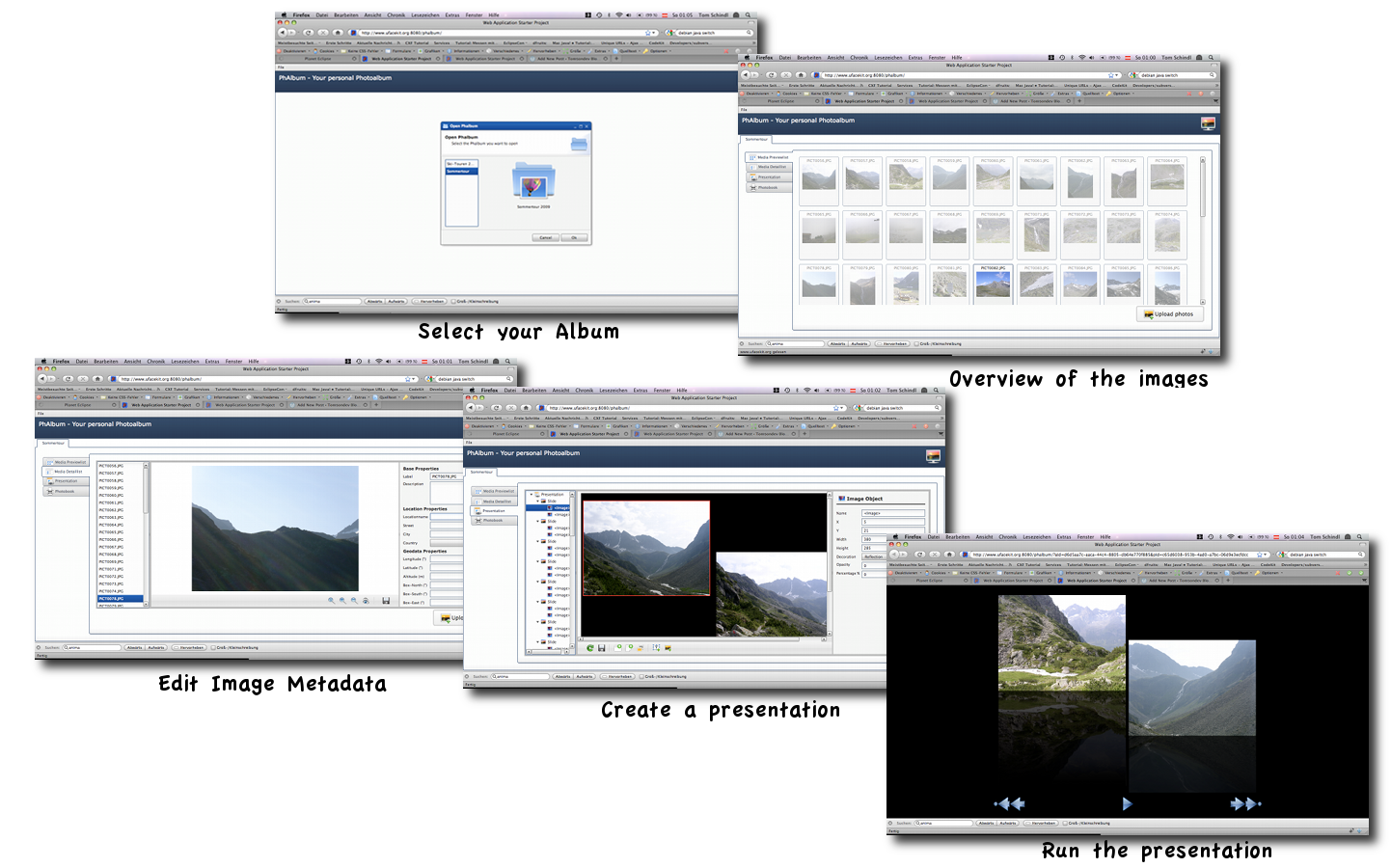
The application looks like this:

  • Open a Image-Album
  • Overview of images in the album
  • Editing meta data to images
  • Creating a custom Online-Presentation
  • Running Presentation

The whole application is not completely ready, I hoped to be further but you can try it out:

The application uses the following opensource libs:

  • Frontend
    • QxWT (EPL/LPGL)/qooxdoo (EPL/LPGL)
    • GRaphael (LGPL/EPL)/Rapael (MIT)
  • Backend:
    • EMF+Teneo (EPL)
    • Hibernate (LGPL)
    • PostgreSQL (MIT)

I have not tested this thoroughly (I only took a look on Firefox, Safari, Chrome and Opera on Mac OS X – Opera seems to have issues with images) so please don’t expect to run everything 100%. The code of the example-application is part of my SVN-Repository but NOT released under an OSS-License! Still you can take a look and learn how to use the QxWT-API.

Things I plan to add in the weeks to come:

  • Finish current features and fixing bugs
  • Adding more presentation features (Image-Transition, Drop-Shadows, Animation, …) using more Features of Raphael
  • Print support to create printable Versions for Calendars, Photo-Books, …

So stay tuned for the release announcement of QxWT 1.0.1.0 tomorrow where I’ll explain features coming with this release and features I plan to add in the next releases.

Posted in GRaphael, QxWT | 3 Comments

e4 – Dependency and Service Lookup Tooling

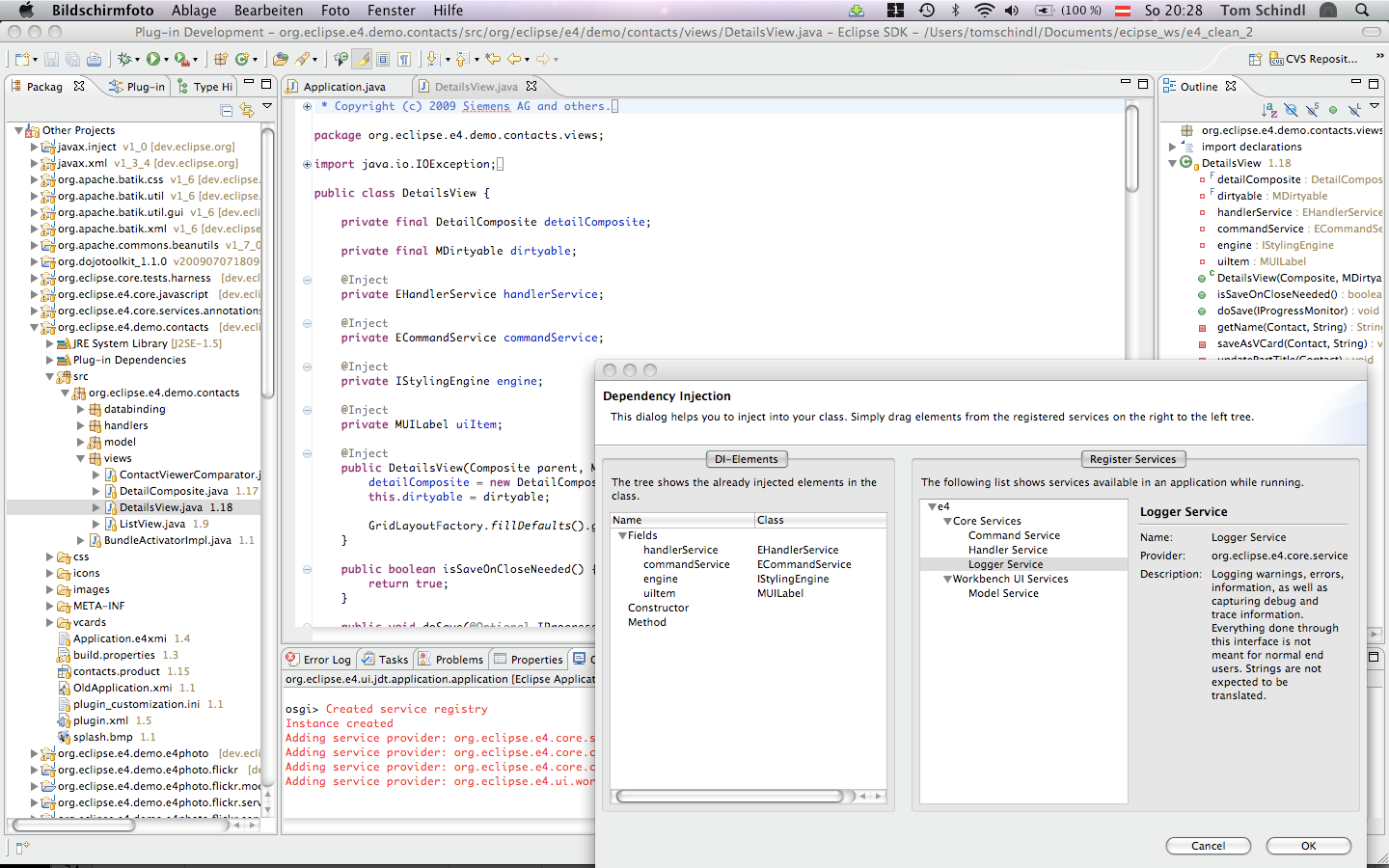
Today I extended my current implementation a bit so that I now extract the currently injected fields in a class and display them in the dialog one can open from within the JavaEditor. The following videos present shows this in action.


The next step is to add injected services through the Dialog. People asked in comments of the last post whether this support is isolated to e4 and it’s services and the answer is no. The current implementation simply registers a service in the OSGi-ServiceRegistry.

public interface IDIServiceRegistry {
  public void addServiceProvider(IDIServiceProvider descriptor);
  public void removeServiceProvider(IDIServiceProvider descriptor);
  public List<IDIServiceProvider> getProviders();
}

Potential Tool implementors can use and provide informations about available services who are probably available at runtime. As an example implementation I’ve implemented 2 example bundles who contribute providers for e4-core services using DS (you see in the screencast that no available services are there until the tooling bundles are started).

The contribution of the Logger-Service is done looks like this:

public class LoggerProvider extends DIServiceProvider implements IDIServiceProvider {
  public LoggerProvider() {
    System.err.println("Instance created");
  }

  public String getLabel() {
    return "Logger Service";
  }

  public String getDescription() {
    return "Logging warnings, errors, information, as well as capturing debug and trace information. Everything done through this interface is not meant for normal end users. Strings are not expected to be translated.";
  }

  public String getServiceClassName() {
    return "org.eclipse.e4.core.services.Logger";
  }

  public String getBundle() {
    return "org.eclipse.e4.core.services";
  }

  public String getProduct() {
    return "e4";
  }

  public String getCategory() {
    return "Core Services";
  }
}

and contributed like this using DS:

<?xml version="1.0" encoding="UTF-8"?>
<scr:component 
  xmlns:scr="http://www.osgi.org/xmlns/scr/v1.1.0" 
  enabled="true" 
  immediate="true" 
  name="org.eclipse.e4.core.services.jdt">
   <implementation 
     class="org.eclipse.e4.core.services.jdt.LoggerProvider"/>
   <service>
      <provide interface="org.eclipse.e4.ui.jdt.IDIServiceProvider"/>
   </service>
</scr:component>

After having implemented the Class-Modification. I think the next logic step would be to write some PDE-Addon which simply registers all available DS-Services found in the Target-Platform into the DI-Registry. I’m still in an experimental stage so probably this is all crap and one has to address the problem differently.

Anyways I’ve learned something about IJavaProject and the AST-Stuff coming with JDT and it’s been a lot of fun so far.

Posted in e4 | 5 Comments

e4 – Dependency Injection Tooling

In bug 302824 we started discussing how to make the use of DI easier and beside e.g. providing Helper-Classes the ideal thing would be to provide good tooling. Think about how hard OSGi-Development would be without PDE and I think the same is true for DI as well.

I had some free minutes (well in reality hours) today and thought about how such a tooling could look like. The first thing I’ve implemented today is a dialog showing core services and add them to your POJO (currently only the UI is working more or less).

There are other JDT/PDE extension we could provide to make DI in general easier but I need to make myself familiar with PDE/JDT-extensions before I know what’s possible.

Posted in e4 | 8 Comments

e4 – Extending an existing Product

After some months of not having contributed substential stuff to e4 and in anticipation of the EclipseCon tutorial “e4 – Anatomy of an e4-Application”. I worked yesterday on some demo stuff which we’ll probably use show the audience:

  • The new development process when writing plugins using Mock-Objects
  • Extending an existing e4-Application

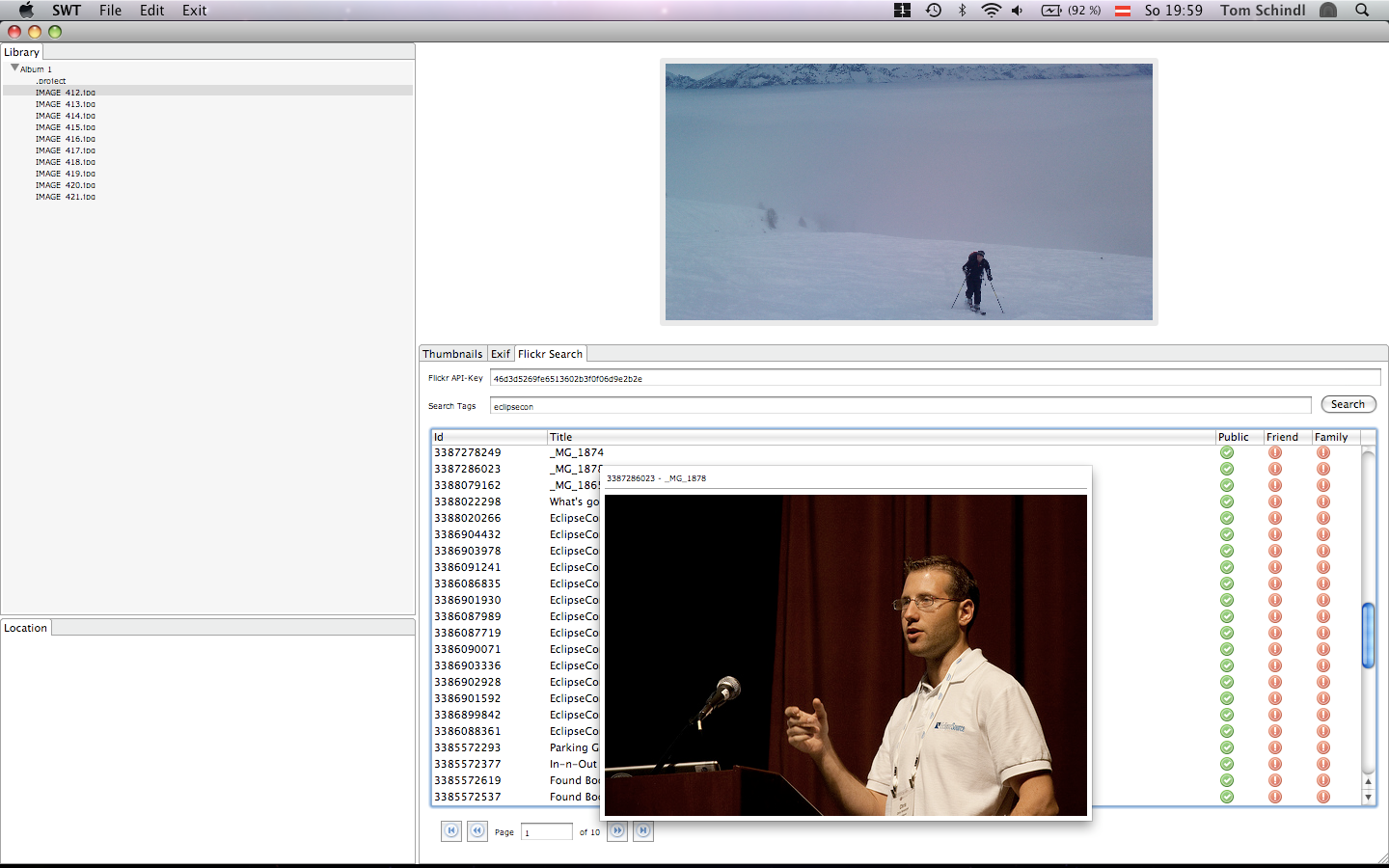
The idea of the extension is to add Flickr-Support (Searching and importing images and adding Images to flickr) to our e4-Photo-Demo using the Service-API provided by flickr.com.

One of the strengths of writing and extending e4-Applications is that you don’t need to bring up whole workbench but can develop all components standalone at first (you can even simply start with a none-OSGi-Application).

Here’s the process I followed

  • Writing the UI as an ordinary SWT-Application (No OSGi, No e4). The initial code looked something like this:
    public class Flickr {
      public Flickr(Composite comp) {
         // Create my UI
      }
      
      private void handleSearch(String apiKey, String tags) {
        // TODO implement search logic
      }
    
      public static void main(String[] args) {
        Display display = new Display();
        Shell shell = new Shell();
    		
        Flickr flickr = new Flickr(shell);
        shell.open();
    		
        while( ! shell.isDisposed() ) {
          if( ! display.readAndDispatch() ) {
            display.sleep();
          }
        }
    		
        display.dispose();
      }
    }
    

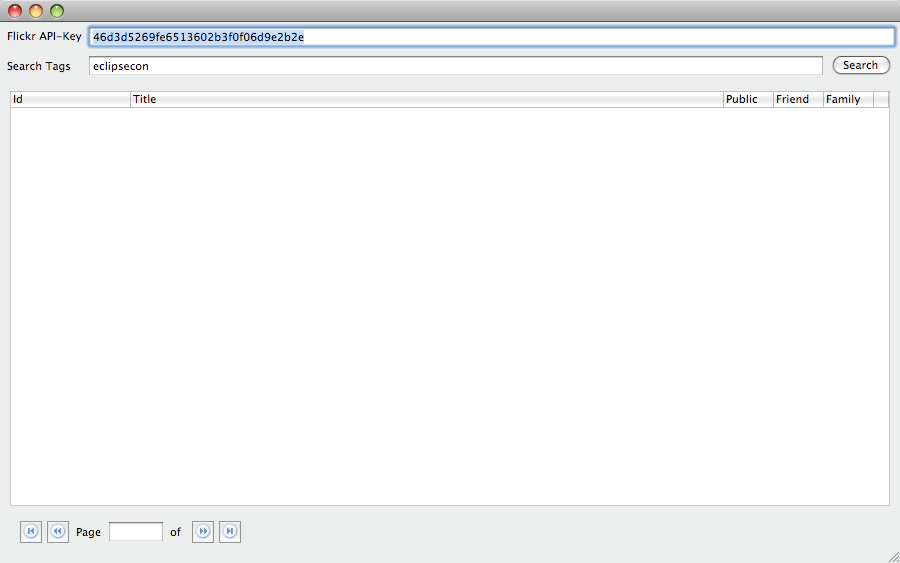
    After some codeing (well I thought writing something like a PagedTableViewer might me a nice thing) the UI looked like something like this:
    . The code is in a Bundle-Project “org.eclipse.e4.demo.e4photo.flickr” which depends on SWT-only for now (I let PDE manage even my standard Java-Project because this frees me from all the ClassPath-Configuration).

  • The next thing was to look at the Flickr-API and what a JavaService to talk with it could look like. The Service-Interface I came up with looked like this:
    public interface IFlickrService {
      public FlickrSearch createTagSearch(String apiKey, String tags) throws RemoteException;
    
      public List<FlickrPhoto> getPhotos(FlickrSearch search, int page) throws RemoteException;
    	
      public InputStream getPhoto(FlickrPhoto photo) throws RemoteException;
    }
    

    The service definition is also part of a separate bundle named ‘org.eclipse.e4.demo.e4photo.flickr.service’.

  • Next step was to create a bundle with a concrete implementation named ‘org.eclipse.e4.demo.e4photo.flickr.service.rest’. Which uses the REST-API provided. The service is self is also a simply POJO and so I was able to test it quite easily by simply adding a main-method.
    public class RestFlickrService implements IFlickrService {
      // Implementation of methods
    
      public static void main(String[] args) {
        try {
          RestFlickrService s = new RestFlickrService();
          FlickrSearch search = s.createTagSearch("46d3d5269fe6513602b3f0f06d9e2b2e", "eclipsecon");
    			
          for( int page = 1; page <= search.getPages(); page++ ) {
            System.err.println("--------------------------------");
            System.err.println("Page " + page);
            System.err.println("--------------------------------");
            List<FlickrPhoto> photos = s.getPhotos(search, page);
            for( FlickrPhoto p : photos ) {
              System.err.println("	* " + p);
            }
          }			
        } catch (Exception e) {
          e.printStackTrace();
        }
      }
    }
    

    Please don’t blame me that I haven’t written this by creating JUnit-Test but you should get the point that writeing application like this makes your whole application very easy to test in a real world application.

  • Now we need to wire the stuff together so until now we didn’t even used OSGi but now we can’t get away without it. First step is to use DS to register our service in the OSGi-Registry:
    <?xml version="1.0" encoding="UTF-8"?>
    <scr:component xmlns:scr="http://www.osgi.org/xmlns/scr/v1.1.0" immediate="true" name="org.eclipse.e4.demo.e4photo.flickr.service.rest">
       <implementation class="org.eclipse.e4.demo.e4photo.flickr.service.rest.RestFlickrService"/>
       <service>
          <provide interface="org.eclipse.e4.demo.e4photo.flickr.service.IFlickrService"/>
       </service>
    </scr:component>
    
  • And we need to make our UI-Bundle use the IFlickrService. To prepare the stuff for DI we need to add the javax.inject-Bundle which holds the annotation of JSR-330.
    public class Flickr {
      @Inject
      private IFlickrService flickrService;
    
      private void handleSearch(String apiKey, String tags) {
        try {
          FlickrSearch search = flickrService.createTagSearch(apiKey, tags);
          table.setInput(new SearchInput(search));
        } catch (RemoteException e1) {
          Status s = new Status(IStatus.ERROR, "org.eclipse.e4.demo.e4photo.flickr", e1.getMessage(), e1);
          ErrorDialog.openError(table.getShell(), "Searchfailure", "Failure while executing search", s);
        }
      }
    }
    
  • Now we make an mock-application bundle ‘org.eclipse.e4.demo.e4photo.flickr.mock’ which holds an Equinox-Application which bootstraps the Dependency Framework coming with e4 and creates an instance of our view.
    public class Application implements IApplication {
      public Object start(IApplicationContext context) throws Exception {
        Display display = new Display();
        Shell shell = new Shell();
    		
        Bundle bundle = FrameworkUtil.getBundle(Application.class);
        BundleContext bundleContext = bundle.getBundleContext();
        IEclipseContext eclipseCtx = EclipseContextFactory.getServiceContext(bundleContext);
        eclipseCtx.set(Composite.class.getName(), shell);
    		
        ContextInjectionFactory.make(Flickr.class, eclipseCtx);
        shell.open();
    
        while( ! shell.isDisposed() ) {
          if( ! display.readAndDispatch() ) {
            display.sleep();
          }
        }
        display.dispose();
        return IApplication.EXIT_OK;
      }
    
      public void stop() {
        // nothing to do
      }
    }
    
  • Running this Application with all the bundles we create above plus the core OSGi-Bundles needed like (equinox.ds) will bring up the same application we’ve had after the first step. With the difference that now executing the search will really do something. We now have a running OSGi-Application which allows us to query Flickr for Photos.

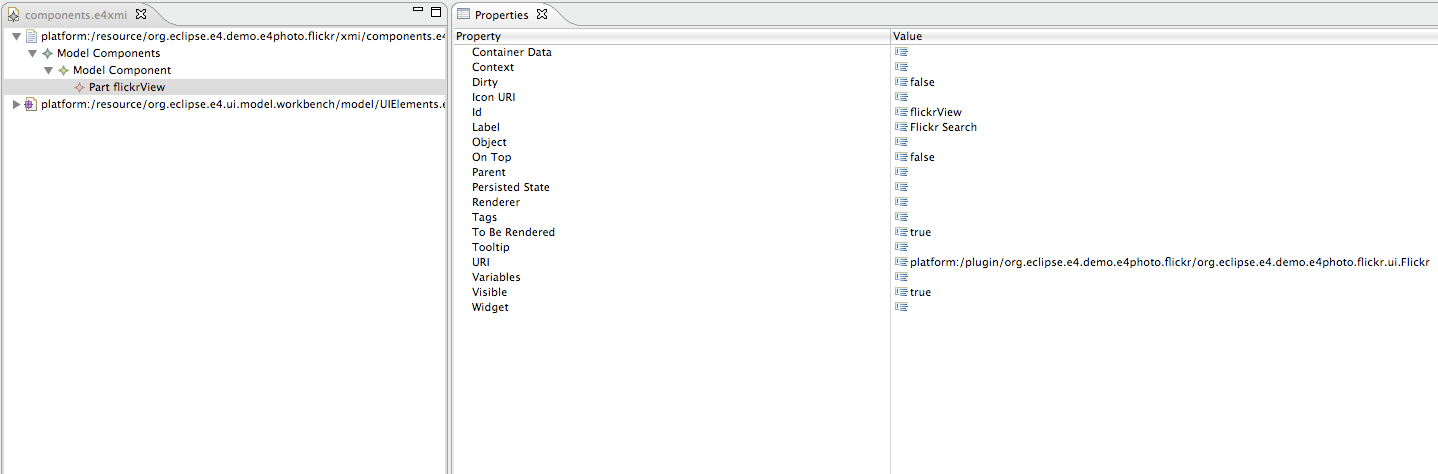
  • Last step is to integrate the “Flickr-Application” as a view in the existing Photo-Demo. This is done using an the ‘org.eclipse.e4.workbench.model’ extension point which allows us to contribute ModelElements to the e4 Workbench-Model.

    Pointing to an XMI-File like this.
  • Add the bundles beside the one of the mock-Application to the Launch-Config of the e4-Photo-Demo and you now have support for searching Fotos from Flickr like shown at the start of the post.

I think one of the strengths of e4 is that it makes it easy to develop code in a way that you can run it standalone while developing. You can do this also to some extend in 3.x but at the moment you reach out to workbench-services you’ll get into trouble.

Writing a general mock framework for 3.x is quite hard because you need to rebuild the complete Workbench-Structure because your component is reaching out to them. For e4 the only thing needed is to provide mock implementation of the 20 things (=core workbench-services) and you are ready to work without bringing up an eclipse-instance to test your contribution.

Posted in e4 | 3 Comments