When talking about single sourceing in terms of e4 we talk about the following:
Write for e4 and run in e4-Applications, Eclipse 4.0 SDK and Eclipse 3.x SDK
In the first part of the series we are going to get familiar with how we can use the e4-Programming model which is build upon DI in a plain 3.x world. The application we’ll develop a small translator application/view.
The project sources are available from the EclipseLabs-Site I just created.
I’ll assume through out the tutorial that you’ve in depth knowledge about things like RCP, 3.x ServiceLocators, SWT/JFace and probably some Eclipse-Databinding background.
Step 1: Generate an 3.x ViewPart-Bundle
To start with the first thing we’ll do is to use the PDE-Project-Wizard “Plug-in with a view” to get an ViewPart which integrates into 3.x (e.g. named at.bestsolution.translate.view).
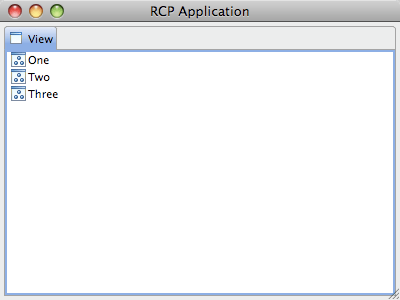
You should have an application looking like this:
Let’s now modify the content in the application to show a small translator UI which looks like this:
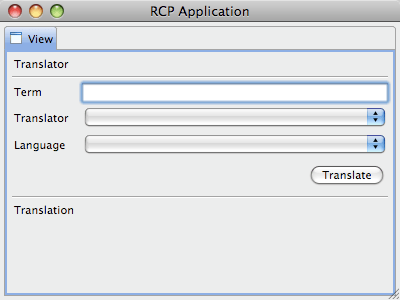
If you familiar with SWT (which i will assume through out this tutorial) here’s the code:
package at.bestsolution.translate.app;

import org.eclipse.jface.viewers.ComboViewer;
import org.eclipse.swt.SWT;
import org.eclipse.swt.layout.GridData;
import org.eclipse.swt.layout.GridLayout;
import org.eclipse.swt.widgets.Button;
import org.eclipse.swt.widgets.Composite;
import org.eclipse.swt.widgets.Label;
import org.eclipse.swt.widgets.Text;
import org.eclipse.ui.part.ViewPart;

public class View extends ViewPart {
  public static final String ID = "at.bestsolution.translate.app.view";

  private Text term;

  /**
   * This is a callback that will allow us to create the viewer and initialize
   * it.
   */
  public void createPartControl(Composite parent) {
    GridLayout layout = new GridLayout(2, false);
    parent.setLayout(layout);

    Label l = new Label(parent, SWT.NONE);
    l.setLayoutData(
      new GridData(GridData.FILL, GridData.BEGINNING, true,false, 2, 1)
    );
    l.setText("Translator");

    l = new Label(parent, SWT.SEPARATOR | SWT.HORIZONTAL);
    l.setLayoutData(
      new GridData(GridData.FILL, GridData.BEGINNING, true,false, 2, 1)
    );

    l = new Label(parent, SWT.NONE);
    l.setText("Term");

    term = new Text(parent, SWT.BORDER);
    term.setLayoutData(new GridData(GridData.FILL_HORIZONTAL));

    l = new Label(parent, SWT.NONE);
    l.setText("Translator");

    ComboViewer translator = new ComboViewer(parent);
    translator.getControl().setLayoutData(
      new GridData(GridData.FILL_HORIZONTAL)
    );

    l = new Label(parent, SWT.NONE);
    l.setText("Language");

    ComboViewer language = new ComboViewer(parent);
    language.getControl().setLayoutData(
      new GridData(GridData.FILL_HORIZONTAL)
    );

    Button b = new Button(parent, SWT.PUSH);
    b.setText("Translate");
    b.setLayoutData(
      new GridData(GridData.END, GridData.CENTER, false,false, 2, 1)
    );

    l = new Label(parent, SWT.SEPARATOR | SWT.HORIZONTAL);
    l.setLayoutData(
      new GridData(GridData.FILL, GridData.CENTER, true,false, 2, 1)
    );

    l = new Label(parent, SWT.NONE);
    l.setText("Translation");
  }

  /**
   * Passing the focus request to the viewer's control.
   */
  public void setFocus() {
    term.setFocus();
  }
}
Step 2: Create the translation services
Create the Service-Interface-Bundle
Create a new plain OSGi-Bundle (without any dependencies in MANIFEST.MF) e.g. named “at.bestsolution.translate.services” and define an ITranslator-Interface like this:
package at.bestsolution.demo.translate.services;

import java.lang.reflect.InvocationTargetException;

public interface ITranslator {
  public class FromTo {
    public final String from;
    public final String to;

    public FromTo(String from, String to) {
      this.from = from;
      this.to = to;
    }
  }

  public String getName();
  public FromTo[] getFromTo();

  public String translate(FromTo fromTo, String term) throws InvocationTargetException;
}
Create Translator implementations
Lets’s as an example create a translator which uses the Google-Services for Translations by using this library from code.google.
The implementation class looks like this:
package at.bestsolution.translate.services.google;

import java.lang.reflect.InvocationTargetException;
import java.util.ArrayList;

import at.bestsolution.translate.services.ITranslator;

import com.google.api.translate.Language;
import com.google.api.translate.Translate;

public class GoogleTranslator implements ITranslator {
  private static FromTo[] FROM_TOS;

  static {
    ArrayList<FromTo> l = new ArrayList<FromTo>();
    for(Language fromLang : Language.values()) {
      for( Language toLanguage : Language.values() ) {
        if( fromLang != toLanguage ) {
          l.add(new FromTo(fromLang.name(), toLanguage.name()));
        }
      }
    }
    FROM_TOS =  l.toArray(new FromTo[0]);
  }

  public String getName() {
    return "Google Translate";
  }

  public FromTo[] getFromTo() {
    return FROM_TOS;
  }

  public String translate(FromTo fromTo, String term) throws InvocationTargetException {
    try {
      return Translate.execute(term, Language.valueOf(fromTo.from), Language.valueOf(fromTo.to));
    } catch (Exception e) {
      throw new InvocationTargetException(e);
    }
  }
}
And the registration through DS looks like this:
<?xml version="1.0" encoding="UTF-8"?>
<scr:component xmlns:scr="http://www.osgi.org/xmlns/scr/v1.1.0" name="at.bestsolution.translate.services.google.googletranslator">
   <implementation class="at.bestsolution.translate.services.google.GoogleTranslator"/>
   <service>
      <provide interface="at.bestsolution.translate.services.ITranslator"/>
   </service>
</scr:component>
Next we add a ITranslatorProviderService which collects the various ITranslator-Service implementation and makes them available as IObservableList an.
The service definition:
package at.bestsolution.translate.services;

import org.eclipse.core.databinding.observable.list.IObservableList;

public interface ITranslatorProvider {
	public IObservableList getTranslators();
}
It’s implementation:
package at.bestsolution.translate.services.internal;

import org.eclipse.core.databinding.observable.list.IObservableList;
import org.eclipse.core.databinding.observable.list.WritableList;

import at.bestsolution.translate.services.ITranslator;
import at.bestsolution.translate.services.ITranslatorProvider;

public class TranslatorProviderComponent implements ITranslatorProvider {
	private IObservableList list = new WritableList();

	public IObservableList getTranslators() {
		return list;
	}

	public void addTranslator(final ITranslator translator) {
		list.getRealm().exec(new Runnable() {

			public void run() {
				list.add(translator);
			}
		});
	}

	public void removeTranslator(final ITranslator translator ) {
		list.getRealm().exec(new Runnable() {

			public void run() {
				list.remove(translator);
			}
		});
	}
}
It’s registration:
<?xml version="1.0" encoding="UTF-8"?>
<scr:component
  xmlns:scr="http://www.osgi.org/xmlns/scr/v1.1.0"
  name="at.bestsolution.translate.services.translatorprovider">
  <implementation
    class="at.bestsolution.translate.services.internal.TranslatorProviderComponent"/>
  <service>
    <provide interface="at.bestsolution.translate.services.ITranslatorProvider"/>
  </service>
  <reference
    bind="addTranslator"
    cardinality="0..n"
    interface="at.bestsolution.translate.services.ITranslator"
    name="ITranslator"
    policy="dynamic"
    unbind="removeTranslator"/>
</scr:component>
Consume the Service in the UI
Let’s for the start now consume the service directly throught the OSGi-Service registry. As a first step add a new method in our TranslatorView:
public class TranslatorView extends ViewPart {
	private IObservableList getTranslators() {
		Bundle bundle = FrameworkUtil.getBundle(getClass());
		BundleContext context = bundle.getBundleContext();
		ServiceReference reference = context.getServiceReference(ITranslatorProvider.class.getName());
		ITranslatorProvider pv = (ITranslatorProvider) context.getService(reference);

		return pv.getTranslators();
	}
}
We don’t have to deal with the case that the ITranslatorProvider is going away because our bundle depends on the TranslatorProvider-Services-Bundle hence if the service goes away we get shutdown as well.
Let’s use this IObservableList in our ui:
public class TranslatorView extends ViewPart {
  public void createPartControl(Composite parent) {
    // ....

    IObservableList translatorsObs = getTranslators();

    ComboViewer translator = new ComboViewer(parent);
    translator.getControl().setLayoutData(
      new GridData(GridData.FILL_HORIZONTAL));
    translator.setContentProvider(new ObservableListContentProvider());
    translator.setLabelProvider(new LabelProvider() {
      @Override
      public String getText(Object element) {
        return ((ITranslator)element).getName();
      }
    });
    translator.setInput(translatorsObs);

    l = new Label(parent, SWT.NONE);
    l.setText("Language");

    ComboViewer language = new ComboViewer(parent);
    language.getControl().setLayoutData(
      new GridData(GridData.FILL_HORIZONTAL)
    );
    language.setContentProvider(new ObservableListContentProvider());
    language.setLabelProvider(new LabelProvider() {
      @Override
      public String getText(Object element) {
        return ((FromTo)element).from + " - " + ((FromTo)element).to;
      }
    });

    IListProperty fromToProp = PojoProperties.list("fromTo");
    IValueProperty selectionProp = ViewerProperties.singleSelection();

    IObservableList input = fromToProp.observeDetail(selectionProp.observe(translator));
    language.setInput(input);

    // ....
  }
}
As you see this is already working very smooth but though the service stuff is working great we can use our View-Component only inside an RCP-Application (e.g. we can’t use it in a plain SWT one). At this point we can learn something from e4s way of doing things.
Learning from e4
Refactor code to use POJOs
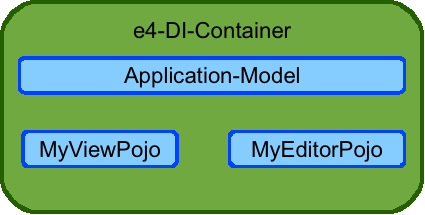
In e4 everything you write are simply POJOs who annotated with DI-Annotation like:
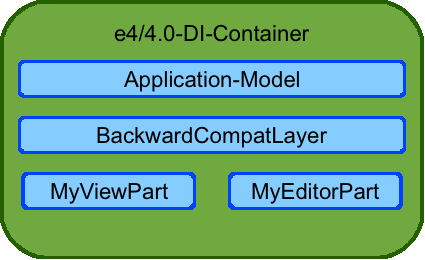
So what we do next is to factor out our UI-Component-Code is a simple POJO class which makes our ViewPart look like this:
package at.bestsolution.translate.view;

import org.eclipse.swt.widgets.Composite;
import org.eclipse.ui.part.*;

public class TranslatorView extends ViewPart {

  public static final String ID = "at.bestsolution.translate.view.views.TranslatorView";

  private TranslatorComponent component = new TranslatorComponent();

  public void createPartControl(Composite parent) {
    component.createUI(parent);
  }


  public void setFocus() {
    component.setFocus();
  }
}
We could stop at this point because our View-Component can now be used in any SWT-application but we can still improve the situation a bit by using e4 DI-Support which helps us to get access to OSGi-Services.
Next we have to set up Eclipse-DI ideally at the Workbench-Level so that e.g. in an RAP-Application every workbench instance has its own EclipseContext. So we are using the ui.services-Extension Point to set up such a context provider stuff:
The service-factory:
package at.bestsolution.translate.view;

import org.eclipse.ui.IWorkbenchPartSite;
import org.eclipse.ui.IWorkbenchWindow;
import org.eclipse.ui.internal.services.IWorkbenchLocationService;
import org.eclipse.ui.services.AbstractServiceFactory;
import org.eclipse.ui.services.IServiceLocator;

@SuppressWarnings("restriction")
public class DIContextServiceFactory extends AbstractServiceFactory {

	@Override
	public Object create(@SuppressWarnings("rawtypes") Class serviceInterface, IServiceLocator parentLocator,
			IServiceLocator locator) {
		if( ! IEclipseContextProvider.class.equals(serviceInterface) ) {
			return null;
		}

		Object o = parentLocator.getService(serviceInterface);

		IWorkbenchLocationService wls = (IWorkbenchLocationService) locator.getService(IWorkbenchLocationService.class);
		final IWorkbenchWindow window = wls.getWorkbenchWindow();
		final IWorkbenchPartSite site = wls.getPartSite();

		if( window == null && site == null ) {
			return new IEclipseContextProviderImpl();
		} else if( o != null && site == null ) {
			return new IEclipseContextProviderImpl((IEclipseContextProvider) o);
		}

		return o;
	}

}
The workbench-service
package at.bestsolution.translate.view;

import org.eclipse.e4.core.contexts.IEclipseContext;

public interface IEclipseContextProvider {
	public IEclipseContext getContext();
}
The service implementation:
package at.bestsolution.translate.view;

import org.eclipse.e4.core.contexts.EclipseContextFactory;
import org.eclipse.e4.core.contexts.IEclipseContext;
import org.osgi.framework.Bundle;
import org.osgi.framework.BundleContext;
import org.osgi.framework.FrameworkUtil;

public class IEclipseContextProviderImpl implements IEclipseContextProvider {
	private IEclipseContext context;

	public IEclipseContextProviderImpl(IEclipseContextProvider parent) {
		this.context = parent.getContext().createChild();
	}

	public IEclipseContextProviderImpl() {
		Bundle bundle = FrameworkUtil.getBundle(IEclipseContextProviderImpl.class);
		BundleContext bundleContext = bundle.getBundleContext();
		IEclipseContext serviceContext = EclipseContextFactory.getServiceContext(bundleContext);

		context = serviceContext.createChild("WorkbenchContext"); //$NON-NLS-1$
	}

	public IEclipseContext getContext() {
		return context;
	}
}
What’s left now is to refactor our POJO code a bit to use DI and make use of it in our ViewPart. Let’s at first adjust our POJO.
public class TranslatorComponent {
	private Text term;
	private ComboViewer translator;

	@Inject
	public TranslatorComponent(Composite parent) {
		createUI(parent);
	}

        // ...
}
We annotate our constructor with the @Inject annotation so that call the createUI-method there. Next we remove the OSGi-Service lookup with a method like this:
	@Inject
	void setTranslationProvider(@Optional ITranslatorProvider provider) {
		if( provider == null ) {
			if( ! translator.getControl().isDisposed() ) {
				translator.setInput(new WritableList());
			}
		} else {
			translator.setInput(provider.getTranslators());
		}
	}
This method gets called by the Injection Framework and passes in the currently available ITranslatorProvider-Instance in the OSGi-Service registry. Finally we adjust our ViewPart like this:
public class TranslatorView extends ViewPart {

	public static final String ID = "at.bestsolution.translate.view.views.TranslatorView";

	private IEclipseContext context;
	private TranslatorComponent component;

	public TranslatorView() {

	}

	public void createPartControl(Composite parent) {
		IEclipseContextProvider p = (IEclipseContextProvider) getSite().getService(IEclipseContextProvider.class);
		context = p.getContext().createChild();
		context.set(Composite.class, parent);
		component = ContextInjectionFactory.make(TranslatorComponent.class, context);
	}

	/**
	 * Passing the focus request to the viewer's control.
	 */
	public void setFocus() {
		component.setFocus();
	}

	@Override
	public void dispose() {
		context.dispose();
		super.dispose();
	}
}






 Tomsondev Blog