Thoughts on JavaFX for Android and iOS

So the big news is out: Oracle will provide the sources of their Android and iOS prototypes. While I agree this is great the announcement leaves me with many questions and doubts.

What Richard is telling us is that they release their (prototype?) code for iOS/Android, not more not less. This means the community has to put a lot of effort to turn this into something one can use to write and package iOS and Android applications – at least this is how I read Richards announcement.

Having the prototype code makes it easier to start because we can see how Oracle approached this but one has to have a lot of knowledge about the inners of the JavaFX’ Glass and Prism code, OpenGL-ES and iOS/Android. Gaining this knowledge will take time and is probably not something one can do on evenings / weekends.

Another uncertainty is “JavaSE Embedded for iOS/Android”. What is it? Does it provide us AOT compilation? In case it does not this is one more thing to be solved by the community so that at least performance critical parts of your application can be AOT compiled. There are solutions to this like Avian or xmlvm but one has to make things work. There is a reason Codenameone provides this as a cloud service for their platform!

The last thing to consider is that only having JavaFX on the system is not really enough. You need to interface with platform services and sensors without them you can’t write useful applications, so we’d need a cross-platform API for this to develop useful apps.

To round up this short post. Yes it’s good news but still leaves me with many questions/doubts.

Posted in e(fx)clipse | 4 Comments

A smarter JavaFX CSS-Editor

This is just a short teaser for those using e(fx)clipse for their JavaFX development. Todays nightly build holds an extermly cool new feature.

JavaFX provides many many CSS-Attributes (many more than HTML) but only very view apply for a given CSS-selector. Because of that we made the CSS-Editor context aware which means it restricts the provided CSS-Attributes based upon the selector you are currently in.

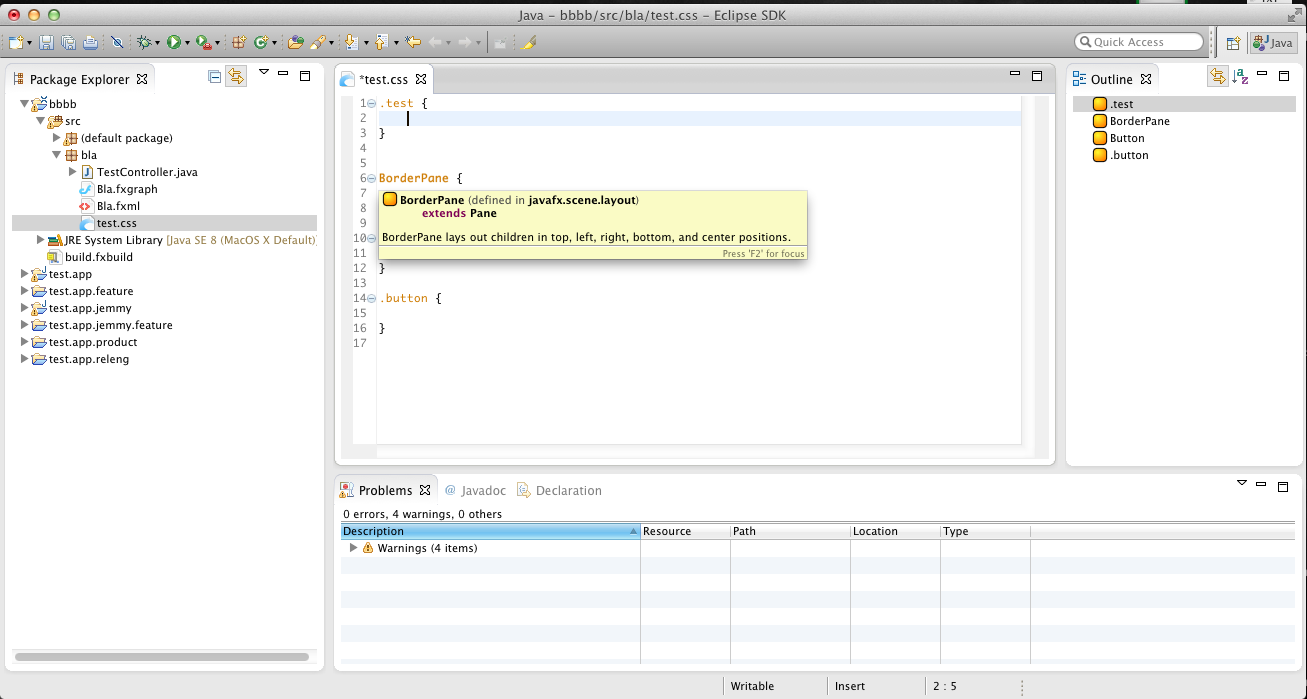
pic_2

This screenshot shows the unrestricted set of CSS-Attributes because the CSS-Selector “.test” is a generic one.

pic_3

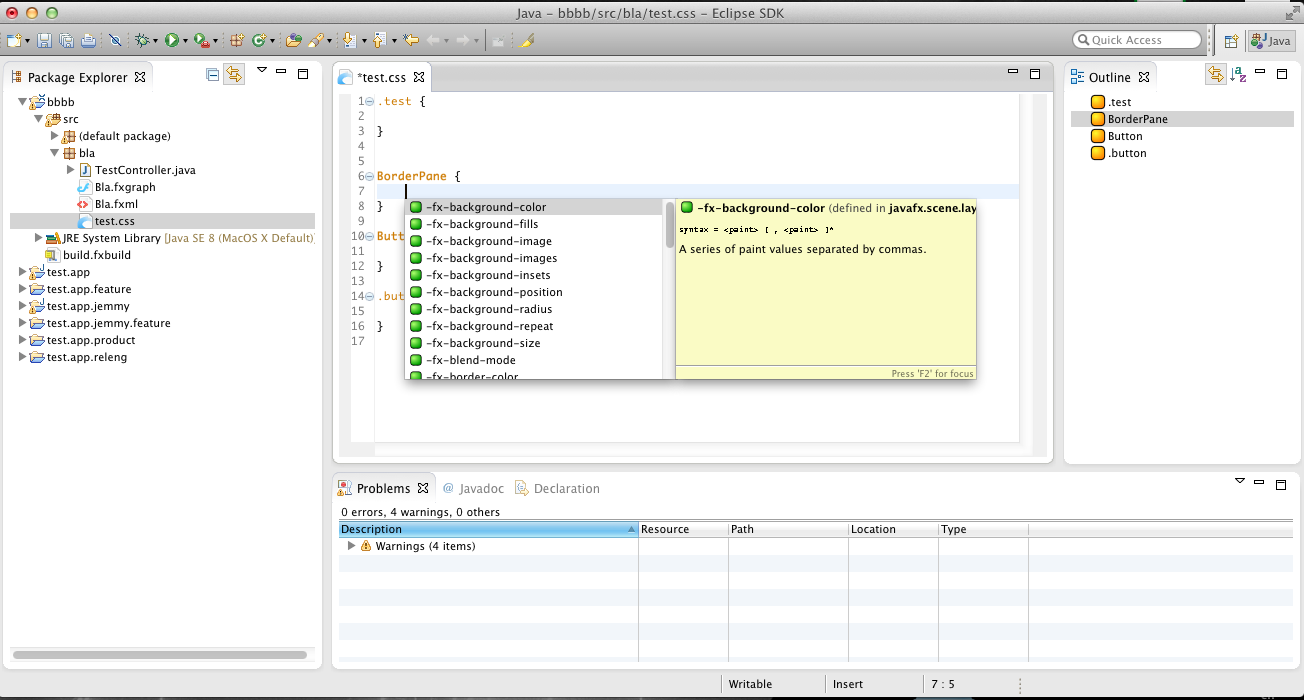
This screenshot shows hover-Informations for element definitions (used for almost all Scene-Graph-Elements beside Controls)

pic_4

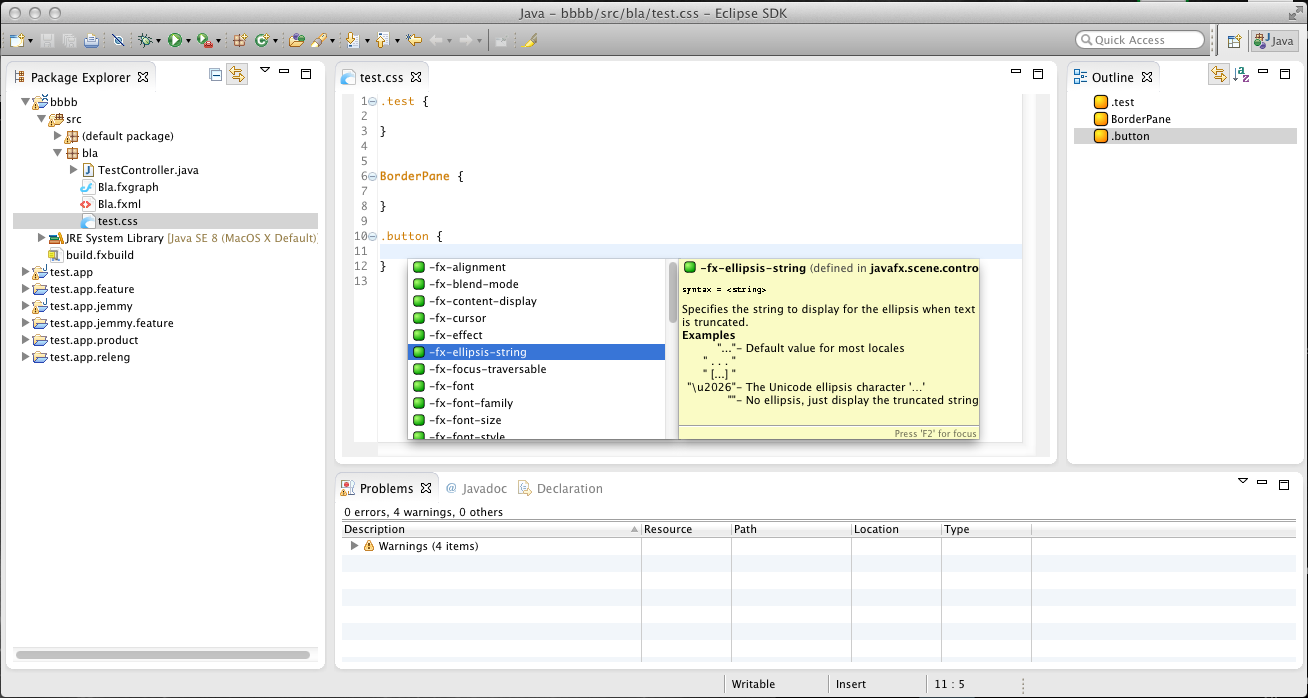
In this screenshot you’ll notice that the list of proposed attributes is way smaller compared to the first screenshot. Nice!

pic_5

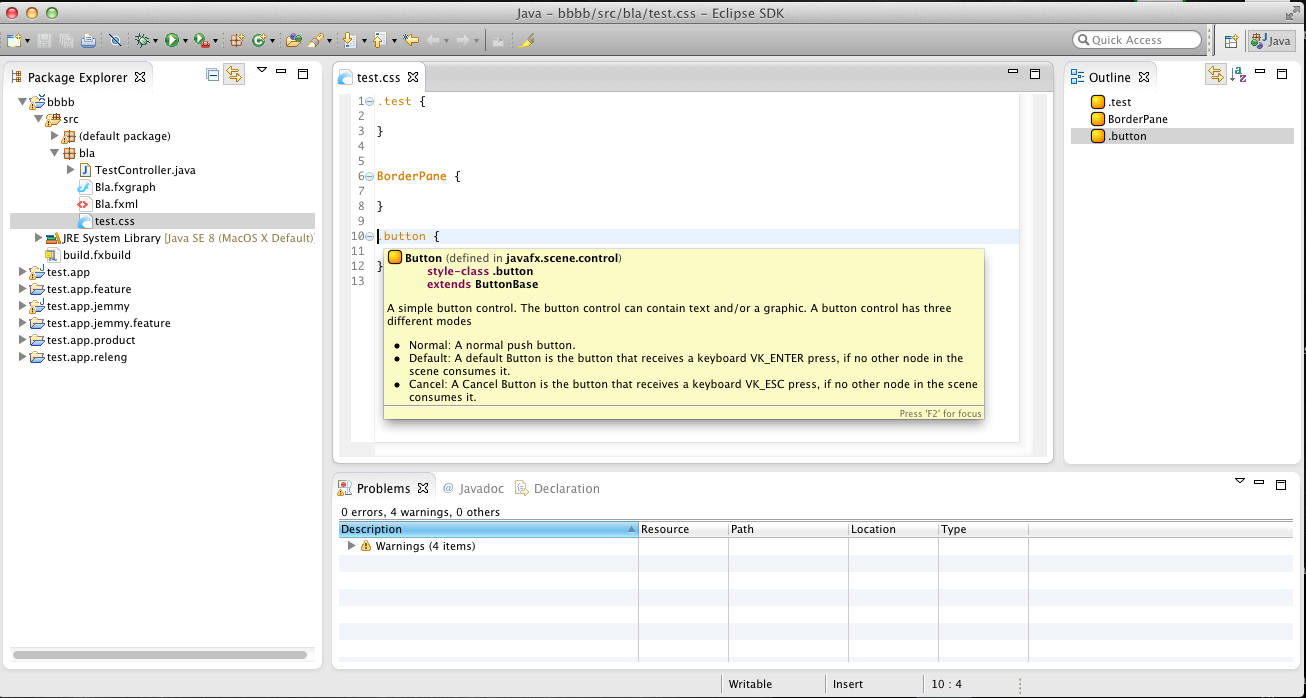
From this screenshot you can see that the editor knows that the .button class is applied to Button-Elements.

pic_1

And naturally the set of attributes is restricted as well in this case.

I think this feature once more puts e(fx)clipse a head of other IDEs.

Posted in e(fx)clipse | 2 Comments

Fed up with famfamfam icons for Eclipse.org – Let’s get Oxygen icons

Whenever I work on Eclipse.org projects, only having access to the famfamfam Silk icon-sets makes me cry.

Don’t get me wrong I’m happy that we have at least those icons available but wouldn’t it be better to have a really modern set of icons? If you are working on a project (http://www.efxclipse.org/) whose aim is to provide tooling and runtime components to write slick looking UIs who can compete with Web-Frameworks and you don’t have access to such a modern icon-set this is not only a small shortcoming but a real problem.

Because of this I filed a CQ 7068 against Eclipse.org to discuss what has to happen to give Eclipse.org projects access to the well known Oxygen Icon Set from KDE. Unfortunately the information found on their homepage is not correct anymore and they currently only release their icon-set under LGPL.

I hope we can find an arrangement with the KDE Artist team so that Eclipse Plugins can look much slicker in future. Until today only Nuno Pinheiro answered to my inquiries via IRC and in a private mail thread but he was not able to answer why the Creative Common Attribution-ShareAlike 3.0 License option was removed with this commit.

I still hope to get someone who can clarify the problem with Creative Common Attribution-ShareAlike 3.0 License option and give me a hint which licenses would be acceptable to KDE-Projects beside LGPL. As it looks today I have to take the last resort and use the icons version before above license change has happened 5 years ago – not my preferred solution.

If you know someone from KDE who I can get in touch with simply leave a comment or get in touch with me e.g. via my twitter handle @tomsontom, via mail, …

Posted in e(fx)clipse, Eclipse | 2 Comments

@Active in e4

Having discussed yesterday with Alex Blewitt and Lars Vogel on what @Active is I thought it might make sense to explain it in a short blog post.

Let’s start with the question Alex posted on twitter: “Which is preferable; using @Named(ACTIVE_SHELL) or @Active shell

Answer: they are completely different things!

Before we understand why we need to know more about the IEclipseContext and how it works:

  1. There’s not a single context but a hierarchy of context
  2. Child-Contexts have access to informations of themselves and their parent(s)

So if we have code like this:

public class MyBean {
  private IEclipseContext owner;
  private String parentValue;
  private String childValue;
	
  @Inject
  public MyBean(IEclipseContext owner) {
    this.owner = owner;
  }

  @Inject
  void setParentValue(@Optional @Named("parent_value") String value) {
    this.parentValue = value;
  }

  @Inject
  void setChildValue(@Optional @Named("child_value") String value) {
    this.childValue = value;
  }
	
  void print() {
    System.err.println(owner.toString() + ": parent = " + parentValue + "; child: " + childValue);
  }
}
IEclipseContext rootContext = EclipseContextFactory.getServiceContext(FrameworkUtil.getBundle(getClass()).getBundleContext());
rootContext.set("parent_value","Hello Parent");

MyBean p = ContextInjectionFactory.make(MyBean.class, rootContext);
p.print(); // OSGi context for bundle: test.di.active: parent = Hello Parent; child: null

IEclipseContext childContext_1 = rootContext.createChild("Child 1");
childContext_1.set("child_value","Hello Child 1");
MyChildBean c1 = ContextInjectionFactory.make(MyBean.class, childContext_1);
c1.print(); // Child 1: parent = Hello Parent; child: Hello Child 1

Anyone working with e4 knows about this already so it should be clear.

To understand now @Active you have to know a much less know thing about the IEclipseContext hierarchy:

The notion of an activeBranch/activeContext

when working in e4 you do not recognize this but the framework switches the activeContext based on which area of your UI currently has the input focus by calling IEclipseContext#activateBranch. Lets extend our example a bit:

IEclipseContext childContext_1 = rootContext.createChild("Child 2");
childContext_1.set("child_value","Hello Child 2");
MyChildBean c1 = ContextInjectionFactory.make(MyBean.class, childContext_2);
c2.print(); // Child 2: parent = Hello Parent; child: Hello Child 2

childContext_1.activateBranch();
p.print(); // // OSGi context for bundle: test.di.active: parent = Hello Parent; child: null

childContext_2.activateBranch();
p.print(); // // OSGi context for bundle: test.di.active: parent = Hello Parent; child: null

Now let’s modify the bean code using @Active

public class MyBean {
  @Inject
  void setChildValue(@Optional @Named("child_value") @Active String value) {
    this.childValue = value;
  }
}

if we now execute the code once more we’ll get the following out put for the last 2 p.print() statements from above:

OSGi context for bundle: test.di.active: parent = Hello Parent; child: Hello Child 1
OSGi context for bundle: test.di.active: parent = Hello Parent; child: Hello Child 2

This means @Active works in the opposite direction of the IEclipseContext hierarchy and instances created on a parent context can track values from their active child using it!

Posted in e4 | Leave a comment

e(fx)clipse proposed to Eclipse Foundation

We’ve said since a long time that one day we’ll propose e(fx)clipse as an Eclipse Foundation project.

Today we’ve published the project proposal at http://eclipse.org/proposals/technology.efxclipse/ and Wayne created a bug for it.

We believe this is the next important step for the project and a win for both – the Eclipse community and the project.

Posted in Announcements, e(fx)clipse | 8 Comments

JavaFX in Eclipse Magazin 02/2013

The Eclipse magazin has published an interview with me about JavaFX, Eclipse and e(fx)clipse.

For those of you interested in JavaFX & Eclipse the next issue (2/2013) holds a lot of information on the topic:

The content of the interview is in German, I’ll publish a translation in about a month on this blog if google translate doesn’t do its job good enough 😉

Posted in Announcements, e(fx)clipse | Leave a comment

e(fx)clipse 0.8.0 released

It’s been a long time since the last release (end of September 2012).

I’m happy to announce that we’ve just released e(fx)clipse 0.8.0 to the public. You can download it from our server! Make sure you run your Eclipse instance we’ve Java7u7 and above, the tooling bundles will refuse to start in Java6!

From 0.1.1 to 0.8.0

I’ve presented our tooling and framework on various conferences and democamps in the last few months and when I talked to people they all thought the framework is immature simply because it has such a low version number. I think 0.8.0 reflects the real state of the project: Stable and mature but not 100% done yet.

None Functional

Infrastructure

The download bandwidth used by this projected started to affect our office’ internet connection so we’ve setup a dedicated server in at an external hosting provider. We’ve updated our trac instance so that you now get mails when you filed bugs and we’ve e.g. fixed it.

Website + Wiki

One of our early adopters (Uwe Sander from TESIS DYNAware) updated our website and started to transform so of the content to our wiki.

Tooling

Java 7 and Java 8

The minimum version needed to run the tooling is now Java7, so you need to make sure you run your Eclipse using Java7u8 but we also added support to run the tooling on Java8/JFX8. Currently Java7 is the main target environment but at least for the runtime JFX8 is a quite interesting. We’ll support Java7 for the forseeable future but clearly Java8/JFX8 is going to be the main target.

FXGraph

This versions has a first implementation of a FXGraph-FXML cycle which means one can convert an FXML file back into an FXGraph file. It’s still a bit rough (e.g. the formatting of the FXGraph-File is not as nice as it could be) but all our fxgraph samples can get translated back and forth.
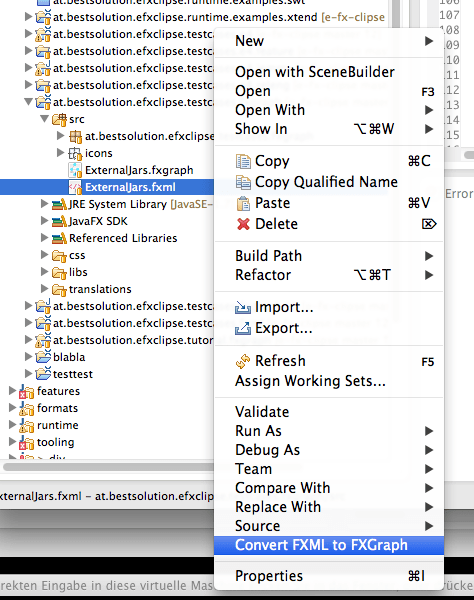
screen1

More and better Wizards

One of the most important facts when developing OSGi-JavaFX projects are:

  • A good project structure: I’ve blogged about my ideal project structure already some time ago.
  • A automated build: Build your project on a CI-Server is one of the most important things but it’s sometimes a bit of a problem to developers to setup things up appropriately

With this release we provide a set of new wizards who solve both problems for you.

screen2

You can see this in action in an older blog post. You as a tooling user might not care about this but we’ve developed a small DSL allowing one to specify your project-set creation.
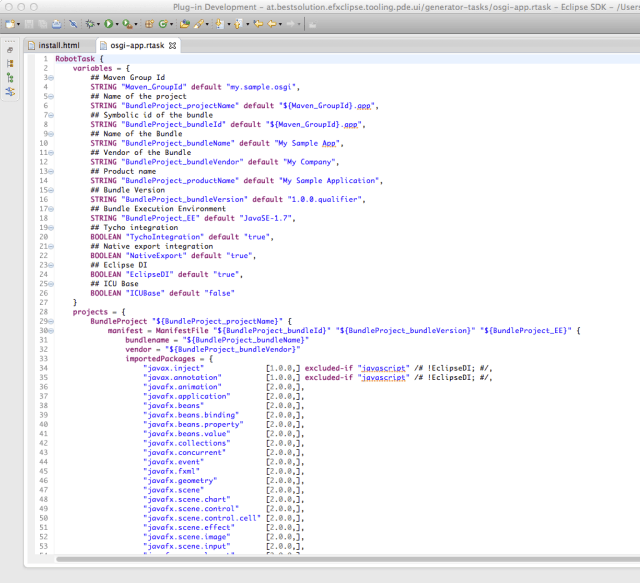
screen3

If you are a tooling developer and want to provide your users wizards to bootstrap projects I’d suggest you take a look at our stuff. It can be used without depending on other e(fx)clipse code.

Runtime

EMF and JavaFX

Another employee from TESIS DYNAware – Torsten Sommer – worked on an integration of JavaFX and EMF-Edit. You can now setup FX List, Tables and Trees from the generated EMF-Edit classes makeing is super easy to implement UIs using EMF-Frameworks like e.g. CDO or Teneo. I’ve already blogged about this some time ago here.

JavaFX & e4

We’ve fixed various bugs and added new feature like a fixed tile-layout. The coolest feature is that you can now specify how the transition for perspective to perspective is done.

Beside that we fixed some bugs (e.g. in the keybinding system) and refactored the API so that people can easier extend and provide customizations.

Logging

One of the nice things we added from an API perspective is how you can log. We don’t want to force you to any logger (not even slf) so we’ve added a minimal Logger interface to our core service library and a default logger which uses java.util.logging (not my prefered framework but available from the JDK).

The logger factory is simply an OSGi-Service you can make use of it by querying the OSGi-Service-Registry:

public class MyClass {
   private Logger logger;
   
   private Logger getLogger() {
     if( logger != null ) {
       return logger;
     }
     BundleContext ctx = FrameworkUtil.getBundle(getClass()).getBundleContext();

     ServiceReference<LoggerFactory> ref = 
       ctx.getServiceReference(LoggerFactory.class);
     logger = ctx.getService(ref).createLogger(getClass().getName());
     return logger;
   }
}

If you know me you can imagine that I’m not too happy with code like the one above and because you’ll most likely develop OSGi and DI driven applications when you use our stuff there’s an easier way.

public class MyClass {
  @Inject
  private LoggerFactory factory;

  private Logger logger;

  private Logger getLogger() {
    if( logger != null ) {
       return logger;
    }
    logger = factory.createLogger(getClass().getName());
  }
}

The runtime components have not been our sole target for the logging but we wanted use it also for our tooling code where some of the parts are using Google Guice. So if you are using OSGi and Google Guice as your DI container you can make use of a small Provider class we’ve implemented for you.

Still above code is still a bit to verbose so we’ve implemented an ObjectSupplier for Eclipse DI and a TypeListener for Guice.

So the code you’ll most likely write in future is simply:

public class MyClass {
  @Inject
  @Log
  Logger logger
}

In the e4 runtime we’ve redefined the Logger and ILoggerProvider to delegate to our log infrastructure so that all informations are logged through the same system.

Like state in the beginning the default logger we provide is based upon java.util.logging but you can simply register your custom LoggerFactory and give it an OSGi-Service ranking of 1 and magically everything will make use of it. We’ve scheduled an Log4j or SLF implementation for the next release.

Samples

For the presentations of JavaFX I did at JavaOne and EclipseCon Europe I’ve implemented some demo applications which i’ve already blogged about already.

Java8 support

To implement features we have to depend on internal API of JavaFX 2.2 which is different between JFX2.x and JFX8 but with this release we’ve isolated those areas. Starting with this release we support running on JFX8 (=Java8) and JFX2.2 (Java7) – supporting both of them is equally important but FX8 will certainly get more attention.

Upstream contribution

We are depending on other projects. In the tooling space we worked with the WTP project to fix some problems with their XML-Editor (you’ll get them once you run on 4.2.2). In the runtime space we are working with e4 and recently with the JavaFX team (we managed to get our first required API into the latest JavaFX builds) which certainly takes time but helps us to provide required features more easily.

Posted in e(fx)clipse, e4 | 8 Comments

2012 in review

The WordPress.com stats helper monkeys prepared a 2012 annual report for this blog.

Here’s an excerpt:

19,000 people fit into the new Barclays Center to see Jay-Z perform. This blog was viewed about 130,000 times in 2012. If it were a concert at the Barclays Center, it would take about 7 sold-out performances for that many people to see it.

Click here to see the complete report.

Posted in Uncategorized | Leave a comment

EMF-Edit-Support is coming to JavaFX via e(fx)clipse

One of the brand new runtime features we will provide with the next release of e(fx)clipse is EMF-Edit-Support for JavaFX so that people who use EMF as their domain technology don’t have to write code by hand when they want to set up List, Tables and Trees in a JavaFX application.

An important side note in is that it is not BestSolution.at who has developed this feature but it has been contributed and is maintained by one of our early adopters (TESIS DYNAware).

As a start let’s take a look how you can set up a ListView:

EditingDomain editingDomain = ....;
AdapterFactory adapterFactory = ....;
Group rootNode = ....;

ListView<Object> listView = new ListView<>();
listView.setItems(new AdapterFactoryObservableList<Object>(adapterFactory, rootNode));

AdapterFactoryListCellFactory listCellFactory;
listCellFactory = new AdapterFactoryListCellFactory(adapterFactory);
listView.setCellFactory(listCellFactory);

Nice isn’t it? Let’s take a look at a more complex control:

Group rootNode = ....;
EditingDomain editingDomain = ....;
AdapterFactory adapterFactory = ....;

TreeView<Object> treeView = new TreeView<>();
treeView.setRoot(new AdapterFactoryTreeItem(rootNode, adapterFactory));
AdapterFactoryTreeCellFactory cellFact;
cellFact = new AdapterFactoryTreeCellFactory(adapterFactory);

treeView.setCellFactory(cellFact);

Let’s add some DND support

cellFact.addCellCreationListener(new CellDragAdapter());
cellFact.addCellCreationListener(new EditingDomainCellDropAdapter(editingDomain));

And finally a nice little table:

Group rootNode = ....;
EditingDomain editingDomain = ....;
AdapterFactory adapterFactory = ....;

TableView<Object> tableView = new TableView<>();

TableColumn<Object, Object> firstNameColumn = new TableColumn<>("First Name");
firstNameColumn.setCellValueFactory(new ProxyCellValueFactory<Object, Object>());

AdapterFactoryTableCellFactory<Object, Object> firstNameCellFactory = 
   new AdapterFactoryTableCellFactory<>(adapterFactory, 0);
firstNameColumn.setCellFactory(firstNameCellFactory);

Now add some inline editing support:

tableView.setEditable(true);
firstNameCellFactory.addCellEditHandler(new EAttributeCellEditHandler(
  ContactsPackage.eINSTANCE.getContact_FirstName(),
  editingDomain));

That’s it for structured controls like List, Table and Tree but often you also need to bind an EMF-Feature e.g. to a TextField and this can be done like this:

Contact contact = ...;
EditingDomain editingDomain = ....;
EStructuralFeature feature = ContactsPackage.eINSTANCE.getContact_FirstName();

Property<String> property = EMFEditFXProperties.value(editingDomain, contact, feature);
textField.textProperty().bindBidirectional(property);

If you want to see this in action I’ve recorded a small video for you.

You noticed that we have full undo/redo support available but for those of you who have used EMF-Edit that is not a suprise. As always you can find the sample code in our github repo.

Posted in e(fx)clipse | 10 Comments

My recommended project structure for (JavaFX) e4 projects

One of the most important things developing OSGi applications is the bundle structure and because e4 applications are by definition OSGi applications. Before looking in detail on e4 applications let’s look at how you should structure your OSGi projects in my opinion.

The main objectives are decoupeling and minimal dependencies so my suggest is to split up your project in 3 layers:

  • Application layer
  • Framework layer
  • Build and Assembly layer

The application layer

  • (Optional)my.project.${subcomponent}.core.model
    This bundle holds your domain model or DTOs
  • my.project.${subcomponent}.core.services:
    This bundle holds the none UI service interfaces e.g. to communicate with your application server or your persitence layer
  • my.project.${subcomponent}.core.services.mock:
    This bundle holds mock implementations for your service interfaces you use while developing
  • my.project.${subcomponent}.core.services.${name}
    This bundle holds your production implementations for your services
  • my.project.${subcomponent}.core.services.junit
    This bundle holds your JUnit-Compatibility Test-Suite. It’s purpose is to ensure that the different service implementation act like described in your API
  • my.project.${subcomponent}.core.services.${name}.junit
    This bundle holds JUnit-Tests who test specific of this very service implementation
  • (Optional)my.project.ui.views.services
    This bundle holds UI services you want use but are normally provided through the framework. A good example is publishing a selection but because you don’t want to add framework dependencies in your application layer you abstract them away through service definitions
  • my.project.${subcomponent}.ui.views
    This is the bundle where you implement your UI elements. It should only depend on:
    • the widget technology you use (=javafx)
    • javax.inject and javax.annotation so that you can make use of DI
    • my.project.${subcomponent}.core.model
    • my.project.${subcomponent}.core.services
    • my.project.ui.views.services

    IMPORTANT: Do not add dependencies on application frameworks here

Framework integration layer

  • my.project.ui.app
    This bundle holds the main application configuration. In e4 you will have here only your Application.e4xmi where you set up your main application structure, including e.g. the window structure, application commands like Quit, …
  • (Optional)my.project.ui.views.services.${appframework}
    This bundle holds the implementation of ui services for the application framework you want to plug into
  • my.project.${subcomponent}.ui.views.${appframework}
    This bundle holds the integration code of your plain UI-Components into your application framework of choice

Build and Assembly layer

I’m using maven-tycho to build my MANIFEST first OSGi applications but I think other build system (buckminster) would have no problem with the below structure

  • my.project.${subcomponent}.feature
    This feature holds all bundles of this subcomponent
  • my.project.ui.app.jemmy
    This bundle holds the Jemmy-UI-tests for your application
  • my.project.ui.app.product
    In this bundle you find the .product-definition for your final application which is based upon feature
  • my.project.ui.app.releng
    In this bundle you have your main release engeneering project which most likely only holds a pom.xml where you configured the p2-repos to use, …

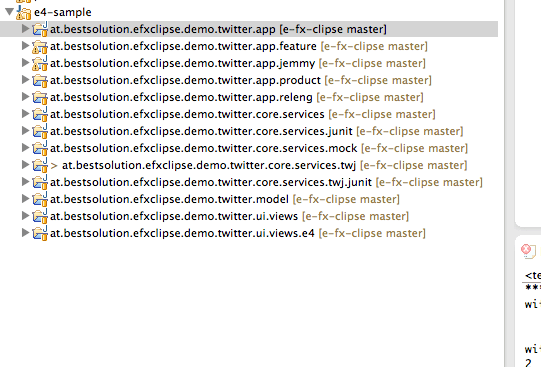
To give you an example how this would look like I started coding a sample setup as part of the e(fx)clispe repo. Check out the projects starting with “at.bestsolution.efxclipse.demo.twitter”.

project-structure

It is not yet ready to be consumed but we’ll go forward with it in the next days.

Posted in e(fx)clipse | 7 Comments