Eclipse on JavaFX (a short video) and next steps

Eclipse on SWT on JavaFX Video / Java8 Launch Panel on e(fx)clipse

As I’ve been at EclipseCon last week and showed our work on JavaFX tooling and SWT on JavaFX I wanted to share the video I used in the talk.

It was BTW great to see an e(fx)clipse an Eclipse Project (at around Minute 13 if you want review it) getting mentioned in the Java8 launch video by Richard Bair and Mark Reinhold!

Next steps

It looks like there’s a big interest to make SWT on JavaFX happen to provide a nice looking IDE and people a possibility to transition from SWT to JavaFX UIs step by step instead of rewriting everything is a big splash.

I’ve always stated that our main focus is RCP but even for this step we need to get help by code contributions or funding we simply can not do all this work for free.

Just to make it super clear. What we have today is I’d say something in between a proof-of-concept and an tech-preview version. I’ve learned a lot on how a port needs to be done and we would now need to reflect what is good what is bad.

I’m still not convinced that we can do a full port of the current SWT-API unless they introduce some higher-level concept to replace low-level ones. Most pressing are:

  • Event Loop exposure:
    The biggest problem is caused by the inability for JavaFX to find out an IDLE-state which is e.g. used by the Eclipse-IDE to run low priority stuff
  • CTabFolder:
    All this rendering stuff introduced by SWT is although once more doable using JavaFX Canvas but not a natural fit for it.
  • Owner draw in Table/Trees:
    First of all: Ownerdraw can be emulated in JavaFX by using a JavaFX-Canvas but it completely ineffecient from a resource point of view when you could use Text-Flow instead.

    Did you ever asked why on hell you need to put your Table/Tree into an owerdraw mode just to get a item-text showing up in multiple colors in one cell. JFace perfectly hides this from you but I don’t think it is the right layer to address this problem, e.g. owner draw has problems with accessibility, …

    I dream of an SWT-API like this:

    TableItem i = ....
    i.setText("red blue", 
      new StyleRange(0,3,"#f00"), 
      new StyleRange(3,6,"#00f")
    );
    

  • StyledText-API without Direct-Paint:
    It would be so nice if all the StyledText semantics would not be exposed in a very direct draw style fashion but having a higher level abstraction one could build all the editor support on.

On the other hand there’s missing stuff as well in JavaFX, like that it is not possible to control the trim-buttons (min, max, close) in a JavaFX Stage as good as on an SWT-Shell. So there JavaFX would have to move forward beside e.g. providing missing controls and APIs (even if they are internal one) to control certain stuff like a Spinner, a Font-Dialog, … .

And last but not least there are areas where both worlds are so different that you can never get them work on an equal API – it is hard to explain many of those but when you hit them you fairly soon understand that this not solvable.

Posted in e(fx)clipse | 1 Comment

Eclipse on JavaFX – Get Dark – The power of JavaFX CSS

This is just a short post based on a question I received on twitter: Can one use JavaFX CSS to theme the IDE? Answer: Of course you can! I don’t know myself why people like the dark themes so much but well some do and making your IDE go black with SWT on JavaFX is no more than those 5 lines of CSS:

.root {
    -fx-base: rgb(50, 50, 50);
    -fx-background: rgb(50, 50, 50);
    -fx-control-inner-background:  rgb(50, 50, 50);
}

and you get this

screen_black

use that

.root {
    -fx-base: #7eaacc;
    -fx-background: #7eaacc;
    -fx-control-inner-background: white;
}

and you get

screen_blue

Not everything is perfectly ok because it looks like some parts of the IDE are setting their color in SWT anyways I think it shows the power of JavaFX CSS. Imagine what a real designer could do to your (commercial) IDE if it gets based on SWT on JavaFX.

I think the SWT CSS people can learn some bits from this. JavaFX derives ALL colors e.g. that the tree-text-color is white from those 3 values!

BTW the file displayed in the center has approximately 10 000 lines of code and it scrolls instantly – more on that in another post.

Anyways that’s it for today!

Posted in e(fx)clipse, Uncategorized | 11 Comments

SWT on JavaFX is now at part of e(fx)clipse

I’ve already outlined in one of my posts about SWT on FX that we are contributing our work on the port to Eclipse.org.

We decided not to contribute it to the SWT project but work on it inside e(fx)clipse. There are multiple reason for this and we are not totally against moving the sources to SWT one day but for now we are proceeding as part of e(fx)clipse.

I’m happy to announce before EclipseConNA 2014 that we’ve passed the initial IP review successfully and our code is no part of the e(fx)clipse git repo.

Please note that SWT on JavaFX is NOT on the official roadmap for 1.0 which will be our first stable release targeted for June 2014 simply don’t have the resources to make the implementation production ready.

Since the last screenshot published I’ve made some progress on rendering the IDE (this time it is Luna M6 on SWT on JavaFX)
screen_default

If you have questions, want to provide feedback or even sponsor the development of the SWT on JavaFX port you’ll find me next week in wonderful California at EclipseConNA 2014 where I’m also presenting some JavaFX related talks & tutorials:

Posted in e(fx)clipse | 9 Comments

Embedding Swing into SWT on Java8

If have have you ever faced the problem to embed Swing into your SWT application you know how nasty things get because you always have to synchronize between the SWT & Swing event loop.

So if you have code like:

Display d = ...;
Shell s = ...;
JButton swingButton = new JButton("Swing");
Button swtButton = new Button("SWT");
swingButton.addActionListener( (e) -> 
   d.asyncExec( 
    () -> swtButton.setEnabled(!swtButton.getEnabled()) 
   ) 
);
swtButton.addListener( SWT.Selection, (e) -> 
 SwingUtilities.invokeLater( 
    () -> swingButton.setEnabled(!swingButton.isEnabled()) 
   )
);

// .....

while(!s.isDisposed()) {
  if(!d.readAndDispatch()) {
    d.sleep();
  }
}

You might not be suprised that this all can lead to fairly complex and unmaintainable code!

Now let’s see what we can do with our JavaFX8 knowledge to make SWT and Swing share the same event loop!

  1. JavaFX and SWT share the same event loop when we embedding JavaFX into SWT using FXCanvas
  2. in Java8 Swing can be forced to run on the same event loop as JavaFX

If we carefully study the above this means:

JavaFX-Event-Loop == SWT-Event-Loop
Swing-Event-Loop  == JavaFX-Event-Loop
----------------------------------------
Swing-Event-Loop == SWT-Event-Loop

Hm – that’s interesting but how does this look like in code:

Display d = ...;
Shell s = ...;
// Make JavaFX run in embedded mode!
Shell dummy = new Shell(d);
FXCanvas c = new FXCanvas(dummy, SWT.NONE);
dummy.dispose();

JButton swingButton = new JButton("Swing");
Button swtButton = new Button("SWT");
swingButton.addActionListener( 
  (e) -> swtButton.setEnabled(!swtButton.getEnabled())
);
swtButton.addListener(SWT.Selection, 
  (e) -> swingButton.setEnabled(!swingButton.isEnabled())
);

// ...
while (!s.isDisposed()) {
  if (!d.readAndDispatch()) {
    d.sleep();
  }
}

d.dispose();
// Exit JavaFX-Platform
PlatformImpl.exit();

That’s all from a source code point of view to get things working – the only extra thing you need to to as well is to launch your SWT-Application with “-Djavafx.embed.singleThread=true”.

I’ve recorded a short screencast on this to show you some SWT/Swing code in action!

I’ve not extensively tested this code and I don’t think it is officially supported by Oracle but the above sample runs fine on Win32 and MacOSX 10.9 – so it is hack but I wanted to get out this information – use it at your own risk!

Posted in e(fx)clipse | 3 Comments

e(fx)clipse 0.9.0 released

We are very pleased to announce the release of e(fx)clipse 0.9.0. This is the first release under the Eclipse.org umbrella and although it took us much longer than estimated we are now in good shape to explore future endenvours.

Anyways what’s in the release!

Download & Update sites

Update site

You can install e(fx)clipse 0.9.0 into any kepler release from our update site which is at http://download.eclipse.org/efxclipse/updates-released/0.9.0/site. As a prerequisit you’d have to have Xtext & Xtend 2.5.0 so you need to add their update site as well http://download.eclipse.org/modeling/tmf/xtext/updates/composite/releases/

All-In-One Downloads

As always to free you from assembling your own SDK we provide you with prepackaged SDKs at http://efxclipse.bestsolution.at/install.html. You’ll notice that we are not supporting 3.8.x any more officiallys so the download has been removed. We’ll update to 4.3.2 once it is released.

New Features

Mobile Support

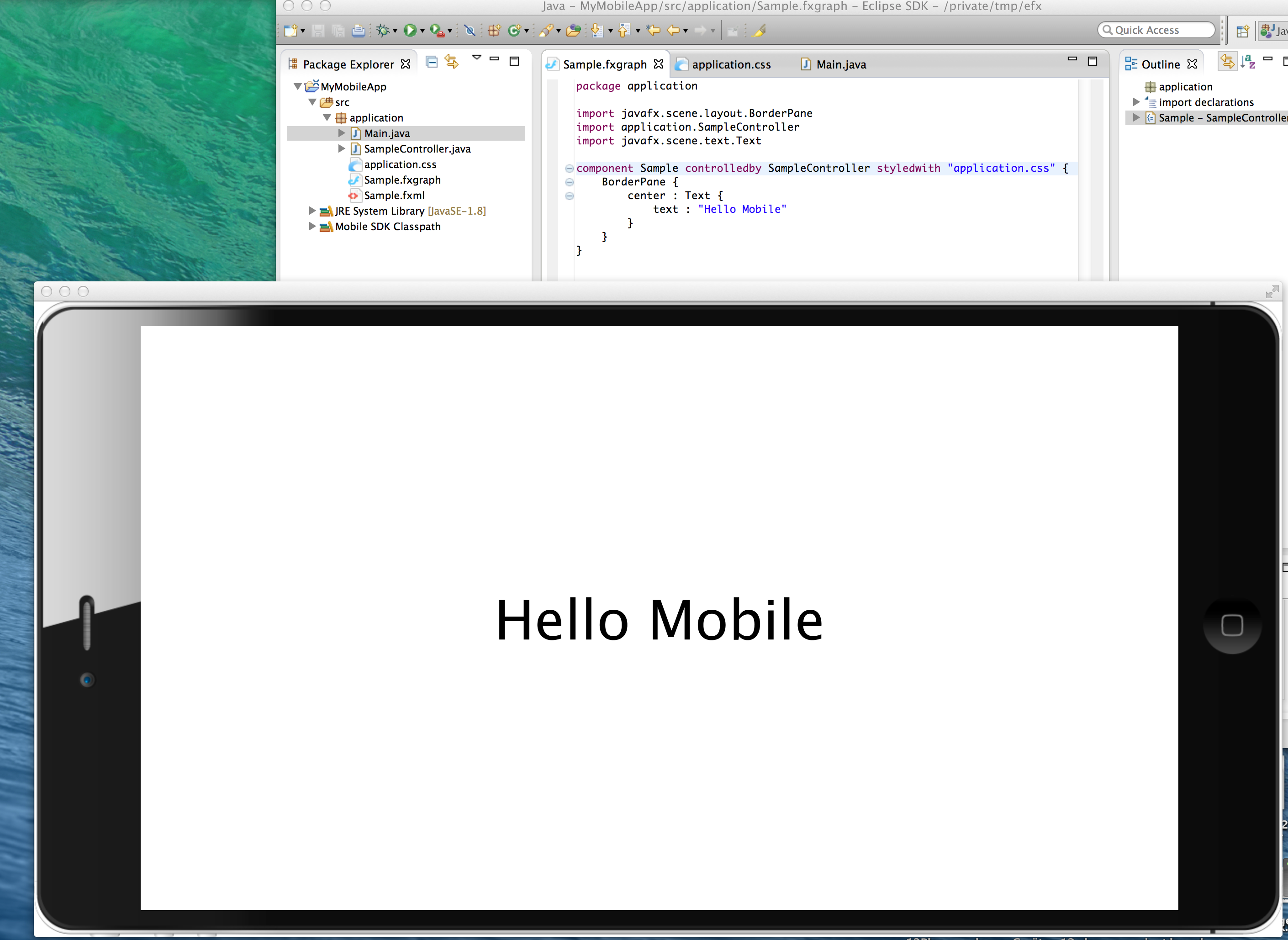
We started to add initial support to develop mobile JavaFX applications. This support is very preliminary but we’ll build on it in the next releases so that developing and deploying mobile JavaFX applications using e(fx)clipse.
mobile

FXML to Java compiler

Also experimental new feature is our FXML to Java compiler which is an important asset when developing for constrainted devices like mobile and embedded ones.

JavaFX8 support

We’ve improved our JavaFX8 support including appropriate detection of the javafx-src.zip in your JDK install so that you can now directly navigate and step through JavaFX code with the Eclipse Java Debugger.
debug

Runtime improvements

We’ve improved our runtime libraries and added new features like @ContextValue (see https://tomsondev.bestsolution.at/2013/11/21/writing-ieclipsecontext-less-code/) and adapter framework. We started collecting recipes how ti use the features at https://wiki.eclipse.org/Efxclipse/Runtime/Recipes

e4 integration

Our renderers have been improved and gaps to e4 on SWT have been closed. One of the major new features is a generic lifecyle system for your model elements allowing you to e.g veto the closing of a perspective, window, part. We also added the possibility for you to decide which panel type is injected to your MPart and MToolControl contribution.

Future

0.9.0 will be the last release in the 0.9.x stream. We’ll release 1.0.0 together (but not part) with Luna. Most of the runtime will switch to Java8 as the required platform while the tooling will still provide support for Java7 although Java8 is the main target platform.

We expect most people writing JavaFX application to use JavaFX8 because it is much more mature than JavaFX2.2 so we believe it makes sense to not spend time on Java7 compat things.

Runtime

The main target is to catch up on Eclipse 4 Luna features and close the last few gaps like Min/Max and DnD support. We’ll also integrate our SWT on JavaFX implementation providing developers a smooth migration path for the existing SWT-RCP applications.

Tooling

Nothing has been decided yet but on potential new feature is the direct integration of SceneBuilder into the Eclipse IDE so that you get a WYSIWYG tool inside Eclipse instead of running a 2nd application next to it. We’d really like to see this integration happening but first have to evaluate how much work it is and if it is too much we won’t be able to do it without getting funded.

Posted in e(fx)clipse | 17 Comments

This somehow looks familiar – Kepler SR1 on SWTonFX

I know it looks completely crashed but well this is what you get when running Kepler on BestSolution.at SWT port which delegates to JavaFX.

eclipse-ide

So there’s still a long long long way to go but to me this screenshot marks a huge break through. I could certainly need some help. So we opensourced or current port at https://bitbucket.org/tschindl/e_on_f.

Our current plan is to integrate it in the next few weeks into the e(fx)clipse project – where it originated from before we moved the code to Eclipse.org.

Posted in e(fx)clipse | 6 Comments

e(fx)clipse runtime recipes

This is just a short notice to all user of e(fx)clipse runtime bundles. e(fx)clipse runtime provides many cool features most people don’t know about yet (e.g. our DI support for FXML-Controllers, the adapter system, …). So I started collecting them in our wiki at https://wiki.eclipse.org/Efxclipse/Runtime/Recipes.

Some of them are not bound to JavaFX, like our logging support, the adapter system and the @ContextValue annotation. I’m sure there’s more. If you have a recipe how you solved a common problem with e(fx)clipse runtime feel free to contribute.

Posted in e(fx)clipse, e4 | 2 Comments

Introducing SWT on FX

In my last few presentations I’ve introduced what I named “SonF” which is short for SWT on FX.

What is it?

SWT on FX is an SWT implementation which instead of using the native widget it use JavaFX controls under the covers (similar to what SWT on Swing did some years ago).

What is the target?

The target is to get as compliant with SWT as possible, there are some parts of SWT that are hard get working right, e.g. spinning an event-loop is something you really only hack into the system, other parts like ownerdraw in tables/trees is maybe doable but is not yet explored. At the moment our target is to get on par with what RWT can do today.

What is the audience? Where is it positioned?

We think there are 3 potential users/usecases:

  • You want move away from SWT in future but have a big legacy code base which uses SWT
  • You want to publish your application through RAP
  • You don’t yet want to fully buy into JavaFX but SWT does not do the job for you anymore because of its limitations

We’d like to position it as a transformation/migration path for people who want move away slowly from SWT, it is not meant be an additional implementation so that people stick to it forever. SWT is quite done and does not introduce new concepts as it looks like.

What is the license? Is it EPL?

Sorry no it is not EPL? We have not yet defined the business model we’ll use for it. Parts of the code are under EPL because they are directly copied from upstream SWT (e.g. all the listener definitions, …) but most of the implementation have been implemented from scratch.

Where can I get it?

At the moment it is hosted in a private bitbucket-repository and we are not yet publishing binary builds. If you want to have a binary you could drop a mail to swtfx@bestsolution.at

Where do we go from here?

Like said above we don’t know where to go. In our opinion people will have to move away from SWT in future but they want to take their legacy code with them. On the other hand we also doubt that companies will pay us license fees for our SWT-FX-Port. A though problem, right! We could start a kick-starter project but would enough people support it? We highly doubt that as well. In case your company thinks this makes sense and wants to contribute substantial get in touch with us through swtfx@bestsolution.at.

Samples

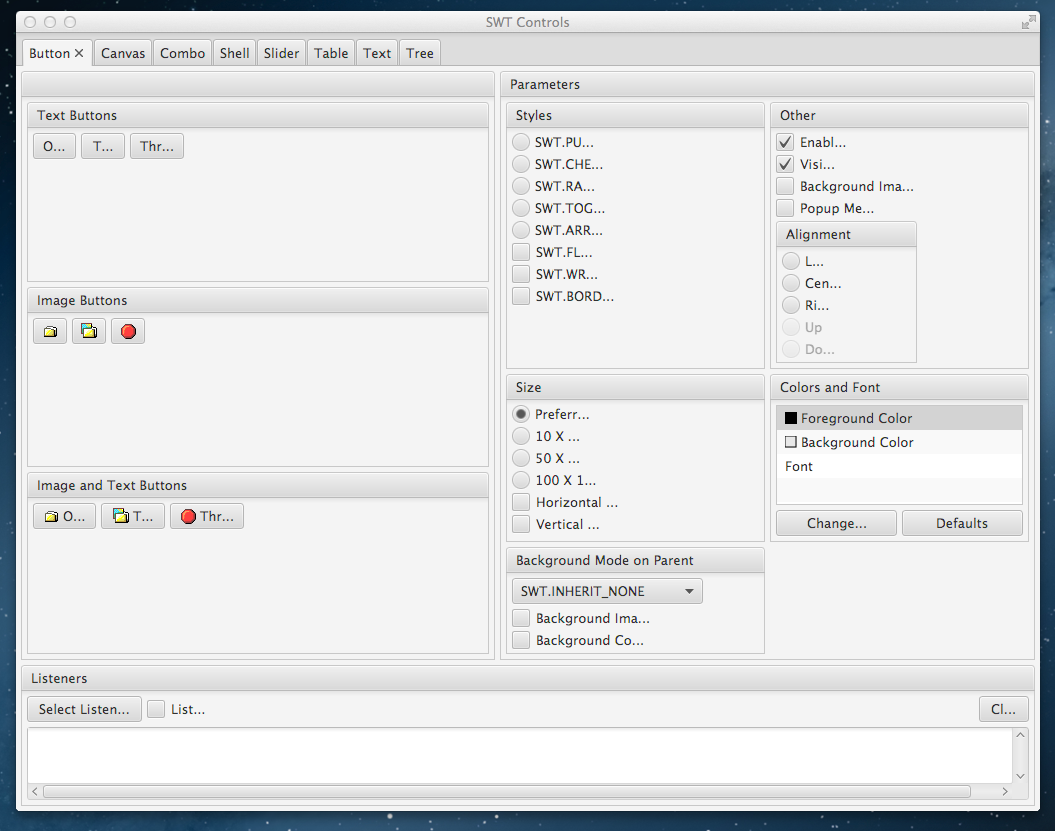
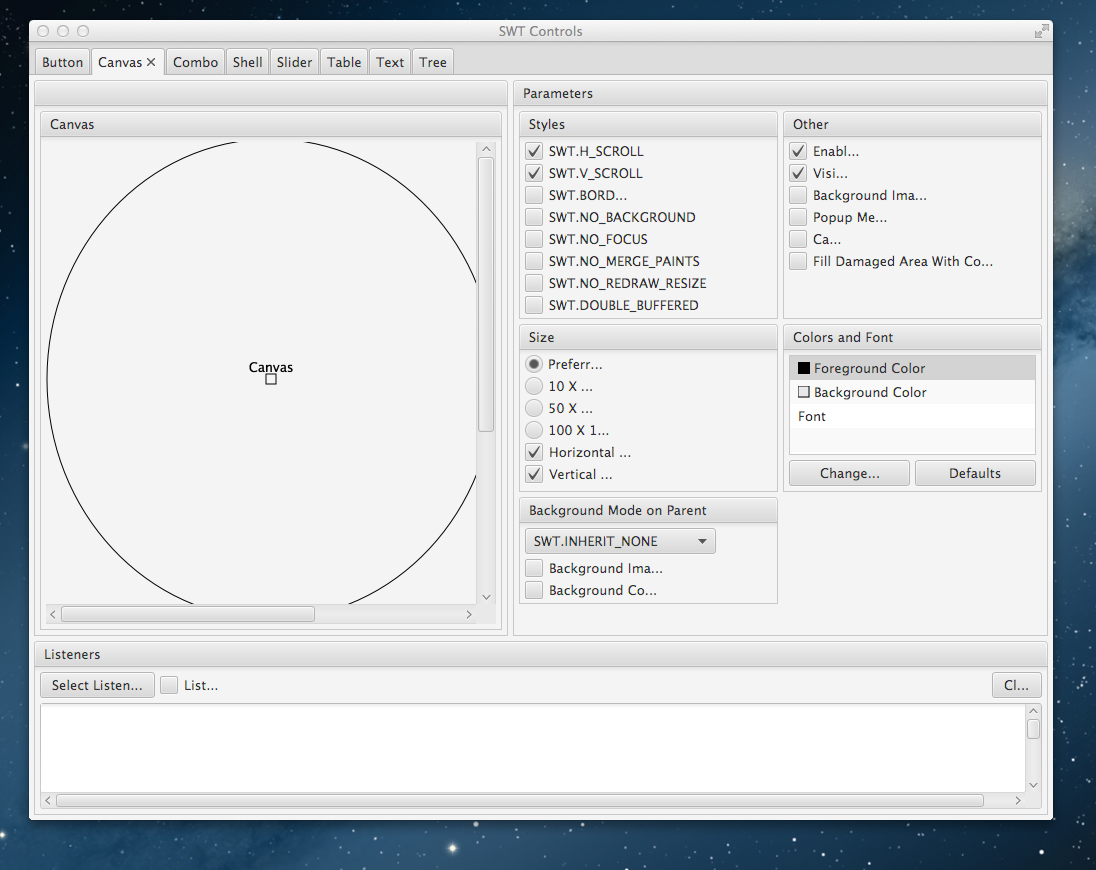
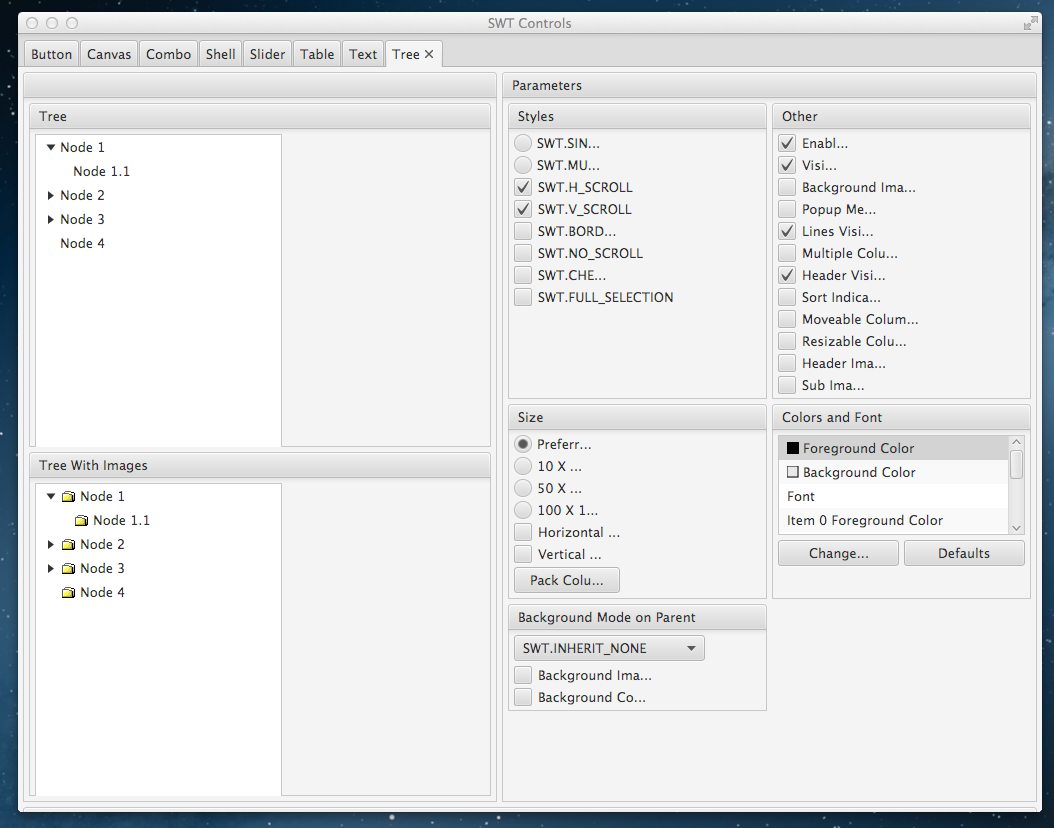
Below you see screen shots UIs defined in SWT and rendered through SonF

SWT-Button

One of the most basic controls

button

SWT-Canvas

Having access to SWT-Canvas is important for many make controls like CTabFolder work

canvas

Combo

One of the a bit more complex controls but still fairly easy. It also shows that we have e.g. support for color chooser.

combo

Table

One of the more complex controls, currently without support for owner draw

table

Tree

Another more complex one is a tree. We don’t yet support TreeColumns but this is not hard to add in the days to come

tree

e4 on FX with SWT-Content

The outerpart is rendered through e4 on JavaFX from e(fx)clipse whereas the real UI is copied 1:1 from the SWT-e4-Addressbook example.

e4-swt

Posted in e(fx)clipse, e4, Uncategorized | 10 Comments

What IEclipseContext#declareModifiable is good for

There was a comment on IEclipseContext less code Rene asked how the publishing into parent contexts is done.

IEclipseContext provides 2 ways to publish information:

  • IEclipseContext#set
  • IEclipseContext#modify

I think 99% of the people are using IEclipseContext#set because they could make up what IEclipseContext#modify is good for.

The problem with IEclipseContext#set is that pushes the value in the context you have called it on, if you want to publish a value somewhere in the parent hiearchy you have to search the IEclipseContext hierarchy yourself == you need to know exactly how the thing working and in which parent-context the original creator of the expected the value to reside.

So you often see code like this:

@Inject
IEclipseContext context;

public void publish() {
   TableViewer v = ...;
   v.addSelectionChangeListener( ... { context.getParent().set(Person.class, p) } );
}

for e4 parts the context you are publishing to is the PerspectiveContext or if there are no perspectives the WindowContext. Let’s suppose you have perspectives and now your requirements change and the value has to be published to WindowContext.

To break up this tight coupling between the publisher and publishing target you can make use of IEclipseContext#modify. Instead of publishing the value into the context instance the method is called on it search the parent hierarchy for the matching slot.

To know in which slot it publishes one has to call declare the variable on the context using IEclipseContext#declareModifiable.

If you are in a e4 application you don’t have to make this call. Haven’t you ever wondered about MContext#variables: List<String>. Congrats you’ve just learned how to define variables in contexts created by the e4 framework – no matter if you are using SWT or JavaFX as a rendering technology.

This makes the original code look like:

@Inject
IEclipseContext context;

public void publish() {
   TableViewer v = ...;
   v.addSelectionChangeListener( ... { context.modify(Person.class, p) } );
}

or if you want to remove the IEclipseContext

@Inject
@ContextValue(contextKey="my.Person")
ContextBoundValue<Person> value;

public void publish() {
   TableViewer v = ...;
   v.addSelectionChangeListener( ... { value.publish(p) } );
}
Posted in e(fx)clipse, e4 | 2 Comments

Writing IEclipseContext-less code

The problem

The IEclipseContext is the center of the the e4 DI system. One can think of it as observable hierarchical key-value map.

One of the major idea of e4 was that people should write code which does not depend on framework classes but use DI to get the values they need no matter if they need an OSGi service, an application service, a local service, a value published inside the IEclipseContext and it works out great.

@Inject
MyService service;

@Inject
public void setSelection(Person p) {
   // ....
}

The opposite does not work yet though. One is NOT able to e.g. publish the selected person from a TableViewer easily into the system but has to generate a compile time dependency on the IEclipseContext so all your nice framework agnostic code is spoiled with the IEclipseContext dependency!

The code often looks like this:

@Inject
IEclipseContext context;

private void myUI() {
   TableViewer v = ...
   v.addSelectionChangedListener(.... { ... context.set(Person.class,p) });
}

This is a reoccuring pattern I see in more and more e4 codebases who violate the programming model principles we set up.

The solution

The solution is simple. Instead of injecting IEclipseContext we inject a structure which is bound directly to a slot in the IEclipseContext:

@Inject
@ContextValue(contextKey="my.Person")
ContextBoundValue<Person> value;

private void myUI() {
   TableViewer v = ...
   v.addSelectionChangedListener(.... { ... value.publish(p); });
}

This code is slightly better because the ContextBoundValue is much smaller than the IEclipseContext and encapsulates the desired behavior. We can get even better!

You are using Eclipse-Databinding

@Inject
@ContextValue(contextKey="my.Person")
IObservableValue value;

private void myUI() {
   DatabindingContext dbc = ...;
   TableViewer v = ...
   dbc.bindValue(ViewerProperties.singleSelection().observe(v),value);
}

Or you prefer JavaFX-Properties?

@Inject
@ContextValue(contextKey="my.Person")
Property<Object> value;

Or you prefer …? The system is completely open to anything you want the injected value to be because it allows you to register adapters (through OSGi-Services) to transform the injected value to anything in the universe.

BTW this makes another reoccuring code pattern obsolete when using Eclipse Databinding in e4 apps where I have not only once written code like this:

WritableValue master = new WritableValue();

// ...
IValueProperty p = ...;
IObservableValue domainObs = p.observeDetail(master);

@Inject
public void setPerson(@Optional Person p) {
  master.set(p);
}

With the above support you can now write:

@Inject
@ContextValue(contextKey="my.Person")
IObservableValue master;

// ...
IValueProperty p = ...;
IObservableValue domainObs = p.observeDetail(master);

How does it work?

It’s a lot less sophisticated then you might think it is. The heart of it is the ExtendedObjectSupplier who deals with the @ContextValue annotation.

public class ContextBoundValueSupplier extends ExtendedObjectSupplier {
  @Inject
  AdapterService adapterService;
	
  @Override
  public Object get(IObjectDescriptor descriptor, IRequestor requestor, boolean track, boolean group) {
    ContextValue qualifier = descriptor.getQualifier(ContextValue.class);
    Requestor r = (Requestor) requestor;
    EclipseContextBoundValue<?> c = r.getInjector().make(EclipseContextBoundValue.class, r.getPrimarySupplier());
    c.setContextKey(qualifier.contextKey());
		
    Class<?> desiredClass = getDesiredClass(descriptor.getDesiredType());
		
    if( desiredClass == ContextBoundValue.class) {
      return c;
    } else {
      return c.adaptTo(desiredClass);
    }
 }

  private Class<?> getDesiredClass(Type desiredType) {
    if (desiredType instanceof Class<?>)
      return (Class<?>) desiredType;
    if (desiredType instanceof ParameterizedType) {
      Type rawType = ((ParameterizedType) desiredType).getRawType();
    if (rawType instanceof Class<?>)
      return (Class<?>) rawType;
    }
    return null;
  }
}

and the context bound value implementation:

public class EclipseContextBoundValue<T> implements ContextBoundValue<T> {
	private IEclipseContext context;
	private String contextKey;
	private List<Callback<T>> callbacks;
	private List<Callback<Void>> disposalCallbacks;
	private AdapterService adapterService;
	private T value;
	
	@Inject
	public EclipseContextBoundValue(IEclipseContext context, AdapterService adapterService) {
		this.context = context;
		this.adapterService = adapterService;
	}
	
	public void setContextKey(final String contextKey) {
		this.contextKey = contextKey;
		this.context.runAndTrack(new RunAndTrack() {
			
			@SuppressWarnings("unchecked")
			@Override
			public boolean changed(IEclipseContext context) {
				setCurrentValue((T) context.get(contextKey));
				return true;
			}
		});
	}
	
	@SuppressWarnings("unchecked")
	private void setCurrentValue(T o) {
		this.value = o;
		if( callbacks != null ) {
			for( Callback<?> c : callbacks.toArray(new Callback<?>[0]) ) {
				((Callback<T>)c).call(o);
			}
		}
	}
	
	@Override
	public T getValue() {
		return value;
	}
	
	@Override
	public void publish(T value) {
		context.modify(contextKey, value);
	}

	@Override
	public Subscription subscribeOnValueChange(final Callback<T> callback) {
		if( callbacks == null ) {
			callbacks = new ArrayList<Callback<T>>();
		}
		callbacks.add(callback);
		return new Subscription() {
			
			@Override
			public void dispose() {
				callbacks.remove(callback);
			}
		};
	}
	
	@Override
	public Subscription subscribeOnDispose(final Callback<Void> callback) {
		if( disposalCallbacks == null ) {
			disposalCallbacks = new ArrayList<Callback<Void>>();
		}
		disposalCallbacks.add(callback);
		return new Subscription() {
			
			@Override
			public void dispose() {
				disposalCallbacks.remove(callback);
			}
		};
	}

	@Override
	public <A> A adaptTo(Class<A> adapt) {
		return adapterService.adapt(this, adapt, new ValueAccessImpl(context));
	}

	@Override
	public boolean canAdaptTo(Class<?> adapt) {
		return adapterService.canAdapt(this, adapt);
	}

	@PreDestroy
	void dispose() {
		if( disposalCallbacks != null ) {
			for(Callback<?> callback : disposalCallbacks.toArray(new Callback<?>[0])) {
				callback.call(null);
			}
			disposalCallbacks.clear();
		}
		if( callbacks != null ) {
			callbacks.clear();
		}
		value = null;
	}
	
	static class ValueAccessImpl implements ValueAccess {
		private final IEclipseContext context;
		
		public ValueAccessImpl(IEclipseContext context) {
			this.context = context;
		}
		
		@SuppressWarnings("unchecked")
		@Override
		public <O> O getValue(String key) {
			return (O) context.get(key);
		}

		@Override
		public <O> O getValue(Class<O> key) {
			return context.get(key);
		}
		
	}
}

If you want to see the full source code you need to look into:

You can find samples in the JUnit-Test suite at http://git.eclipse.org/c/efxclipse/org.eclipse.efxclipse.git/tree/bundles/runtime/org.eclipse.fx.core.di.context.tests/src/org/eclipse/fx/core/di/context/tests/ContextBoundValueTestCase.java

Posted in e(fx)clipse, e4 | 7 Comments