Most people who use Eclipse DI know that they can simply use
@Inject
MyOsgiService service;
and the system will inject the service as desired but there are multiple problems with that:
What happens if the there’s a newer higher ranked service registered?
What if there are multiple services and you want all of them?
What happens if the service is created with a OSGi-ServiceFactory on demand by the OSGi-Service registry?
The answer:
Nothing will happen
You can only inject the service with the highest ranking
The service is always requested with the BundleContext of one of the framework bundles
With the next nightly build of e(fx)clipse – users of our core-bundles (you not necessarily need to write e4+JavaFX apps!) can now overcome those limitations with this:
@Inject
@Service
MyOsgiService service; // highest ranked service

@Inject
@Service
List<MyOsgiService> service; // services sorted by ranking
Eike posted lately about interesting problem when changing the return type of a method with respect to callers of the method.
In his sample he switched from a void to a String return type and suddenly old byte code was not able to call the method anymore which sounds strange to most java devs because they learned that a method is unique if it has different parameter types.
This restriction although is something of language Java (other JVM language may allow method overloading by return type) not the JVM and there are good reasons that even javac makes use of!
Think about the following simple snippet:
public class ByteCodeSample {
	public static class Base {
		public Object test() {
			return null;
		}
	}

	public static class Sub extends Base {
		@Override
		public String test() {
			return "";
		}
	}

	public static void main(String[] args) {
		Sub s = new Sub();
		s.test();
	}
}
Here the subclass Sub returns a more specific type than the base one and of you look at the byte code generated you’ll notice that there are 2 methods test() generated:
Thomass-MacBook-Pro-Retina:bin tomschindl$ javap -c ByteCodeSample\$Sub.class
Compiled from "ByteCodeSample.java"
public class ByteCodeSample$Sub extends ByteCodeSample$Base {
  public ByteCodeSample$Sub();
    Code:
       0: aload_0
       1: invokespecial #8                  // Method ByteCodeSample$Base."<init>":()V
       4: return

  public java.lang.String test();
    Code:
       0: ldc           #16                 // String
       2: areturn

  public java.lang.Object test();
    Code:
       0: aload_0
       1: invokevirtual #19                 // Method test:()Ljava/lang/String;
       4: areturn
}
Thomass-MacBook-Pro-Retina:bin tomschindl$
So when we call test() in main() we would be in trouble if the return type would not be in the call signature because we would not know which of the 2 methods we need to call hence the byte code looks like this:
Thomass-MacBook-Pro-Retina:bin tomschindl$ javap -c ByteCodeSample.class
Compiled from "ByteCodeSample.java"
public class ByteCodeSample {
  public ByteCodeSample();
    Code:
       0: aload_0
       1: invokespecial #8                  // Method java/lang/Object."<init>":()V
       4: return

  public static void main(java.lang.String[]);
    Code:
       0: new           #16                 // class ByteCodeSample$Sub
       3: dup
       4: invokespecial #18                 // Method ByteCodeSample$Sub."<init>":()V
       7: astore_1
       8: aload_1
       9: invokevirtual #19                 // Method ByteCodeSample$Sub.test:()Ljava/lang/String;
      12: pop
      13: return
}
Thomass-MacBook-Pro-Retina:bin tomschindl$
One could have also found out about this JVM thing at the java level by looking at the reflection API-JavaDoc Class.getMethod(String, Class...) which states the following:
To find a matching method in a class or interface C: If C declares exactly one public method with the specified name and exactly the same formal parameter types, that is the method reflected. If more than one such method is found in C, and one of these methods has a return type that is more specific than any of the others, that method is reflected; otherwise one of the methods is chosen arbitrarily.
Note that there may be more than one matching method in a class because while the Java language forbids a class to declare multiple methods with the same signature but different return types, the Java virtual machine does not. This increased flexibility in the virtual machine can be used to implement various language features. For example, covariant returns can be implemented with bridge methods; the bridge method and the method being overridden would have the same signature but different return types.
So remember at the JVM level a method signature is made up from:
Name
Parameter types
Return type
This means changing the return type is a binary incompatible change change which requires a major version update!
Tonight I had some time to hack on a research project which uses the StyledTextControl provided by e(fx)clipse. Syntax highlighting for the basic languages like Java, JavaScript, XML and groovy has already been implemented since a long time.
So next on my list was support for outlines which turned out to be fairly easy. Watch the video to see it in action.
If you watched the video you noticed that while a generic outline for Java makes always sense for JavaScript it does not necessarily because frameworks invented their own way to define a class. In my example I used qooxdoo – because I knew it from earlier work – but the same applies for others as well.
Java
For Java I simply added org.eclipse.jdt.core and the main logic then looks like this:
	@Override
	public Outline createOutline(Input<?> input) {
		ASTParser parser = ASTParser.newParser(AST.JLS8);
		parser.setKind(ASTParser.K_COMPILATION_UNIT);
	    parser.setSource(input.getData().toString().toCharArray());
	    parser.setResolveBindings(true);
	    ASTNode cu = parser.createAST(null);

	    Stack<OutlineItem> i = new Stack<>();
        i.push(new JavaOutlineItem("<root>",null));

	    cu.accept(new ASTVisitor() {

	    	@Override
	    	public boolean visit(TypeDeclaration node) {
	    		OutlineItem o = new JavaOutlineItem(node.getName().getFullyQualifiedName(), "java-class");
	    		i.peek().getChildren().add(o);
	    		i.push(o);

	    		return super.visit(node);
	    	}

	    	@Override
	    	public void endVisit(TypeDeclaration node) {
	    		i.pop();
	    		super.endVisit(node);
	    	}

	    	@Override
	    	public boolean visit(FieldDeclaration node) {
	    		for( Object v : node.fragments() ) {
	    			if( v instanceof VariableDeclarationFragment ) {
	    				VariableDeclarationFragment vdf = (VariableDeclarationFragment) v;
	    				i.peek().getChildren().add(new JavaOutlineItem(vdf.getName().getFullyQualifiedName(), "java-field"));
	    			}
	    		}
	    		return super.visit(node);
	    	}

	    	@Override
	    	public boolean visit(MethodDeclaration node) {
	    		i.peek().getChildren().add(new JavaOutlineItem(node.getName().getFullyQualifiedName(), "java-method"));
	    		return super.visit(node);
	    	}

		});
		return new JavaOutline(i.peek());
	}
JavaScript
We only look at the enhanced outline contributed to the framework. To understand it better here’s some simple background:
A class definition is done with qx.Class.define
Properties are defined in the properties-Attribute
Members are defined in the members-Attribute
Names with _ means protected, __ means private
So I used Nashorn to parse the JavaScript files like this:
I’ve been in need for Week-Calendar view to display appointments but could not find anyone that completely fit my needs to I implemented a custom one.
This short screen cast shows what I’ve today.
The control is backed by a replaceable service interface to retrieve and store appointments so it can be connected to fairly any kind of backend store, for my needs a plain XMI-Store was enough but one might want something more fancy can connect it most likely any calendar-service e.g. by using REST, … .
This blog post is more of a question to others (probably much more knowledgeable people than me) who have already wrapped C++ libraries in Java. So if you have and the strategy I document as part of this blog post is completely wrong please comment and point me towards a better one!
Anyways let’s get started!
We take a very simply case where we have a C++-Class like this:
#ifndef CTESTSIMPLE_H
#define CTESTSIMPLE_H

class CTestSimple
{
public:
    CTestSimple();
    virtual int test();
    int test_delegate();
};

#endif // CTESTSIMPLE_H
#include "ctestsimple.h"

CTestSimple::CTestSimple()
{
}

int CTestSimple::test() {
    return 100;
}

int CTestSimple::test_delegate() {
    return test();
}
and in java we want to do the following things:
import testjni.TestSimple;


public class TestApp {
	public static void main(String[] args) {
		System.load("/Users/tomschindl/build-JTestJNI/libJTestJNI.dylib");

		System.out.println("===== Simple");
		TestSimple t = new TestSimple();
		System.out.println("Direct: " + t.test());
		System.out.println("Delegate:" + t.test_delegate());

		System.out.println("===== No Override");
		NoOverride tn = new NoOverride();
		System.out.println("Direct: " + tn.test());
		System.out.println("Delegate: " + tn.test_delegate());

		System.out.println("===== With Override");
		SubTestSimple ts = new SubTestSimple();
		System.out.println("Direct: " + ts.test());
		System.out.println("Delegate: " + ts.test_delegate());

		System.out.println("===== With Override");
		SubSuperTestSimple tss = new SubSuperTestSimple();
		System.out.println("Direct: " + tss.test());
		System.out.println("Delegate: " + ts.test_delegate());
	}

	static class SubTestSimple extends TestSimple {
		@Override
		public int test() {
			return 0;
		}
	}

	static class SubSuperTestSimple extends TestSimple {
		@Override
		public int test() {
			return super.test() + 10;
		}
	}

	static class NoOverride extends TestSimple {

	}
}
We expect the application to print:
===== Simple
Direct: 100
Delegate:100
===== No Override
Direct: 100
Delegate: 100
===== With Override
Direct: 0
Delegate: 0
===== With Override & super
Direct: 110
Delegate: 110
The strategy I found to make this work looks like this:
On the C++ side one needs to define a subclass of CTestSimple I named JTestSimple
The important step is to check in if the java-object we got passed in has overwritten the test()-method because in
that case we need to call from C++ to java for the correct result.
On the Java side we define our object like this
package testjni;

public class TestSimple {
	private long NativeObject;

	public TestSimple() {
		NativeObject = createNativeInstance();
	}

	protected long createNativeInstance() {
		return Native_new(getClass() != TestSimple.class);
	}

	public int test() {
		if( getClass() == TestSimple.class ) {
			return Native_test();
		} else {
			return Native_test_explicit();
		}
	}

	public final int test_delegate() {
		return Native_test_delegate();
	}

	private native long Native_new(boolean subclassed);

	private native int Native_test();
	private native int Native_test_explicit();

	private native int Native_test_delegate();
}
Some remarks are probably needed:
Notice that the there are 2 native delegates for test() depending on fact whether the method is invoked in subclass or not
test_delegate() is final because it is none-virtual on the C++ side and hence is not subject to overloading in subclasses
The only interesting thing is the Java_testjni_TestSimple_Native_1test_1explicit who does not invoke the test-method on JTestSimple but on its super class CTestSimple.
So my dear C++/Java gurus how bad / dump / … is this strategy?
Inspired by a new feature available on Android Lollipop named AnimatedVectorDrawable I found in this blog post and the availability of the Twitter Emoji I tried to recreate the same using JavaFX.
The result can be seen in this short video.
The process is fairly simple:
I used the SVG to FXML converter who is part of e(fx)clipse to get JavaFX representation of the Emoji
Replace the SVGPath-Shape making up the mouth from the FXML with a Group
Replaced it with an Path-Shape in Java code like this
Naturally we have also updated the prebuilt distro so that you don’t need to find out the pre-requisits yourself and start developing javafx applications immediately! Distros for all 3 major platforms (Windows, Linux and OS-X) are available from http://efxclipse.bestsolution.at/install.html
The community
I’m amazed about the developer community we managed to shape around e(fx)clipse which already starts to contribute patches and ideas for improvement. We try to follow the example of the EMF people and leave no question unanswered on our forum or leave gerrit-patches unmerged or uncommented with in 1-2 work days.
What I’m not so amazed about is the support with get from people who are using our components in their application. We totally understand and are committed to the ideas of OpenSource software but without starting to generate revenue the first class support we provide through our forum and other services we provide for free at the moment (e.g. prepackaged distros) will be reduced.
If you are using e(fx)clipse in a commercial application it should be in your own interest to keep us working full force on bugfixes and features you require in your applications.
We are not asking for charity donation but e.g. about hireing our experts to setup and structure your e4+JavaFX application, implement special features, make use of all features e4+JavaFX provide (I guarantee – you don’t know all features e4 and e4+JavaFX provide) and apply them in creative ways to solve your problems in a much more elegant fashion.
In any case – if you have an application who makes use of e(fx)clipse tooling and/or runtime components we’d be interested to learn about and add you to our reference page.
What’s up for the future
We have not yet made the plan on what we’ll put the focus on for the 1.2 release.
The runtime platform is stable and provides more features than the one you are used to from e4 + SWT (I’d argue that it does things in the more correct and better way than its “older” brother). I know it misses the minimize/maximize feature of e4+SWT but I’ve never seen the real need for this in RCP-Applications. So to me not providing this feature is of no big deal, in case it is for you contribute the implementation or think about sponsored development.
The tooling needs some polishing and we want to improve the CSS-Editor even more.
SWTonJavaFX is onhold until someone steps up and makes the investment to improve it – for our applications it is good enough.
An area you’ll most likely see progress is in our research projects
to implement a CodeEditor-Framework on top of JavaFX/e4/JDT/Nashorn & Flux which helps us to find missing features
to implement jface-viewer 2.0
to develop an SWT-Extension-API which allows RWT and SWTonJavaFX to break out of the trap and use advanced features like animations, ARGB-Colors, Async-APIs, …
but they are research projects – their code is in the repo but they are not part of any release.
Enjoy e(fx)clipse 1.1.0 and help us improve the tooling and runtime platform
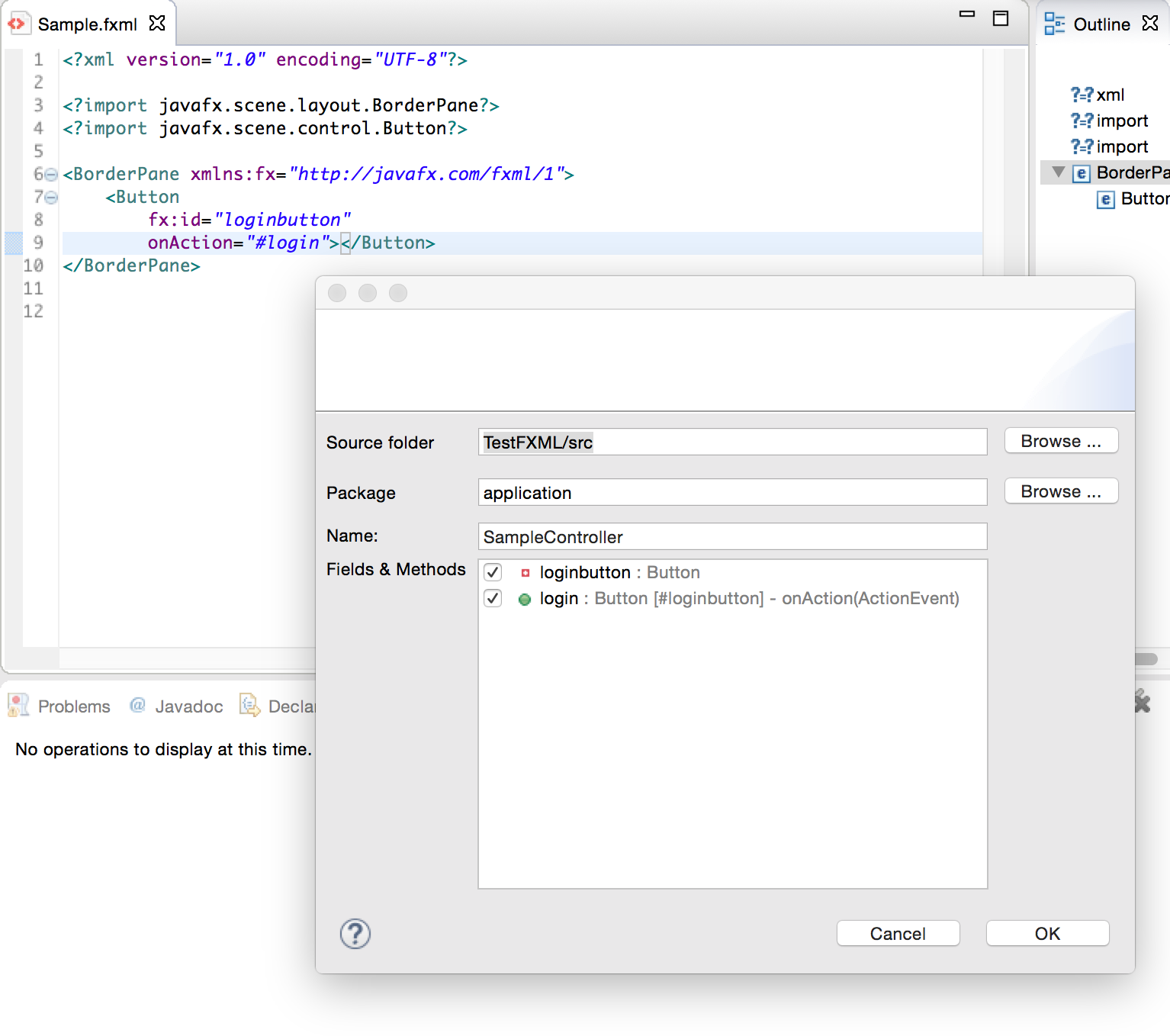
Although we have a very feature rich FXML-Editor with a live preview many users are using SceneBuilder to define their UIs. In case you have an FXML you want the possibility to generate a controller who references:
elements marked with fx:id as fields
event handler properties like onAction="#login" as methods
e(fx)clipse 1.1.0 added a first version of a wizard who allows you to generate the controller from it (no merging yet!)
The more people are adopting our core OSGi-Support inside the IDE (e.g. STS, GEF4, …) the more important it is that they depend on the same basic feature so that you can install and update them side by side.
Easier runtime consumption through special features
org.eclipse.fx.runtime.min.feature
e(fx)clipse will join the Mars release train and other Mars participants like GEF4 make use of our core OSGi-Integration so for all those who really only needed our OSGi integration layer we created an extra feature they can depend on named “org.eclipse.fx.runtime.min.feature” which only holds:
org.eclipse.fx.osgi
org.eclipse.fx.javafx
org.eclipse.fx.runtime.e4fx.feature
Upon request from our community we added a new feature which holds all required Eclipse 4 Application Platform and e4 JavaFX bundles required to write e4 JavaFX applications.
Our application wizard is not yet using the new feature because didn’t want to break anything late in the release cycle but we’ll update the wizard in 1.2.0. Anyways: If you are setting stuff up by hand “org.eclipse.fx.runtime.e4fx.feature” will make your job a lot easier!
Having a clever CSS-Editor at hand is crucial when developing JavaFX applications so we once more worked a bit in this central utility for e(fx)clipse 1.1
CSS-Editor improvements
Support for @font-face
The 1.0 CSS-Editor completely freaked out if you tried to add an @font-face definition to load external fonts with the help of your stylesheet. We have not only fixed the problem but also added
autocomplete
simply validation rules
Support for predefined color properties
JavaFX CSS has a very special feature allowing you to define color property-variables which you can reference in an other property’s value so you frequently see something like this:
The CSS-Editor in 1.0 croaked on the -fx-base definition because -fx-base is not a property on any node. In 1.1 the editor is smart enough to understand that -fx-base, -fx-control-inner-background, … and many more a color-property-variables and will not mark them as invalid.
Selectively suppress warnings
The CSS-Editor is smart and if it detects that a scenegraph element hasn’t got the property you are using it issues a warning which generally is good because e.g. you might have a spelling error e.g. you wrote -fx-background-colour (british english) instead of -fx-background-color (american english). Yet there are situations where you want to suppress a warning because you know better than the CSS-Editor.
The most important ones are:
You define custom color property variables
You use an external library who defines custom css properties but does not provide a cssext-File to help the e(fx)clipse CSS editor
In 1.1 we allow you to suppress those warnings selectively by simply adding @SuppressWarning in a comment above the property like this:
In 1.0 the CSS-Editor has been too greedy validating all CSS-Files in your project e.g. if you had a CSS-File in your project to style a HTML-page it got validated and naturally showed a vast number of problems. In 1.1 we only validate files part of the build path of your project and leave out all others.
Co-Existence with WST-CSS-Editor
We improved the co-existence in cases when the WST-CSS-Editor has been installed as well. In 1.0 if both had been installed CSS-Files have been opened by default ALWAYS with the WST-Editor. In 1.1 we added a ITextContentDescriber which detects if the CSS-File:
Holds a header which holds the term JavaFX CSS
Any of the properties in the first 20 lines starts with -fx




 Tomsondev Blog