Release QxWT-0.8.2-RC2

One week after release of RC1. We’ve just published RC2 of the Qooxdoo-GWT-Wrapper QxWT. You can fetch the release from our project site.

RC2 holds the following changes:

  • Completed Qooxdoo-FX-Support
  • 100% of the framework JavaDoc’ed (online)
  • Removal of unneeded images to optimize jar-sizes
  • Themes extracted into extra-jars to optimize jar-sizes

Because of the modified packaging to make the example from here run on RC2 you need to make the following adjustments:

  • Drop the following jars into your lib-directory:
    • org.ufacekit.qx.script.minjs-0.8.2-rc2.jar
    • org.ufacekit.qx.theme.modern-0.8.2-rc2.jar
    • org.ufacekit.qx.wrapper-0.8.2-rc2.jar

    and the remove all *-rc1.jars

  • Adjust the GWT-Module-XML
    <?xml version="1.0" encoding="UTF-8"?>
    <!DOCTYPE module PUBLIC "-//Google Inc.//DTD Google Web Toolkit 1.6.4//EN" "http://google-web-toolkit.googlecode.com/svn/tags/1.6.4/distro-source/core/src/gwt-module.dtd">
    <module rename-to='myfirstqxapp'>
      <!-- Inherit the core Web Toolkit stuff.                        -->
      <inherits name='com.google.gwt.user.User'/>
      <inherits name="org.ufacekit.qx.wrapper.QxScript" />
      <inherits name="org.ufacekit.qx.QxEngine" />
      <inherits name="org.ufacekit.qx.theme.modern.QxTheme" />
    

    to include org.ufacekit.qx.theme.modern.QxTheme

The source code of the example is now also available from our SVN-Repository. So you only have the check it out and give it a spin. There’s currently a know problem on Linux which I’ve tracked down to a JS-Error in the Qooxdoo-Sources which will be fixed until the final release.

Posted in Announcements, QxWT | Leave a comment

Release QxWT-0.8.2-RC1

QxWT-0.8.2-rc1

I happy to announce that a first release candidate of the GWT-Wrapper for the Qooxdoo-Widget-Library can be downloaded from our project homepage.

I started working on QxWT because I needed a GWT-Widget library providing me access to advanced controls like tables and trees and is released under a license which makes it possible to get integrated in commercial applications without paying license fees. I know there are other libraries out who already provide such a features but none of them provided me all features I wanted to have – for the record I don’t want to mess around with stores, buy in to a special domain model technology, … ).

What is QxWT

QxWT is a GWT wrapper for the qooxdoo-JS-Library. The qooxdoo-library is used for example by the RAP team as the client-side widget library. QxWT follows the qooxdoo-API as much as possible but naturally some constructs available in JavaScript can not get translated the Java 1:1 so some API methods have been adjusted. The biggest difference is that QxWT adopts the GWT-Event-Handler-System instead of wrapping the one of Qooxdoo but then once more provides 99% the same API.

One of the most important things is that Java-Developers expect to have the API documentation available in their IDE and I’ve worked with many GWT-Libraries who are not providing a good documentation. QxWT will provide full JavaDoc of all API methods when we release the final version of QxWT-0.8.2. In the RC we have documented already 99% of the widget-API but e.g. the Event-API completely lacks JavaDoc.

The second important thing is that the qooxdoo-JS-Library as well as QxWT are released under EPL which should allow you to easily use in corporate environments as well as in opensource projects.

Future plans

QxWT

  • Release 0.8.2 with the following features:
    • Based upon 0.8.2 release of Qooxdoo
    • 95% of the Widget-API of qooxdoo
    • 100% JavaDoced API
  • Release 0.8.3 with the following features:
    • Based upon 0.8.3 release of Qooxdoo
    • Eclipse-Wizard for setting up a QxWT-Project
    • Postprocess step to optimize deployment size of Qooxdoo-JS

UFaceKit for QxWT
After the release of QxWT 0.8.3 we are going to provide the following UFaceKit-Implementations

  • Qx-Databinding
  • Qx-Viewers
  • Qx-UFaceKit-Implementation
  • GWT-Integration for e4 so that you can access workbench-services from GWT-Applications (See the wonderful PDE-Editor written by Boris Bokowski for e4-0.9)

Getting started with QxWT

The following should give you a jump start on how to create a QxWT-Application from scratch (I assume you have the Google-Eclipse-Tools installed).
Setup of a new project

  1. Download the latest QxWT release form UFaceKit.org and unzip it somewhere on your hard drive
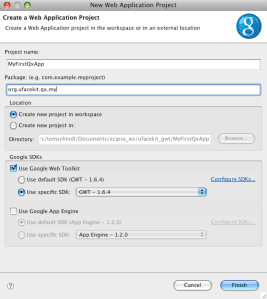
  2. Create a new GWT-Application named “MyFirstQxApp”
    screen1
  3. Create a directory named “lib” in the “MyFirstQxApp”-Project and copy the qx-jars from the download into it
    screen1_5
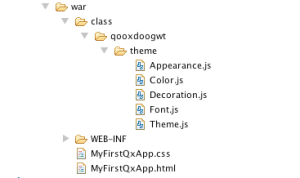
  4. Copy the “class”-Folder from the download into the war-Folder of your project
    screen1_6
  5. Open the MyFirstQxApp.html and add the following lines directly below the title
    <!--                                           -->
    <!-- Any title is fine                         -->
    <!--                                           -->
    <title>Web Application Starter Project</title>
    <script type="text/javascript">
      window.qxgwtmodule = "myfirstqxapp";
    </script>
    

    Please note that the “myfirstqxapp” must match the value you have as a “rename-to” in your “$MODULE.gwt.xml”

    Beside that you can delete the HTML-Code in the body-Tag so that it looks like this:

    <body>
    <!-- OPTIONAL: include this if you want history support -->
     <iframe src="javascript:''" id="__gwt_historyFrame" tabIndex='-1' style="position:absolute;width:0;height:0;border:0"></iframe>
    </body>
    
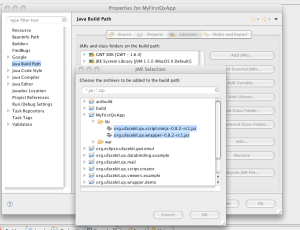
  6. Add the Qx-jars to your build pathscreen2
  7. Make your GWT-Module inherit from Qx-Libraries like this:
    <?xml version="1.0" encoding="UTF-8"?>
    <!DOCTYPE module PUBLIC "-//Google Inc.//DTD Google Web Toolkit 1.6.4//EN" "http://google-web-toolkit.googlecode.com/svn/tags/1.6.4/distro-source/core/src/gwt-module.dtd">
    <module rename-to='myfirstqxapp'>
      <!-- Inherit the core Web Toolkit stuff.                        -->
      <inherits name='com.google.gwt.user.User'/>
      <inherits name="org.ufacekit.qx.wrapper.QxScript" />
      <inherits name="org.ufacekit.qx.QxEngine" />
    </module>
    
  8. Open MyFirstQxApp.java remove everything beside the class definition
    package org.ufacekit.qx.my.client;
    
    /**
     * Entry point classes define <code>onModuleLoad()</code>.
     */
    public class MyFirstQxApp {
    }
    

Your first cup of QxWT

  1. In GWT every application starts with an entry point and so does a plain Qooxdoo-JS-Application. That’s why QxWT provides you a specialized class which bridges both systems. So the first thing you need to do is to make your GWT-EntryPoint class inherit from org.ufacekit.qx.wrapper.application.QooxdooApp
    public class MyFirstQxApp extends QooxdooApp {
    	@Override
    	protected void run(QxAbstractGui application) {
    		// TODO Auto-generated method stub
    	}
    }
    
  2. The run method will by called once both framework start ups are finished and you are ready to create the application.

  3. The QxAbstractGui is the application scope into which your QxWT-Application is running in currently the only thing it provides you access to is the viewport you can add your UI-Widgets (QxComposite) to. Let’s as a first exercise create a GroupBox somewhere on the screen
    protected void run(QxAbstractGui application) {
      QxGroupBox container = new QxGroupBox();
      container.setContentPadding(16, 16, 16, 16);
      
      application.getRoot().add(container, QxOption.leftTop(50, 30, "%"));
    }
    

    This code creates a groupbox and positions it 50% to the left and 30% to the top of the browser window. As you’ll notice QxWT works different to SWT because you don’t pass the parent of a widget to the constructor but you add the widget later on to the parent together with some layout informations, for swing developers this should be quite familiar.
    Your ui looks like this now:
    screen3

  4. QxWT like every other widget library provides the possibility to layout child-controls using layout managers so the next thing we do is to set a layout manager on the groupbox widget like this:
    QxGridLayout layout = new QxGridLayout(9, 5);
    layout.setColumnAlign(0, HAlign.LEFT, VAlign.MIDDLE);
    layout.setColumnAlign(1, HAlign.RIGHT, VAlign.MIDDLE);
    
    container.setLayout(layout);
    

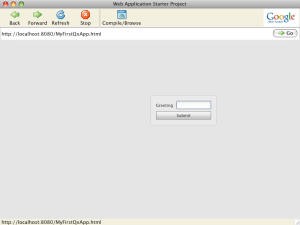
    and add 2 children (a label and a text field) like this:

    QxLabel label = new QxLabel("Greeting");
    container.add(label, QxOption.rowColumn(0, 0));
    		
    QxTextField field = new QxTextField();
    container.add(field, QxOption.rowColumn(0, 1));
    

    The code should be quite self-explanatory and result in this UI.screen4

  5. As a final step let’s add a button which invokes a remote services. So the first step is to add a button like this:
    QxButton button = new QxButton("Submit");
    container.add(button, QxOption.row(1), QxOption.column(0), QxOption.colSpan(2));
    

    Once more quite self-explanatory beside the fact that the button is spaning 2 columns. The next thing to do is to react on button clicks which could be done in different ways but using a command which is attached to the control is the better one. So the first thing we do is to define a command and connect the button to it

    QxCommand cmd = new QxCommand("CTRL+S");
    button.setCommand(cmd);
    

    As you might guess the advantage of a command is that you can attach a keyboard sequence so the command not only gets executed when the user presses the button but also when entering a the keyboard sequence CTRL+S. The last thing we need to do is to attach a listener to the command which gets informed when the command is called. So we are adding an inner-class which looks like this:

    class QxExecuteHandlerImpl implements QxExecuteHandler {
      private QxTextField field;
    
      public QxExecuteHandlerImpl(QxTextField field) {
        this.field = field;
      }
    
      public void execute(QxExecuteEvent executeEvent) {
      }
    }
    

    and attach it to the command like this:

    cmd.addExecuteHandler(new QxExecuteHandlerImpl(field));
    

    The application should look like this now:
    screen5

  6. Next step is to call the remote service which should be quite familiar to people who know GWT already.
    public void execute(QxExecuteEvent executeEvent) {
      GreetingServiceAsync service = GWT.create(GreetingService.class);
      service.greetServer(field.getValue(), new AsyncCallback<String>() {
        public void onFailure(Throwable caught) {}
    
        public void onSuccess(String result) {}
      });
    }
    

    and display the result for example using a QxWindow like this:

    public void onFailure(Throwable caught) {
      QxWindow window = new QxWindow("Error");
      window.setLayout(new QxVBoxLayout(10));
      QxAtom atom = new QxAtom(caught.toString(),"/myfirstqxapp/qooxdoo-0.8.2-sdk/framework/source/resource/qx/icon/Oxygen/48/status/dialog-error.png");
      atom.setRich(true);
      window.add(atom);
      window.center();
      window.open(); 
    }
    
    public void onSuccess(String result) {
      QxWindow window = new QxWindow("Remote Answer");
      window.setLayout(new QxVBoxLayout(10));
      QxAtom atom = new QxAtom(result,"/myfirstqxapp/qooxdoo-0.8.2-sdk/framework/source/resource/qx/icon/Oxygen/48/status/dialog-information.png");
      atom.setRich(true);
      window.add(atom);
      window.center();
      window.open();
    }
    

    If you now run your application, enter a text and hit the submit button or as alternative press CTRL+S your application should react like this:
    screen6

Here’s the complete application class once more for reference:

package org.ufacekit.qx.my.client;

import org.ufacekit.qx.wrapper.application.QooxdooApp;
import org.ufacekit.qx.wrapper.application.QxAbstractGui;
import org.ufacekit.qx.wrapper.event.QxCommand;
import org.ufacekit.qx.wrapper.event.type.gwt.QxExecuteEvent;
import org.ufacekit.qx.wrapper.event.type.gwt.QxExecuteHandler;
import org.ufacekit.qx.wrapper.ui.basic.QxAtom;
import org.ufacekit.qx.wrapper.ui.basic.QxLabel;
import org.ufacekit.qx.wrapper.ui.form.QxButton;
import org.ufacekit.qx.wrapper.ui.form.QxTextField;
import org.ufacekit.qx.wrapper.ui.groupbox.QxGroupBox;
import org.ufacekit.qx.wrapper.ui.layout.QxGridLayout;
import org.ufacekit.qx.wrapper.ui.layout.QxVBoxLayout;
import org.ufacekit.qx.wrapper.ui.layout.QxGridLayout.HAlign;
import org.ufacekit.qx.wrapper.ui.layout.QxGridLayout.VAlign;
import org.ufacekit.qx.wrapper.ui.window.QxWindow;
import org.ufacekit.qx.wrapper.util.gwt.QxOption;

import com.google.gwt.core.client.GWT;
import com.google.gwt.user.client.rpc.AsyncCallback;

/**
 * Entry point classes define <code>onModuleLoad()</code>.
 */
public class MyFirstQxApp extends QooxdooApp {
	
	class QxExecuteHandlerImpl implements QxExecuteHandler {
		private QxTextField field;
		
		public QxExecuteHandlerImpl(QxTextField field) {
			this.field = field;
		}
		
		public void execute(QxExecuteEvent executeEvent) {
			GreetingServiceAsync service = GWT.create(GreetingService.class);
			service.greetServer(field.getValue(), new AsyncCallback<String>() {

				public void onFailure(Throwable caught) {
					QxWindow window = new QxWindow("Error");
					window.setLayout(new QxVBoxLayout(10));
					QxAtom atom = new QxAtom(caught.toString(),"/myfirstqxapp/qooxdoo-0.8.2-sdk/framework/source/resource/qx/icon/Oxygen/48/status/dialog-error.png");
					atom.setRich(true);
					window.add(atom);
					window.center();
					window.open(); 
				}

				public void onSuccess(String result) {
					QxWindow window = new QxWindow("Remote Answer");
					window.setLayout(new QxVBoxLayout(10));
					QxAtom atom = new QxAtom(result,"/myfirstqxapp/qooxdoo-0.8.2-sdk/framework/source/resource/qx/icon/Oxygen/48/status/dialog-information.png");
					atom.setRich(true);
					window.add(atom);
					window.center();
					window.open();
				}
				
			});
		}
	}

	@Override
	protected void run(QxAbstractGui application) {
		QxGroupBox container = new QxGroupBox();
		container.setContentPadding(16, 16, 16, 16);

		QxGridLayout layout = new QxGridLayout(9, 5);
		layout.setColumnAlign(0, HAlign.LEFT, VAlign.MIDDLE);
		layout.setColumnAlign(1, HAlign.RIGHT, VAlign.MIDDLE);
		
		container.setLayout(layout);
		
		QxLabel label = new QxLabel("Greeting");
		container.add(label, QxOption.rowColumn(0, 0));
		
		QxTextField field = new QxTextField();
		container.add(field, QxOption.rowColumn(0, 1));
		
		QxButton button = new QxButton("Submit");
		container.add(button, QxOption.row(1), QxOption.column(0), QxOption.colSpan(2));

		QxCommand cmd = new QxCommand("CTRL+S");
		button.setCommand(cmd);
		
		cmd.addExecuteHandler(new QxExecuteHandlerImpl(field));
		
		application.getRoot().add(container, QxOption.leftTop(50, 30, "%"));
		
	}	
}

If you want to learn more of the APIs you can take a look at the demo-Project in our subversion repository and naturally you can support my work on this by making a donation (See paypal button at the left of the page).

Stay tuned for more news on this and other cool stuff – there are a lot of ideas floating around in my head (some of them even translated into source-code)

Posted in Announcements, QxWT | 8 Comments

e4 on the road

If you are curious on what e4 is all about and get a first impression you’ll probably want to attend one of the following events where I’m going to talk about e4:

If you haven’t done yet it’s still time to register for free to those events.

Because I’m doing this in my spare time (well I’ll take one or two days off) I even had to reject requests for talks which is a bitty. Still there are more e4 presentations in the queue but their dates are not fixed yet (I’ll be very likely in Zürich at the Java User Group Switzerland and maybe going to Lille). I’ll post details about those events once the dates are fixed.

A big thank you to the people and companies who make/made the travels to Hamburg or e.g. to EADD possible by paying my travel expenses.

Posted in e4, Talks & Conferences | 2 Comments

The core-platform, e4 – some random thoughts

At the Eclipse Summit there’s was a special symposia where discussion about Eclipse Foundation 2.0 happened. I’m not going into detail but as others already also found out (e.g. Bjorn) the investment into core platform is decreasing and too few people understand that without a properly maintained platform-core their business will be broken sooner than they imagine.

One of the problems I see from the point of an indivual committer (I own my company so individual might not be the right term here) is: Making money from working on those low levels of the Eclipse Ecosystem stack is nearly impossible whereas gaining revenue from things up in the stack e.g. getting payed for adding features to Nebula for example is easier. This is the reason I had to reduce (=stop) my work investment in the 3.x (though I’m still fixing severe bugs when found it code I introduced into the repository).

Looking at e4 the situation is similar because we are here also developing something which is at the bottom of the whole stack – well e4 is a new application runtime platform.
The difference to 3.x is that:

  • I can at least justify my investment with an academic interest
  • I believe with e4, eclipse is prepared for the future and without it other platforms will outpace it in the short-term and make it obsolete in the long-term when we talk about RCP/RIA-Applications (for IDEs it might be a bit different) which will make my Java, SWT, Eclipse, … know-how obsolete as well

but without an immediate use case or customer who needs certain features in e4 I can only spend my spare time into this.

I still hope that I can find a customer or a business use case which makes it possible to also invest work time (1-2 days a week) into it (I think my in depth knowledge about the core design is something others might cause some trouble to get started) but at the moment it’s not looking very promising because like it is with 3.x people take the core for granted.

Anyways Eclipse is with e4 getting once more an innovative core-platform and I’m proud to be and stay part of it – especially e4.

Posted in e4, Eclipse | 4 Comments

ESE 09 – My Slides

Back from ESE 09 – once more a nice event and got to know even more people. I was quite busy this year taking part in 5 Sessions so a short review from my side:

EMF Tutorial

I think Ed, Eike and me did a good job though there’ve been too many people so working through examples was not possible. The next time (EclipseCon 09) we need probably skip some parts. Beside that I think I could demostrate fairly good how flexible Eclipse-Databinding can be used in RCP-Applications.

E4 Symposia

Boris and me had many people in our symposia and I think we could explain those people our vision of e4 and how the internals are structured. Boris gave a short overview about the 20 things, how DI is working using the IEclipseContext and WebUI and I talked about our EMF-driven Application model and our flexible rendering story.
I think people start to get our point that E4 is a flexible Application Framework they can build any UI-Application (the UI technology doesn’t really matter) if you start accepting that rendering is just another service like it is the selection, logging, … service.

What’s in E4

This was an overview talk given by Boris, Kai, Hallvard, Yves and me on e4. I gave a short overview about the reasoning and how the application platform is designed around our EMF-Model. I think we could at least reduce the confusion in the community.

e4 in Detail – The model workbench and it’s possibilities

In this talk I tried to explain in more detail how the e4-application platform uses EMF, DI and the rendering services to create a flexible UI-Application. The slides are available here.

UFaceKit – A uniform UI development model for different UI and Runtime platforms

This was my last talk where I explain the reasons and various cool things you can with UFaceKit which since a week before can be optionally backed up by an Ecore-Model so that Application can developed (and of needed deployed) using EMF-Technologies. The slides are here.

Posted in e4, EMF, Talks & Conferences, UFaceKit | Leave a comment

Build for Databinding4GWT available

Following an discussion on stackoverflow.com where people stated that we don’t offer binary builds I sat down yesterday and wrote a short ant script to create binary builds people can consume out of the box easily.

I didn’t use the Eclipse build system but a simple ant script which fetches the sources from SVN and builds them. I also could figure out how to promote this stuff to the eclipse-download servers so I released them to our official page.

You can fetch the latest binary gwt builds from here or find a link to them on our release page. I’m going to add binary builds for other UFaceKit stuff hopefully soon though I’d prefer to put them on Eclipse.org Servers if I can figure out how to do it.

Please don’t forget to give us feedback on problems you encounter. We can’t fix problems you are not reporting to us.

Posted in Announcements, Databinding, GWT, UFaceKit | Leave a comment

Eclipse Databinding and QxWT

If you followed my blog closely you already know that I invested some time into makeing Eclipse Databinding available for GWT (as part of the Eclipse UFaceKit project) and because I couldn’t find a GWT-UI-Library who suited my needs I started on writing a GWT wrapper for Qooxdoo.

In my last blog entry I show a very minimal example of a UFaceKit-TableViewer. One of the major problem of the code base by then was that I had to load myriads of small tiny JavaScript files which made the start up extremely slow and unusable in a none local environment.

Though I haven’t solved the problem completely I improved the situation by using the YUI-Compressor and merging the all necessary files into as few as possible (I ended up with 6 yet). This still makes the download around 1MB (which is cached by the browser once loaded) so still a “bit” too high but for Intranet Applications acceptable.

Besiding doing this necessary downsizing of the download size I also improved the UFaceKit-Viewer support and implemented some databinding properties to observe some standard widget attributes (currently only text attributes of various widgets).

Example code

So time to show of some demo and the accompanying code. Let’s at first take a look on the following screencast I created:

It’s a simply application but it the important thing is to see how it is created.

The first important thing when it comes to databinding an GWT is that we need a domain object which informs us about attribute changes. In case of Java and Eclipse one has 2 main choices:

  • JavaBeans(tm) with reflection and PropertyChangeSupport
  • EMF with it’s reflective EObject-API and Adapter

where I would preferr the latter.

The problem in GWT is that one can’t use the JavaBeans because of the (out of the box) missing reflection support nor one can use EMF because there’s no port available yet (long ago I worked on such a thing but its simply a very huge task) but there’s a very minimal EMF-like domain model implementation named UBean (part of the UFaceKit project) which provides a similar reflective API than EObject does.

Here’s the example of a domain model object when using UBean:

import java.util.HashSet;
import java.util.List;
import java.util.Set;

import org.eclipse.ufacekit.core.ubean.UArrayBean;

public class MailFolder extends UArrayBean {
  public static final int MAILS = 0;
  public static final int SUBFOLDERS = 1;
  public static final int LABEL = 2;
  public static final int LAST_SELECTION = 3;

  private static final HashSet<Integer> SET 
    = new HashSet<Integer>();
  static {
    SET.add(MAILS);
    SET.add(SUBFOLDERS);
    SET.add(LABEL);
  }

  public MailFolder(String label) {
    set(LABEL, label);
  }

  @Override
  public Set<Integer> getSupportedFeatureIds() {
    return SET;
  }

  @SuppressWarnings("unchecked")
  @Override
  public <T> T getValueType(int featureId) {
    switch (featureId) {
    case MAILS:
      return (T) List.class;
    case LAST_SELECTION:
      return (T) Mail.class;
    case SUBFOLDERS:
      return (T) List.class;
    default:
      return (T) String.class;
    }
  }
}

At the moment one has to hand craft those UBean classes but in future I want to provide a JET-Template to generate them from your Ecore-Model. The complete domain model has 2 more classes named Account and Mail.

The UI itself is made up from 3 classes until now:

  • UMail: Which is simply the Application with its main start point
  • MailFolderPart: Representing the Accounts and the folders as a Tree
  • MailDetailPart: Representing the MailFolder contents and displaying the mail content

Let’s start with UMail class which is fairly simple:

public class UMail extends QooxdooApp {
  @Override
  protected void run(final QxAbstractGui application) {
    Realm.runWithDefault(QxObservables.getRealm(), 
      new Runnable() {

      public void run() {
        QxPane pane = new QxPane(Orientation.HORIZONTAL);

        MailFolderPart folderPart = new MailFolderPart();
        MailDetailPart detailPart = new MailDetailPart(
          folderPart.getSelection()
        );

        application.getRoot().add(
          pane, 
          QxOption.top(0), 
          QxOption.left(0),
          QxOption.bottom(0), 
          QxOption.right(0)
        );

       pane.add(folderPart, 0);
       pane.add(detailPart, 1);
     }
   });
 }
}

I think it’s not really a miracle what the code above this. It simply splits the main window area into 2 parts so let’s take a look at the second class which makes up the left hand side folder structure.

public class MailFolderPart extends QxComposite {
  private WritableValue value = new WritableValue();

  public MailFolderPart() {
    super();
    setWidth(200);
    setLayout(new QxGrow());

    TreeViewer<UBean, Collection<UBean>> viewer = new TreeViewer<UBean, Collection<UBean>>();
    viewer.setLabelConverter(new LabelConvertImpl());
    viewer.setContentProvider(new ContentProviderImpl());
    viewer.setInput(getAccounts());
    viewer.addSelectionChangedListener(new ISelectionChangedListener<UBean>() {
      public void selectionChanged(SelectionChangedEvent<UBean> event) {
        if( ! event.getSelection().isEmpty() ) {
          if( event.getSelection().getElements().get(0) instanceof MailFolder ) {
            value.setValue(event.getSelection().getElements().get(0));
          } else {
            value.setValue(null);
          }
        } else {
          value.setValue(null);
        }
      }
    });
    add(viewer.getWidget());
  }

  public IObservableValue getSelection() {
    return value;
  }

  private Collection<UBean> getAccounts() {
    Collection<UBean> accounts = new ArrayList<UBean>();

    Account account = new Account("tom.schindl@ufacekit.org");
    MailFolder folder = new MailFolder("Inbox");
    account.add(Account.FOLDERS, folder);

    Mail mail = new Mail(
      "QxWT example",
      "examples@ufacekit.org", 
      "tom.schindl@ufacekit.org", 
      new Date()
    );
    /*  CREATE TEST MAIL CONTENT */
    folder.add(MailFolder.MAILS, mail);

    mail = new Mail(
      "Qt for UFaceKit",
      "tom.schindl@bestsolution.at", 
      "tom.schindl@ufacekit.org", 
      new Date(new Date().getTime()+60*60*1000*10)
    );
    /*  CREATE TEST MAIL CONTENT */
    folder.add(MailFolder.MAILS, mail);
		
    MailFolder subfolder = new MailFolder("QxWT");
    folder.add(MailFolder.SUBFOLDERS, subfolder);

    subfolder = new MailFolder("UFaceKit");
    folder.add(MailFolder.SUBFOLDERS, subfolder);
    folder = new MailFolder("Templates");
    account.add(Account.FOLDERS, folder);

    folder = new MailFolder("Sent");
    account.add(Account.FOLDERS, folder);

    folder = new MailFolder("Trash");
    account.add(Account.FOLDERS, folder);

    accounts.add(account);
    account = new Account("info@ufacekit.org");
    accounts.add(account);
    return accounts;
  }

  private class LabelConvertImpl extends LabelConverter<UBean> {
     @Override
     public String getText(UBean element) {
       if( element instanceof Account ) {
         return element.get(Account.LABEL);
       } else {
         return element.get(MailFolder.LABEL);
       }
     }
  }

  private class ContentProviderImpl implements ITreeContentProvider<UBean, Collection<UBean>> {
    public Collection<UBean> getChildren(UBean parentElement) {
      if (parentElement instanceof Account) {
        return ((Account) parentElement).get(Account.FOLDERS);
      } else if (parentElement instanceof MailFolder) {
        return ((MailFolder) parentElement).get(MailFolder.SUBFOLDERS);
      }
      return Collections.emptyList();
    }

    public UBean getParent(UBean element) {
      return null;
    }

    public boolean hasChildren(UBean element) {
      if (element instanceof Account) {
        List<MailFolder> rv = ((Account) element).get(Account.FOLDERS);
        return rv != null && rv.size() > 0;
      } else if (element instanceof MailFolder) {
        List<MailFolder> rv = ((MailFolder) element).get(MailFolder.SUBFOLDERS);
        return rv != null && rv.size() > 0;
      }
      return false;
    }

    public void dispose() {
      // TODO Auto-generated method stub
    }

    public Collection<UBean> getElements(Collection<UBean> inputElement) {
      return inputElement;
    }

    public void inputChanged(IViewer<UBean> viewer, Collection<UBean> oldInput, Collection<UBean> newInput) {
      // TODO Auto-generated method stub
    }
  }
}

This code is a bit more interesting because in:

  • Lines 9 – 12: Standard setting up of a TreeViewer
  • Lines 13 – 25: Modifying the observable value to use in Master-Detail-Observables
  • Lines 78 – 87: Setting up of a LabelConverter
  • Lines 89 – 125: Setting up of a standard ITreeContentProvider

And in the end the last class:

public class MailDetailPart extends QxComposite {
  private IObservableValue mailObservable;

  public MailDetailPart(IObservableValue master) {
    super();
    setLayout(new QxGrow());
    QxPane pane = new QxPane(Orientation.VERTICAL);

    QxComposite selectionList = createList(master);
    QxComposite messageDetail = createDetail();

    pane.add(selectionList, 0);
    pane.add(messageDetail, 1);

    add(pane);
  }

  private QxComposite createList(final IObservableValue master) {
    QxComposite comp = new QxComposite(new QxGrow());
    TableViewer<Mail, IObservableList> table = new TableViewer<Mail, IObservableList>();
    table.setContentProvider(new ObservableListContentProvider<Mail, IObservableList>());

    TableViewerColumn<Mail> subject = new TableViewerColumn<Mail>(table,"Subject");
    subject.setLabelConverter(new LabelConverter<Mail>() {
      @Override
      public String getText(Mail element) {
        return element.get(Mail.SUBJECT);
      }
    });
    subject.setWidth(300);
		
    TableViewerColumn<Mail> from = new TableViewerColumn<Mail>(table,"From");
    from.setLabelConverter(new LabelConverter<Mail>() {
      @Override
      public String getText(Mail element) {
        return element.get(Mail.FROM);
      }
    });
    from.setWidth(200);

    TableViewerColumn<Mail> date = new TableViewerColumn<Mail>(table,"Date");
    date.setLabelConverter(new LabelConverter<Mail>() {
      @Override
      public String getText(Mail element) {
        return DateTimeFormat.getShortDateTimeFormat().format(
          (Date) element.get(Mail.DATE));
      }
    });
    date.setWidth(200);

    table.setInput(
      UBeansObservables.observeDetailList(
        Realm.getDefault(),
        master, 
        MailFolder.MAILS, 
        Mail.class
      )
    );

    mailObservable = ViewersObservables.observeSingleSelection(Realm.getDefault(), table);

    comp.add(table.getTable());
    comp.setHeight(200);

    return comp;
  }

  private QxComposite createDetail() {
    DataBindingContext ctx = new DataBindingContext();

    QxDock dock = new QxDock();
    dock.setSeparatorY("separator-vertical");

    QxComposite comp = new QxComposite();
    comp.setPadding(10);
    comp.setLayout(dock);
    comp.setBackgroundColor("white");

    QxGrid layout = new QxGrid(10);
    layout.setColumnAlign(0, HAlign.RIGHT, VAlign.MIDDLE);
    layout.setSpacing(3);

    QxComposite header = new QxComposite(layout);
    header.setAllowGrowY(true);
    header.setMarginLeft(10);
    header.setMarginBottom(10);
    header.setMarginTop(10);

    comp.add(header, QxOption.edge(Edge.NORTH));

    QxFont font = QxFont.fromString("12px sans-serif bold");
    IQxValueProperty textProperty = QxWidgetProperties.text();

    QxLabel label = new QxLabel();
    label.setContent("Subject: ");
    label.setFont(font);
    label.setTextColor("#a0a0a0");
    header.add(label, QxOption.rowColumn(0, 0));

    label = new QxLabel();
    label.setFont(font);
    label.setMarginLeft(10);
    ctx.bindValue(
      textProperty.observe(label), 
      UBeansObservables.observeDetailValue(
        Realm.getDefault(), 
        mailObservable,
        Mail.SUBJECT, 
        String.class
      )
    );
    header.add(label, QxOption.rowColumn(0, 1));

    // ------------------------------------------------
    label = new QxLabel();
    label.setContent("From: ");
    label.setFont(font);
    label.setTextColor("#a0a0a0");
    header.add(label, QxOption.rowColumn(1, 0));

    label = new QxLabel();
    label.setMarginLeft(10);
    ctx.bindValue(
      textProperty.observe(label), 
      UBeansObservables.observeDetailValue(
        Realm.getDefault(), 
        mailObservable,
        Mail.FROM, 
        String.class
      )
    );
    header.add(label, QxOption.rowColumn(1, 1));

    // ------------------------------------------------
    label = new QxLabel();
    label.setContent("Date: ");
    label.setFont(font);
    label.setTextColor("#a0a0a0");
    header.add(label, QxOption.rowColumn(2, 0));

    label = new QxLabel();
    label.setMarginLeft(10);

    Converter date2string = new Converter(Date.class, String.class) {
      public Object convert(Object fromObject) {
        return fromObject == null ? "" : DateTimeFormat.getShortDateTimeFormat().format((Date) fromObject);
      }
    };

    ctx.bindValue(
      textProperty.observe(label), 
        UBeansObservables.observeDetailValue(
          Realm.getDefault(), 
          mailObservable,
          Mail.DATE, 
          Date.class
        ), 
      null, 
      new UpdateValueStrategy().setConverter(date2string)
    );
    header.add(label, QxOption.rowColumn(2, 1));

    // ------------------------------------------------
    label = new QxLabel();
    label.setContent("To: ");
    label.setFont(font);
    label.setTextColor("#a0a0a0");
    header.add(label, QxOption.rowColumn(3, 0));

    label = new QxLabel();
    label.setMarginLeft(10);
    ctx.bindValue(
      textProperty.observe(label), 
      UBeansObservables.observeDetailValue(
        Realm.getDefault(), 
        mailObservable,
        Mail.TO, String.class
      )
    );
    header.add(label, QxOption.rowColumn(3, 1));

    // ------------------------------------------------
    QxHtml html = new QxHtml("");
    html.setOverflow(Overflow.AUTO, Overflow.AUTO);
    ctx.bindValue(
      textProperty.observe(html), 
      UBeansObservables.observeDetailValue(
        Realm.getDefault(), 
        mailObservable,
        Mail.TEXT, 
        String.class
      )
    );
    comp.add(html, QxOption.edge(Edge.CENTER));
    return comp;
  }
}

This code is a bit longer but in the end for those familiar with Eclipse Databinding and JFace it should look quite straight forward:

  • Line 18 – 66: Creates a TableViewer and binds the detail list (=list of mails) of the selected folder to it and observes the current selection to bind their detail values to the controls afterwards
  • Line 68 – 196: Binds labels and widgets using QxWidgetProperties and UBeanObservables

UFaceKit Development

A new homepage is available which is going to example backgrounds and more about UFaceKit.

Licenses
I was not sure about this in my last blog so here’s the current status:

  • Qooxdoo-Wrapper: Released under EPL
  • Eclipse Databinding, Viewer and UFaceKit-API: Released under GPLv3 and UFaceKit.org Commercial License

The decision not to release everything under EPL made is necessary to setup my own server with SVN and a bug tracker. Beside the current code available already yet there’s much more we are going to provide which is currently on my workstation.

Give a try yourself

All code shown is available from the above mentionned Subversion repository but if you are not familiar with setting this up you can give it a try your own here (Please note that as mentionned above there’s still ~1 MB JS-code so application startup could be better)

Posted in Databinding, QxWT | Leave a comment

QxWT a wrapper for Qooxdoo-JS

In my last blogs I wrote about my current exploration of Qooxdoo and despite the silence since then I made a lot of good progress. I explored different things:

  • Rewrite the whole library in plain-GWT: Doable but well a bit of work and without haveing a something founding this undoable
  • Simply write a wrapper using GWT’s JSNI-calling interface: Doable in an acceptable time, though to get acceptable load-performance I need to investigate a bit (minimizing JavaScript loading, …)

After having explored the above options I decided to go down to route writing a wrapper library and well I think I was quite successful until now because I now have the following examples from their demo running:

Running Demos

If you look at the list you’ll notice that in the end the all important controls to write UI applications are available to me now and naturally the next thing is to make them UFaceKit-Viewer and UFaceKit-Databinding aware.

I haven’t started yet with Databinding support because for more complex controls having a UFaceKit-Viewer implementation is much more important writing those “dumb”-Observables is a piece of cake since 3.5 and the new Properties-API. So the first thing I can show you is how to implement an UFaceKit-Viewer for QxWT-Widgets:

package at.bestsolution.ufacekit.qx.viewers.example.client;

import java.util.ArrayList;
import java.util.Collection;

import org.eclipse.ufacekit.ui.viewers.CollectionContentProvider;
import org.eclipse.ufacekit.ui.viewers.LabelConverter;

import at.bestsolution.qx.wrapper.client.application.QooxdooApp;
import at.bestsolution.qx.wrapper.client.application.QxAbstractGui;
import at.bestsolution.qx.wrapper.client.ui.layout.QxVBox;
import at.bestsolution.qx.wrapper.client.ui.window.QxWindow;
import at.bestsolution.qx.wrapper.client.util.gwt.QxOption;
import at.bestsolution.ufacekit.qx.viewers.TableViewer;
import at.bestsolution.ufacekit.qx.viewers.TableViewerColumn;

public class TableViewerExample extends QooxdooApp {
  @Override
  protected void run(QxAbstractGui application) {
    QxWindow window = new QxWindow("JFace TableViewer",
      "/icon/16/apps/office-spreadsheet.png");
    window.setWidth(600);
    window.setHeight(400);
    window.setContentPadding(0, 0, 0, 0);
    window.setShowClose(false);
    window.setShowMinimize(false);
    window.setLayout(new QxVBox());
    window.open();

    application.getRoot().add(window, QxOption.leftTop(50,10));

    TableViewer<Person, Collection<Person>> tableViewer = 
      new TableViewer<Person, Collection<Person>>(3);
    tableViewer.setContentProvider(
      new CollectionContentProvider<Person>()
    );
    
    TableViewerColumn<Person> col = 
      new TableViewerColumn<Person>(tableViewer, "Firstname");
        col.setLabelConverter(new LabelConverter<Person>() {
          @Override
          public String getText(Person element) {
            return element.getFirstname();
          }
    });

    col = new TableViewerColumn<Person>(tableViewer, "Lastname");
    col.setLabelConverter(new LabelConverter<Person>() {
      @Override
      public String getText(Person element) {
        return element.getLastname();
      }
    });

    col = new TableViewerColumn<Person>(tableViewer, "Age");
    col.setLabelConverter(new LabelConverter<Person>() {
      @Override
      public String getText(Person element) {
        return element.getAge() + "";
      }
    });

    Collection<Person> ps = new ArrayList<Person>();
      for (int i = 0; i < 10000; i++) {
        ps.add(new Person("First " + i, "Last" + i, i));
      }
    tableViewer.setInput(ps);

    window.add(tableViewer.getTable(), QxOption.flex(1));
  }
}
<?xml version="1.0" encoding="UTF-8"?>
<!DOCTYPE module PUBLIC "-//Google Inc.//DTD Google Web Toolkit 1.6.4//EN" 
   "http://google-web-toolkit.googlecode.com/svn/tags/1.6.4/distro-source/core/src/gwt-module.dtd">
<module rename-to='at_bestsolution_ufacekit_qx_viewers_example'>
  <!-- Inherit the core Web Toolkit stuff.                        -->
  <inherits name='com.google.gwt.user.User'/>

  <!-- Other module inherits                                      -->
  <inherits name="at.bestsolution.qx.wrapper.QxScript" />
  <inherits name="at.bestsolution.qx.wrapper.QxEngine" />
  <inherits name="org.eclipse.ufacekit.ui.Viewers"/>
  <inherits name="org.eclipse.ufacekit.core.UBean" />
  <inherits name="at.bestsolution.ufacekit.qx.QxViewers"/>

  <!-- Specify the app entry point class.                         -->
  <entry-point class='at.bestsolution.ufacekit.qx.viewers.example.client.TableViewerExample'/>
</module>

This results in an demo application like this:

You’ll probably notice the big start up time but this is because I’m loading all Qooxdoo-JavaScript files one by one until now without any size optimization but this is something to address later. The important fact for me now is the runtime/rendering performance of Qooxdoo and I’ll have to say that I’m amazed how fast one can scroll those 10.000 items (well I also tested with 100.000 and there’s no difference once the control is shown).

Another thing you might notice is that the colum headers are not correct and that one needs to define the amount of columns before creating the viewer. This is because I’m by far no expert in Qooxdoo and didn’t find out how to do this stuff until now so bear with me.

The last thing you might observe is that all this stuff is not under the org.eclipse.ufacekit-namespace but under at.bestsolution. The reason for this is that if there’s no one else puting resources (time and/or money) into this I don’t see a reason for releasing it into the public domain.

In the end something about Qooxdoo. I have to say that I’m amazed by the performance but what amazes me even more is that this is the first JavaScript-UI-Library I’ve worked with really concentrating on providing you widgets, just like SWT does, not requiring me to use their stores, domain object models, MVC-story, … – it’s “just” an widget library.

Posted in QxWT | 5 Comments

UFaceKit and Java5-Viewers

I had some time today to once more work a bit on UFaceKit and it’s viewer implementation and I think I added a feature which makes sense to show of.

I was working on the rewrite of an old application we wrote 3 years ago to use the Highlevel-Databinding-API I’m developing as part of the UFaceKit-Project. One of the common problems I had in my RCP-Application was that SWT-Combo-Widgets are not friendly if you have many entries because native keyboard selection is not supported on by default.

Inspired by a proposed component for JFace I wrote such a Viewer-Implementation from scratch which can be used like this:

/**
  * @param args
  */
public static void main(String[] args) {
  final Display d = new Display();
  Shell shell = new Shell(d);
  shell.setLayout(new GridLayout());
		
  Text text = new Text(shell,SWT.BORDER);
  text.setLayoutData(new GridData(GridData.FILL_HORIZONTAL));
		
  final Collection<Person> persons = new ArrayList<Person>();
  persons.add(new Person(1, "Tom"));
  persons.add(new Person(2, "Udo"));
  persons.add(new Person(3, "Bernd"));
  persons.add(new Person(4, "Tom"));
  persons.add(new Person(5, "Thomas"));
		
  final ProposalViewer<Person, Collection<Person>> viewer = 
    new ProposalViewer<Person, Collection<Person>>(text);

  viewer.setLabelConverter(new LabelConverter<Person>() {
    @Override
    public String getText(Person element) {
      return element.name + " ( ID-"+element.id+")";
    }
  });
  viewer.setContentProvider(
    new CollectionContentProvider<Person>()
  );
  viewer.setInput(persons);
  viewer.addSelectionChangedListener(
    new ISelectionChangedListener<Person>() {
      public void selectionChanged(
        SelectionChangedEvent<Person> event) {
          if( event.getSelection().isEmpty() ) {
            System.out.println("<Empty>");
          } else {
            for( Person p : event.getSelection() ) {
              System.out.println(p.name);
            }	
          }
      }
  });

  Button b = new Button(shell,SWT.PUSH);
  b.setText("Selection");
  b.addSelectionListener(new SelectionAdapter() {
    @Override
    public void widgetSelected(SelectionEvent e) {
      viewer.setSelection(
        new StructuredSelection<Person>(
          persons.iterator().next()
        )
      );
    }
  });
  shell.open();

  while( ! shell.isDisposed() ) {
    if( ! d.readAndDispatch() ) {
      d.sleep();
  }
}

There are some interesting things to notice about the Viewers and their implementation:

  • Java5 Language Features like Generics, for-loop above Selection
  • A generic interface definition making it widget-toolkit agnostic (I’ve already implemented some Swing, Qt, SWT, GWT, SmartGWT-Viewers)
  • Automatic Databinding support because it works on the Interface-Definition

How nice this new SWT-Proposal-Viewer integrates itself into my application take a look at this small screencast:

and for the readers of blog aggregators here as an image Screenshot

Posted in UFaceKit | 3 Comments

E4@Eclipse Application Developer Day

In my last post I published the demo applications I planned to show of at EADD in Karlsruhe and here are the PDF-slides.

The talk was split into 4 areas:

  • History and Reasons
  • Design ideas (EMF-Model, IEclipseContext, Declarative Styling, DI)
  • The implementation of the ideas + BackwardsCompat
  • Demos:
    • Application development with EMF-XMI-Editor using the E4-PhotoDemo
    • Declarative-Themeing via E4-Contacts-Demo
    • Workbench-Renders: Using PShelf and Ribbon using the E4-Contacts-Demo
    • Backwards compat by launching our E4-Builds and writing a HelloWorld application
    • Abandoning of Static and Singleton by launching E4-Contacts-Demo as a RAP-Application with unmodified workbench code

The talk was quite well received and I showed how we try to create innovation in the core-platform. I’d like to thank EclipseSource who made my travel to Karlsruhe possible by funding the half of my travel costs.

Posted in e4, Talks & Conferences | 2 Comments