e4 – Fundamental Overview on the Eclipse 4 Application Platform

In my last blog post I talked very short about the relation of XWT and the Eclipse 4 Application platform. It looks like many people are mixing things up. In this post I’ll try to give a deeper look into the Eclipse 4 Application Platform which might make even clearer why XWT is not necessarily part of a Eclipse 4 application.

I can only reiterate that the Eclipse 4.0 Application Platform (EAP) is not forcing you in a direction or technology (it even not force you to use SWT though for many applications this might be the natural choice). Let’s look at the big picture at first.

The center of an EAP-Application is the Application Model   is defined using Ecore and holds the complete application state at runtime. One of those runtime informations is the core UI-Structure your custom UI-Code is plugged in at runtime but there are many other none ui types found in like handlers and commands. You can think of the Application Model as the central registry of an EAP Application and because things come and go in a running application the model is dynamic and changes while your application is running (e.g. when switching Perspectives, moving UI-Elements around e.g. detaching an editor)

An interesting fact though is that you also use this very same Application Model at design time which is in complete contrast to Eclipse 3.x where you use the plugin.xml-Model to describe your application. The default format we use to persist the model at design time is XMI which is supported by EMF but in the end the EAP does not really care in which format the Application Model is persisted all it needs when starting up is an in memory instance of the model.

This means the Application Model has 2 different states in can be in:

  • Designtime state: Used to describe how the running application should look like when started which gets persisted e.g. to an XMI-File
  • Runtime state: An in memory model loaded e.g. from the designtime state stored which gets processed by EAP and once finished the Eclipse 4 Application UI is presented to the user and after this point a bidirectional relationships between the in memory model and UI-Controls is established

The 2 different states the Application Model can be in is also reflected by the tooling:

  • Model Editor: Is an filesystem based editor similar to the plugin.xml-Editor and stores the model as an XMI-File
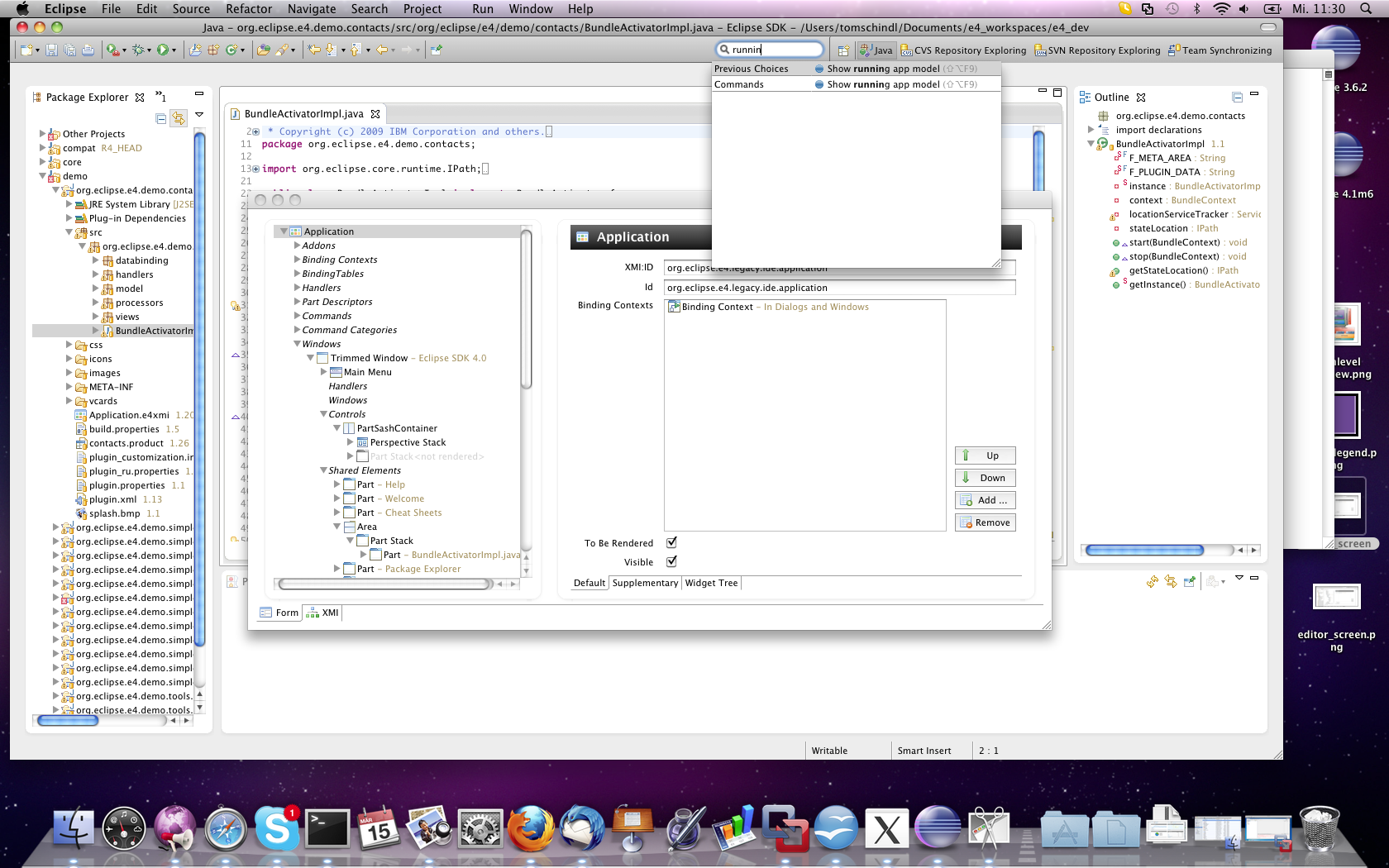
  • Live Model Viewer/Editor: Is operating on the in memory model of an running EAP Application and because the model is a live model you can not only view informations but also modify them
    State 1: State 2:
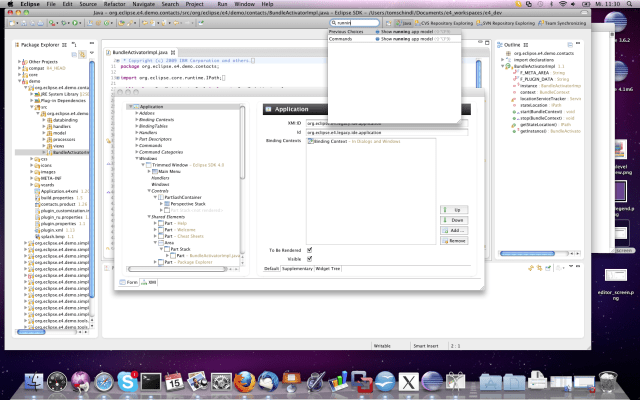
Now let’s go on to see what the EAP does with the model and how it creates the UI out of this abstract information.

As outlined already the Application Model holds UI-Information but what you find in the model are abstract UI-Concepts like Window, Perspective and PartStack but does not talk about concrete widgets to used to implement such a concept in the UI presented to the user. The transformation (we call it rendering) of the model elements into concrete widgets is the responsibility of the Rendering Engine  .

From a very highlevel the process is like this:

The last small thing I’d like to show in this post how the Java-Class referenced in the MPart named my.bundle.a.View looks like:

package my.bundle.a;

public class View {
  @Inject
  public View(Composite parent) {
    // Make up the content displayed in the part
  }
}

There are a lot of talks at EclipseCon 2011 and I’m giving a tutorial together with Kai Tödter and Eric Moffatt where you can learn how to write applications using the Eclipse Application Platform.
Posted in e4 | 4 Comments

e4 – Relation between Eclipse 4.1 and XWT

Today someone approach me and his introduction statement was that he’s interested in XWT and was told that Eclipse 4.1 is built upon XWT. I’ll restate the same I’ve stated in all of my talks: XWT is a technology developed in the e4-Incubator side by side with the Eclipse 4 Application Platform.

The important thing here is SIDE BY SIDE which means XWT nor the Eclipse 4 Application Platform have a dependency on each other! The Eclipse 4 Application platform makes no assumption on the technology you use to write/describe your UI – the system is extremely open which I highlighted in another blog where I used Swing to render the UI.

So once more the important message: Eclipse 4.1 does not depend on XWT nor does XWT depend on Eclipse 4.1

Posted in e4 | 5 Comments

e4 – More News from ModelTooling

Some weeks ago I’ve blogged about some new features I’ve added to the e4-ModelTooling. The soon declared 4.1M6 release will hold some more features I’d like to present to you in this blog entry.

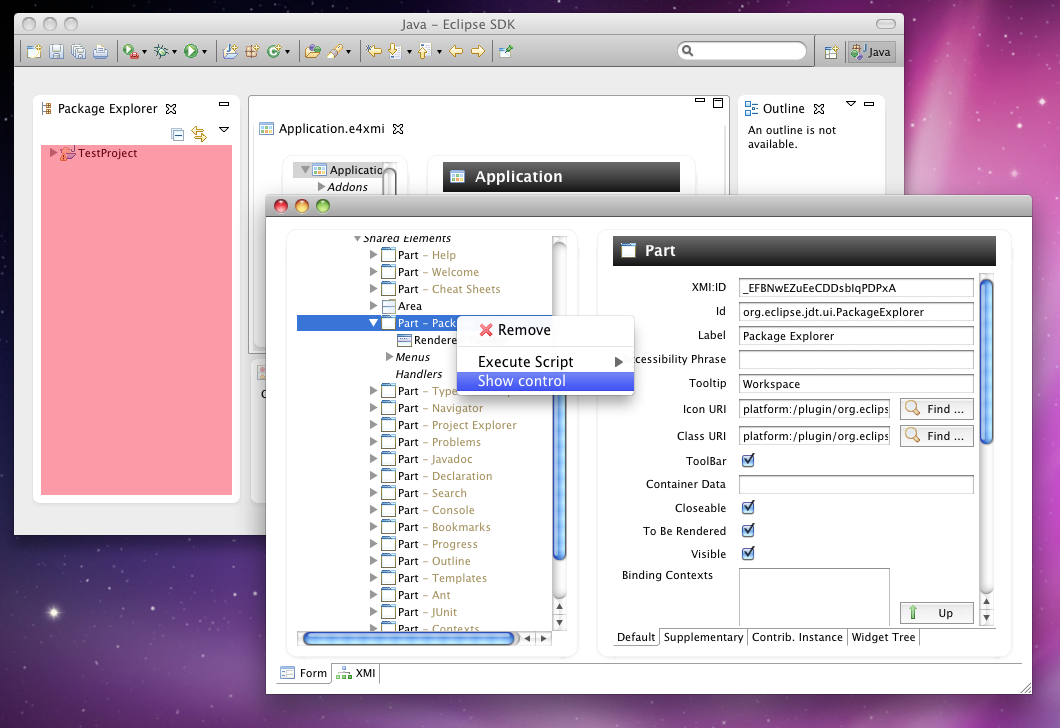
Control Finder

If you are interested into which widget the rendering engine turned a specific model element into and where it is rendered on the screen there’s now support to find this out.

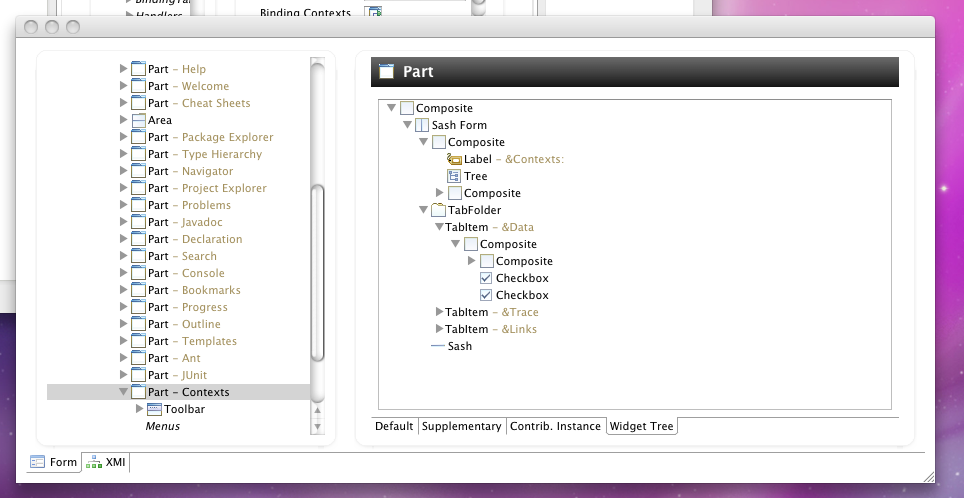
Widget Tree Browser

The widget browser allows you to completely inspect the widget tree of the running applications. Together with the introduced Control-Finder those 2 utilities will help developer to inspect, debug and ultimately better understand and control applications built upon the Eclipse 4.0 Application Platform.

Scripting Support

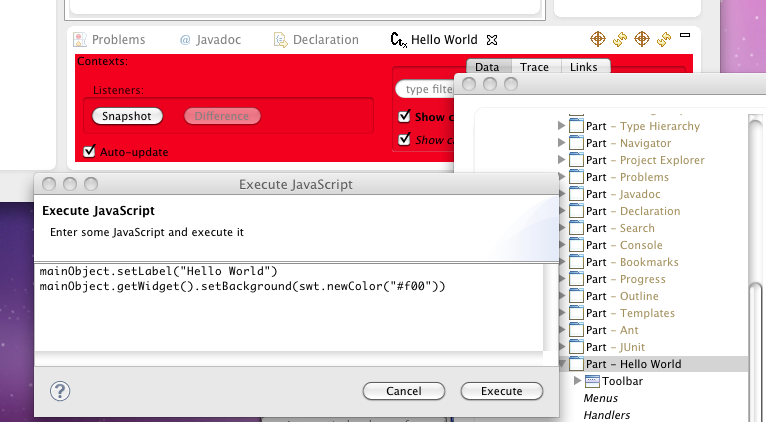
In contrast to the 2 features above who allow developers to inspect the applications this feature give developers the power to interact with the running application using a scripting language like JavaScript, Groovy, … .

Posted in e4 | Leave a comment

Europe rules at the Eclipse Individual Awards

Looking at finalists of the individual awards finalists it looks like Europe rules (9 finalists, 7 from europe, 2 canada – I counted Boris for Canada).

I’m delighted to be part of the final nominies once more [see 2009 1,2] and thank anyone who voted for me. It is really a big honor to be part of the final nominees given that I’m a sparetime committer (well if I’d really count the hours I spend e.g. on e4 it could be compared to a half-day job).

BTW if there are people arriving already Friday for EclipseCon 2011 and search for a taxi share to get to Santa Clara there’s a wiki page to coordinate the arrivals.

Anyways if you happen to be at EclipseCon I’d like to invite you to the sessions I’m going to present together with great people:

I think both of those session will provide interesting topics to you and even if you’ve not considered the Eclipse 4.0 development relevant to your daily work I’d like to invite you to my talk Singlesourcing for Eclipse 4.x and Eclipse 3.x who might change your mind.

Posted in Talks & Conferences | 1 Comment

e4 – Use Eclipse 4.1 Application Platform but not SWT

So the title already says what this Blog-Post is about. It will talk about the possibility to use the Eclipse 4.1 Application Platform without using SWT to develop your UI-Components.

Already the initial designs of Eclipse 4.x splitted the codebase not only into Core and UI-Components but futher broke up the UI-Components in stuff into a toolkit independent and toolkit dependent part. The concept we are using here is often referred in our talks as the “RenderingEngine” which is responsible of turning our Application Model into an UI.

In the 4.0 we violated our own design by dragging in unwanted SWT-Dependency through referenced bundles but we got rid (or better said will get because of bug 338559) of them in 4.1 and so the Eclipse 4 Application Platform we’ll be able to be used without using SWT but use the UI-Toolkit of your choice (e.g. Swing, Qt, …).

To make it possible to write e.g. Swing-Applications using the Eclipse 4 Application the only requirement is that someone wrote a replacement for the default rendering engine provided by default by the e4-Team. To find out how much effort it would be to write such a thing I’ve experimented a bit yesterday and have to admit it’s doable using the SWT-Implementation and translating into Swing calls. Hacking for about 5 hours I had a minimal Swing-Application running on.

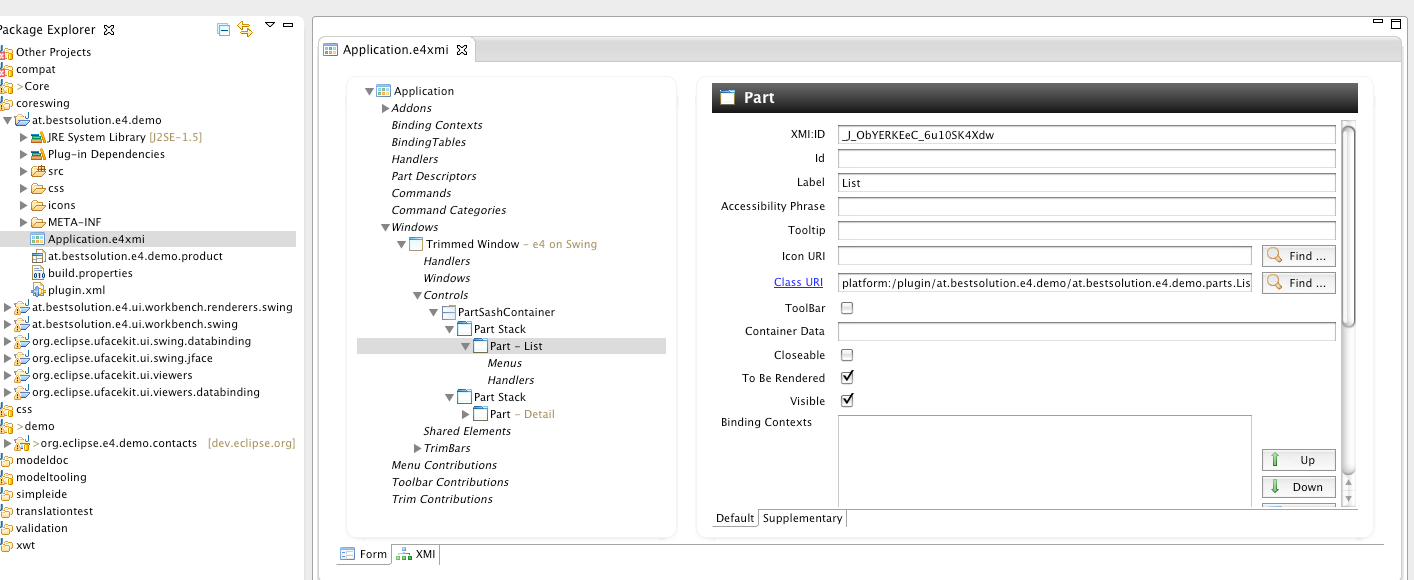
Here’s a screenshot of my model editor which is used to connect the pieces so that we get a running application:

So what does this first experiment tell us? The Eclipse 4 Application Platform is a flexible UI Framework to build component based UI application no matter if you use SWT or not and the effort to provide a rendering engine for another UI-Toolkit is not a task of man years.

The educated reader might ask why one would want to write applications without using SWT given that Eclipse 4.1 allows you to style widgets using CSS.

There are multiple:

  • SWT and Styling pixelperfect: For many types of applications I have no problems with the limitation SWT has when it comes to styling the native widgets (when e.g. writing Database-Forms) but when it want to write a stylish UI which looks as slick as applications created with other RIA technologies. Don’t believe me? Ever tried to change the background-color of a Button?
  • JavaFX on the horizon: The first test reports from JavaFX 2.0 are promising and my bet is that integration into a Swing-Application is going to be easier than in SWT. I think using JavaFX will be quite nice if you’d like to include multimedia content and use animations which is something SWT has not made any progress since the early days of the Eclipse 4.0 effort
  • Legacy-Swing codebase: If you have a lot of Swing knowledge and probably even source code it might be easier to stay with Swing
  • Learn only one RCP-Framework: If you have to write application using different Toolkits (SWT,Swing, …) it is easier to learn only one framework currently you’ll have to keep the knowledge about Nebeans and Eclipse RCP
  • You simple like Swing/Qt and want to make use of the new DI-Programming model, OSGi-Services and the new idea of the central application model

Finally what did i use to make the small application in the screen shot:

  • Java 1.6 SE (swing is part of it 🙂
  • Eclipse Databinding: Only the core part and Pojo-stuff
  • org.eclipse.ufacekit.ui.viewers: Base implementation for JFace-Viewer like components but defined in a widget toolkit independet fashion (plus support for Generics)
  • org.eclipse.ufacekit.ui.swing.jface: JFace-Viewer like components for Swing-Controls
  • org.eclipse.ufacekit.ui.swing.databinding: Observable implementation of the Eclipse Databinding API for Swing controls
  • org.eclipse.ufacekit.ui.viewers.databinding: Observable implementation working on top of the generic JFace-Viewer API provided by org.eclipse.ufacekit.ui.viewers
Posted in e4 | 4 Comments

e4 – News from ModelTooling

It’s been a very long time since I’ve blogged about my work on the e4 model tooling front but this does not mean nothing happened. I think I have some interesting news to share on features I’ve implemented:

Edit/View XMI-File

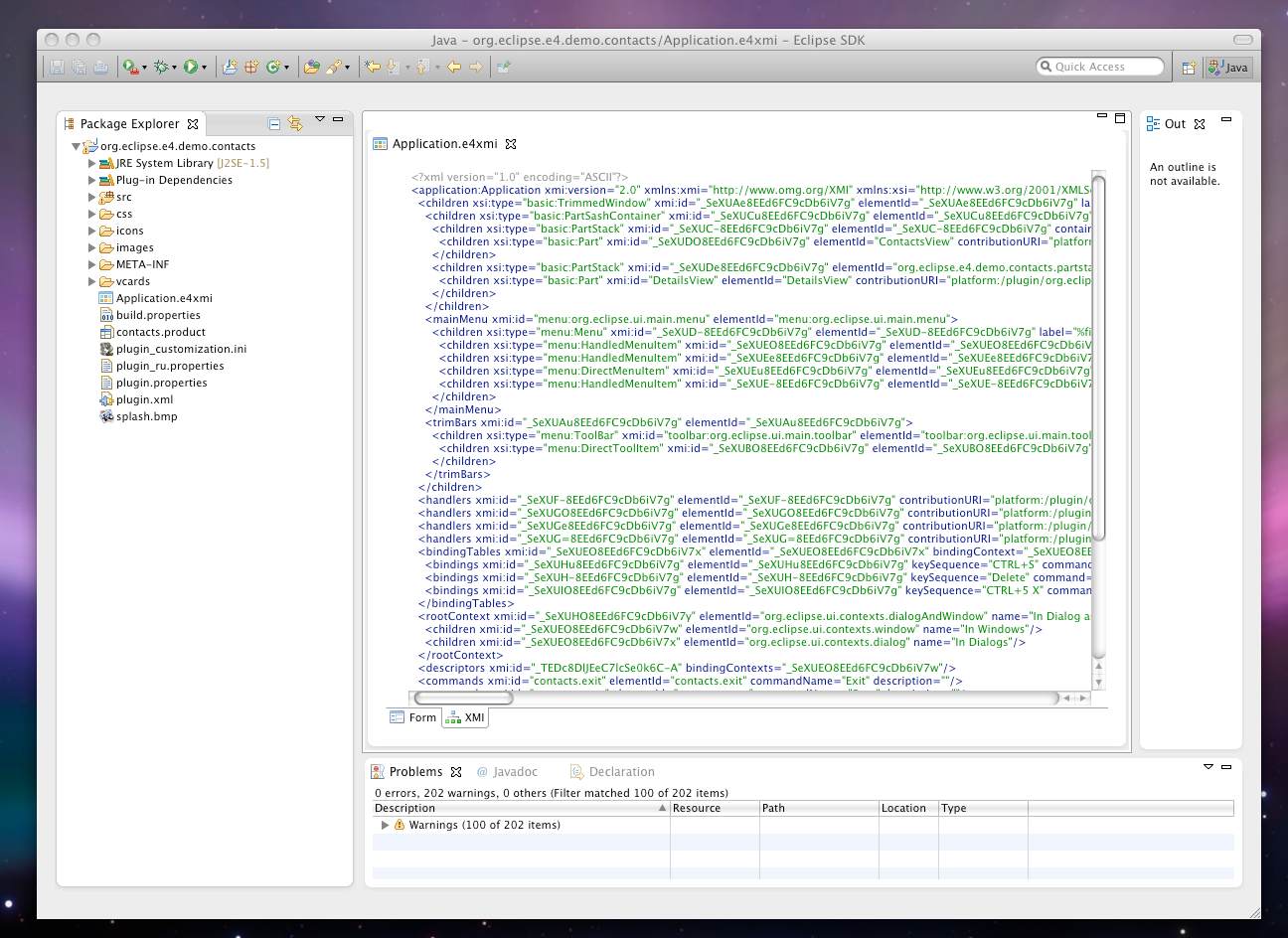
Beside editing the Application model using the form based ui the editor now allows you to view and update the model by directly editing the XMI-representation of the model similar to how what you can do with the plugin.xml-Editor provided by PDE.

The editor is currently only provids highlighting and error markers. The reason is that I’m not able to simply include the XML-Editor provided by WTP because that would drag in too many dependencies. To add such a feature would be a nice job for a contributor though – any volunteers e.g. students as a SoC-Project 😉

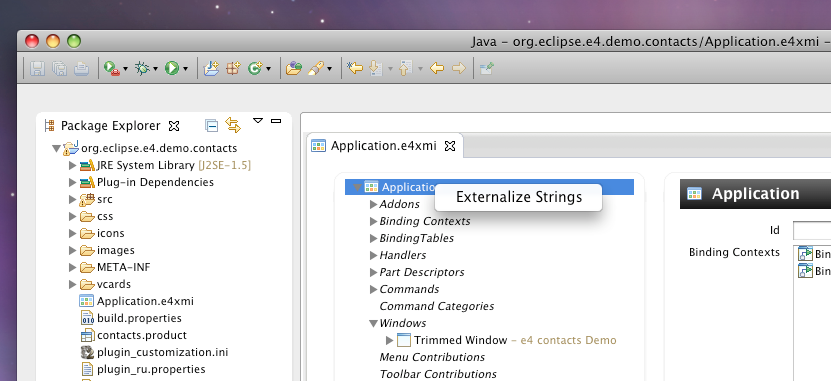
Support for externalizing Strings

One of the plan items we’ve worked on for the “Eclipse 4.1 Application Platform” was to add Native Language Support (NLS) and a major part of this is to make our application aware of internationalized text values. The process is quite similar to the one used in plugin.xml.

Instead of entering the real value you put it into OSGi-Bundles NLS-Properties-File (by default located in OSGI-INF/l10n/bundle.properties).
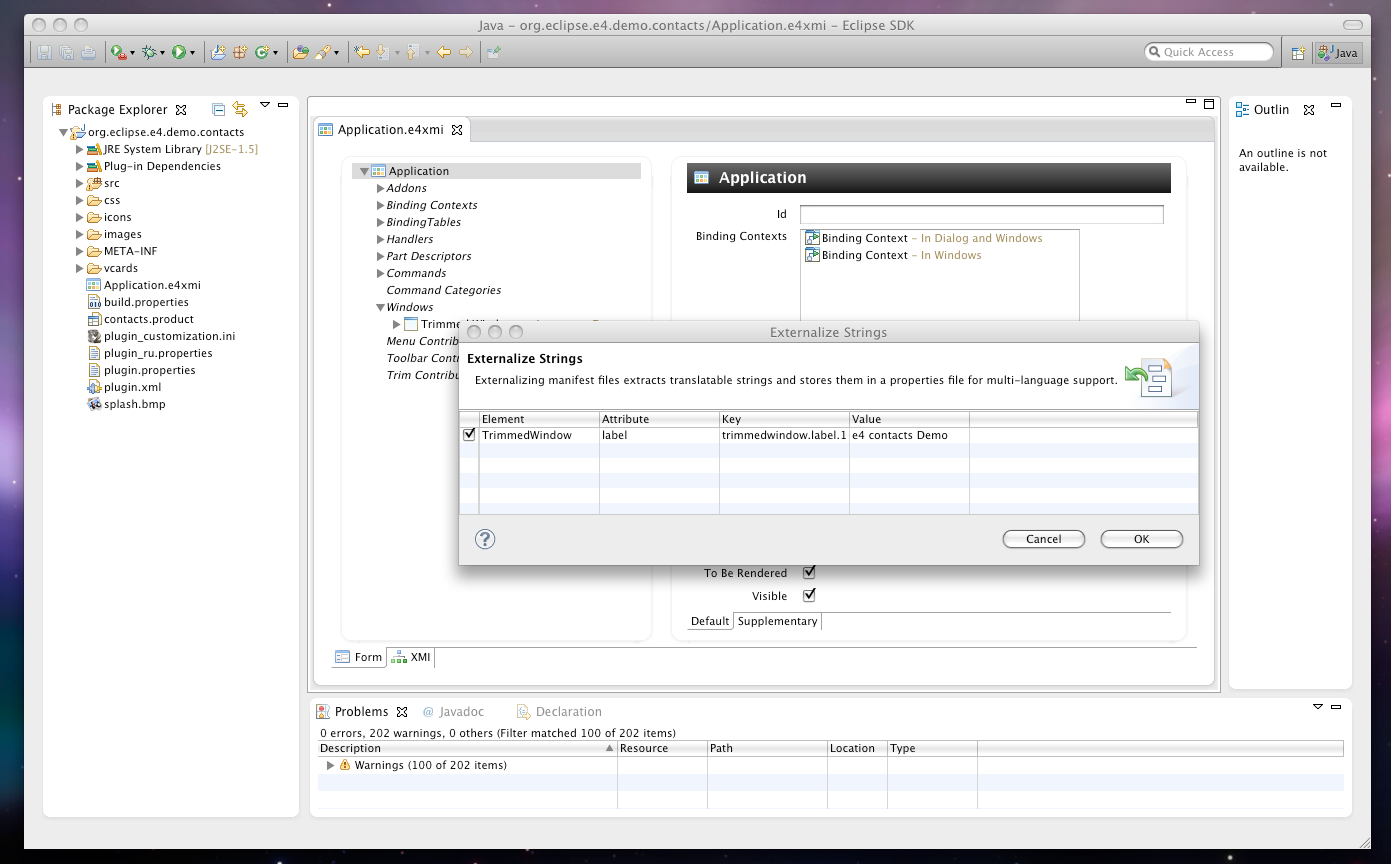
The model editor which is going be released as part of M6 is going to provide tooling to internationalize your application with only a few clicks which is once more similar to how you externalized texts using the plugin.xml-Editor provided by PDE.

  • Bring up context menu
  • Review provided externalization information
  • Improved C&P Support

    Copy and Paste support was not implemented appropriately. It allowed you only to copy and paste inside the left tree area. Since some days this is fixed and you can also use C&P in the form-fields (currently only text fields on the right hand side)

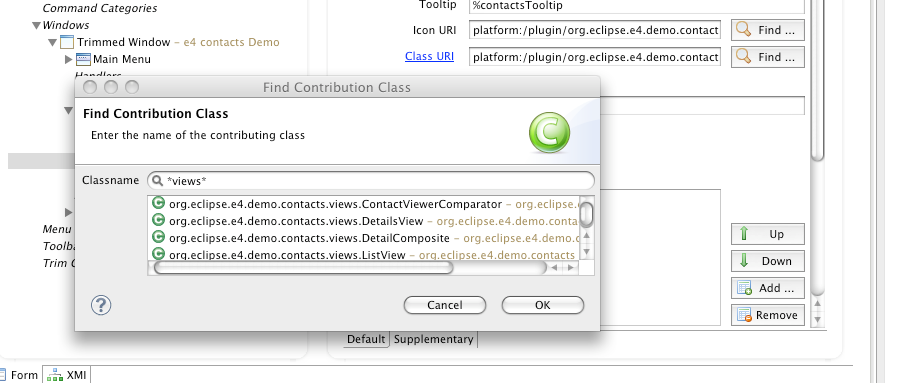
    Improved Search support for contributed classes

    The dialog to search for contributed classes (the classes handed over to the DI-Container to create instances) has been improved to allow wildcard searchs as part of the package name.

    Bundle-Dependency management in wizards

    The class creation wizards have been improved so that if they add Java code which requires your bundle to have more dependencies they add them automatically to your MANIFEST.MF so that the generated code can compile.

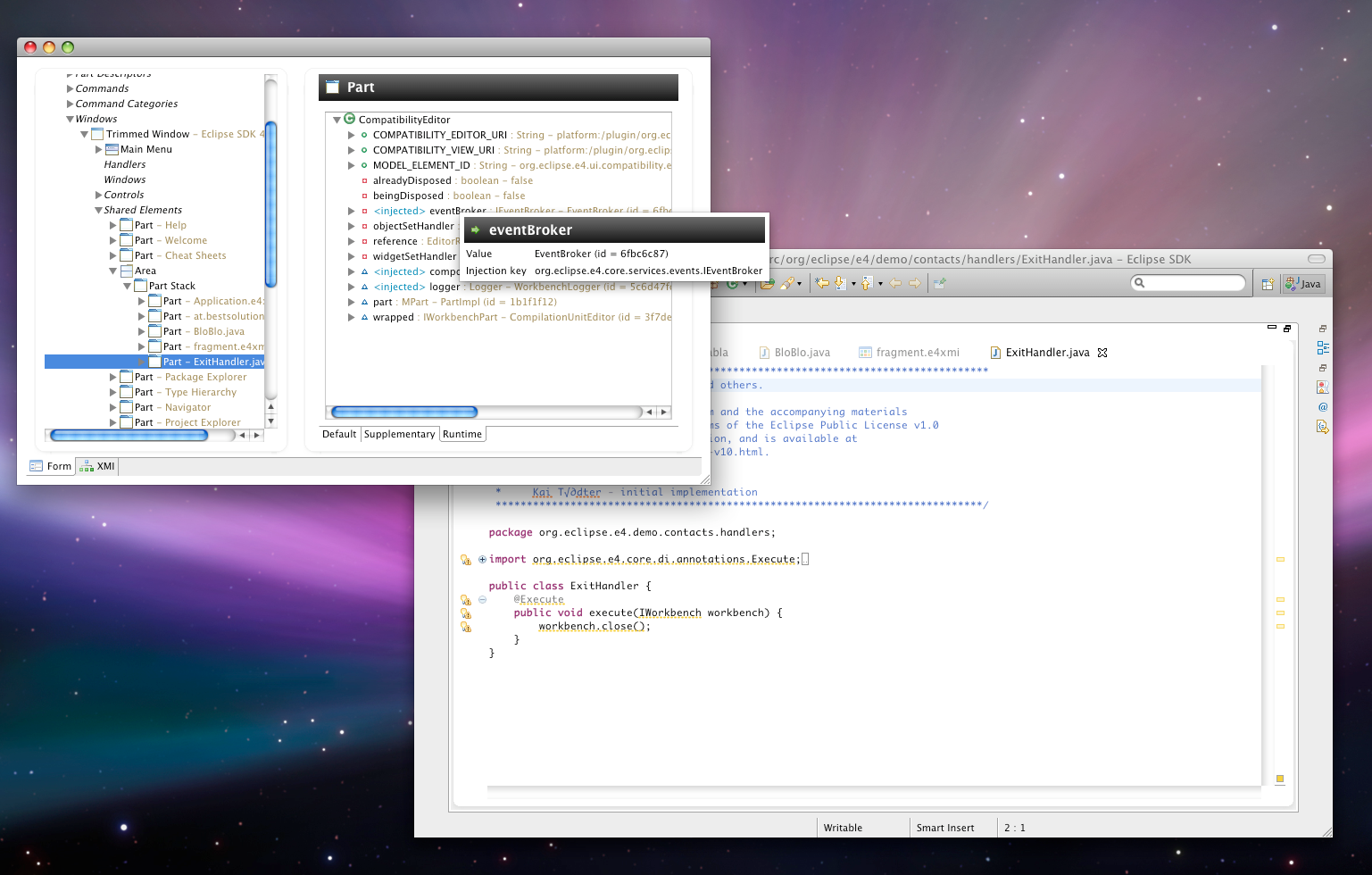
    Runtime Contribution Inspection

    This is the feature I’m just working on and I think we’ll be a great way for you to debug the application written on the “Eclipse 4.x Application Platform” because it provides you a deep look in the runtime environment of your application.

    The first thing provided as part of this tooling effort is to inspect you the instance of contributed classes making up the parts contents including extra informations for stuff provided by the DI-Container. At the moment only field informations are provided but others – most important Method Injections and @Execute-methods – will follow soon.

    Another plan item is to provide informations about the IEclipseContext an Application Model Element is located in so that you can better understand why you’ve got which value injected.

Posted in e4 | 1 Comment

Enhanced RCP: Reuse of WritableList in JFace-Viewers

Just because I’ve been running into this today. I thought it might be interesting to others as well. The following is a shortened version of a code I’ve been using in an RCP-Application.

public class CreateItemsHandler {
   @Execute
   public void execute(IObservableList companies, 
                      @Named(IServiceConstants.ACTIVE_SHELL) Shell shell) {
       DialogImpl i = new DialogImpl(shell,companies);
       i.open();
   }

   class DialogImpl extends TitleAreaDialog {
      private final IObservableList companies;

      // ....
      public Composite createDialogArea(Composite parent) {
        // ....
        TreeViewer v; 
        // ....
        v.setContentProvider(
          new ObservableListTreeContentProvider(new ObservableFactoryImpl(),
          new StructureAdvisorImpl())
        );
        v.setInput(companies);
      }
   }; 
}

Does someone spot the error? I guess not because from it is not visible at all without looking into the implementation of ObservableListTreeContentProvider. The problem in there is that when the viewer is disposed it disposes also the IObservableList passed into it so when the handler is executed the second time you’ll run into problems.

The solution to the problem though is quite simple by making the input call look like this:

 v.setInput(new DecoratingObservableList(companies,false));

This way your original IObservableList is not disposed but only the decorator.

Posted in Enhanced RCP | Leave a comment

Enhanced RCP: How views can communicate – The e4 way

Some weeks ago I published how views can communicate using the EventAdmin-Service. To get things working in an 3.x application one has to write some glue code but more importantly one has to know about all those nifty things about event publishing, getting access to OSGi-Services, … .

One of the main topics of the Eclipse 4 Application Platform was to make easy things easy by removing the need to know about all the concepts by hiding them using DI. The service responsible to deliver events in application built on top the Eclipse 4 Application Platform is the EventBroker-Service:

package org.eclipse.e4.core.services.events;

public interface IEventBroker {
	public String DATA = "org.eclipse.e4.data"; //$NON-NLS-1$

	public boolean send(String topic, Object data);
	public boolean post(String topic, Object data);

	public boolean subscribe(String topic, EventHandler eventHandler);

	public boolean subscribe(String topic, String filter, EventHandler eventHandler,
			boolean headless);

	public boolean unsubscribe(EventHandler eventHandler);
}

This is all we need to know (assuming we have already understood how DI-works) to implement our sender and receiver views:

public class SenderView {
  @Inject
  private IEventBroker eventBroker;
  private Button b;

  @PostConstruct
  void init(Composte parent) {
    parent.setLayout(new GridLayout());
    b = new Button(parent, SWT.PUSH);
    b.setText("Send Event");
    b.addSelectionListener(new SelectionAdapter() {
      @Override
      public void widgetSelected(SelectionEvent e) {
        Date d = new Date();
        eventBroker.send("viewcommunication/syncEvent",d);
        eventBroker.post("viewcommunication/asyncEvent", d);
      }
    });
  }

  @Focus
  void focus() {
    b.setFocus();
  }
}

These are some fewer lines of code which is good but IMHO the more important fact is that you are independent from OSGi running now so the code you have there is much easier testable by simply mocking IEventBroker!

Let’s look now at the receiver side of the story. If you take a look at the IEventBroker you see the subscribe methods which allows us to subscribe to various topics so we could as a first step implement it like this:

public class ReceiverView {
  @Inject
  private IEventBroker eventBroker;
  private TableViewer viewer;

  @PostConstruct
  public void init(final Composite parent) {
    parent.setLayout(new FillLayout());
    viewer = new TableViewer(parent);
    viewer.getTable().setHeaderVisible(true);
    viewer.getTable().setLinesVisible(true);
    viewer.setLabelProvider(new ColumnLabelProvider() {
      @Override
      public String getText(Object element) {
        return DateFormat.getDateTimeInstance().format(element);
      }
    });

    EventHandler handler = new EventHandler() {
      public void handleEvent(final Event event) {
        if( parent.getDisplay().getThread() == Thread.currentThread() ) {
          viewer.add(event.getProperty(IEventBroker.DATA));
        } else {
          parent.getDisplay().syncExec(new Runnable() {
            public void run() {
              viewer.add(event.getProperty(IEventBroker.DATA));
            }
          });
        }
      }
    };
    eventBroker.subscribe("viewcommunication/*",handler);
  }

  @Focus
  void focus() {
    viewer.getTable().setFocus();
  }
}

This is once more making your code looser coupled because you are independent from OSGi running but we can do even better by fully leveraging the Eclipse DI-Framework. By default Eclipse DI injects data it has stored in its IEclipseContext (you can think of the IEclipseContext as a Map where the value is thing that gets injected into you “POJO”).

The important thing for us is that one can extend Eclipse DI to consult other resources like e.g. Preferences (@Preference) and e.g. Event-Data (@EventTopic) – a blog post explaining how this works will follow hopefully soon.

So we can rewrite our receiver code like this:

public class ReceiverView {
  private TableViewer viewer;

  @PostConstruct
  public void init(final Composite parent) {
    parent.setLayout(new FillLayout());
    viewer = new TableViewer(parent);
    viewer.getTable().setHeaderVisible(true);
    viewer.getTable().setLinesVisible(true);
    viewer.setLabelProvider(new ColumnLabelProvider() {
      @Override
      public String getText(Object element) {
        return DateFormat.getDateTimeInstance().format(element);
      }
    });
  }

  @Inject
  void eventReceived(@EventTopic("viewcommunication/*") Date date) {
    Display d = viewer.getControl().getDisplay();
    if( d.getThread() == Thread.currentThread() ) {
      viewer.add(date);
    } else {
      parent.getDisplay().syncExec(new Runnable() {
        public void run() {
          viewer.add(date);
        }
      });
    }
  }

  @Focus
  void focus() {
    viewer.getTable().setFocus();
  }
}

[Update 2011-02-07] – Start
But we can do even better so that we don’t need to take of the UI-Thread syncing all we need to do is use another annotation:

@Inject
  void eventReceived(@UIEventTopic("viewcommunication/*") Date date) {
    viewer.add(date);
  }

Now the DI-Framework takes care of the Event loop syncing. Thanks to Brian de Alwis for pointing this out.
[Update 2011-02-07] – End

If you are interested in how you can use things like this in your Eclipse 3.x applications and you are going to be at EclipseCon you should come to my talk about “Singlesourcing for Eclipse 4.x and Eclipse 3.x

Posted in Enhanced RCP, tutorials, Uncategorized | 13 Comments

Subversion + Certificates + Java > 1.6u17

I’ve blogged a long time ago about my problems with Subversion + Certificates and Java with a version higher than u17.

Today the author of SVNKit added a comment to the ticket talking about the problem. The solution is so simple once you know about the following resource. All you need to do is to open your eclipse.ini and add the following entry:

-Dsun.security.ssl.allowUnsafeRenegotiation=true

which makes my eclipse.ini on OS-X look like this:

-startup
../../../plugins/org.eclipse.equinox.launcher_1.1.0.v20100507.jar
--launcher.library
../../../plugins/org.eclipse.equinox.launcher.cocoa.macosx.x86_64_1.1.1.R36x_v20100810
-showsplash
org.eclipse.platform
--launcher.XXMaxPermSize
256m
--launcher.defaultAction
openFile
-vmargs
-Xms40m
-Xmx512m
-Xdock:icon=../Resources/Eclipse.icns
-XstartOnFirstThread
-Dorg.eclipse.swt.internal.carbon.smallFonts
-Dsun.security.ssl.allowUnsafeRenegotiation=true

On OS-X you need to open your Eclipse.app using the Context-Menu “Show Package Content”.

Posted in Uncategorized | Leave a comment

QxWT: Find out API changes between Qooxdoo-Releases

While trying to update my qooxdoo wrapper to 1.3. I had the problem that I could find out easily which classes, methods and properties have been added/remove between e.g. 1.2 and 1.3 so that I could adjust my GWT-Wrappers.

This was until Andreas Ecker from the qooxdoo team pointed me to an interesting Meta-Data information the generator spits out for the API-Viewer. It took me about an hour to write a small Java-Programm which created a diff of those .json-Files.

Below you see an example output of a diff between Qooxdoo 1.2 and 1.3.

You can download the small utility from here. The usage is quite simply as long as you have Java installed on your system.

Usage: java -jar qxapidiff.jar -v0 $APIVIEWER_DIR_VERSION_0 -v1 $APIVIEWER_DIR_VERSION_1 [-a 0|1|2]
Arguments:
	* -v0 (mandatory) ... Path to old versions API-Viewers script directory e.g. /home/tom/qx-1.0-sdk/framework/api/script
	* -v1 (mandatory) ... Path to new versions API-Viewers script directory e.g. /home/tom/qx-1.3-sdk/framework/api/script
	* -a ................ Minum-Access-Level for Method diff: 0 = private, 1 = protected, 2 = public
	* -h ................ Prints this message

if you think you can improve it, you are free to do so (e.g. to add constructors and method-arguments to the diff calculation) because you can access the sources from my public SVN-Repository.

I think in future I can use this informations to e.g. write create wrappers or at least their stubs automagically 🙂 but until then I need to wrap them by hand.

Posted in QxWT, Uncategorized | 4 Comments