Using LESS in JavaFX

Inspired by a posting to openjfx-dev where I claimed: Using LESS in JavaFX applications is possible – I thought I should proof my statement and get LESS working in a JavaFX app.

The LESS-File i’ve created for looks like this:

.opacity(@opacity) {
  -fx-opacity: @opacity / 100;
}

Rectangle {
    .opacity(30);
    -fx-fill: red;
}

// Selector interpolation only works in 1.3.1+. Try it!
@theGoodThings: ~".food, .beer, .sleep, .javafx";

@{theGoodThings} {
  -fx-font-weight: bold;
  -fx-font-size: 20pt;
}

which written in CSS looks like this:

Rectangle {
  -fx-opacity: 0.3;
  -fx-fill: red;
}
.food, .beer, .sleep, .javafx {
  -fx-font-weight: bold;
  -fx-font-size: 20pt;
}

So I create a library project, download the less.css for rhino and tried to get it running. My first tries always failed the because the script did not appropriately detect that it was running in rhino (or nashorn when executed in Java8) – so I tweaked the file a bit. To make it damn easy for me to invoke the parser from Java I created a small JS-Script:

var parseString = function(value) {
	var parser = new(less.Parser);
	var rv;
	parser.parse(value, function (err, tree) {
		if (!err) {
			rv = tree.toCSS();	
		}
	});
	return rv;
}

So my Java-Code can pass in the content of the less-file and gets the css-content returned:

public class LessLoader {
  // ...
  public URL loadLess(URL lessFile) {
    try {
      StringBuilder lessContent = new StringBuilder();
      readFileContent(lessFile, lessContent);
			
      Object rv = ((Invocable)engine).invokeFunction("parseString", lessContent.toString());
      File f = File.createTempFile("less_", ".css");
      f.deleteOnExit();

      try(FileOutputStream out = new FileOutputStream(f) ) {
        out.write(rv.toString().getBytes());
        out.close();
      }
      return f.toURI().toURL();
    } catch (Exception e) {
      throw new RuntimeException(e);
    }
  }

// ...

So I can now make use of it in my JavaFX application:

public class Main extends Application {
  @Override
  public void start(Stage primaryStage) {
    try {
      Group root = new Group();
      root.getChildren().add(new Rectangle(100,100,200,200));
			
      Text t = new Text("JavaFX");
      t.getStyleClass().add("javafx");
      t.relocate(150, 320);
      root.getChildren().add(t);
			
      Scene scene = new Scene(root,400,400);
			
      LessCSSLoader ls = new LessCSSLoader();
      scene.getStylesheets().add(ls.loadLess(getClass().getResource("sample.less")).toExternalForm());
      primaryStage.setScene(scene);
      primaryStage.show();
    } catch(Exception e) {
      e.printStackTrace();
    }
  }
	
  public static void main(String[] args) {
    launch(args);
  }
}

This makes the application look like this:

screen

I’ve pushed the library to our efxclipse-addons-github-repo.
Posted in e(fx)clipse | 5 Comments

e(fx)clipse builds on hudson.eclipse.org

The transition of our sources from our github-repository to the Eclipse.org server has been finished almost since a long time and we’ve been working on our codebase since then already.

The last missing bit was to migrate our maven-tycho build to Eclipse.org’s hudson instance. For the main build the transition was really easy but as it turned out we’ve been running into problems when trying to sign our artifacts using the eclipse-maven-signing-plugin which corrupted some of the jar-Files.

To our rescue came another – not yet very well known – signing possibility when running a maven-tycho build which is part of CBI and in my opinion is the better strategy to make the signing happen because it does it as part of the build of each and every module instead of doing it in a post processing step. All you need to do is to add the following lines to your root pom.xml

<!-- ... -->
<properties>
  <!-- ... -->
  <tycho-version>0.18.0</tycho-version>
  <tycho-extras.version>0.18.0</tycho-extras.version>
  <cbi-plugins.version>1.0.3</cbi-plugins.version>
  <eclipse-repo.url>https://repo.eclipse.org/content/repositories/releases/</eclipse-repo.url>
</properties>
<!-- ... -->
<pluginRepositories>
  <!-- ... -->
  <pluginRepository>
    <id>eclipse</id>
      		<url>${eclipse-repo.url}</url>
      		<releases>
        		<enabled>true</enabled>
      		</releases>
      		<snapshots>
        		<enabled>true</enabled>
      		</snapshots>
    	</pluginRepository>
</pluginRepositories>
<!-- ... -->
<profiles>
    <profile>
      <id>build-server</id>
      <build>
        <plugins>
          <plugin>
            <groupId>org.eclipse.tycho</groupId>
            <artifactId>target-platform-configuration</artifactId>
            <version>${tycho-version}</version>
            <configuration>
              <includePackedArtifacts>false</includePackedArtifacts>
            </configuration>
          </plugin>
          <plugin>
            <groupId>org.eclipse.tycho.extras</groupId>
            <artifactId>tycho-pack200a-plugin</artifactId>
            <version>${tycho-extras.version}</version>
            <executions>
              <execution>
                <id>pack200-normalize</id>
                <goals>
                  <goal>normalize</goal>
                </goals>
                <phase>verify</phase>
              </execution>
            </executions>
          </plugin>
          <plugin>
            <groupId>org.eclipse.cbi.maven.plugins</groupId>
            <artifactId>eclipse-jarsigner-plugin</artifactId>
            <version>${cbi-plugins.version}</version>
            <executions>
              <execution>
                <id>sign</id>
                <goals>
                  <goal>sign</goal>
                </goals>
                <phase>verify</phase>
              </execution>
            </executions>
          </plugin>
          <plugin>
            <groupId>org.eclipse.tycho.extras</groupId>
            <artifactId>tycho-pack200b-plugin</artifactId>
            <version>${tycho-extras.version}</version>
            <executions>
              <execution>
                <id>pack200-pack</id>
                <goals>
                  <goal>pack</goal>
                </goals>
                <phase>verify</phase>
              </execution>
            </executions>
          </plugin>
          <plugin>
            <groupId>org.eclipse.tycho</groupId>
            <artifactId>tycho-p2-plugin</artifactId>
            <version>${tycho-version}</version>
            <executions>
              <execution>
                <id>p2-metadata</id>
                <goals>
                  <goal>p2-metadata</goal>
                </goals>
                <phase>verify</phase>
              </execution>
            </executions>
            <configuration>
              <defaultP2Metadata>false</defaultP2Metadata>
            </configuration>
          </plugin>
        </plugins>
      </build>
    </profile>
</profiles>

You can now access our nightly builds:

Posted in e(fx)clipse | 2 Comments

Using Eclipse for development on OpenJFX8 and Java8 in general

If you are following the OpenJFX development you might already know that they switched their build to JDK8 and also started using Java8 language features in their codebase (defender methods, lambdas) – see the announcement.

The direct result of this change is that I’d have to switch to Netbeans or IntelliJIDEA to work with the code base which although not really nice would have been acceptable but there’s another problem with all this.

The e(fx)clipse code started to make use of JDK8 APIs and because we are subclassing JDK8/OpenJFX8 classes (e.g. collections) we got compile errors in our workspace, the same is true for our maven-tycho build.

The Java8 support is developed in an extra branch of JDT-Core and you can find informations about it on the wiki how to selfhost it. This would have allowed me to work around the development problem but I don’t think this is an acceptable solution for the months to come (until Kepler SR2!) so I’ve set up my custom CBI build where instead of building with JDT-Core from master I’m switching to the BETA_JAVA8 branch – you can find my shell script here.

For those who don’t want to run the CBI stuff their own I’ve also published complete SDKs (Platform+JDT+PDE) which I’ll update from time to time – if you know a certain fix went into the repo you can ping me e.g. on twitter (@tomsontom) to start a build.

Please note: The JDT stuff is very young code so don’t immediately file bugs when things don’t work. Consult the wiki on the status of the feature. Don’t spam the JDT-Team with bugs on stuff they have not yet developed!

Posted in e(fx)clipse, Eclipse | 5 Comments

e(fx)clipse e4 renderers go astray (rendering Swing)

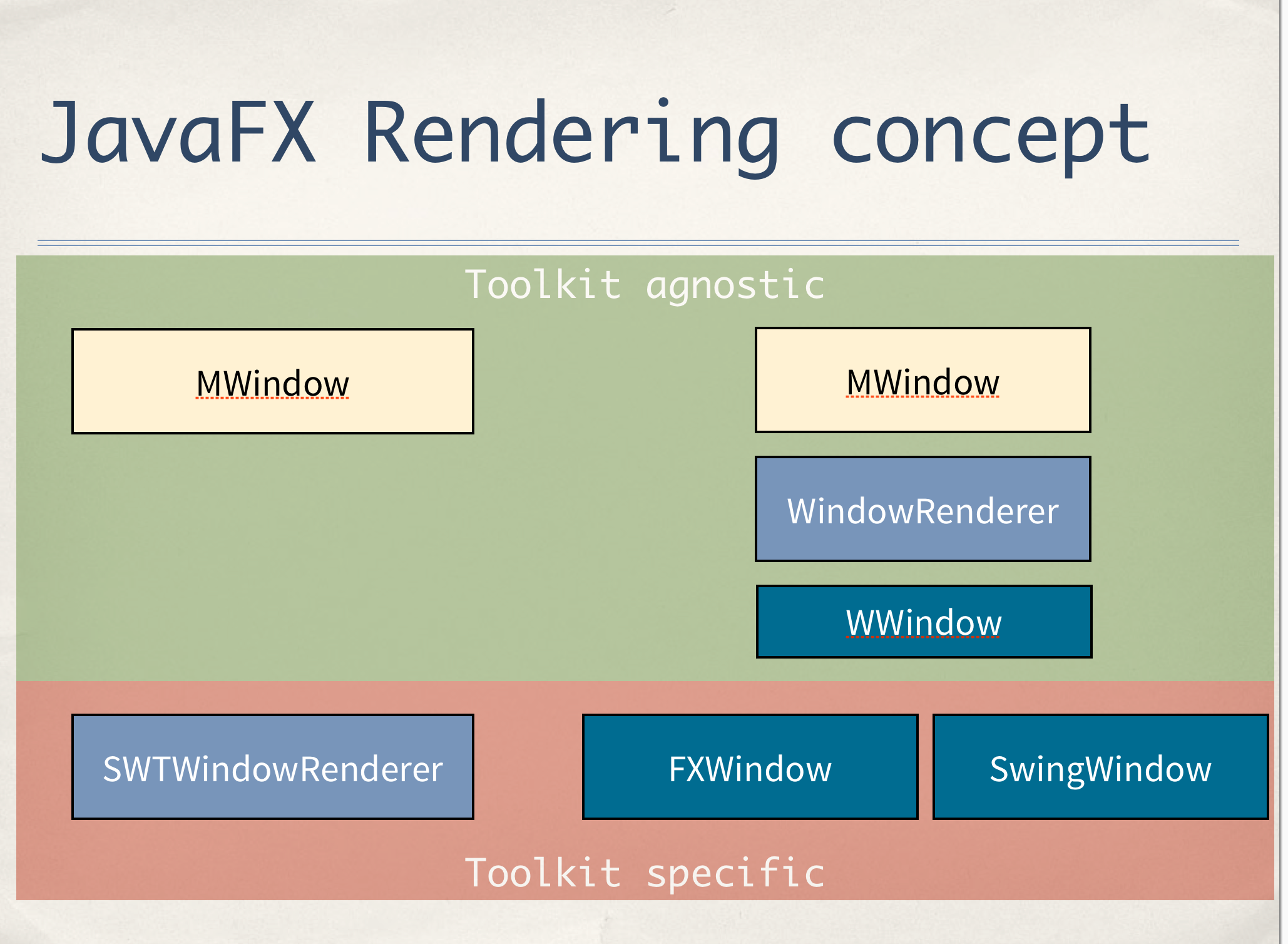
I gave some talks at EclipseCon about our e4 renderers for JavaFX and showed of how the our renderers are built and different to those you find in the SWT implementation coming with Eclipse.

screen_rendering

On the left you see how the SWT one works and on the right handside how the JavaFX one is structured. The cool thing is that all the complex logic with lazy activation, … is implemented in an toolkit agonostic way and abstracted throught W*-Interfaces (git-repo).

Here’s an example of the WWindow abstraction we are using:

public interface WWindow<N> extends WWidget<MWindow> {
	
  public void setMainMenu(WLayoutedWidget<MMenu> menuWidget);
  public void setTopTrim(WLayoutedWidget<MTrimBar> trimBar);
  // ... left, right, bottom

  public void addChild(WLayoutedWidget<MWindowElement> widget);
  public void addChild(int idx, WLayoutedWidget<MWindowElement> widget);
  public void removeChild(WLayoutedWidget<MWindowElement> widget); 
	
  public void show();
  public void close();
}

That’s the whole interface you need to implement. Back to EclipseCon so showed off this concept and on the last day I was approach by a guy who immediately recognized that this renderering can be used to renderer with other UI-Toolkits like FX as well.

He’s been interested in a Swing one! He asked me for an estimate how much time it would take to get such a thing going and I answered: “Not more than a week”. He could not believe that is doable so had to proof it to some extend!

All the conversation happened before the start of a talk and I have to confess I don’t know anything about what the talk was about because I started hacking right on a Swing renderer, and before the 35 minutes talk had been finished I could show him this little app.

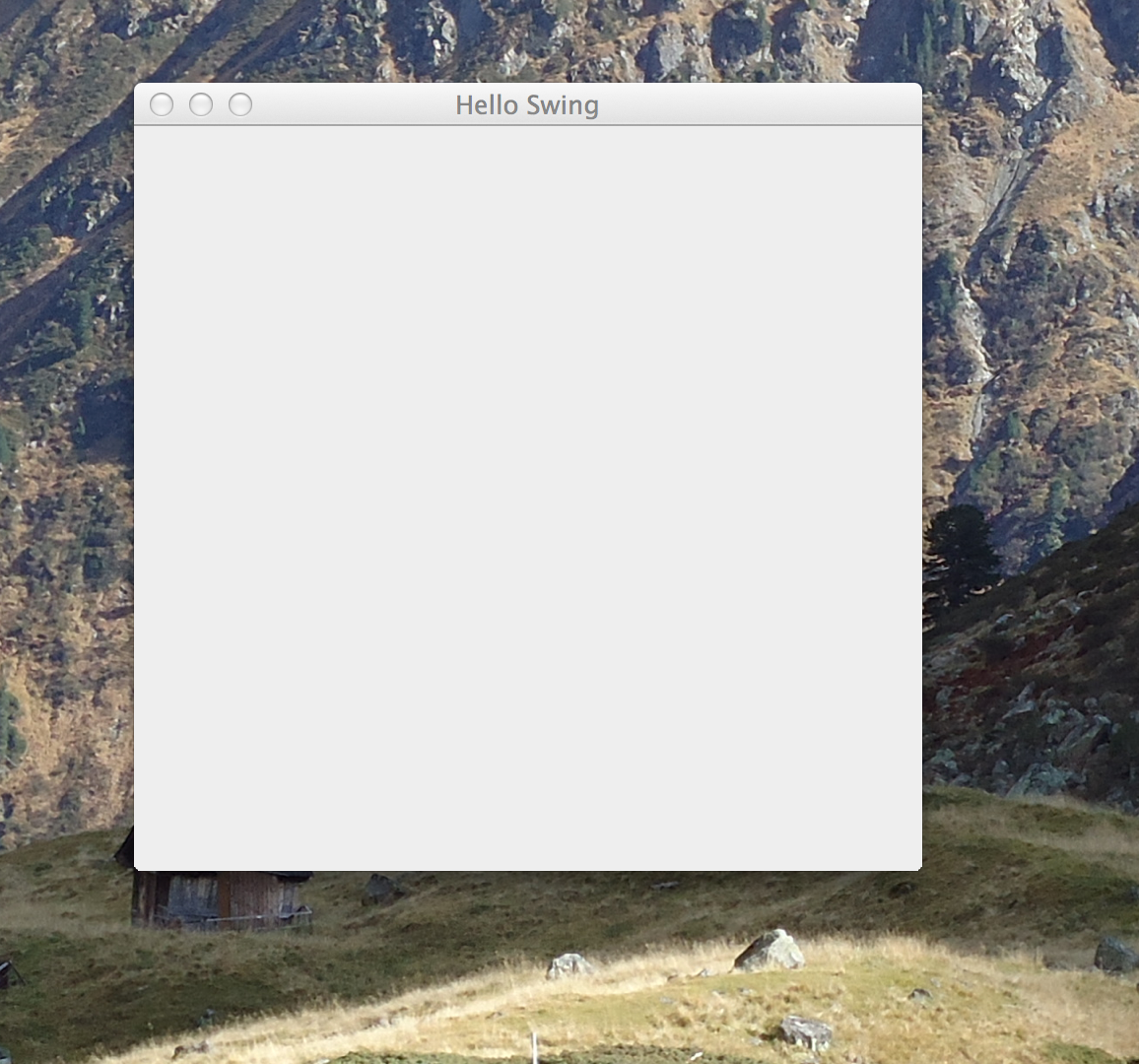
screen_swing

The most of the time it took to implement the bootstrapping of the OSGi-Application (25 minutes) implementing the SwingWindowWidget was a simple task. If you happen to be in need of a e4 on Swing-Renderer I’d suggest you take a look at the prototype I hacked together in 30 minutes.

I’ve pushed the code to an extra repository for now (it is not part of the e(fx)clipse code base donation to Eclipse.org).

We (BestSolution.at) currently have no plan to develop any Swing-Renderers but if you are interested in doing so or want to hire us to do it for you just get in touch with me because 99% of the code builds the foundation for our JavaFX renderer story (where we provide commercial support) a swing implementation automatically inherits all improvements and bugfixes we are implementing.

Before someone asks: Yes I know about Kai’s prototype doing something similar but he approaches the problem in a different way. In our case being able to implement Swing renderers is only a (nice) side effect of our rendering design concept which makes it super easy for you to implement custom JavaFX renderers (e.g. writing SWT-Renderers with our engine would/will never work!)

Posted in e(fx)clipse | 4 Comments

e(fx)clipse and JavaFX at EclipseCon

EclipseCon NA 2013 is not far away anymore (only one week to go) – if you happen to be there and you are interested in e(fx)clipse or JavaFX in general I’ve assembled a list of talks to attend I know JavaFX is part of:

Hope to see you in Boston.

Posted in e(fx)clipse, Eclipse | Leave a comment

e(fx)clipse 0.8.1 released

We are happy to announce that e(fx)clipse 0.8.1 is available. This is most likely the last release we’ll provide outside from Eclipse.org. Let’s go straight to the New & Noteworth.

All in one downloads

Updated to the latest and greatest up-stream projects (Eclipse 4.2.2/3.8.2, WTP 3.4.2, egit 2.3.1). The WTP-Update holds fixes for the FXML-Editor we’ve developed with the Upstream project committers and the Eclipse 4.2.2 Platform fixes many of the performance problems people have been having.

Tooling

Kepler Support

The tooling now installs into Kepler M5 and there we make use of new API we’ve developed with the PDE-Team. We are not yet providing All-In-One downloads and we are not testing the tooling in Kepler but this is going to one of the main targets for the next iteration (0.9.0).

Java8-Support

Since JDK8 b75 JavaFX is on the extension classpath which e(fx)clipse now detects appropriately in plain Java-Projects and PDE-Projects. The only problem as of now is dealing with the JavaDoc which will be solved with Kepler M6 where JDT-Launching will provide us new API to contribute JavaDoc and Source Locations for entries of the JRE-Container. We’ve not yet decided whether we can backport this support to Juno and how we could do it.

CSS-Editor

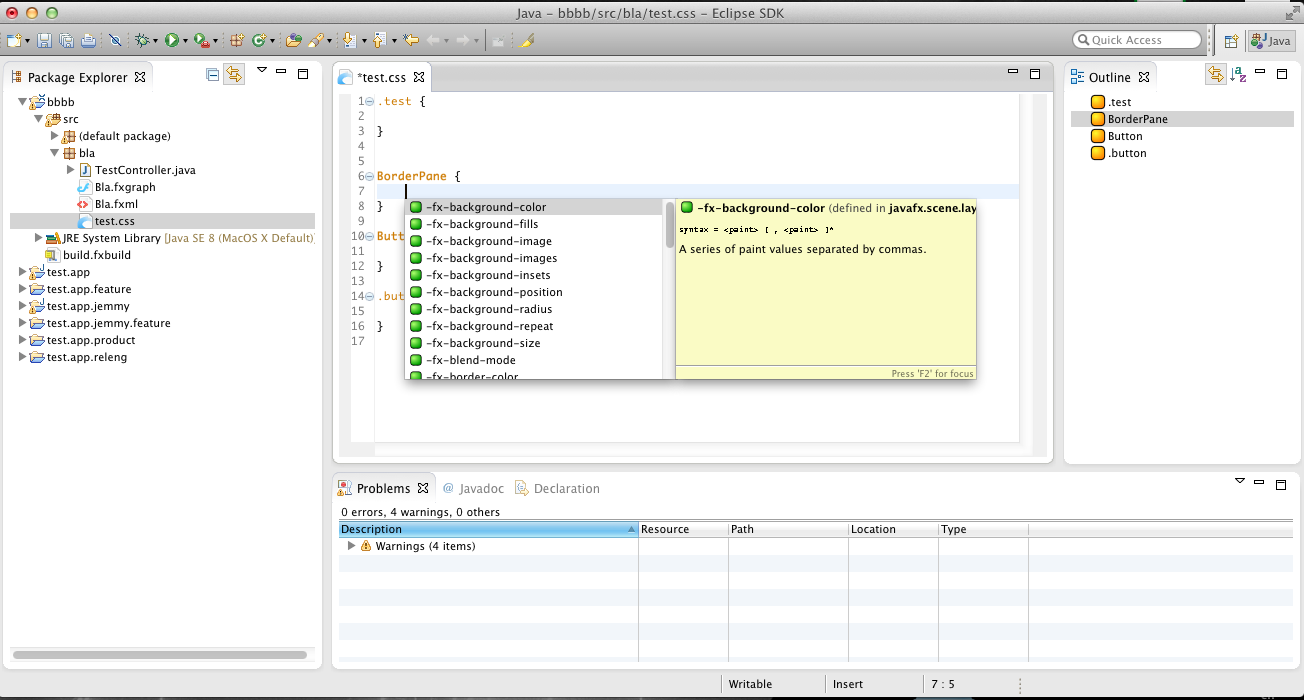
The CSS-Editor is not context sensitive and if it e.g. detects that you are editing the styles of a BorderPane it only shows the styles applicable for it.

pic_4

I’ve blogged in more detail already.

@FXML

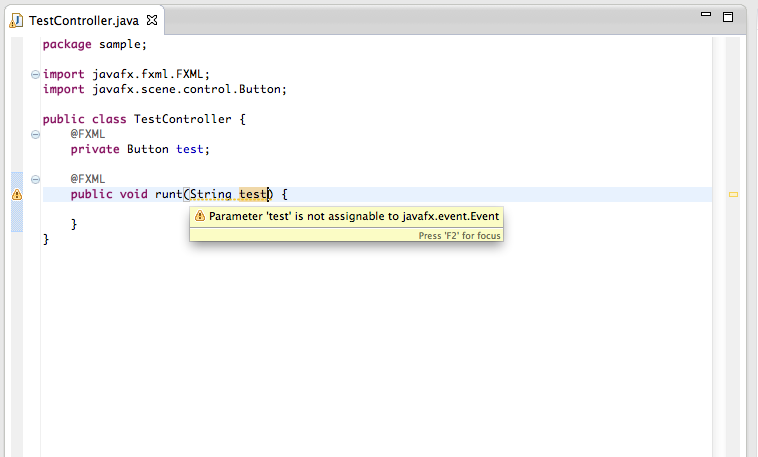
To help you detecting errornous @FXML annotations in your controller methods we’ve made the ECJ a bit smarter delivering a warning if the arguments in @FXML annotated methods is not of type javafx.event.Event.
compiler

Runtime

Java8

At runtime we now support Java8 b75 and above where JavaFX is on the extension classpath and starting with this we are now also compatible with ScenicView so that you can inspect your applications from the outside with it.

e4 support

Animations

Since some time we already support animations for perspective switching. Starting with this release we also support animations for window show/hide. You can see both of them in action in a demo applications I’m currently working on.

View Toolbar/Menu-Support

We’ve added support for View Toolbar and View Menus like you know them from e4 on SWT

StyledTextArea

If you are reading my blog you know that I’ve been working a lot on getting a StyledTextArea up and running for JavaFX while the widget itself is not yet included into the build and downloads it’s been one of my major working areas in this iteration and I think what we’ve already achieved in this short timeframe is amazing.

Development Target Platform

To make it as simple as possible to develop JavaFX-OSGi-Application we are now building a complete target platform for you including bits from eclipse.org and efxclipse-runtime bundles. Simply point your target platform and tycho build to http://downloads.efxclipse.org/p2-repos/dev/releases/latest/ and you are done.

Bugfixes

We’ve made a lot of bugfixes like unrendering of perspectives and many many more small things.

Posted in e(fx)clipse | Leave a comment

Build an intelligent code editor with JavaFX and JDT

If you followed my blog in the last weeks you know that I’ve been working on a StyledText-Control which allows one to build a source-code editor with syntax highlighting, … .

With basic syntax highlighting you can already achieve a good results because you can highlight things like keywords, String-Literals, … . Still if you are used to e.g. the JDT sourcecode editor you know it e.g. highlights fields – this is called semantic highlighting and because it involves some time to run the compiler to find out semantic informations this is done in the background.

So I started and ported more parts of the Eclipse-Text and JDT-Infrastructure

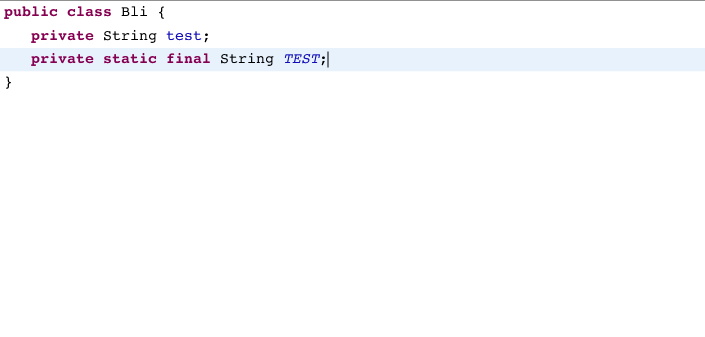
screen

Highlighting is nice but a more important feature is auto-complete and so I ported more and more of the JDT-UI infrastructure and the result in shown in the video below which shows a prototype of an IDE I’m working on for my EclipseCon talk.

Posted in e(fx)clipse | 10 Comments

From StyledTextViewer to a StyledTextEditor with JavaFX8

The title already says what this is about

the internal code is a bit ugly and I’m using some brute force stuff to simply get it going, naturally there are missing features like selection, … . Next is to port more stuff from Eclipse-Text-Infrastructure and integrate with JDT once more.

The sourcecode is found at e(fx)clipse github repo

Posted in e(fx)clipse | 12 Comments

Speeding up TextFlow for JavaFX8 (by a factor of ~100)

So at the end of last week I blogged about my experiments to get a styled text viewer for (java) source using the new TextFlow-Support in JavaFX8, I did a short screencast and there you noticed that for larger source files the rendering speed was not acceptable anymore.

I’ve worked a bit on it last night and take a look at this result:

The really cool thing is that the API of my StyledTextArea is fairly the same than the one from SWT-StyledText (in fact also many of the inner workings are a shameless copy from SWT!) this will make it super easy to use and adjust the current text parsing infrastructure used by the Eclipse IDE.

public class StyledTextArea extends Control {
  public void setContent(StyledTextContent content) {
    // ...
  }

  public StyledTextContent getContent() {
    // ...
  }

  public ObjectProperty<StyledTextContent> contentProperty() {
    // ...
  }

  public void setStyleRange(StyleRange range) {
    // ...
  }

  public void setStyleRanges(int start, int length, int[] ranges, StyleRange[] styles) {
    // ...
  }

  public void setStyleRanges(int[] ranges, StyleRange[] styles) {
    // ...
  }

  public void setStyleRanges(StyleRange[] ranges) {
    // ...
  }

  public void replaceStyleRanges(int start, int length, StyleRange[] ranges) {
    // ...
  }

  public StyleRange[] getStyleRanges(int start, int length, boolean includeRanges) {
    // ...
  }
}

Ok. This was the easy part, next is to somehow add editing functionality, I have no freaking idea on how to do it.

Posted in e(fx)clipse | 5 Comments

Experimenting with TextFlow from JavaFX8

I’ve spend tonight doing some experiments with combining the org.eclipse.text-Support and JavaFXs new TextFlow which allows to one to render complex texts. The result of this 3 hours is astonishing! I have a working SourceViewer (please note it is ONLY a viewer without editing support!).

Here are some screenshots:
screen_1

screen_2

screen_3

I’ve recorded a small video so that you can see it in action:

The scrolling performance is great but you’ll notice that the initial rendering of big files (> 10.000 lines) takes some time. So while this is Ok for a prototype time has to be spend on the performance for a real world app (I also hope there are optimization possibilities in JavaFX itself), adding editing needs logic to only modify parts of the TextFlow model but I hope I can find some time to give it a try.

Posted in e(fx)clipse | 13 Comments