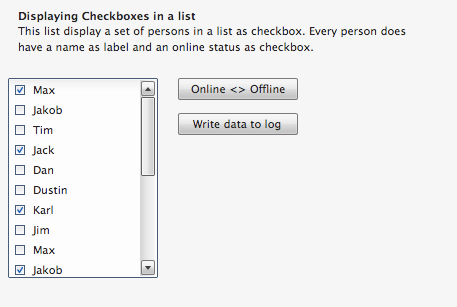
e4 – why you don’t need e5

This was orginally a reply on Elias post on e5:

On “should take risks”:
We agreed that e4 would be compatible with 3.x. Is not 100% correct: We agreed on the fact that e4 will provide a compat layer so that people can run the 3.x plug-ins which is a completely different thing IMHO because the underpinning designs of e4 are not influenced by this fact.

So what you suggest is what we’ve done in e4 we started with a new set of ideas and code leaving the old one behind already which you notice if you look at the plain e4-bundles in CVS.

On “needs a driver”:
The driver for e4 in my way of thinking is RCP and though you probably don’t believe we are on a good way to make development of RCP much easier. Yet what is missing is tooling, wizards and documentation and people who mastered to learn programming e4-Applications and give you a lending hand.

There’s no need anymore for using plugin.xml for example. You can create an e4 application in a fully programmatic way only you don’t know it as a newcomer.

On “must be easy to learn & master”:
I agree but we should not forget what we are talking about. This are not HelloWorld-programs nor a simple webpages. We are talking about business applications. Still this is a valid point and we need to do our best to give people convenience tools and API to hide away the natural complexities of a multi purpose platform like e4 is one.

General sum up:
I really don’t think that you need an e5 any time soon if you look at how modular e4 is designed from scratch with

  • its extensible workbench-model at the bottom (it even allows you to add your own workbench concepts if you are unhappy with the one coming with e4)
  • its plugable rendering structure on the top
  • its abandoning of singletons making it useable in multi-user environments like RAP (by the use of DI)
  • its leveraging of OSGi (Direct support for OSGi-Services through DI, usage of the OSGi-EventSystem)
  • its even looser coupeling by the use of DI (e.g. I have code I run as plain SWT-Application and inside e4-Applications)

and this all with a really really small amount of size (as Boris already explained in his former reply your numbers are incorrect). The killer feature of e4 is that it comes with concepts and strategies to write UI applications but doesn’t force you the way to do it in certain way by allowing you to exchange (most) of them:

  • You don’t like plugin.xml to make up your UI – Great don’t use it and make up the workbench model from code, your own DSL (e.g. there’s an Xtext-Tutorial at EclipseCon where they show of how to define an Workbench-Model using a DSL), …
  • You don’t like the limitation of SWT or some of their controls – Great don’t use them and replace them with your own ones (and this even by not controling the Application-Startup like you had to do in your Ribbon-Examples for 3.x) by writing your own IPresentation engine which has about 5 methods you need to implement
  • You don’t even like SWT at all – Great don’t use it, use Swing, Qt, ncurses and write your own renderers
  • You don’t like DI but prefer to reach out to the OSGi-Service-Registry your own – Great do it. The argument that you don’t know which services are available is a tooling and documentation issue. The argument that you don’t know which services are available at a given time is something you need to get used to in dynamic environments like OSGi but at least e4 (when using DI) saves from writing code to handle this

I think e4 with the right documentation gives you (and many many people out there) exactly what you/they want so before starting to think about e5 I hope you dive deeper and exploit its possibilities.

To end this post what I like most about e4 is: It gives me back control of almost everything – if I want to – and I can’t live without this power (anymore).

Posted in e4 | 6 Comments

UFaceKit – 2 (new) interesting features in latest nightly

Like the title already says the latest nightly build comes with 2 amazing features one already part of the code base since a long time (XPath to traverse the UI-DOM) the second one just hit SVN (plugable model-item mapping). I’m going to discuss them in short in this blog posting.

Plugable Model-Item-Mapping

You probably ask yourself. What’s this and why should I care. To understand the problem you must know how the current JFace-Viewers are working internally and which problems this can cause.

JFace-Viewers store strong Java-References between the domain model and the SWT-Item using TableItem#setData(Object)/TreeItem#setData(Object) and additionally if you turn on hashlookup (to speed up setting of selections, …) in an internal HashTable.

The problem with this is that your domain model stays resident in memory as long as the TableItem exists even if no one really needs it until you e.g. want to update the table-item. This implementation detail of current JFace-Viewers makes the use of CDO in UI less ideal because CDO can’t apply it’s clever memory management because your UI code holds strong references into your domain-object graph.

One can overcome this problem in JFace-Viewer world as well by writing some clever Content- and LabelProviders (The implementation is also available from our repository but not part of a build yet) but in my opinion not ideal from a users point of view. Moreover I think a viewer framework should have the possibility to plug-in “your” mapping strategy (e.g. provided by the domain-technoloy project you are using) according to the use case.

That’s why I decided that this feature has to be part of the core UFaceKit-Viewer-Framework and the support of it has just hit the SVN-Repository and is part of my shining new nightly athena build.

/*******************************************************************************
 * Copyright (c) 2010, BestSolution.at and others
 * All rights reserved. This program and the accompanying materials
 * are made available under the terms of the Eclipse Public License v1.0
 * which accompanies this distribution, and is available at
 * http://www.eclipse.org/legal/epl-v10.html
 *
 * Contributors:
 *     Tom Schindl <tom.schindl@bestsolution.at> - Initial API and implementation
 *******************************************************************************/
package org.eclipse.ufacekit.ui.jface.cdo.viewers;

import java.util.Collection;
import java.util.Collections;
import java.util.HashMap;
import java.util.Map;

import org.eclipse.emf.cdo.CDOObject;
import org.eclipse.emf.cdo.common.id.CDOID;
import org.eclipse.emf.cdo.view.CDOView;
import org.eclipse.ufacekit.ui.jface.viewers.Viewer;
import org.eclipse.ufacekit.ui.jface.viewers.mapping.AbstractTableItemModelMapping;

public class CdoModelTableItemMapping<ModelElement extends CDOObject,Item extends org.eclipse.swt.widgets.Item> extends AbstractTableItemModelMapping<ModelElement, Item> {
  private CDOView view;
  private Map<CDOID, Item> map;

  public CdoModelTableItemMapping( CDOView view, Viewer<ModelElement, ?> viewer) {
    super(viewer);
    this.view = view;
    this.map = new HashMap<CDOID, Item>();
  }

  @Override
  public void associate(ModelElement model, Item item) {
    if (map.containsKey(model.cdoID())) {
      throw new IllegalStateException("This mapping only supports one instance of a model element");
    }
    item.setData(model.cdoID());
    map.put(model.cdoID(), item);
  }

  @Override
  public void disassociate(Item item) {
    map.remove(item.getData());
    item.setData(null);
  }

  @Override
  public void disassociateAll() {
    map.clear();
  }

  @SuppressWarnings("unchecked")
  @Override
  public ModelElement lookup(Item item) {
    return (ModelElement) view.getObject( (CDOID)item.getData() );
  }

  @Override
  public Collection<Item> lookup(ModelElement element) {
    Item item = (Item) map.get(element);
    if( item != null ) {
      return Collections.singleton(item);
    }

    return Collections.emptyList();
  }
}

This implementation is completely untested but I think you should get the point because we are not restoring the domain object but look it up from our local CDOView we can once more rely on CDOs clever memory management. Nice isn’t it?

XPath support to traverse your UI-DOM

This feature is part of UFaceKit sources since day one in the SVN-Repository but I added it not into the first nightly builds. I think the XPath support for UIs is a fairly unique feature of UFaceKit and the reflective API makes it extremly easy to implement it operations like e.g. applying changes to a many widgets.

package testproject;

import java.util.Iterator;

import org.eclipse.core.runtime.IStatus;
import org.eclipse.core.runtime.Status;
import org.eclipse.equinox.app.IApplication;
import org.eclipse.equinox.app.IApplicationContext;
import org.eclipse.ufacekit.core.xpath.common.XPathContext;
import org.eclipse.ufacekit.core.xpath.common.XPathContextFactory;
import org.eclipse.ufacekit.ui.core.UIDesktop;
import org.eclipse.ufacekit.ui.core.UIFactory;
import org.eclipse.ufacekit.ui.core.UIRunnable;
import org.eclipse.ufacekit.ui.core.UIWidget;
import org.eclipse.ufacekit.ui.core.controls.UIApplicationWindow;
import org.eclipse.ufacekit.ui.core.controls.UIButton;
import org.eclipse.ufacekit.ui.core.controls.UIComposite;
import org.eclipse.ufacekit.ui.core.controls.UIInputField;
import org.eclipse.ufacekit.ui.core.controls.UILabel;
import org.eclipse.ufacekit.ui.core.controls.UIApplicationWindow.ApplicationWindowUIInfo;
import org.eclipse.ufacekit.ui.core.controls.util.Rectangle;
import org.eclipse.ufacekit.ui.core.form.UIGridFormBuilder;
import org.eclipse.ufacekit.ui.core.layouts.GridLayoutData;
import org.eclipse.ufacekit.ui.core.layouts.UIFillLayout;
import org.eclipse.ufacekit.ui.core.layouts.GridLayoutData.Alignment;
import org.eclipse.ufacekit.ui.core.xpath.UFacekitXPathContextFactory;
import org.eclipse.ufacekit.ui.jface.core.JFaceFactory;
import org.eclipse.ufacekit.ui.uform.UBeanForm; 

public class Application implements IApplication {

  public Object start(IApplicationContext context) throws Exception {
    JFaceFactory factory = new JFaceFactory();
		
    final UIDesktop desktop = factory.newDesktop();
    desktop.runWithDefaultRealm(new UIRunnable<UIDesktop>() {
      @Override
      protected IStatus run(UIDesktop arg0) {
        createUI(arg0);
        return Status.OK_STATUS;
      }
    });
    desktop.run();

    return IApplication.EXIT_OK;
  }
	
  private void createUI(UIDesktop d) {
    UIFactory<?> f = d.getFactory();
		
    UIFillLayout l = f.newFillLayout();
    final UIApplicationWindow window = f.newApplicationWindow(d, new ApplicationWindowUIInfo(l));
    window.setText("UFaceKit - Hello World");
		
    UIComposite comp = f.newComposite(window, new UIComposite.CompositeUIInfo(null, f.newGridLayout(1)));
    UILabel label = f.newLabel(comp, new UILabel.LabelUIInfo(GridLayoutData.fillHorizontalData()));
    label.setText("Form Example");
		
    UBeanForm form = new UBeanForm(f);		
		
     UIGridFormBuilder builder = UIGridFormBuilder.newInstance(comp, GridLayoutData.fillHorizontalData(), form);
     builder.newLabel("Firstname");
     builder.newInputField(UIInputField.InputFieldBindingInfo.newTextFieldInfo(form.detailValue(Person.FIRSTNAME, String.class)) );
		
      builder.newLabel("Surname");
      builder.newInputField(UIInputField.InputFieldBindingInfo.newTextFieldInfo(form.detailValue(Person.SURNAME, String.class)) );
		
      UIButton button = f.newButton(comp, new UIButton.ButtonUIInfo(new GridLayoutData(Alignment.END, Alignment.DEFAULT)));
      button.setText("Save");
      button.setActionRunnable(new UIRunnable<UIButton>() {

      @Override
      protected IStatus run(UIButton b) {
        XPathContextFactory<UIWidget> factory = UFacekitXPathContextFactory.newInstance();
        XPathContext context = factory.newContext(b.getParent());
				
        Iterator<?> iterator = context.iterate("UIComposite/UIInputField");
        boolean flag = true;
        while( iterator.hasNext() ) {
          UIInputField field = (UIInputField) iterator.next();
          if( field.getText().equals("") ) {
            flag = false;
            field.getStyle().setBackground("#ff0000");	
          } else {
            field.getStyle().setBackgroundColor(null);
          }
        }
				
        if( ! flag ) {
          b.getDesktop().showErrorDialog(
            b.getWindow(), 
            "Validation Error", 
            "Required fields are marked read", 
            new Status(IStatus.ERROR, Activator.PLUGIN_ID, ""),
            null );
        }
				
        return Status.OK_STATUS;
      }
    });
    window.open();
    window.setBounds(new Rectangle(500, 400, 400, 250));
  }

  public void stop() {
    // nothing to do
  }
}

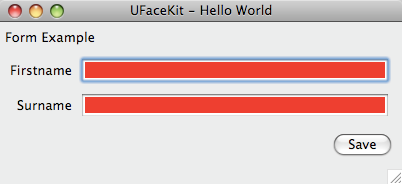
This creates an UI like this:

Posted in UFaceKit | Leave a comment

Consumeable UFaceKit-Builds for SWT

This a remarkable day in the history of UFaceKit because since today we can provide consumeable nightly builds to install or create a target platform.

A big thank you to Chris Aniszczyk and Pascal Rapicault who helped me in getting my build in shape – I hope to meet you at EclipseCon and pay you some beers.

Let’s take a look how one get his/her hands dirty on UFaceKit for SWT:

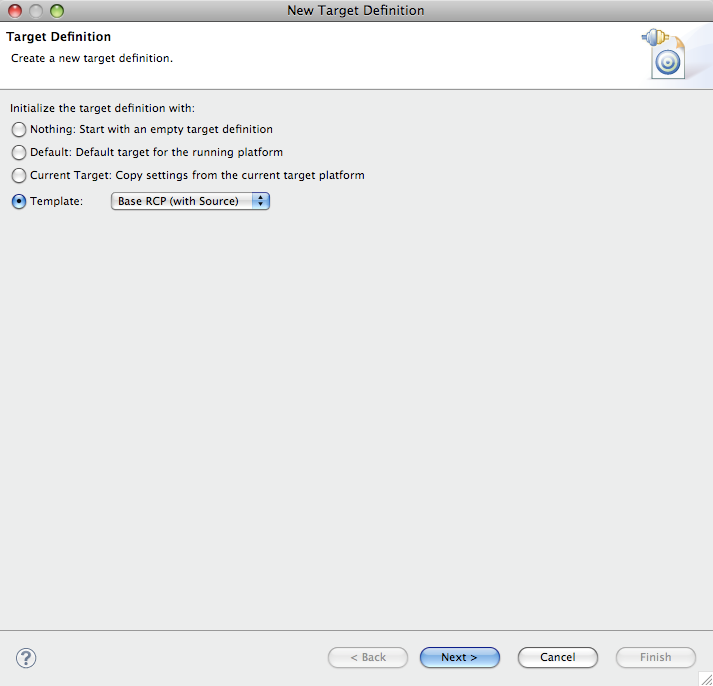
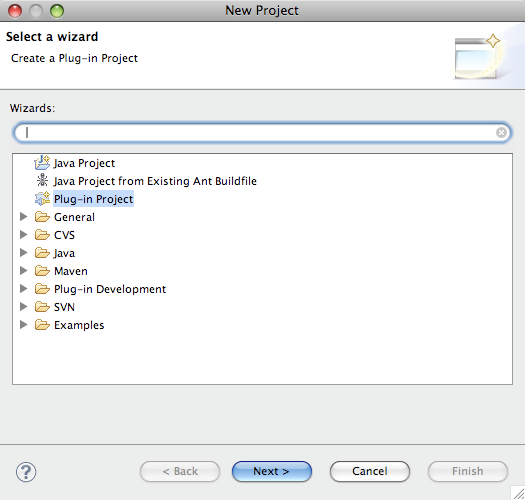
  • Create a new target platform with the following steps
    • Open the target platform properties page
    • Select the RCP-With-Source-Template
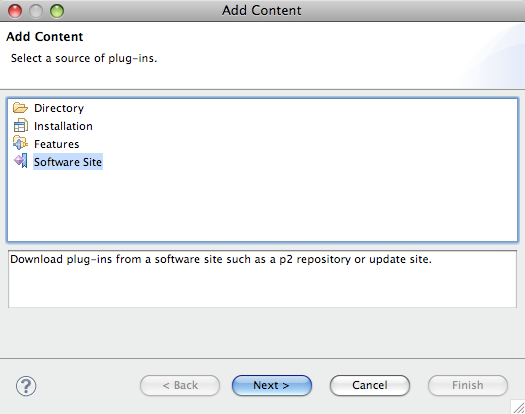
    • Select Add… on the page to add additional plugins and select “Software Site” on the opened dialog
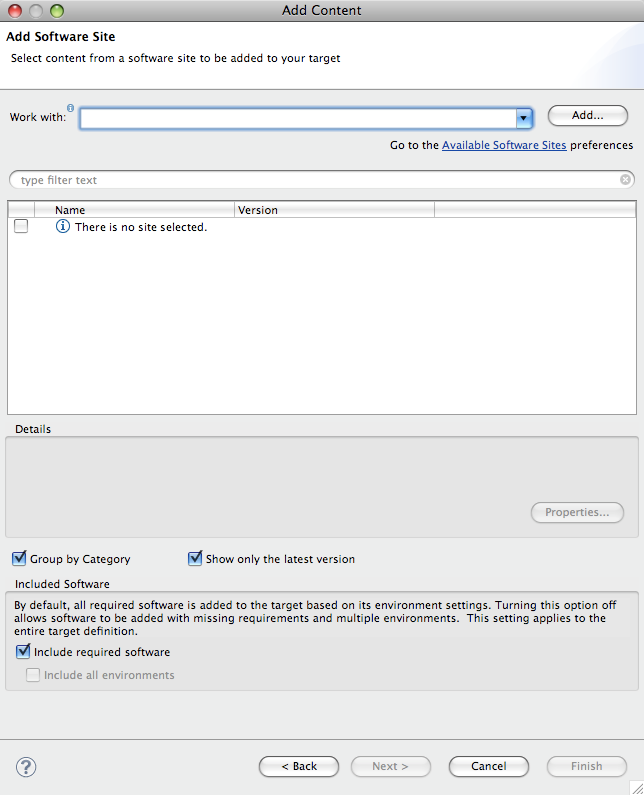
    • Click once more the Add…-Button
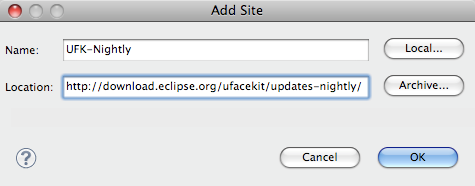
    • Insert as URL http://download.eclipse.org/ufacekit/updates-nightly/
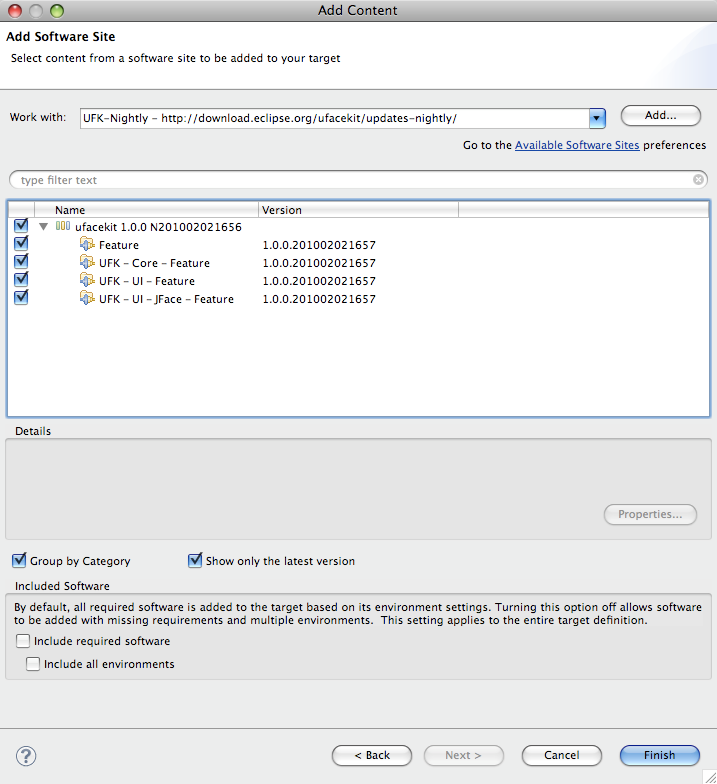
    • Check the top most checkbox in the tree shown and VERY IMPORTANT UNCHECK “Include required software”
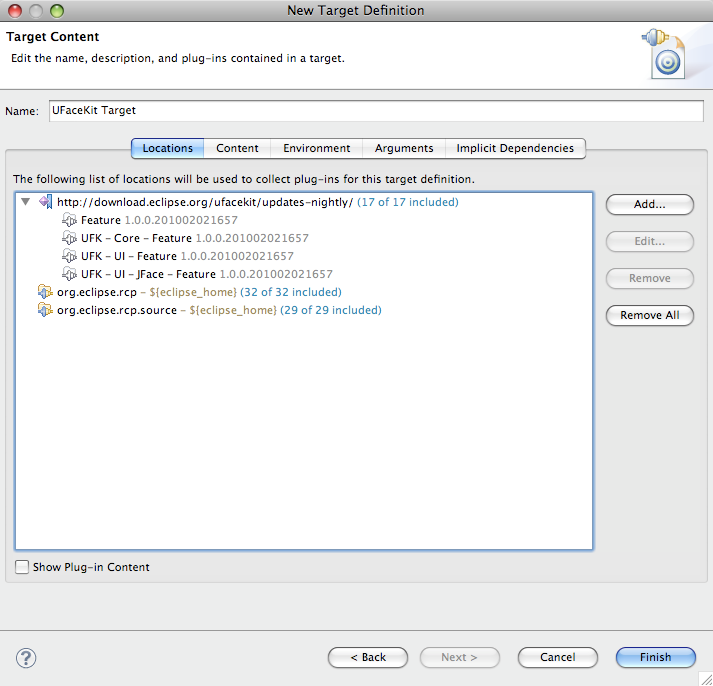
    • Enter a name for the target
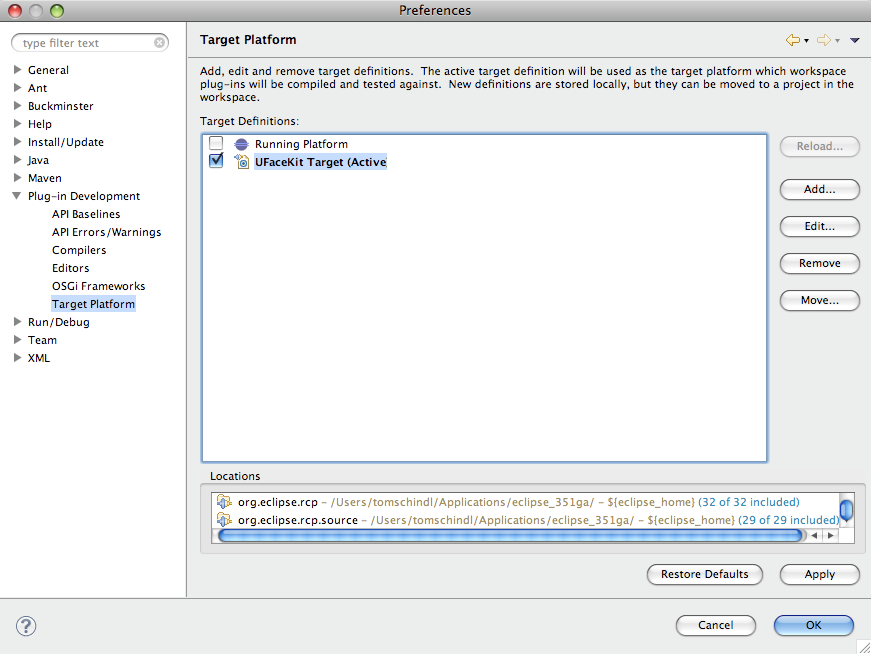
    • Activate the new target

    Now we are ready to create our first UFaceKit-Application:

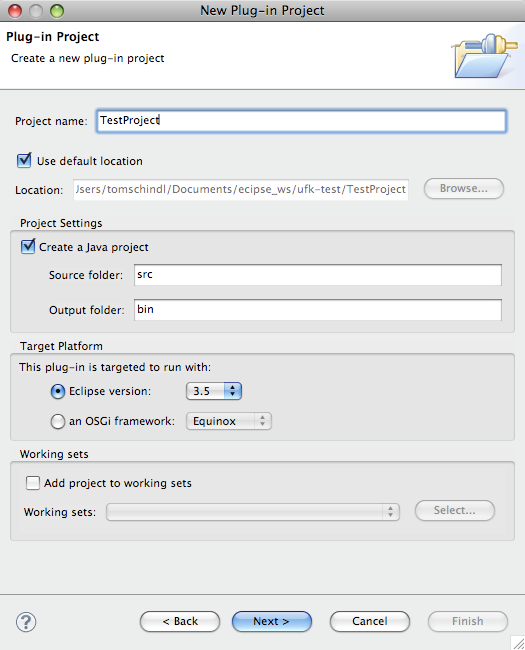
    • Select Plugin-Project
    • Give the Project a Name
    • Uncheck “This plug-in will make contributions to the UI”
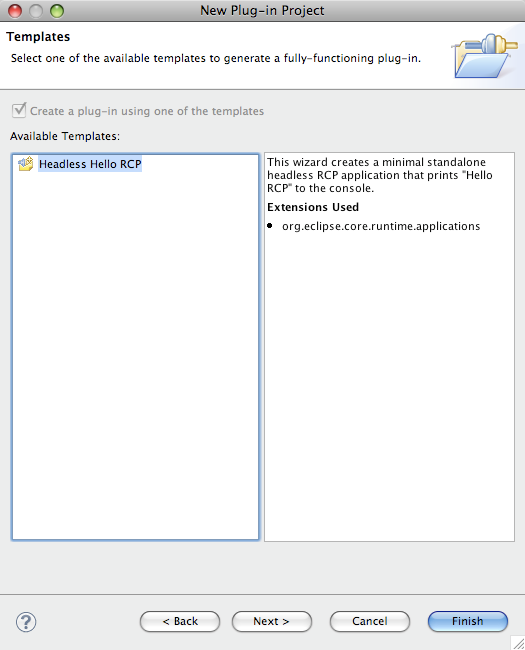
    • Select the Headless template
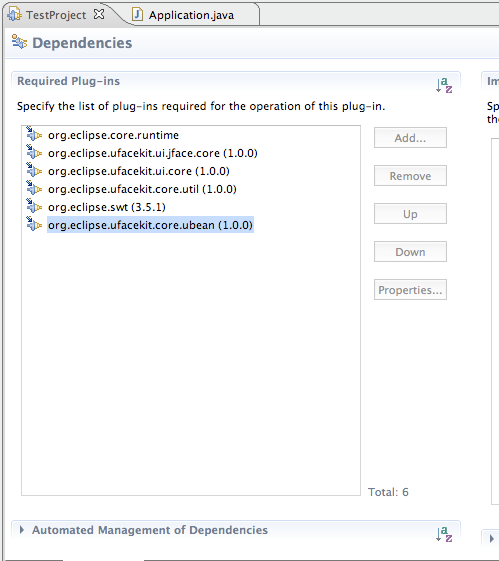
    • Open the MANIFEST.MF and add the following Bundles:
      • org.eclipse.ufacekit.ui.jface.core
      • org.eclipse.ufacekit.ui.core
      • org.eclipse.ufacekit.core.util
      • org.eclipse.swt;bundle-version
      • org.eclipse.ufacekit.core.ubean

The project is now configured appropriately. Now let’s create an HelloWorld-Application. Open the Application.java-File and make it look like this:

import org.eclipse.core.runtime.IStatus;
import org.eclipse.core.runtime.Status;
import org.eclipse.equinox.app.IApplication;
import org.eclipse.equinox.app.IApplicationContext;
import org.eclipse.ufacekit.core.util.DataRunnable;
import org.eclipse.ufacekit.ui.core.UIDesktop;
import org.eclipse.ufacekit.ui.core.UIRunnable;
import org.eclipse.ufacekit.ui.core.controls.UIApplicationWindow;
import org.eclipse.ufacekit.ui.core.controls.UIButton;
import org.eclipse.ufacekit.ui.core.controls.UIButton.ButtonUIInfo;
import org.eclipse.ufacekit.ui.core.controls.UIApplicationWindow.ApplicationWindowUIInfo;
import org.eclipse.ufacekit.ui.core.controls.util.Rectangle;
import org.eclipse.ufacekit.ui.core.layouts.UIFillLayout;
import org.eclipse.ufacekit.ui.jface.core.JFaceFactory;

public class Application implements IApplication {

  public Object start(IApplicationContext context) throws Exception {
    JFaceFactory f = new JFaceFactory();
		
    final UIDesktop dk = factory.newDesktop();
		
    UIFillLayout layout = f.newFillLayout();
    ApplicationWindowUIInfo d = new ApplicationWindowUIInfo(layout);
    final UIApplicationWindow window = f.newApplicationWindow(dk, d);
    window.setText("UFaceKit - Hello World");
    
    ButtonUIInfo d1 = new UIButton.ButtonUIInfo(null)
    UIButton button = f.newButton(window, d1);
    button.setText("Click me");
    button.setActionRunnable(new UIRunnable<UIButton>() {
      @Override
      protected IStatus run(UIButton arg0) {
        DataRunnable<Boolean> run = new DataRunnable<Boolean>() {
          public void run(Boolean arg0) {
            if( arg0 ) {
              System.out.println("Good Boy/Girl");
            } else {
              System.out.println("Too bad.");
            }
          }
        }
        dk.showQuestionDialog(window, "Question", "Do you like UFaceKit?", run);
        return Status.OK_STATUS;
      }
    });
    window.open();
    window.setBounds(new Rectangle(500, 400, 400, 100));
    dk.run();

    return IApplication.EXIT_OK;
  }

  public void stop() {
    // nothing to do
  }
}

I think the code is quite self-explanatory but there are some remarkable things you should have noticed:

  1. No SWT-Imports
  2. Beside the factory creation all code is UI-Technology agnostic (and it’s quite easy to get rid of this by using Declarative Services because UFaceKit is designed with the idea of “UI as a service”)
  3. Blocking operations like showQuestionDialog() get passed a callback – this is needed because one of the target platforms is Web-Browsers who have no concept of an event loop

I’m going to transfer this content over to UFaceKit-Wiki in the following days and write other tutorials on how to exploit other features of UFaceKit like:

  • Declarative Styling
  • Applying XPaths to your UI-Dom
  • Built-in databinding

One more note: The UFaceKit-SWT port is feature complete and stable since about 6 months and there hardly any todos before releasing 1.0.0 of the SWT-Port so it’s really useable and I hope that some people give it a try and report back problems so that I can release a very stable build.

The only real blocker for a 1.0.0 release is that the test suite is not completed yet and I won’t release before having a complete test suite which helps me to avoid regressions in future versions and ensure compability of future platform ports to the API contract defined.

Posted in UFaceKit | 1 Comment

QxWT 1.0.1.0-rc1 and other cool stuff

As the blog title suggest I’ve uploaded a first release candidate for the QxWT 1.0.1.0 which is going to be released on about a month.

The most important new features coming with this release:

  • Postprocessing to use qooxdoo toolchain
  • Support for Databinding

Beside this I am in need of a browser charting library and played around a bit with Raphael this weekend which also has a very tiny charting module which is released under MIT. Because of my QxWT-work I’m quite good now in writing JSNI-Wrappers and so I did that for Raphael. You can look at the result of this here.

The wrapper is released under EPL and LGPL and I guess QxWT will in cooperate this library in 1.0.1.0.

Posted in Announcements, GRaphael, QxWT | 4 Comments

Looking back and into the future – First conclusions

I admit I’ve been depressed a bit after having looked back to year 2009 because making the summary showed that I failed in most of my Eclipse “Jobs”. Until then I’ve had a lot of fun working on OpenSource projects but still the question remains how to do a better job in 2010.

My current belief is that I tried to help in my spare time at too many places and this has to change so that looking back on to 2010 is better than it’s been to the last year.

Here are the first 2 action items

  • Action-Item 1: Unsubscribe from newsgroups. Hard but saves me about 1 hour a day answering questions on platform, swt, jface newsgroups. To me it’s an imporant task every committer has to fullfill but because of action item 2 I’m not in charge of this any more.
  • Action-Item 2: Those of you who are attached to the ~80 platform bugs I owned might already received a mail. I plan to step back as a platform-ui-comitter after EclipseCon. This is one of the really hard decision because getting the comittership on the platform was the door opener for me to the Eclipse Ecosystem but when looking back to the last year I’ve the feeling that I don’t deserve the committer status any more and owning bugs I’ve no time nor business use case for is harming more than it helps.
    • A strange thing is that I lately had discussions with different people who stated that they wanted bring in stuff into the platform (or require bugfixes) but failed because none of the committers had enough time to work with them on their contribution. I told them and repeat it once more that I’d be willing to help them but don’t have the resources to do so.

      My current hope is that I can find my way back into e4 development but if I see me failing there as well in the next 2 months I guess I’ll also step back from my committership there also (though I also believe that some things I’d like e4 come with e.g. flexible modeled workbench loading e.g. from CDO won’t be available in 1.0 then).

Posted in Eclipse | 3 Comments

QxViewers – The first steps towards a UFaceKit-Webport

I’ve talked a lot (1,2,3,4) lately about my progress on QxWT towards release 1.0.0.2. Now that all the codeing is done more or less I can restart working on my master plan:

Single APIing for Web and Desktop programing use Eclipse Libraries like Eclipse Databinding – In short UFaceKit

Having completed the SWT-Port more or less since some time, having portotype implementations for Qt and Swing (to check if the concept can be transfer easily to other Desktop-UI-Frameworks) the missing thing is a port for a Web-UI-Framework.

The problem is in the Web/GWT-UI space that GWT itself comes with a very restricted UI library missing important things like Table/TreeTables for example and one needs an external framework. I couldn’t find a framework that fully satisfied my needs (most important a clear, reliable license scheme allowing me to use it in commercial applications) so I started my work on QxWT and now that this framework enters in a stable phase I can once more shift sources back to UFaceKit.

To get to a first UFaceKit-Webport I have the following workitems:

  1. Done: Eclipse Databinding 3.5.2 for GWT – (no builds until Eclipse 3.5.2 itself is declared)
  2. In progress: UFaceKit-Viewers for QxWT-Structured-Controls – this gives automagically support for ufacekit-viewers-databinding because UFaceKit-Viewers are split in generic and widget-toolkit parts and ufacekit-viewers-databinding only talks to the generic part
  3. Not started: UFaceKit-Wrapper for QxWT – the thoughest thing might be to write write the native layouts

As the blog title suggests I’ve made good progress today and I can show off the first demo results from this work. The implementations are not finished yet but for people who are familiar with JFace-Viewers lines like the following might look familiar (beside the obvious Java5 features of UFaceKit-Viewers):

/** 
 * Combo Viewer Setup
 */
ComboViewer<Person, Collection<Person>> viewer = new ComboViewer<Person, Collection<Person>>();
viewer.setContentProvider(new CollectionContentProvider<Person>());
viewer.setLabelConverter(new LabelConverter<Person>() {
  @Override
  public String getText(Person element) {
    return element.getFirstname() + ", " + element.getLastname();
  }
});

Collection<Person> ps = new ArrayList<Person>();
for (int i = 0; i < 300; i++) {
  ps.add(new Person("First " + i, "Last" + i, i));
}
viewer.setInput(ps);

/**
 * TableViewerSetup
 */
TableViewer<Person, Collection<Person>> tableViewer = new TableViewer<Person, Collection<Person>>();
tableViewer.setContentProvider(new CollectionContentProvider<Person>());

TableViewerColumn<Person> col = new TableViewerColumn<Person>(tableViewer, "Firstname");
col.setLabelConverter(new LabelConverter<Person>() {
  @Override
  public String getText(Person element) {
    return element.getFirstname();
  }
});

// ...
Collection<Person> ps = new ArrayList<Person>();
for (int i = 0; i < 300; i++) {
  ps.add(new Person("First " + i, "Last" + i, i));
}
tableViewer.setInput(ps);

/**
 * TreeViewer setup
 */
TreeViewer<Person, Collection<Person>> viewer = new TreeViewer<Person, Collection<Person>>();
viewer.setLabelConverter(new LabelConverter<Person>() {
  @Override
  public String getText(Person element) {
    return element.getLastname() + ", " + element.getFirstname() + " ("+ element.getAge() + " years)";
  }
});

viewer.setContentProvider(new ITreeContentProvider<Person, Collection<Person>>() {
  public Collection<Person> getChildren(Person parentElement) {
    return parentElement.getChildren();
  }

  public Person getParent(Person element) {
    return element.getParent();
  }

  public boolean hasChildren(Person element) {
    return element.getChildren().size() > 0;
  }

  public void dispose() {
  }

  public Collection<Person> getElements(Collection<Person> inputElement) {
    return inputElement;
  }

  public void inputChanged(IViewer<Person> viewer, Collection<Person> oldInput, Collection<Person> newInput) {
  }
});
viewer.setInput(setupData());

The widgets look like this:

I’d like to point out once more that UFaceKit is structured in a way that you can use all parts independently from each other. So if you are in need to a Databinding-Framework for GWT and a light weight Domain-Technology like UBean then you can use them, you only need Java5 ready viewers for SWT and Databinding integration, … all of them are useable standalone with minimal dependencies.

Beside that I’m still struggeling with setting up a build for the SWT-Port on the Eclipse-Servers so that people can start consume stuff from there but that’s a problem many small project suffer.

Posted in QxWT, UFaceKit | Leave a comment

e4@JUGS

Yesterday I presented e4 to members of the JavaUserGroup Schweiz. There’ve been 80+ people (I was told that this was the highest number of participants ever taken part in Special Interest Group talk).

I’d like to thank Edwin Steiner from inventage for giving me/us the possibility to present e4 to a interested group of people. I think the talk ones more was quite well received (which was every talk I gave about e4 in the last year BTW).

The slides I used in my presentation can be downloaded from here.

Posted in e4, Talks & Conferences | 3 Comments

QxWT explained Part 4

In the last 3 blog entries (part 1, part 2, part 3) we concentrated on generating JavaScript code using the GWT-Compiler integration and Java-Annotations. In this blog post we’ll concentrate on something completely different.

One of the major problems of JSNI-Wrappers for JavaScript libraries is that you always have to deliver the complete JavaScript-framework though you probably don’t need vast parts (e.g. your application doesn’t use a Tree-control so why still sending out the JS-Code for tree creation?).

A nice feature of the qooxdoo-library is that it comes with a toolchain which analyzes your code dependencies and creates an optimized js-Files for you only holding the code and classes you really need (please note this is still not as good as GWT because GWT even strips out methods you are not calling).

The task now is that we need to teach QxWT to spit out informations about which Java-Classes are used in your application and collect somewhere which JavaScript-class(es) those are related to.

Step 1: Is once to define an annotation:

/**
 * This holds meta informations about JS-Resource-Files required by this class
 */
public @interface QxJsResource {
  /**
   * @return list of qooxdoo javascript resource files
   */
  String[] jsResourceFiles();
}

Step 2: make the GWT-Generator regonize those meta information

Well the GWT-Generator only steps in when creating a Class-Instance using GWT.create() which is a bit of a problem for us because this would required that people create widget-classes like this:

QxLabel l = GWT.create(QxLabel.class);

instead of

QxLabel l = new QxLabel();

beside that inconvenience the second problem is that this concept assumes that there’s a no-arg constructor which is not available always in QxWT and there are even static classes which are not instantiated at all. This means we need to find some other way to make the GWT-Generator to kick in.

The only solution I came up with was to create an inner class, call GWT.create() in an static-init block like this:

public class QxAtom extends QxWidget {
  @QxJsResource(jsResourceFiles={ "qx.ui.basic.Atom" })
  private static class I extends QxJsResourceBuilder {
		
  }
	
  static {
    GWT.create(I.class);
  }
}

Step 3: Collect informations in a GWT-Generator

The information we provide through the annonations have to be collected by a generator which and passed on to the GWT-Linking chain where we can access them and spit out a bootstrap class we can feed into the qooxdoo-Toolchain.

The Generator looks like this:

public class QxToolchainGenerator extends Generator {
  /**
   * {@inheritDoc}
   */
  @Override
  public String generate(TreeLogger logger, GeneratorContext context,
    String typeName) throws UnableToCompleteException {

    try {
      QxJsResource resource = context.getTypeOracle().getType(typeName).getAnnotation(QxJsResource.class);
      for( String jsFile : resource.jsResourceFiles() ) {
        QxToolchainArtifact art = new QxToolchainArtifact(jsFile);
        context.commitArtifact(logger, art);
      }
    } catch (NotFoundException e) {
      throw new UnableToCompleteException();
    }
    return null;
  }
}

The trick here is to generate a so called linker artifact we can pass on to the linker chain and plug in ourselves there with a class like this:

@LinkerOrder(Order.PRE)
public class QxToolchainLinker extends AbstractLinker {
  /**
   * {@inheritDoc}
   */
  @Override
  public String getDescription() {
    return "QooxdooToolChain";
  }

  /**
   * {@inheritDoc}
   */
  @Override
  public ArtifactSet link(TreeLogger logger, LinkerContext context,
    ArtifactSet artifacts) throws UnableToCompleteException {

    ArtifactSet toReturn = new ArtifactSet(artifacts);

    StringBuffer buf = new StringBuffer(template_1);

    for (QxToolchainArtifact e : toReturn.find(QxToolchainArtifact.class)) {
      buf.append("#require(" + e.getQxClassName() + ")\n");
    }
		
    buf.append(template_2);

    // Add a new artifact to the set that we're returning.
    toReturn.add(emitString(logger, buf.toString(), "class/qooxdoogwt/Application.js"));

    return toReturn;
  }
}

This generates the main-Application file used by qooxdoo as the start of an application (similar to class with the main-Method on your Java-Application). We add all collected information to this class using a special meta-data tag “#require” recognized by the qooxdoo toolchain.

Step 4: Call the qooxdoo tool chain

Calling the qooxdoo toolchain is not a very hard task but it still involves some steps you need to follow to use it with our QxWT-Project. That’s why QxWT 1.0.0.2 will come with an extra build-project which provides you with an ant-file to create an deployable QxWT-Application.

One only have to define in 2 parameters:

  • qxproject.name: the project name
  • qxproject.source: the project source directory

For my QxDemo-Project the call looks like this:

ant build.xml -Dqxproject.name=QxDemo -Dqxproject.source=/Users/tomschindl/ws/ufacekit/QxDemo
Posted in QxWT | 4 Comments

QxWT explained Part 3

I continue the blog post series (Part 1, Part 2) about the internal of QxWT by describing how one can even extend qooxdoo-JS-classes using the GWT-generator features without writing a single line of JavaScript-code.

In the last blog entry we learned how to define a qooxdoo-JS-Class from scratch which was quite an easy task and so is the extending of qooxdoo classes. The idea is that we need to generate code which overloads an existing qooxdoo-class method and delegate the method call to our JavaCode.

Let’s take a look at an qooxdoo-example at first to see how extending a class and changing it’s behavior is done in “native” code. A good example is the JsonStore which makes it very easy to work with JSON-Datasources in qooxdoo.

A problem though is that if you need to load the data from an URL which is different than the one our application is coming from you can not use the JsonStore coming with the qooxdoo-framework but need to extend it so that the requested is done differently.

In plain qooxdoo a specialized JsonStore which e.g. connects to twitter looks like this:

qx.Class.define("demobrowser.demo.data.store.Twitter",
{
  extend : qx.data.store.Json,

  statics : {
    saveResult: function(result) {
      this.__result = result;
    }
  },

  construct : function(user)
  {
    var url = "http://twitter.com/statuses/user_timeline/" + user + ".json";
    this.base(arguments, url);
  },

  members :
  {
    _createRequest: function(url) {
      var loader = new qx.io.ScriptLoader();
      url += "?callback=demobrowser.demo.data.store.Twitter.saveResult";
      loader.load(url, function(data) {
        this.__loaded();
      }, this);
    },


    __loaded: function() {
      var data = demobrowser.demo.data.store.Twitter.__result;

      if (data == undefined) {
        this.setState("failed");
        return;
      }

      // create the class
      this._marshaler.toClass(data);
      // set the initial data
      this.setModel(this._marshaler.toModel(data));

      // fire complete event
      this.fireDataEvent("loaded", this.getModel());
    }
  }

The above class inherits from the base implementation and overloads the method _createRequest to make a cross domain request. What we want to achive is that the GWT-Generator creates a qooxdoo-class like this:

qx.Class.define("demobrowser.demo.data.store.Twitter",
{
  extend : qx.data.store.Json,
  members :
  {
    _createRequest: function(url) {
      // Delegate to Java
    }
  }
}

The first thing we need is another annotation which makes it possible to declare a Java method to be the delegate of the JavaScript-method:

/**
 * Define a the native method that will call back to this java method
 */
@Target(ElementType.METHOD)
public @interface QxNativeMethod {
  /**
   * @return name of the javascript method
   */
  String name();

  /**
   * @return <code>true</code> if the js method should call the overloaded
   *         method before delegating to java
   */
  boolean callsuper() default false;
}

We can now annotate Java-Methods like this:

@QxNativeMethod(name = "_createRequest")
public void qxcb_createRequest(String url) {
  // Logic written in Java
} 

and our GWT-Generator takes care of generating a qooxdoo-class and delegating method calls to our Java implementation.

Reimplementing the Twitter-JsonStore from above in plain QxWT would look like this:

@QxClass(jsBaseClass = "qx.data.store.Json", properties = {})
public abstract class TwitterStore extends QxJsonStore<Object> {
  private JavaScriptObject result;

  /**
   * @param o
   */
  public TwitterStore(JavaScriptObject o) {
    super(o);
  }

  @QxNativeMethod(name = "_createRequest")
  public void qxcb_createRequest(String url) {
    QxScriptLoader loader = new QxScriptLoader();
    url += "?callback=saveResult";
    VoidParam<String> statusCallback = new VoidParam<String>() {
      @Override
      public void invoke(String value) {
        loaded();
      }
    };
    VoidParam<JavaScriptObject> globalFunctionCallback = new VoidParam<JavaScriptObject>() {
       @Override
        public void invoke(JavaScriptObject value) {
           result = value;
        }
    };

    loader.load(url, statusCallback, "saveResult",globalFunctionCallback);
  }

  private void loaded() {
    if (result == null) {
      setState(State.FAILED);
      return;
    }

    QxModelObject model = QxJsonMarshaler.createModel(result, true);
    setModel(model);

    // fire complete event
    this.fireDataEvent("loaded", this.getModel());
  }
}

The Store can now be used like this:

// fetch some data from Twitter
final TwitterStore store = GWT.create(TwitterStore.class);
store.setUrl("http://twitter.com/statuses/user_timeline/wittemann.json");

Behind the scenes GWT generated the following Java-Class for us:

package org.ufacekit.qx.wrapper.demo.client.demobrowser.demo.data;

public class TwitterStore_Gen extends org.ufacekit.qx.wrapper.demo.client.demobrowser.demo.data.TwitterStore {

  /* Define the native-qooxdoo class and load it when the class is loaded */
  static { defineQxClass(); }

  private static native com.google.gwt.core.client.JavaScriptObject defineQxClass() /*-{
    $wnd.qx.Class.define("qxwt.org.ufacekit.qx.wrapper.demo.client.demobrowser.demo.data.TwitterStore_Gen",
    {
      extend : $wnd.qx.data.store.Json,
      properties : {

      }
      , members: {
        _createRequest: function(url) {
          this._gwt.@org.ufacekit.qx.wrapper.demo.client.demobrowser.demo.data.TwitterStore::qxcb_createRequest(Ljava/lang/String;)(url);
        }}
      });
    }-*/;

    /* Create an instance of the native class */
    private static native com.google.gwt.core.client.JavaScriptObject createNativeObject() /*-{
      var rv = new $wnd.qxwt.org.ufacekit.qx.wrapper.demo.client.demobrowser.demo.data.TwitterStore_Gen();
      return rv;
    }-*/;

    public TwitterStore_Gen() {
      super(createNativeObject());
    }

  }

I think this is once more a nice feature QxWT and GWT is bringing to you because it gives you the power to modify and extend framework classes quite easily without dealing with JavaScript but staying in your wellknown Java environment.

Though we now solved our uses cases from the last blog this blog series will continue because QxWT 1.0.0.2 is going to leverage the extensibility of the GWT-Compiler-Toolchain (GWT-Generator and Linker this time) even more by collecting meta data about the used QxWT-classes and feeding them into the qooxdoo-toolchain to optimize the qooxdoo framework code based upon your projects need. So stay tuned a give QxWT a try by checking out the dev-Demos provided and the source.

Posted in QxWT | 2 Comments

QxWT explained Part 2

In my last blog post I started explaining how QxWT adopters get support from us in release 1.0.0.2 (due end of February). We are going more into detail in this blog post.

Let’s once more recap what we are trying to achieve:

  • Generated qooxdoo class for domain model usage (e.g. when working with databinding and forms)
  • Extend exisiting qooxdoo classes

Since the last blog post the I added some more features so let’s look at the Annotations I presented in my last blog:

/**
 * Definition of a Qooxdoo-class
 */
@Target(ElementType.TYPE)
public @interface QxClass {
  /**
   * @return Java super class
   */
  String javaSuperClass() default "org.ufacekit.qx.wrapper.core.QxObject";

  /**
   * @return javascript base class
   */
  String jsBaseClass() default "qx.core.Object";
	
  /**
   * @return the fully qualified class name of the js-class generated
   */
  String jsClassName() default "N/A";
	
  /**
   * @return the properties
   */
  QxProperty[] properties();
}

and the property definition:

/**
 * A property of a qooxdoo object
 */
@Retention(RetentionPolicy.SOURCE)
public @interface QxProperty {
  /**
   * @return name of the property
   */
  String name();

  /**
   * @return the value to check for e.g. String, ...
   */
  String check() default "N/A";

  /**
   * @return the event
   */
  String event() default "N/A";

  /**
   * @return whether property can be null
   */
  boolean nullable() default false;

  /**
   * @return initial value
   */
  String init() default "N/A";
	
  /**
   * @return the class to wrap the init value in 
   */
  String initQxClass() default "N/A";

  /**
   * @return validate function to call
   */
  String validate() default "N/A";

  /**
   * @return the method called when the value is applied
   */
  String apply() default "N/A";
}

The information in the property are the ones one can use to when defining a class property.

We are now ready to address the first use case for and showing you an example how it is used in a demo:
Step 1: Define the domain interface

public interface Person extends IQxObject {

  public String getName();

  public void setName(String name);
	
  public String getEmote();

  public void setEmote(String emote);

  public boolean isOnline();

  public void setOnline(boolean online);

  public void toggleOnline();
}

Step 2: Annotate the interface

@QxClass(properties = {
  @QxProperty(check = "String", event = "changeName", name = "name", nullable = true),
  @QxProperty(check = "String", event = "changeEmote", name = "emote"),
  @QxProperty(check = "Boolean", event = "changeOnline", name = "online", init = "true")
})
public interface Person extends IQxObject {
  // ...

Step 3: Use the annotated interface in your GWT-Application

// names
String[] names = { "Max", "Jakob", "Tim", "Jack", "Dan", "Dustin","Karl", "Jim" };
String[] emotes = { "embarrassed", "kiss", "plain", "sad", "surprise","angel" };

// create the data
Person[] rawData = new Person[20];
for (int i = 0; i < 20; i++) {
  Person person = GWT.create(Person.class); 
  person.setName(names[i % names.length]);
  person.setEmote(emotes[i% emotes.length]);
  person.setOnline(i % 3 == 0);
  rawData[i] = person;
}

Easy isn’t it? Yes it is but how does it work? We’ve never defined a class which implements the Person interface nor there are things like dynamic proxy available in GWT. The important call is GWT.create(Person.class) which triggers the GWT-Generator which allows one to generate Javacode.

In case of the above the code generated looks like this:

package org.ufacekit.qx.wrapper.demo.client.demobrowser.demo.data.model;

public class Person_Gen extends org.ufacekit.qx.wrapper.core.QxObject implements org.ufacekit.qx.wrapper.demo.client.demobrowser.demo.data.model.Person {

  
  static { defineQxClass(); }

  private static native com.google.gwt.core.client.JavaScriptObject defineQxClass() /*-{
    $wnd.qx.Class.define("qxwt.org.ufacekit.qx.wrapper.demo.client.demobrowser.demo.data.model.Person_Gen",
    {
      extend : $wnd.qx.core.Object,
      properties : {
        name: {
          check : "String",
          event : "changeName",
          nullable : true
        },
        emote: {
          check : "String",
          event : "changeEmote",
          nullable : false
        },
        online: {
          check : "Boolean",
          event : "changeOnline",
          init : true,
          nullable : false
        }
      }
    });
  }-*/;

  
  private static native com.google.gwt.core.client.JavaScriptObject createNativeObject() /*-{
    var rv = new $wnd.qxwt.org.ufacekit.qx.wrapper.demo.client.demobrowser.demo.data.model.Person_Gen();
    return rv;
  }-*/;

  public Person_Gen() {
    super(createNativeObject());
  }

  public java.lang.String getName() {
    return  native_getName( getNativeObject() );
  }

  private native java.lang.String native_getName(com.google.gwt.core.client.JavaScriptObject self)/*-{
    return self.getName();
  }-*/;

  public void setName(java.lang.String name) {
     native_setName( getNativeObject() ,name);
  }

  private native void native_setName(com.google.gwt.core.client.JavaScriptObject self,java.lang.String name)/*-{
    return self.getName();
  }-*/;

  public void setName(java.lang.String name) {
     native_setName( getNativeObject() ,name);
  }

  private native void native_setName(com.google.gwt.core.client.JavaScriptObject self,java.lang.String name)/*-{
    self.setName(name == null ? null : name + "");
  }-*/;

  public java.lang.String getEmote() {
    return  native_getEmote( getNativeObject() );
  }

  private native java.lang.String native_getEmote(com.google.gwt.core.client.JavaScriptObject self)/*-{
    return self.getEmote();
  }-*/;

  public void setEmote(java.lang.String emote) {
     native_setEmote( getNativeObject() ,emote);
  }

  private native void native_setEmote(com.google.gwt.core.client.JavaScriptObject self,java.lang.String emote)/*-{
    self.setEmote(emote == null ? null : emote + "");
  }-*/;

  public boolean isOnline() {
    return  native_isOnline( getNativeObject() );
  }

  private native boolean native_isOnline(com.google.gwt.core.client.JavaScriptObject self)/*-{
    return self.isOnline();
  }-*/;

  public void setOnline(boolean online) {
     native_setOnline( getNativeObject() ,online);
  }

  private native void native_setOnline(com.google.gwt.core.client.JavaScriptObject self,boolean online)/*-{
    self.setOnline(online);
  }-*/;

  public void toggleOnline() {
     native_toggleOnline( getNativeObject() );
  }

  private native void native_toggleOnline(com.google.gwt.core.client.JavaScriptObject self)/*-{
    self.toggleOnline();
  }-*/;
}

A lot of code right! So what you are getting back from the call to GWT.create(Person.class) is an instance from this dynamically generated class named Person_Gen (If you are interested how this works you should take a look at QxClassGenerator.java).

The nice thing is that we can now directly use such an instance or list of instances as input for qooxdoo-Databinding:

QxArray<Person> p = QxArray.breed(rawData);
		
final QxDataArray<Person> data = new QxDataArray<Person>(p);
		
// create the widgets
QxFormList<QxFormListItem> list = new QxFormList<QxFormListItem>();
list.setWidth(150);
// add the widgets to the document
container.add(list, QxOption.leftTop(10, 80));

// create the controller
QxListController<Person,QxFormCheckBox> controller = new QxListController<Person,QxFormCheckBox>(null, list);

Delegate<QxListController<Person,QxFormCheckBox>, QxFormCheckBox, Person> delegate = new 
  Delegate<QxListController<Person,QxFormCheckBox>, QxFormCheckBox, Person>() {
    public int delegatesMask() {
      return DEFAULT;
    }
			
    public boolean filter(Person data) {
      return true;
    }
			
    public QxFormCheckBox createItem() {
      return new QxFormCheckBox();
    }

    public void configureItem(QxFormCheckBox item) {
      item.setPadding(3);
    }
			
    public void bindItem(QxListController<Person,QxFormCheckBox> controller,
      QxFormCheckBox item, int id) {
      controller.bindProperty("name", "label", item, id);
      controller.bindProperty("online", "value", item, id);
      controller.bindPropertyReverse("online", "value", item, id);
    }
};
		
controller.setDelegate(delegate);
controller.setModel(data);

This creates an UI like this:
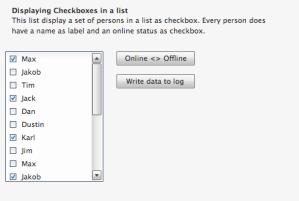
I think this example shows how powerful the GWT-Generator features is. We have now seen how we can use it to solve our first use case and in the next blog post will discuss how the GWT-Generator helps us solve the second use case “Extending existing qooxdoo classes”.

If you’d like to follow my progress towards 1.0.0.2 you can take a look at the extended demos.

Posted in QxWT | 3 Comments