Slides from latest talks

I’ve seen some people coming to my blog from the eclipsecon.org website and are probably looking for slides of the talks I’ve given:

Just in case you liked my talks and think they might be interesting to others as well think about voting for my EclipseCon 2012 North America submissions:

Beside that I’m going to be in Bay Area end of November joining Lars@Eclipse-Day-At-Googleplex which is already sold out but if you are interested in e(fx)clipse I’ve proposed a demo for the San Francisco Democamp – having been to Democamps in Europe I can only say discussing cool technologies while having one or two beers is one of the most enjoyable things in our business.

Posted in Talks & Conferences | Leave a comment

A busy time

It’s going to be a busy time in the next few weeks.

Next week I’m heading to Antwerpen to join Ralph, Wayne, Benjamin and Sven on the Eclipse Deep Dive-Evening on Oct, 27th where I give a short intro to Eclipse 4.x.

Afterwards I’m going to EclipseCon Europe to do an “State of Eclipse 4.x talk” together with Eric Moffatt and one where I dive a bit deeper into the Eclipse Application Platform.

The next event I’m heading to is EclipseDemoCamp Munich which takes place on the Nov 15th where I’m going to talk a bit about e(fx)clipse.

Then I have a break for about 10 days and will then make a trip to the US to join Lars on the Eclipse Day At Google on Nov, 30th to talk once more a bit about Eclipse 4.x.

I also registered myself for the San Francisco Democamp which should take place on Nov, 29th where I’d once more talk about e(fx)clipse if my proposal is accepted.

I hope to get to know many new people, meet with old friends and discuss Eclipse and Java related topics over one or the other cold beer – it’s going to be 1.5 months full of fun.

Posted in Talks & Conferences | 1 Comment

e(fx)clipse 0.0.7 released

UPDATE
Please download the latest version from efxclipse.org

So the next release 0.0.7 with a huge amount of new features is available so let’s directly dive into it them.

Tooling

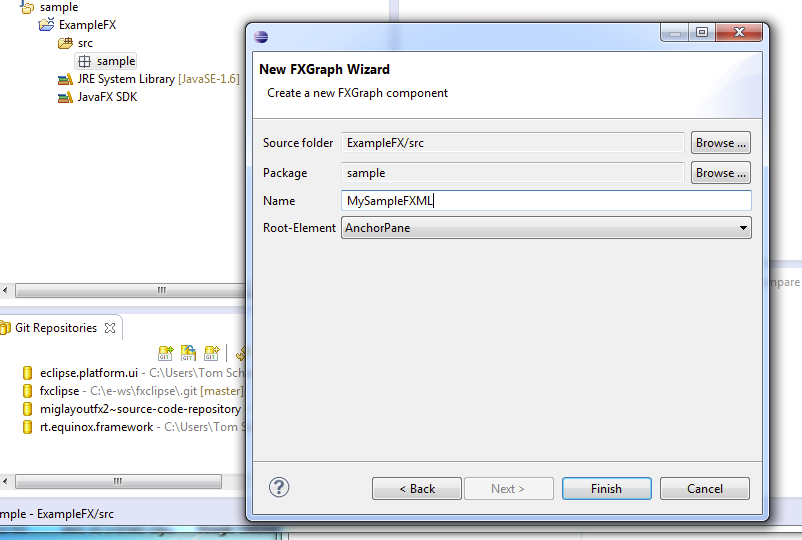
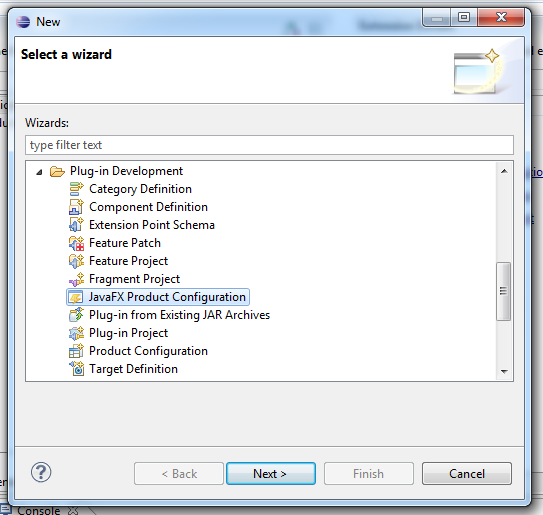
New Wizards

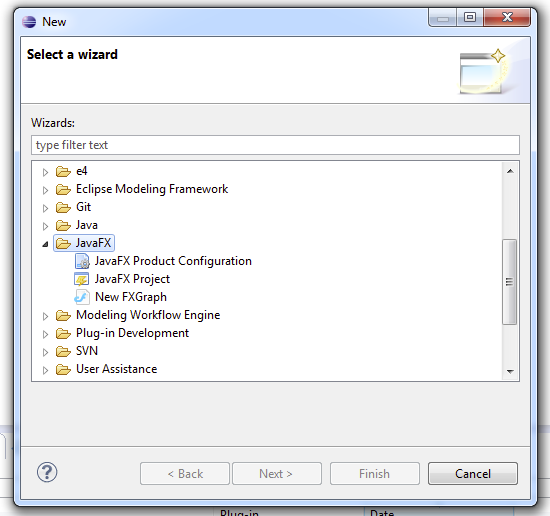
  • A JavaFX category to group all JavaFX-Wizards has been added
  • A Wizards to create FXGraph-Files has been added who takes care that the src-gen directory is created if it does not exist so that the fxml-File can be generated for you in the background

FXGraph

Speaking of my FXGraph-DSL the syntax has change so that the live preview e.g. knows where to locate CSS-Files and Resource-Properties take a look the git-repo to see how FXGraph-Files now look like beside that the following things have been changed/improved:

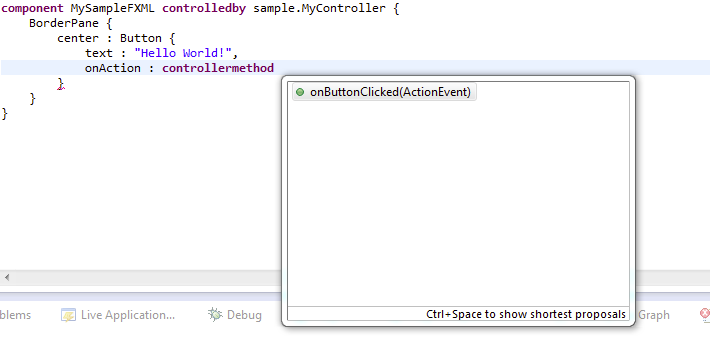
  • Autocompletion for controller methods
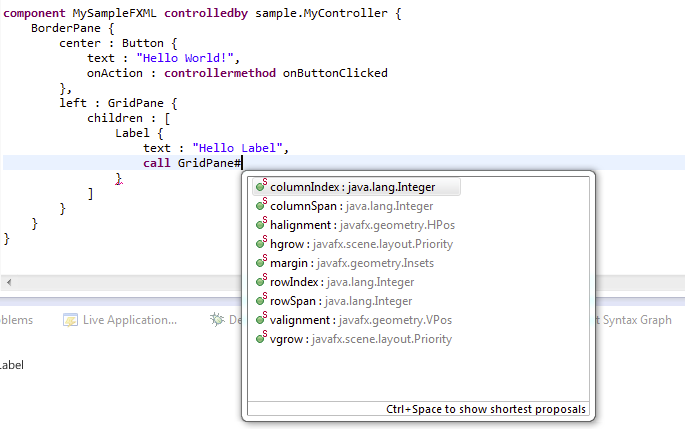
  • Autocompletion for static properties (used mainly to set layout informations)
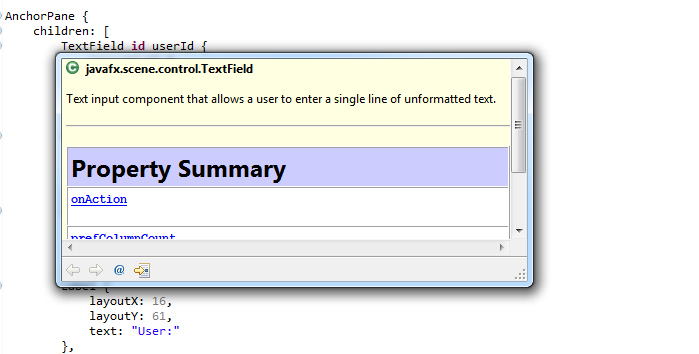
  • JavaDoc displayed for fairly Java elements you reference (controller, properties, …)

Live Preview

Although this is a feature of the FXGraph-Tooling I think this feature deserves its own entry because it is a really cool feature when writing UIs using FXGraph because you directly see which effect a change is going to have in the final UI. I’ve recorded a small videa showing the FXGraph-Tooling in action:

CSS

I once more fixed some CSS-Problems like the fact that e.g. Alpha-Hex-Colors have been marked as errors

Documentation

I’ve added an install documentation to the Wiki because to get the “Live Preview” working you’ll have to add an extra attribute to your eclipse.ini

Runtime

Detection of Installed JavaFX-Binaries

I’m now reading the installation directory from the Windows registry.

Eclipse Databinding for JavaFX’s properties

A component is included which allows one to use observe properties of JavaFX-Objects using Eclipse Databinding which then allows one to bind them e.g. to JavaBeans, EObjects, … .

Support for DI in FXML-Controllers

Google Guice

For standard java users I’ve added a small library which allows one to use Google Guice for the controllers so that one doesn’t have to think a lot one self on how to inject informations into your controller.

Eclipse DI user

For those of you who want to use Eclipse DI which was developed for Eclipse 4.x and is used by the Eclipse 4.x Application Platform an OSGi bundle is available that takes care of making FXML to work inside Equinox. There are some special things needed as I outlined in this blog post but you don’t need to care about this and simple let you inject a appropriately configured FXML-Loader.

import java.io.IOException;

import javafx.scene.Node;
import javafx.scene.layout.BorderPane;

import javax.annotation.PostConstruct;

import at.bestsolution.efxclipse.runtime.di.FXMLBuilder;
import at.bestsolution.efxclipse.runtime.di.FXMLLoader;
import at.bestsolution.efxclipse.runtime.di.FXMLLoaderFactory;

public class MyClass {
  @Inject
  @FXMLLoader
  private FXMLLoaderFactory factory;

  @PostConstruct
  void init(BorderPane parent) {
    try {
      FXMLBuilder<Node> builder = 
        factory.loadRequestorRelative("personform.fxml");
      parent.setCenter(builder.load());
    } catch (IOException e) {
      e.printStackTrace();
    }
  }
}

Eclipse 4.x Application Platform for JavaFX

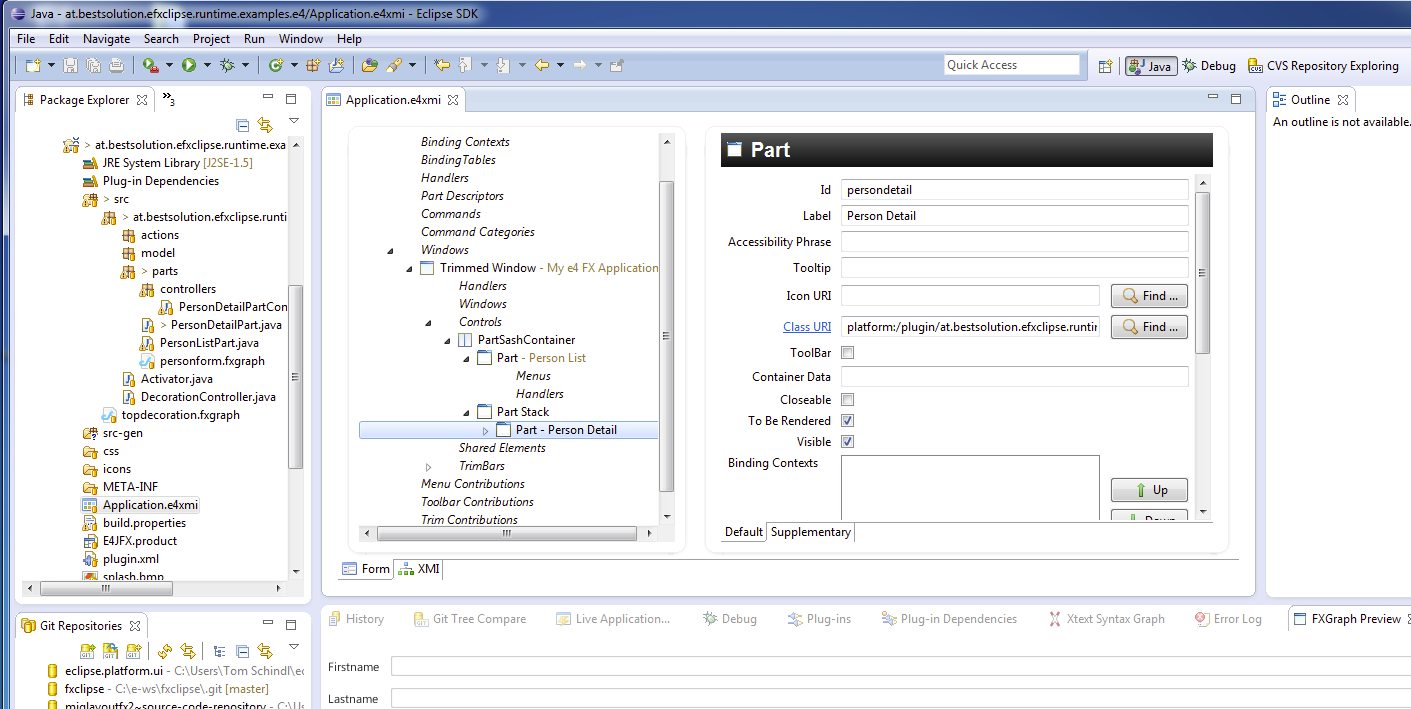
I saw that there was a talk at JavaOne 2011 about providing a JavaFX-RCP-Framework ontop the Netbeans-Core-Runtime – I only looked at their slides and not at their code yet. Well my efforts are the same and this release now holds a first version of an implementation of such a platform.

Here’s the model of the application:

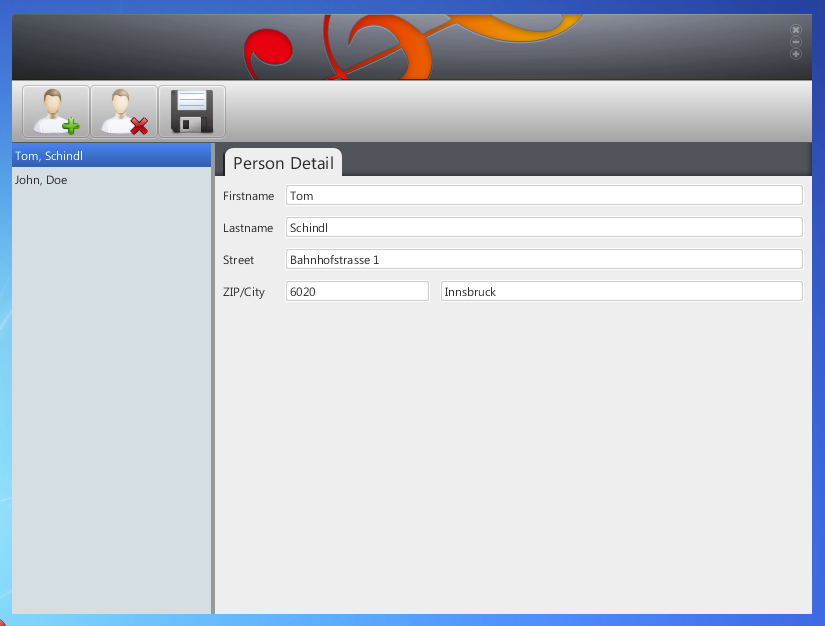
And the running application:

What I think is very nice is how the EAP, FXGraph (FXML), Eclipse Databinding and DI can work together to create an UI. Take a look at the following code:

The Part-Definition:

package at.bestsolution.efxclipse.runtime.examples.e4.parts;

import java.io.IOException;

import javafx.scene.Node;
import javafx.scene.layout.BorderPane;

import javax.annotation.PostConstruct;

import at.bestsolution.efxclipse.runtime.di.FXMLBuilder;
import at.bestsolution.efxclipse.runtime.di.FXMLLoader;
import at.bestsolution.efxclipse.runtime.di.FXMLLoaderFactory;

public class PersonDetailPart {
  @PostConstruct
  void init(BorderPane parent, @FXMLLoader FXMLLoaderFactory factory) {
    try {
      FXMLBuilder<Node> builder = factory.loadRequestorRelative("personform.fxml");
      parent.setCenter(builder.load());
    } catch (IOException e) {
      e.printStackTrace();
    }
  }
}

The controller:

package at.bestsolution.efxclipse.runtime.examples.e4.parts.controllers;

import javafx.animation.FadeTransition;
import javafx.event.ActionEvent;
import javafx.event.EventHandler;
import javafx.fxml.FXML;
import javafx.scene.control.TextField;
import javafx.scene.layout.GridPane;
import javafx.util.Duration;

import javax.annotation.PostConstruct;
import javax.inject.Inject;
import javax.inject.Named;

import org.eclipse.core.databinding.DataBindingContext;
import org.eclipse.core.databinding.beans.BeanProperties;
import org.eclipse.core.databinding.observable.value.IObservableValue;
import org.eclipse.core.databinding.observable.value.WritableValue;
import org.eclipse.e4.core.di.annotations.Optional;

import at.bestsolution.efxclipse.runtime.databinding.IJFXBeanValueProperty;
import at.bestsolution.efxclipse.runtime.databinding.JFXBeanProperties;
import at.bestsolution.efxclipse.runtime.di.FXMLLoaderFactory;
import at.bestsolution.efxclipse.runtime.examples.e4.model.Person;

@SuppressWarnings("restriction")
public class PersonDetailPartController {
  private IObservableValue master = new WritableValue();
	
  @FXML
  TextField firstname;
	
  @FXML
  TextField lastname;
	
  @FXML
  TextField street;
	
  @FXML
  TextField zip;
	
  @FXML
  TextField city;

  private FadeTransition fadeOutTransition;

  private FadeTransition fadeInTransition;
	
  @PostConstruct
  void init(@Named(FXMLLoaderFactory.CONTEXT_KEY) GridPane rootPane) {
    IJFXBeanValueProperty uiProp = JFXBeanProperties.value("text");
		
    DataBindingContext ctx = new DataBindingContext();
    ctx.bindValue(uiProp.observe(firstname), 
      BeanProperties.value("firstname").observeDetail(master));
    ctx.bindValue(uiProp.observe(lastname), 
      BeanProperties.value("lastname").observeDetail(master));
    ctx.bindValue(uiProp.observe(street), 
      BeanProperties.value("street").observeDetail(master));
    ctx.bindValue(uiProp.observe(zip), 
      BeanProperties.value("zip").observeDetail(master));
    ctx.bindValue(uiProp.observe(city), 
      BeanProperties.value("city").observeDetail(master));
		
    fadeOutTransition = new FadeTransition(Duration.millis(500), rootPane);
    fadeOutTransition.setFromValue(1.0f);
    fadeOutTransition.setToValue(0.0f);
    fadeOutTransition.setAutoReverse(true);

    fadeInTransition = new FadeTransition(Duration.millis(500), rootPane);
    fadeInTransition.setFromValue(0.0f);
    fadeInTransition.setToValue(1.0f);
    fadeInTransition.setAutoReverse(true);
  }
	
  @Inject
  public void setPerson(@Optional final Person person) {
    if( fadeOutTransition != null ) {
      fadeOutTransition.setOnFinished(new EventHandler<ActionEvent>() {
        public void handle(ActionEvent arg0) {
          master.setValue(person);
          fadeOutTransition.setOnFinished(null);
          fadeInTransition.playFromStart();
        }
      });
			
      fadeOutTransition.playFromStart();	
    }
  }
}

What does the framework provide:

  • Modularity through OSGi
  • All features it inherits from the Eclipse Application Platform like a Command Framework, Event Bus, Dependency Injection, …
  • Themeability through CSS-Contribution (similar to how Eclipse 4.x provides such a feature)

Please note that JavaFX-Renderers are in a very early stage and most of the things are not yet implemented. Improvements will be made in the next releases. If you are interested in example codes, … simply clone my github-repository.

Please provide feedback on problems you encounter with the tooling as well of the runtime components (an important note in this respect is that to make @PostConstruct work you have to set the Bundle-RequiredExecutionEnvironment: J2SE-1.5 and not 1.6!).

Posted in e(fx)clipse, Uncategorized | 14 Comments

Find Classloader for a given OSGi-Bundle or Having fun with FXML in OSGi

So this is something I wanted serval times already and now since Equinox 3.7 it is available. You get get the classloader used by bundle very simple.

My use case is that I have to pass an none OSGi-Aware lib (in my case JavaFX) the correct classloader when it creates instances using reflection. In my e(fx)clipse runtime I’d like to have support for loading FXML-Files when specified in the Application.e4xmi. Loading the FXML file from an external bundle is not a problem because one can pass it an URL.

The problem is that FXML files allow users to reference external classes like e.g. a controller instance and now in my case the class executing the loading is not the one that holds the controller and FXML loading fails. The only possibility to make this work is to temporarily change the context-classloader while the loading happens and reset it to once done so.

My problem is that at the position the FXML-Loading happens I have only 2 informations:

  • Bundle-Id
  • Bundle Relative FXML-File

So there’s the solution:

String bundleId = // ....
String fxmlFile = // ....

Bundle b = org.eclipse.core.runtime.Platform.getBundle(bundleId);
URL url = bundle.getResource(fxmlFile);

// This the important line and available since Equinox 3.7
ClassLoader loader = bundle.adapt(BundleWiring.class).getClassLoader();
ClassLoader originalLoader = Thread.currentThread().getContextClassLoader();
try {
  Thread.currentThread().setContextClassLoader(loader);
  // Load the fxml-File
} finally {
  Thread.currentThread().setContextClassLoader(originalLoader);
}

The better solution would be if the FXMLLoader would allow to pass a delegate which does the classloading and instantiation (this would the make DI-Frameworks useable as well) but until then e(fx)clipse will provide you helpers so that you don’t have to remember deal with such things in your OSGi-enabled JavaFX applications

Posted in e(fx)clipse, Eclipse | 3 Comments

FXML and Google Guice

JavaFX comes with the possibility to define your UI using a declarative XML-Syntax instead of writing Java code. To react on user input the XML-Syntax allows you to call back into programm code.

A simple example looks like this:

<?xml version="1.0" encoding="UTF-8"?>
<!-- 
	Do not edit this file it is generated by e(fx)clipse from /at/bestsolution/efxclipse/runtime/examples/guice/guice.fxgraph
-->


<?import java.lang.*?>
<?import javafx.scene.control.Button?>
<?import javafx.scene.control.Label?>
<?import javafx.scene.control.PasswordField?>
<?import javafx.scene.control.TextField?>
<?import javafx.scene.layout.AnchorPane?>

<AnchorPane xmlns:fx="http://javafx.com/fxml" fx:controller="at...LoginController"> 
	<children>
		<Label layoutX="10" layoutY="10"> 
			<text>Username</text>
		</Label>
		<TextField fx:id="username" layoutX="80" layoutY="10"/> 
		<Label layoutX="10" layoutY="40"> 
			<text>Password</text>
		</Label>
		<PasswordField fx:id="password" layoutX="80" layoutY="40"/> 
		<Button layoutX="80" layoutY="70" onAction="#login"> 
			<text>Login</text>
		</Button>
		<Label fx:id="message" layoutX="80" layoutY="100"/> 
	</children>
</AnchorPane>

The controller:

package at.bestsolution.efxclipse.runtime.examples.guice.controller;

import javafx.event.ActionEvent;
import javafx.fxml.FXML;
import javafx.scene.control.Label;
import javafx.scene.control.PasswordField;
import javafx.scene.control.TextField;
import at.bestsolution.efxclipse.runtime.examples.guice.service.ILoginService;

import com.google.inject.Inject;

public class LoginController {
	@FXML
	TextField username;
	
	@FXML
	PasswordField password;
	
	@FXML
	Label message;
	
	@FXML
	public void login(ActionEvent event) {
		// do the login
	}
}

And load the FXML-File like this:

FXMLLoader.load(
  GuiceExample.class.getResource("guice.fxml"), 
  null, 
  new JavaFXBuilderFactory()
);

If you are used to dependency injection – like I am since working on Eclipse 4 – you can’t imagine to work without it anymore and so you’d like to make guice inject an ILoginService to the controller.

package at.bestsolution.efxclipse.runtime.examples.guice.controller;

import javafx.event.ActionEvent;
import javafx.fxml.FXML;
import javafx.scene.control.Label;
import javafx.scene.control.PasswordField;
import javafx.scene.control.TextField;
import at.bestsolution.efxclipse.runtime.examples.guice.service.ILoginService;

import com.google.inject.Inject;

public class LoginController {
	@Inject
	ILoginService loginService;
	
	@FXML
	TextField username;
	
	@FXML
	PasswordField password;
	
	@FXML
	Label message;
	
	@FXML
	public void login(ActionEvent event) {
		try {
			long id = loginService.login(username.getText(), password.getText());
			message.setStyle("-fx-text-fill: green;");
			message.setText("Logged in as User: " + id);
		} catch (IllegalArgumentException e) {
			message.setStyle("-fx-text-fill: red;");
			message.setText(e.getMessage());
		}
	}
}

Now the question is how to make the FXMLLoader use Guice to inject stuff. The problem is that you can’t pass the loader a delegate so that you can make Guice create the controller instance which means you can’t use constructor injection but that’s a minor problem for me.

So we let the FXMLLoader construct the controller and execute the injection afterwards:

public static <N> N loadFXML(Injector injector, URL url) throws IOException {
	FXMLLoader loader = new FXMLLoader();
	loader.setLocation(url);
	loader.setBuilderFactory(new JavaFXBuilderFactory());
	InputStream in = url.openStream();
	N value = (N) loader.load(in);
	in.close();
		
	if( loader.getController() != null ) {
		injector.injectMembers(loader.getController());
	}
		
	injectLoaders(loader, injector);
		
	return value;
}
	
private static void injectLoaders(FXMLLoader parentLoader, Injector injector) {
	for( FXMLLoader l : parentLoader.getIncludes() ) {
		if( l.getController() != null ) {
			injector.injectMembers(l.getController());
			injectLoaders(l, injector);
		}
	}
}

I’ve packaged up the code in my runtime modules so you can make use of it quite easy. A similar implementation is available for Eclipse-DI but Eclipse-DI requires an OSGi-Runtime whereas the guice one can be used with or without OSGi.

Posted in e(fx)clipse | 6 Comments

e(fx)clipse – LivePreview for fxgraph

I’ve justed pushed something very cool to my e(fx)clipse git-repo. I’ve added a preview which gets updated while you are defining your JavaFX-UI using my fxgraph-DSL:


It was really hard to implement but I had an example for the Xtext folks.

Posted in e(fx)clipse | Leave a comment

JFace-Viewer and Eclipse Databinding with > 10.000 Objects

Inspired by a bugzilla-discussion where virtual support for the nebula grid. I thought I blog a bit about Eclipse Databinding when it comes to big datasets.

The standard way used looks like this:

IObservable list = // ... a huge list of items

TableViewer viewer = new TableViewer(parent,SWT.BORDER|SWT.H_SCROLL|SWT.V_SCROLL);
ObservableListContentProvider cp = new ObservableListContentProvider();
viewer.setContentProvider(cp);

TableViewerColumn column = new TableViewerColumn(viewer,SWT.NONE);
column.getColumn().setText("Firstname");
column.getColumn().setWidth(200);
column.setLabelProvider(new ObservableMapCellLabelProvider(
    BeanProperties.value("firstname").observeDetail(cp.getKnownElements())
  )
);

TableViewerColumn column = new TableViewerColumn(viewer,SWT.NONE);
column.getColumn().setText("Lastname");
column.getColumn().setWidth(200);
column.setLabelProvider(new ObservableMapCellLabelProvider(
    BeanProperties.value("lastname").observeDetail(cp.getKnownElements())
  )
);

viewer.setInput(list);

Executing this code with the following item count shows the following figures:

Object count Time to fill (in ms)
10,000 1,178
30,000 2,793
100,000 17,689
200,000 62,689

So as we might have guess the performance degrades with the number of items with put in the viewer. In SWT you normally get the advise to use SWT.VIRTUAL but I don’t think that will address all your problems. One of them is the freaking high number of Listeners attached to your domain-objects. For 200.000 items above Eclipse Databinding has created 400.000 listeners (200.000 rows x 2 columns) not think about what would have happened if you’d have 10 columns.

So in reality there are 2 problems we have to address:

  • get the time of the initial creation down
  • only attach listeners only to those elements visible in the viewer

As outlined for SWT-Table you could address the 1st problem using SWT.VIRTUAL but for the 2nd there’s no solution. For Nebula-Grid the situation is different you don’t have SWT.VIRTUAL but instead of that some much more powerful. You can attach a listener and get informed about all visible cells so we can address both problems.

Let’s first look at the figures:

Object count Time to fill (in ms)
Original Range tracking
10,000 1,178 111
30,000 2,793 246
100,000 17,689 518
200,000 62,689 1,298

So the numbers have improved dramatically but the other really nice thing is that because by viewer shows in my test e.g. only 24 rows I have a total of 48 listeners attached to my domain objects.

The code is not really complex:

public class ViewOptimized extends ViewPart {
  public static final String ID = "at.bestsolution.grid.databinding.view";

  private GridTableViewer viewer;
	
  static final String ITEM_VISIBLE = "ITEM_VISIBLE";
	
  private static int LISTENERCOUNT = 0;
	
  public static class Person {
    private PropertyChangeSupport support = new PropertyChangeSupport(this);
		
    private String firstName;
    private String lastName;
		
    public void addPropertyChangeListener(PropertyChangeListener listener) {
      support.addPropertyChangeListener(listener);
      LISTENERCOUNT++;
    }
		
    public void removePropertyChangeListener(PropertyChangeListener listener) {
      support.removePropertyChangeListener(listener);
      LISTENERCOUNT--;
    }

    public Person(String firstName, String lastname) {
      this.firstName = firstName;
      this.lastName = lastname;
    }
		
    public String getFirstName() {
      return firstName;
    }

    public void setFirstName(String firstName) {
      support.firePropertyChange("firstName", this.firstName, 
        this.firstName = firstName
      );
    }
		
    public String getLastName() {
      return lastName;
    }

    public void setLastName(String lastName) {
      support.firePropertyChange("lastName", this.lastName, 
        this.lastName = lastName
      );
    }
  }

  public void createPartControl(Composite parent) {
    parent.setLayout(new GridLayout());
    this.viewer = new GridTableViewer(parent);
    this.viewer.getGrid().setHeaderVisible(true);
    this.viewer.getGrid().setLayoutData(new GridData(GridData.FILL_BOTH));
		
    viewer.setContentProvider(new ObservableListContentProvider());
    ObservableSet obserableSet = new WritableSet();
		
    GridVisibleRangeSupport rangeSupport = 
      GridVisibleRangeSupport.createFor(viewer.getGrid());
    rangeSupport.addRangeChangeListener(
      new VisibleRangeListenerImpl(viewer,obserableSet)
    );
		
    {
      GridViewerColumn col = new GridViewerColumn(viewer, SWT.NONE);
      col.getColumn().setText("Firstname");
      col.getColumn().setWidth(200);
      col.setLabelProvider(new LazyColumnLabelProvider(
        BeanProperties.value("firstName").observeDetail(obserableSet))
      );
    }
		
    {
      GridViewerColumn col = new GridViewerColumn(viewer, SWT.NONE);
      col.getColumn().setText("Lastname");
      col.getColumn().setWidth(200);
      col.setLabelProvider(new LazyColumnLabelProvider(
        BeanProperties.value("lastName").observeDetail(obserableSet))
      );
    }

    final ObservableList list = new WritableList();
    for( int i = 0; i < ViewOriginal.TOTAL_ITEMS; i++ ) {
      list.add(new Person("Tom " + i,"Schindl"));
    }
		
    Composite composite = new Composite(parent, SWT.NONE);
    composite.setLayout(new RowLayout());
		
    {
      Button b = new Button(composite, SWT.PUSH);
      b.setText("Populate it");
      b.addSelectionListener(new SelectionAdapter() {
        @Override
        public void widgetSelected(SelectionEvent e) {
          long t1 = System.currentTimeMillis();
          viewer.setInput(list);
          long t2 = System.currentTimeMillis();
          System.err.println("Rendering table took: " + (t2 - t1));
        }
      });
    }
		
    {
      Button b = new Button(composite, SWT.PUSH);
      b.setText("Modify First Object");
      b.addSelectionListener(new SelectionAdapter() {
        @Override
        public void widgetSelected(SelectionEvent e) {
          ((Person)list.get(0)).setFirstName("Hello World");
        }
      });
    }

    {
      Button b = new Button(composite, SWT.PUSH);
      b.setText("Stats");
      b.addSelectionListener(new SelectionAdapter() {
        @Override
        public void widgetSelected(SelectionEvent e) {
          System.err.println("Listeners: " + LISTENERCOUNT);
        }
      });
    }
  }

  public void setFocus() {
    viewer.getControl().setFocus();
  }

  public static class LazyColumnLabelProvider extends 
    ObservableMapCellLabelProvider {

    public LazyColumnLabelProvider(IObservableMap attributeMap) {
      super(attributeMap);
    }
		
    @Override
    public void update(ViewerCell cell) {
      Object visibleCheck = cell.getItem().getData(ITEM_VISIBLE);
      if( visibleCheck != null && ((Boolean)visibleCheck).booleanValue() ) {
        super.update(cell);
      }
    }
  }

  public static class VisibleRangeListenerImpl implements 
    VisibleRangeChangedListener {

    private ObservableSet obserableSet;
    private GridTableViewer viewer;
		
    public VisibleRangeListenerImpl(GridTableViewer viewer, 
      ObservableSet obserableSet
    ) {
      this.viewer = viewer;
      this.obserableSet = obserableSet;
    }
		
    @Override
    public void rangeChanged(RangeChangedEvent event) {
      for( GridItem i : event.removedRows ) {
        i.setData(ITEM_VISIBLE,Boolean.FALSE);
        obserableSet.remove(i.getData());
      }
			
      for( GridItem i : event.addedRows ) {
        i.setData(ITEM_VISIBLE,Boolean.TRUE);
        obserableSet.add(i.getData());
        viewer.update(i.getData(), null);
      }
    }	
  }
}

To round up the numbers here are those you get with plain SWT-Table with and without VIRTUAL:

Object count Time to fill (in ms)
Nebula Original Nebula Range tracking SWT Original SWT VIRTUAL
10,000 1,178 111 1,661 919
30,000 2,793 246 4,508 2,547
100,000 17,689 518 23,473 17,659
200,000 62,689 1,298 72,578 59,711
Posted in Enhanced RCP | 6 Comments

Teneo, OSGi and Javaassist for proxy loading

Yesterday I’ve debugged to get javaassist working with teneo which gave us headaches in the past so we simply turned it off which isn’t really a problem to us but I simply wanted to know why it didn’t worked.

As very often when hibernate and OSGi meet each other this is a problem of classloading and class-visibility.

A normal bundle layout for a Teneo-Hibernate application looks like this:

  • org.my.model: Holds your EMF-Model
  • org.hibernate: Holds the hibernate libraries with its dependencies (one of them is javassist)
  • org.eclipse.emf.teneo.hibernate: The Teneo Hibernate integration

The problem is that the classloader used by javaassist is the BundleClassLoader from org.my.model so from there it needs to look up 2 other important classes when it comes to proxy creation:

  • org.eclipse.emf.teneo.hibernate.mapping.internal.TeneoInternalEObject
  • javassist.util.proxy.ProxyObject

The first one you can fix by adding org.eclipse.emf.teneo.hibernate as an optional depdency on your org.my.model not really nice but well it is the only possibility.

The second one is similar but the solution is even worse because it is NOT sufficient to add org.hibernate as a required bundle because the Bundle-Classloader will not know that org.hibernate provides javassist.util.proxy because org.hibernate doesn’t export it.

So the only solution I found was to import the org.hibernate bundle coming shipped by Martin Taal from elver.org and add the exports in question.

Posted in Enhanced RCP | Leave a comment

e(fx)clipse 0.0.6 released

UPDATE
Please download the latest version from efxclipse.org

I’ve justed pushed the 0.0.6 release of my JavaFX 2.0 Tooling and Runtime for Eclipse named e(fx)clipse to my git-repo and you can download the p2 repo to your local hard drive and install it using this link (DO NOT SIMPLY UNPACK THE ZIP TO YOUR ECLIPSE-INSTALL USE THE “Install New Software…”-Wizard!).

This release is the first one which does not only hold tooling stuff but also runtime components but I’ll go into detail after having introduced the new tooling features. Here’s a list of new and noteworthy stuff.

Tooling

css

Since b45 the CSS-Syntax for gradients changed to be valid CSS the CSS-Tooling of e(fx)clipse is now in sync with the one from the runtime. This release holds improved validation for radial-gradients

fxml

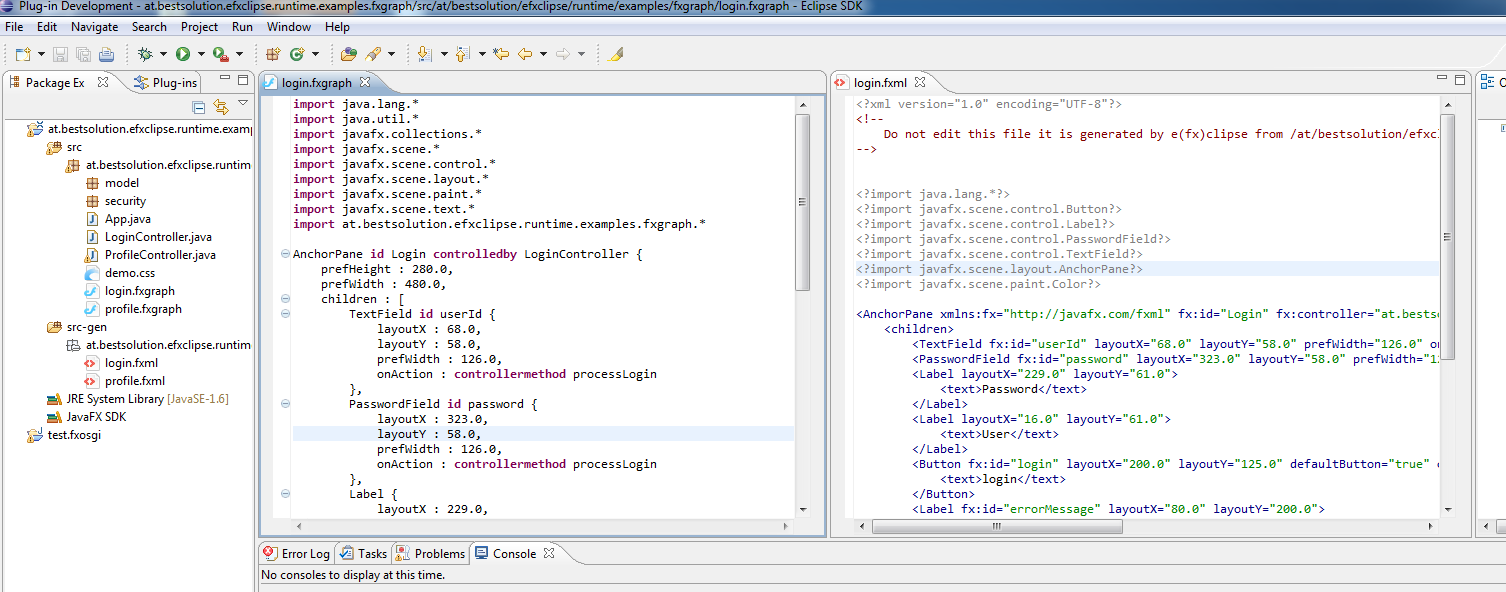
As outlined in my last blog I don’t think fxml is meant to be authored directly by developers. It is a good foundation for tools to produce JavaFX-Objects graphs instead of generating Java-Code. My approach to it is that I created a small DSL (or better markup language) which provides all the features FXML understands but remove the XML noise – I named the markup language fxgraph. To better view fxml-Files I’ve added an xml-viewer with markup support.

fxgraph

Is a simple DSL which allows one to define a JavaFX object graph but instead of producing executable code as its output it simply creates the an fxml-File which can be interpreted by the JavaFX runtime..

I know that there are a number of DSLs out there (GroovyFX, ScalaFX, Visage, …). The difference here is that fxgraph is not a programming language but a markup language which is used at design time but has no runtime concepts. The output of a fxgraph is fxml – so it is not a replacement for fxml but a different way to express the content of a fxml-File. The really cool thing about fxgraph is the excellent integration with Eclipse JDT/PDE because of Xtext+Xbase+JvmTypes which provides you content assistent like you get it in JDT.

Class-ContentAssist for Element Definition

Property-ContentAssist for Elements

PDE

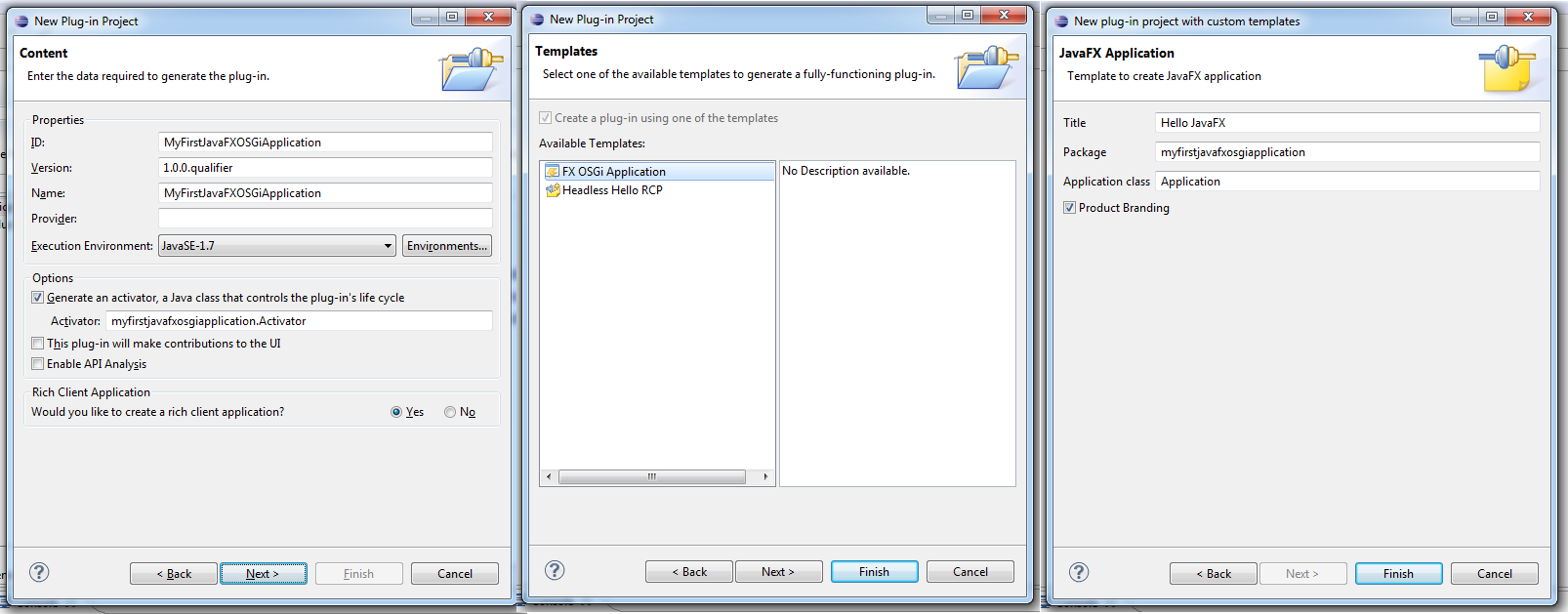
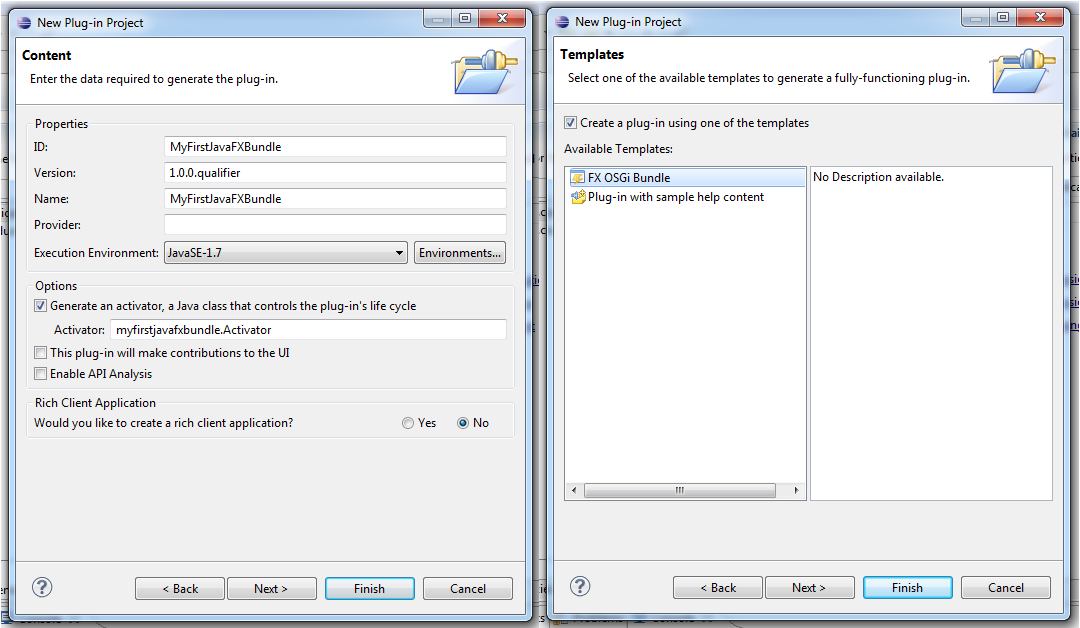
OSGi is one of the keyconcepts in the up coming runtime components but to make the experience for users as good as possible integration into PDE is an absolute must. One of the most important things in this sense are project templates who allow a developers to:

  1. Create a runnable JavaFX Equinox OSGi-Application
  2. Create an OSGi-Bundle which uses JavaFX

The wizards are even more important for JavaFX based applications because there are some special settings and classpath adjustments needed to make your application compile, exported and run using Eclipse JDT/PDE.

Application Wizard
used to created an OSGi-Application bundle including a application and production definition in the plugin.xml

Bundle Wizard
used to create an OSGi-Bundle which uses JavaFX classes

Product Wizard
used to create a .product-File which is can be used to export an JavaFX application inside Eclipse or by using maven-tycho.

There’s no big difference to .product definition created by the default “Product Configuration” wizard but as always – the small things make the difference because to make JavaFX useable in OSGi (Equinox) one has to configure the Framework Adaptors appropriately and this is what the “JavaFX Product Configuration” wizard takes care of (See my other blog for some background info).

Runtime

As outlined in the first paragraph this release comes with a set of runtime components who are needed as a foundation for more sophisticated ones like the Eclipse 4 Application Platform. So what does this release come with:

Layout-Panes

I’ve ported some of the layouts one is used to from SWT:

  • FillLayoutPane: Is the FillLayout as you know it from SWT
  • GridLayoutPane: Is the GridLayout as you know it from SWT
  • RowLayoutPane: Is the RowLayout as you know it from SWT
  • SashLayoutPane: This one is probably not know to most of the people because it is not part of SWT nor Eclipse 3.x but has been developed for use in Eclipse 4.x which is not using Sashes for splitting up the Workbench-Window but a Layout

OSGi-Support

To make JavaFX useable in OSGi I’ve implemented 2 bundles and 1 fragment who make – together with the PDE-Integration – very easy to develop Equinox-OSGi-Applications. The following 2 bundles are available:

  • at.bestsolution.efxclipse.runtime.javafx
    Is a bundle which exports all public javafx-packages so that client bundles can define package-imports. The bundle doesn’t hold the javafx-classes but when equinox requests javafx-Classes from at.bestsolution.efxclipse.runtime.javafx a framework adaptor steps in and does the class look up in the location the oracle-installer placed the javafx.jar in (Warning: At the moment the location is hard coded to “C:/Program Files (x86)/Oracle/JavaFX Runtime 2.0/lib/jfxrt.jar” but this will change with the next release if I can figure out how to locate those files in a better way)
  • at.bestsolution.efxclipse.runtime.osgi
    This is a fragment for “org.eclipse.osgi” which contributes specialized classloader which used by “at.bestsolution.efxclipse.runtime.javafx”.
  • at.bestsolution.efxclipse.runtime.application
    This bundle provides a base class named AbstractJFXApplication which implements the IApplication-Interface for OSGi-Applications and can be subclassed like this:

    public class Application extends AbstractJFXApplication {
      @Override
      protected void jfxStart(Stage primaryStage) {
        Group root = new Group();
        Scene scene = new Scene(root, 800, 600, Color.BLACK);
        primaryStage.setScene(scene);
      }
    }
    

A whole lot of new features which means a lot of polishing has to go on as the 0.0.6 version number indicates. The most impressive feature I’ve implemented in the tooling is the support for fxgraph but the support for JavaFX in Equinox is also an extremely import feature.

Posted in e(fx)clipse | 11 Comments

How to author fxml

JavaFX allows one to define an UI not only using the JVM-Language of your choice but also by describing the UI in an XML-Format which is turned into an object graph at runtime.

The JavaFX samples are coming with an example like this:

<?xml version="1.0" encoding="UTF-8"?>
<!--
 * Copyright (c) 2008, 2011 Oracle and/or its affiliates.
 * All rights reserved. Use is subject to license terms.
 *
 * This file is available and licensed under the following license:
 *
 * Redistribution and use in source and binary forms, with or without
 * modification, are permitted provided that the following conditions
 * are met:
 *
 *  - Redistributions of source code must retain the above copyright
 *    notice, this list of conditions and the following disclaimer.
 *  - Redistributions in binary form must reproduce the above copyright
 *    notice, this list of conditions and the following disclaimer in
 *    the documentation and/or other materials provided with the distribution.
 *  - Neither the name of Oracle Corporation nor the names of its
 *    contributors may be used to endorse or promote products derived
 *    from this software without specific prior written permission.
 *
 * THIS SOFTWARE IS PROVIDED BY THE COPYRIGHT HOLDERS AND CONTRIBUTORS
 * "AS IS" AND ANY EXPRESS OR IMPLIED WARRANTIES, INCLUDING, BUT NOT
 * LIMITED TO, THE IMPLIED WARRANTIES OF MERCHANTABILITY AND FITNESS FOR
 * A PARTICULAR PURPOSE ARE DISCLAIMED. IN NO EVENT SHALL THE COPYRIGHT
 * OWNER OR CONTRIBUTORS BE LIABLE FOR ANY DIRECT, INDIRECT, INCIDENTAL,
 * SPECIAL, EXEMPLARY, OR CONSEQUENTIAL DAMAGES (INCLUDING, BUT NOT
 * LIMITED TO, PROCUREMENT OF SUBSTITUTE GOODS OR SERVICES; LOSS OF USE,
 * DATA, OR PROFITS; OR BUSINESS INTERRUPTION) HOWEVER CAUSED AND ON ANY
 * THEORY OF LIABILITY, WHETHER IN CONTRACT, STRICT LIABILITY, OR TORT
 * (INCLUDING NEGLIGENCE OR OTHERWISE) ARISING IN ANY WAY OUT OF THE USE
 * OF THIS SOFTWARE, EVEN IF ADVISED OF THE POSSIBILITY OF SUCH DAMAGE.
-->
<?import java.lang.*?>
<?import java.util.*?>
<?import javafx.collections.*?>
<?import javafx.scene.*?>
<?import javafx.scene.control.*?>
<?import javafx.scene.layout.*?>
<?import javafx.scene.paint.*?>
<?import javafx.scene.text.*?>

<AnchorPane fx:controller="demo.LoginController" id="Login" prefHeight="280.0" prefWidth="480.0"
  xmlns:fx="http://javafx.com/fxml">
  <children>
    <TextField layoutX="68.0" layoutY="58.0" prefWidth="126.0" fx:id="userId" onAction="#processLogin"/>
    <PasswordField layoutX="323.0" layoutY="58.0" prefWidth="126.0" fx:id="password" onAction="#processLogin"/>
    <Label layoutX="229.0" layoutY="61.0" text="Password:" />
    <Label layoutX="16.0" layoutY="61.0" text="User:" />
    <Button layoutX="200.0" layoutY="125.0" text="login" defaultButton="true" fx:id="login" onAction="#processLogin"/>
    <Label layoutX="80.0" layoutY="200.0" textFill="RED" fx:id="errorMessage" />
  </children>
  <styleClass>
    <String fx:value="login" />
  </styleClass>
  <properties>
    <backgroundColor>
      <Color blue="1.0" green="1.0" red="1.0" />
    </backgroundColor>
    <elementLockSel>
      <Boolean fx:value="true" />
    </elementLockSel>
  </properties>
</AnchorPane>

The important thing here is that there’s no DTD or Schema available (which is similar to XAML) but there’s a set of rules how the XML-Elements are mapped to Java-Objects. I’m not going into the details of the mapping the interested reader can consult the PDF which describes the XML-Format in detail – the important fact for me is:

  • XML is very verbose – so a more condense syntax would be favored to author such files and generate the fxml-File from it
  • One needs integration in to Java Development Tools to look up Classes, Attributes, …

Price Question: Which framework in Eclipse world can be used to meet those requirements? Correct Xtext + Xbase + Xtend2 is the perfect match for those requirements. One of the strengths of Xtext is that you get a useable editor out of the box so I defined my own DSL. The translated XML-File from above looks like this:

import java.lang.*
import java.util.*
import javafx.collections.*
import javafx.scene.control.*
import javafx.scene.layout.*
import javafx.scene.paint.*
import javafx.scene.text.*

AnchorPane {
	children: [
		TextField id userId {
			layoutX:68.0,
			layoutY:58.0, 
			prefWidth: 126,
			prefHeight: 280
		},
		PasswordField id password {
			layoutX:323,
			layoutY:58,
			prefWidth:126
		},
		Label {
			layoutX: 229,
			layoutY: 61,
			text: "Password:"
		},
		Label {
			layoutX: 16,
			layoutY: 61,
			text: "User:"
		},
		Button id login { 
			layoutX: 200,
			layoutY: 125,
			text: "login",
			defaultButton: true
		},
		Label id errorMessage {
			layoutX: 80,
			layoutY: 200,
			textFill: "RED",
			call GridPane#rowIndex: 0
		} 
	],
	styleClass: String("login"),
	properties: {
		backgroundColor: Color {
			blue: 1.0,
			green: 1.0,
			red: 1.0
		},
		elementLockSel: Boolean("true")     
	}
}

Which automatically generates the following xml-file in the background while you are editing:

<?xml version="1.0" encoding="UTF-8"?>
<!-- 
	Do not edit this file it is generated by e(fx)clipse from /demo/login.fxgraph
-->
<?import java.lang.*?>
<?import java.util.*?>
<?import javafx.collections.*?>
<?import javafx.scene.control.*?>
<?import javafx.scene.layout.*?>
<?import javafx.scene.paint.*?>
<?import javafx.scene.text.*?>

<AnchorPane xmlns:fx="http://javafx.com/fxml"> 
	<children>
		<TextField fx:id="userId" layoutX="68.0" layoutY="58.0" prefWidth="126" prefHeight="280"/> 
		<PasswordField fx:id="password" layoutX="323" layoutY="58" prefWidth="126"/> 
		<Label layoutX="229" layoutY="61"> 
			<text>Password:</text>
		</Label>
		<Label layoutX="16" layoutY="61"> 
			<text>User:</text>
		</Label>
		<Button fx:id="login" layoutX="200" layoutY="125" defaultButton="true"> 
			<text>login</text>
		</Button>
		<Label fx:id="errorMessage" layoutX="80" layoutY="200"> 
			<textFill>RED</textFill>
			<GridPane.rowIndex>0</GridPane.rowIndex>
		</Label>
	</children>
	<styleClass>
		<String fx:value="login"/> 
	</styleClass>
	<properties>
		<backgroundColor>
			<Color blue="1.0" green="1.0" red="1.0"/> 
		</backgroundColor>
		<elementLockSel>
			<Boolean fx:value="true"/> 
		</elementLockSel>
	</properties>
</AnchorPane>

As you see in the end my DSL looks very similar to FX-Script (I’ve never used it myself so I’m doing guess work here).

Anyways the really cool thing is that you get integration into JDT (current only for the element-definition not for the attributes):

  • Content assist integration
  • JavaDoc integration

What I have currently is the default generated editor (took around 8 hours) and I’ll include this initial version into the up-coming e(fx)clipse release.

Posted in e(fx)clipse | 7 Comments