
JavaFX allows one to define an UI not only using the JVM-Language of your choice but also by describing the UI in an XML-Format which is turned into an object graph at runtime.
The JavaFX samples are coming with an example like this:
<?xml version="1.0" encoding="UTF-8"?>
<!--
 * Copyright (c) 2008, 2011 Oracle and/or its affiliates.
 * All rights reserved. Use is subject to license terms.
 *
 * This file is available and licensed under the following license:
 *
 * Redistribution and use in source and binary forms, with or without
 * modification, are permitted provided that the following conditions
 * are met:
 *
 *  - Redistributions of source code must retain the above copyright
 *    notice, this list of conditions and the following disclaimer.
 *  - Redistributions in binary form must reproduce the above copyright
 *    notice, this list of conditions and the following disclaimer in
 *    the documentation and/or other materials provided with the distribution.
 *  - Neither the name of Oracle Corporation nor the names of its
 *    contributors may be used to endorse or promote products derived
 *    from this software without specific prior written permission.
 *
 * THIS SOFTWARE IS PROVIDED BY THE COPYRIGHT HOLDERS AND CONTRIBUTORS
 * "AS IS" AND ANY EXPRESS OR IMPLIED WARRANTIES, INCLUDING, BUT NOT
 * LIMITED TO, THE IMPLIED WARRANTIES OF MERCHANTABILITY AND FITNESS FOR
 * A PARTICULAR PURPOSE ARE DISCLAIMED. IN NO EVENT SHALL THE COPYRIGHT
 * OWNER OR CONTRIBUTORS BE LIABLE FOR ANY DIRECT, INDIRECT, INCIDENTAL,
 * SPECIAL, EXEMPLARY, OR CONSEQUENTIAL DAMAGES (INCLUDING, BUT NOT
 * LIMITED TO, PROCUREMENT OF SUBSTITUTE GOODS OR SERVICES; LOSS OF USE,
 * DATA, OR PROFITS; OR BUSINESS INTERRUPTION) HOWEVER CAUSED AND ON ANY
 * THEORY OF LIABILITY, WHETHER IN CONTRACT, STRICT LIABILITY, OR TORT
 * (INCLUDING NEGLIGENCE OR OTHERWISE) ARISING IN ANY WAY OUT OF THE USE
 * OF THIS SOFTWARE, EVEN IF ADVISED OF THE POSSIBILITY OF SUCH DAMAGE.
-->
<?import java.lang.*?>
<?import java.util.*?>
<?import javafx.collections.*?>
<?import javafx.scene.*?>
<?import javafx.scene.control.*?>
<?import javafx.scene.layout.*?>
<?import javafx.scene.paint.*?>
<?import javafx.scene.text.*?>

<AnchorPane fx:controller="demo.LoginController" id="Login" prefHeight="280.0" prefWidth="480.0"
  xmlns:fx="http://javafx.com/fxml">
  <children>
    <TextField layoutX="68.0" layoutY="58.0" prefWidth="126.0" fx:id="userId" onAction="#processLogin"/>
    <PasswordField layoutX="323.0" layoutY="58.0" prefWidth="126.0" fx:id="password" onAction="#processLogin"/>
    <Label layoutX="229.0" layoutY="61.0" text="Password:" />
    <Label layoutX="16.0" layoutY="61.0" text="User:" />
    <Button layoutX="200.0" layoutY="125.0" text="login" defaultButton="true" fx:id="login" onAction="#processLogin"/>
    <Label layoutX="80.0" layoutY="200.0" textFill="RED" fx:id="errorMessage" />
  </children>
  <styleClass>
    <String fx:value="login" />
  </styleClass>
  <properties>
    <backgroundColor>
      <Color blue="1.0" green="1.0" red="1.0" />
    </backgroundColor>
    <elementLockSel>
      <Boolean fx:value="true" />
    </elementLockSel>
  </properties>
</AnchorPane>
The important thing here is that there’s no DTD or Schema available (which is similar to XAML) but there’s a set of rules how the XML-Elements are mapped to Java-Objects. I’m not going into the details of the mapping the interested reader can consult the PDF which describes the XML-Format in detail – the important fact for me is:
- XML is very verbose – so a more condense syntax would be favored to author such files and generate the fxml-File from it
- One needs integration in to Java Development Tools to look up Classes, Attributes, …
Price Question: Which framework in Eclipse world can be used to meet those requirements? Correct Xtext + Xbase + Xtend2 is the perfect match for those requirements. One of the strengths of Xtext is that you get a useable editor out of the box so I defined my own DSL. The translated XML-File from above looks like this:
import java.lang.*
import java.util.*
import javafx.collections.*
import javafx.scene.control.*
import javafx.scene.layout.*
import javafx.scene.paint.*
import javafx.scene.text.*

AnchorPane {
	children: [
		TextField id userId {
			layoutX:68.0,
			layoutY:58.0,
			prefWidth: 126,
			prefHeight: 280
		},
		PasswordField id password {
			layoutX:323,
			layoutY:58,
			prefWidth:126
		},
		Label {
			layoutX: 229,
			layoutY: 61,
			text: "Password:"
		},
		Label {
			layoutX: 16,
			layoutY: 61,
			text: "User:"
		},
		Button id login {
			layoutX: 200,
			layoutY: 125,
			text: "login",
			defaultButton: true
		},
		Label id errorMessage {
			layoutX: 80,
			layoutY: 200,
			textFill: "RED",
			call GridPane#rowIndex: 0
		}
	],
	styleClass: String("login"),
	properties: {
		backgroundColor: Color {
			blue: 1.0,
			green: 1.0,
			red: 1.0
		},
		elementLockSel: Boolean("true")
	}
}
Which automatically generates the following xml-file in the background while you are editing:
<?xml version="1.0" encoding="UTF-8"?>
<!--
	Do not edit this file it is generated by e(fx)clipse from /demo/login.fxgraph
-->
<?import java.lang.*?>
<?import java.util.*?>
<?import javafx.collections.*?>
<?import javafx.scene.control.*?>
<?import javafx.scene.layout.*?>
<?import javafx.scene.paint.*?>
<?import javafx.scene.text.*?>

<AnchorPane xmlns:fx="http://javafx.com/fxml">
	<children>
		<TextField fx:id="userId" layoutX="68.0" layoutY="58.0" prefWidth="126" prefHeight="280"/>
		<PasswordField fx:id="password" layoutX="323" layoutY="58" prefWidth="126"/>
		<Label layoutX="229" layoutY="61">
			<text>Password:</text>
		</Label>
		<Label layoutX="16" layoutY="61">
			<text>User:</text>
		</Label>
		<Button fx:id="login" layoutX="200" layoutY="125" defaultButton="true">
			<text>login</text>
		</Button>
		<Label fx:id="errorMessage" layoutX="80" layoutY="200">
			<textFill>RED</textFill>
			<GridPane.rowIndex>0</GridPane.rowIndex>
		</Label>
	</children>
	<styleClass>
		<String fx:value="login"/>
	</styleClass>
	<properties>
		<backgroundColor>
			<Color blue="1.0" green="1.0" red="1.0"/>
		</backgroundColor>
		<elementLockSel>
			<Boolean fx:value="true"/>
		</elementLockSel>
	</properties>
</AnchorPane>
As you see in the end my DSL looks very similar to FX-Script (I’ve never used it myself so I’m doing guess work here).
Anyways the really cool thing is that you get integration into JDT (current only for the element-definition not for the attributes):
-
Content assist integration

-
JavaDoc integration


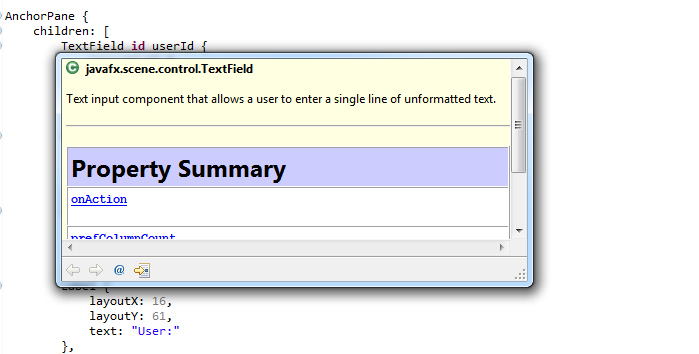
What I have currently is the default generated editor (took around 8 hours) and I’ll include this initial version into the up-coming e(fx)clipse release.
 Tomsondev Blog
The Xtext + Xbase + Xtend2 combinatio is great, isn’t it! I think you should add Jvm types in the expression, i.e. Xtext + JvmTypes + Xbase + Xtend2, since it 1) is an important part of the mechanism and 2) useful on its own.
Pingback: e(fx)clipse 0.0.6 released | Tomsondev Blog
Pingback: Java desktop links (for the past few days), September 30 | Jonathan Giles
Pingback: JavaFX links (for the past few days), September 30 // JavaFX News, Demos and Insight // FX Experience
Thanks for your great work creating this tool! It’s made editing FXML files much easier. However I’m having problems using the fxgraph editor – I can’t work out how to generate the FXML file. Is there a options panel that I’m missing? I was also wondering if you’ve included the live interface preview in the 0.0.6 release or is it just an example?
Thanks, Ben
Hi -you need to create an src-gen source folder and the generation should happen automagically while you are editing 🙂
The live preview is currently only available in the git repo – I’m just finishing my work on various parts and release 0.0.7 Sunday – it will come with other fxgraph editor improvements (the DSL will change a bit to help the livepreview e.g. find CSS-FIles to loader), the live preview, a working runtime layer to develop OSGi-base RCP applications, css-fixes, and many more cool new things