e(fx)clipse 1.2.0 – Helper API to call methods who throw exceptions

Have you ever worked with a library who throws an exceptions but there’s not possible recovery for you and you simply want to move on with a default value or null?

I’ve had the “fun” to work with something like this lately and all the exception handling cluttered my code. I’m using the IMarker-API as an example

private Annotation transform(IMarker m) {
   String type;
   try {
      type = marker.getType();
   } catch(CoreException e) {
      type = "Unknown";
   }
   
   return new Annotation(type,....);
}

In the ideal case IMarker would have similar as it has for getAttribute() a method who allows to define a default instead of throwing the exception but apparently this not the case and could only be fixed when adopting Java8.

So I’ve add a set of helper methods to deal with APIs who throw exceptions and now I can write:

import static org.eclipse.fx.core.function.ExExecutor.*;

private Annotation transform(IMarker m) {
  return new Annotation(
    executeSupplierOrDefault(m::getType, e -> "Unknown"), .....);
}
Posted in e(fx)clipse | Leave a comment

e(fx)clipse 1.2.0 – publishing runtime as an R5 bundle repository

In other posts I already outlined that our effort beside creating new features is to make the e(fx)clipse runtime a better citizen of the OSGi community / ecosystem.

Starting with 1.2.0 we are not only providing a p2 repository – for people using PDE and Tycho – but also an R5 bundle repository you can use with bnd and bnd-tools (if you are an eclipse user).

Publishing our runtime as an R5 bundle repository in theory would allow you to use other IDEs as well to make use of our runtime – I say in theory because if not mistaken IntelliJ IDEA nor Netbeans yet support bnd directly.

I tried to get something working with IntelliJ IDEA, gradle and bnd but failed miserably which might be because I’m a newbie at gradle and IntelliJ IDEA – so if someone can give me a lending hand I’m happy to document the steps at our wiki and even add project setup support to our project wizards in future versions so that you are able to generate multi IDE projects.

So if a Netbeans or IntelliJ IDEA user is reading this I would really appreciate your input because I want our runtime used as much as possible without you leaving and forcing you into a specific IDE is not the way to go.

Posted in e(fx)clipse | 5 Comments

e(fx)clipse 1.2.0 – StyledTextArea improvements

A lot of time has been spent on StyledTextArea and so it has improved a lot.

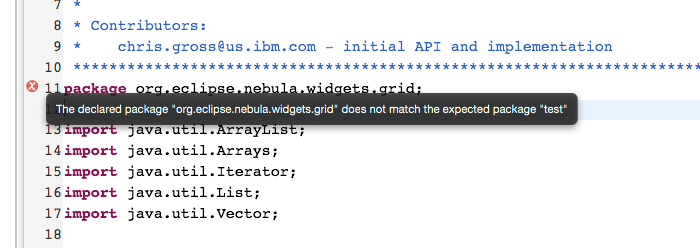
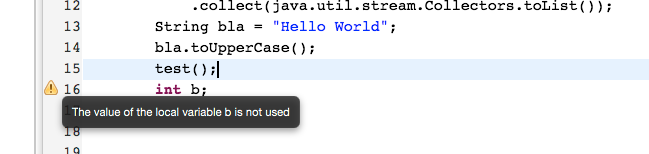
Many many bugs have been fixed one of the most interesting features from an API point of view is most likely support for custom graphic nodes as part of the LineRuler column.

This new API allows you to e.g. show errors like you know them from your favorite IDE.

screen

screen_2

Still there are many many bugs to fix so it’s going to be a long way to match all the features of e.g. SWT-StyledText.

Posted in e(fx)clipse | Tagged | Leave a comment

e(fx)clipse 1.2.0 – New service to observe a filesystem path

With 1.2.0 the e(fx)clipse core runtime bundle comes with a service who is able to track filesystem modifications. Since Java7 there’s an API to observe filesystem paths and so has the Eclipse Core Resources System which is used inside your Eclipse IDE.

The service we created looks like this:

public interface FilesystemService {
  public enum Kind {
    CREATE,
    MODIFY,
    DELETE
  }
  public Subscription observePath(URI path, BiConsumer<Kind, URI> consumer);
  public Subscription observePath(Path path, BiConsumer<Kind, Path> consumer);
  public boolean applies(URI uri);
}

and you use it like this:

import org.eclipse.fx.core.Util;
import org.eclipse.fx.core.FilesystemService;
import org.eclipse.fx.core.URI;

public class Sample {
   private static Optional<Subscription> void observe(String pathUri, Consumer<Kind,URI> c) {
    URI uri = URI.createURI(pathUri);
    return Util.lookupService(FilesystemService.class)
       .stream()
       .filter(fs -> fs.applies(uri))
       .findFirst()
       .map(fs -> fs.observe(uri,c));
   }

   public static void main(String[] args) {
     observe("file:/User/tomschindl", 
       (kind,uri) -> System.out.println( kind + " => " + uri));
   }
}

Things to notice:

  • There can be multiple Filesystem Services depending on the URI you want to observe
  • This whole stuff works in plain Java as well as it does in an OSGi-Environment
  • The system is extensible so you could plug-in your own filesystem service for you special filesystem and register it using the Java built-in service loader and the OSGi-Service registry
Posted in e(fx)clipse | Tagged | 1 Comment

e(fx)clipse 1.2.0 – RRobot learned to generate declarative services

In my last blog post I described that the way you define themes has changed – pre 1.2.0 you used extension points, now with 1.2.0 you are supposed to use OSGi-Services (preferably through the use of declarative services).

I guess most people don’t know that but when they are using one for the project wizards we provide the code responsible to do setup is not handcrafted Java code but we are using a DSL named RRobot who holds the setup description in files named .rtask. RRobot has not dependencies to other e(fx)clipse stuff so it can be used by your eclipse plug-in as well to automate the creation of projects.

All the wizard does at the end does is:

public class NewProjectStructureWizard extends Wizard implements INewWizard {
  // ....

  @Override
  public boolean performFinish() {
    Bundle b = FrameworkUtil.getBundle(getClass());
    BundleContext ctx = b.getBundleContext();
    ServiceReference<RRobot> ref = ctx.getServiceReference(RRobot.class);
    RRobot r = ctx.getService(ref);

    FileLoader loader = FileLoader.createLoader();
    RobotTask task = loader.loadTask(
      URI.createPlatformPluginURI("/org.eclipse.fx.ide.pde.ui.e4/generator-tasks/e4App.rtask", true));
    Map<String,Object> additionalData = new HashMap<>();

    try {
      getContainer().run(true, true,
        (monitor) -> r.executeTask(monitor, task, additionalData));
    } catch (Throwable e) {
       // Handle it ....
    }
    return true;
}

The following is the part of rtask-File used when you use the e4 Application wizard for JavaFX in 1.1.0:

screen_ext

With the change to the runtime we had to extend the feature set of rrobot to allow setting up DS-Components so the setup has change to this in 1.2.0:
screen_ds

Posted in e(fx)clipse | Tagged | Leave a comment

e(fx)clipse 1.2.0 – Themes are OSGi services

e(fx)clipse 1.2.0 is trying to get a better OSGi citizen and so we try to remove more and more Equinox/Eclipse specific stuff which means that we want to get rid of the Extension Registry in our/your code.

In 1.1.0 themes have been defined using the theme extension point org.eclipse.fx.ui.theme where you’ve been able to:

  • Define a theme
  • Contribute Stylesheets to themes

In 1.2.0 we deprecated the extension point in favor of making Themes and Stylesheets OSGi-Services you e.g. contribute through declarative services.

There are 2 main advantages:

  • We get dynamics for free so themes and stylesheets can be installed/updated/uninstalled in a running application
  • You have much more control over contributing a Stylesheet e.g. whether it applies to a given theme

A disadvantage if you want to find one is that it is a bit more work to define the theme and looks like this

<?xml version="1.0" encoding"UTF-8"?>
<scr:component xmlns:scr="http://www.osgi.org/xmlns/scr/v1.1.0" name="org.eclipse.fx.code.compensator.app.default-theme">
  <implementation 
    class="org.eclipse.fx.code.compensator.app.DefaultTheme"/>
   <service>
      <provide 
       interface="org.eclipse.fx.ui.services.theme.Theme"/>
   </service>
   <reference 
     bind="registerStylesheet" 
     cardinality="0..n" 
     interface="org.eclipse.fx.ui.services.theme.Stylesheet" 
     name="Stylesheet" 
     policy="dynamic" unbind="unregisterStylesheet"/>
</scr:component>
package org.eclipse.fx.code.compensator.app;

import org.eclipse.fx.ui.services.theme.Theme;
import org.eclipse.fx.ui.theme.AbstractTheme;
import org.osgi.service.component.annotations.Component;

public class DefaultTheme extends AbstractTheme {
  public DefaultTheme() {
    super("default", "Default Theme", 
      DefaultTheme.class.getClassLoader().getResource("css/default.css"));
  }
}
Posted in e(fx)clipse | Tagged | 5 Comments

EMap – Map your EMF to an SQL-Database

There are various technologies available for mapping EMF-objects to SQL databases, like the probably most established ones in the Eclipse ecosystem (both developed by Martin Taal)

  • Teneo
  • Texo

We more than contentendly used these two in quite some projects until we had – at the end of 2013 – to rethink our RCP architecture due to various (most of all performance) challenges with teneo (or more precisely hibernate).

I want to point out that these technical issues we faced were not caused by design problems of hibernate, but origin from the different lifespans of sessions to be handled – application servers with short living sessions on the one hand and RCP with typically fairly long running sessions.

Anyways this blog post is not about discussing why we left Teneo & Hibernate behind and developed our own EMF to SQL mapper named EMap but introducing this new mapping choice.

What is EMap

On first sight EMap is a DSL allowing you to:

  • define how an EMF entity is mapped to an SQL table
  • define how to retrieve EMF-Entities from your SQL-Database

But going deeper into it … EMap is a lot more, as the following example illustrates.

Let’s assume we have an EMF entity like the following:

interface TreeItem {
  public long getId();
  public void setId(long id);
  public String getName();
  public String setName(String name);
  public List<TreeItem> getChildren(); // containment, opposite of parent
  public TreeItem getParent(); // opposite of children
}

This would be mapped into a SQL database like this:

====================================
| T_ID | T_NAME     | T_REF_PARENT |
====================================
|  1   | Root 1     | NULL         |
------------------------------------
|  2   | Root 2     | NULL         |
------------------------------------
|  3   | Child 1.1  | 1            |
------------------------------------
|  4   | Child 1.2  | 1            |
------------------------------------
|  5   | Child 2.1  | 2            |
------------------------------------
| ....

The EMaping for that would look like this:

package sample;

entity TreeItem
{
  etype "http://www.bestsolution.at/emap/sample"#TreeItem
  attributes {
    primarykey id => T_ID 
      generatedby { 
        "Oracle" seqnext "SEQ_ID_TREEITEM", 
        "h2" autokey 
      }
    name          => T_NAME
    children      => 
      resolve TreeItem.selectChildren(T_ID)
    parent        => 
      resolve TreeItem.selectById(T_REF_PARENT)
  }
  queries {
    single selectById(long id) {
      default TreeItem FROM 
        '"TREE_ITEM"' WHERE '"T_ID" = ${id}'
    },
    selectAllItems() {
      default TreeItem FROM '"TREE_ITEM"'
    }
    selectChildren(long parentId) {
      default TreeItem FROM 
        '"TREE_ITEM"' WHERE '"T_REF_PARENT" = ${parentId}'
    },
    selectRootItems() {
      default TreeItem FROM 
        '"TREE_ITEM"' WHERE '"T_REF_PARENT" IS NULL'
    }
  }
}

And having this in EMap brings along the following stuff – automatically generated:

  • DDL file to create the SQL tables
  • a set of SQL files holding the named SQL queries
  • a set of Java interfaces & classes allowing you to
    retrieve, insert, update and delete entities

Most important here are the Java interfaces which look as follows for our TreeItem:

interface TreeItemMapper 
  extends at.bestsolution.persistence.ObjectMapper<TreeItem> {
   TreeItem selectById(long id);
   List<TreeItem> selectChildren(long parentId);
   List<Treeitem> selectRootItems();

   List<Treeitem> selectAllItems();
   MappedQuery<TreeItem> selectAllItemsMappedQuery();

   public static class Expression {
     public static final 
      TreeItemMapper.ExpressionStringExpressionFactory<TreeItem> name();
     public static final 
      LongExpressionFactory<TreeItem> id();
     public static final 
      LongExpressionFactory<TreeItem> parent_fk();

     public static final TreeItemMapper.Join<TreeItem> parent();
     public static final TreeItemMapper.Join<TreeItem> children();
   }

   static class Join<O> {
     StringExpressionFactory<O> name();
     LongExpressionFactory<O> id();
     LongExpressionFactory<O> parent_fk();
   }

   static class Order {
     OrderColumnFactory<TreeItem> id();
     OrderColumnFactory<TreeItem> name();
   }
}

// at.bestsolution.persistence.ObjectMapper
interface ObjectMapper<O> {
  void update(O object);
  void insert(O object);
  void delete(O object);
  // ....
}

who have the API you’ll use in your code to interact with the backend store.

Access data in your application

At runtime only the generated artifacts are needed so you don’t get extra dependencies e.g. on Xtext, … beside naturally some emap components who do the mapping.

EMap is fully integrated into OSGi and makes use of the OSGi-Service registry to e.g. retrieve the configuration to access datasources but it publishes itself as well into the OSGi-Service-Registry.

Let’s assume you would have an e4 component with which you would like to present the TreeItem structure. What would you have to do?

import static ...TreeItemMapper.Expression

public class MyView {
   private Session session;

   @Inject
   public MyView(SessionFactory factory) {
     session = factory.createSession();
   }

   private void printTree2Level() {
      TreeItemMapper m = 
        session.createMapper(TreeItemMapper.class);

      for( TreeItem r : m.selectRootItems() ) {
        System.out.println("+ " + r.getName());
        for( TreeItem c : r.getChildren() ) {
          System.out.println("  + " + c.getName());
        }
      }
   }

   private void findAllItemsNameStartWith(String namePrefix) {
     TreeItemMapper m = 
       session.createMapper(TreeItemMapper.class);

     MappedQuery<TreeItem> q = m.selectAllItemsMappedQuery();
     Expression<TreeItem> filter = 
       name().like(namePrefix+"%");

     q.where(filter).list().map( (i) -> i.getName() );
   }

   private void renameItem(TreeItem item) {
     String name = ...;
     TreeItemMapper m = 
       session.createMapper(TreeItemMapper.class);
     item.setName(newName);
     session.runInTransaction( (s) -> { 
       m.update(item); return true; 
     } );
   }

   @PreDestroy
   public void destroy() {
     session.close();
   }
}

Cool isn’t it!

And all this is typesafe!

And EMap brings along much more like this (for example FETCH JOINS similar to Hibernate, …), but going into these would go beyond the scope of this blog post.

Supported platforms, databases and the sourcecode

The sources are all available under EPL from our github repository at https://github.com/BestSolution-at/emap.

In current version EMap offers production ready support for

  • Firebird 2.5
  • Oracle 11

and runs on Java6 and above.

What’s next?
At the moment, we are looking for further funding on EMap allowing us to
add additional databases and further features. Just drop us a note for
sponsored development possibilities.

Posted in Eclipse | Leave a comment

Introducing XGrid – a toolkit agnostic Grid control and component

Today I am happy being able to talk for the first time about a new component we’ve been developing for quite some time.

Before going into technical details, I’d like to point out that the development of features currently available has been sponsored by ITBH who agreed to have all sources released under the Apache license Version 2.0, that allows free usage in commercial products as long as the license terms are respected.

What is XGrid

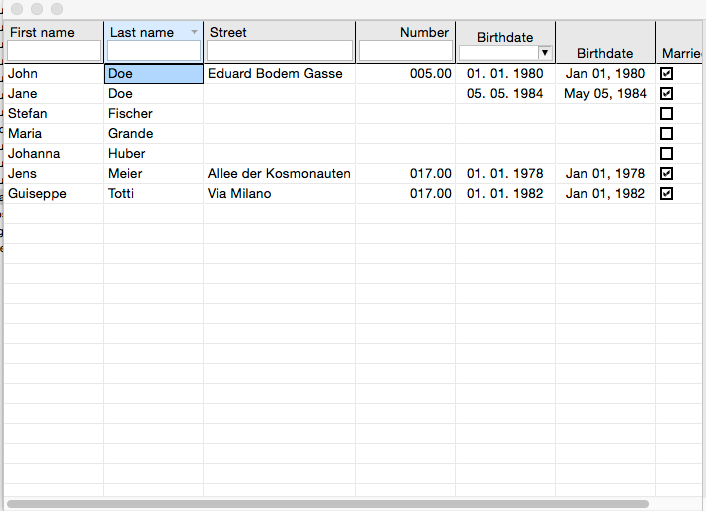
XGrid is a feature rich Grid-Control, that can be set up using an imperative language like Java, but also by an EMF model in declarative fashion. In the current version, XGrid comes with built-in features like filtering or sorting and we are looking for funding of further developement (e.g. PDF export?). If you are interested, please contact us by email.
grid-total

Where do I get it from

XGrid is developed in a public github-repository and we are using the github infrastructure for bugtracking and documentation.

In case you miss a feature, please file a ticket and maybe consider, if you can support the development by funding it like ITBH did.

The XGrid design

At the root, XGrid is nothing more but a set of interfaces completely agnostic to the underlying UI toolkit, so it is possible, to use the same configuration and API regardless if you are developing an SWT, JavaFX, … application. At the moment, the only implementation of the XGrid API is for SWT, based on the excellent Nebula Grid control, that BestSolution.at has been maintaining for many years.

XGrid follows two key design patterns: On the one hand, @FunctionalInterface types are accepted almost everywhere in the API and on the other hand, Java8 features should be integrated including for example type annotations for NullAnalysis.

Sample usage

You are able to use XGrid by using its java API

public abstract class MyPersonGrid {

  public void setup() {
    XGridTable<Person> t = createControl();

    {
      XGridColumn<Person, String> c = t.createColumn("firstname", 
        p -> p.getFirstname());
      c.labelProperty().set("Firstname");
    }

    {
      XGridColumn<Person, String> c = t.createColumn("lastname", 
        p -> p.getLastname());
      c.labelProperty().set("Lastname");
    }

    {
      DateFormat f = DateFormat.getDateInstance();
      XGridColumn<Person, Date> c = t.createColumn("birthday", 
        p -> p.getBirthdate());
      c.textFunctionProperty().set((p,b) -> f.format(b));
      c.labelProperty().set("Birthday");
    }

    t.contentProviderProperty().set(
      new ListGridContentProvider<Person>(getPersonList()));
  }

  protected abstract XGridTable<Person> createControl();
}

public class MySWTPersonGrid extends MyPersonGrid {
  protected XGridTable<Person> createControl() {
    return new SWTGridTable<>(s, 
      SWT.BORDER | SWT.H_SCROLL | SWT.V_SCROLL);
  }
}

Like in day to day work, we often see that setting up controls like a grid based on Java is very cumbersome, and if you for example want to display different configurations based for example on user privileges, your code gets very complex quickly and maintainances becomes much more difficult.

Due to this, XGrid comes with an optional component that allows you to configure a grid instance by an EMF model, bringing the additional benefit of being able to load the application model from anywhere. So you can even update your XGrid component without deploying a new version of your application. Simply put the configurations on a remote server and fetch them from there.

Setting up a grid based on a configuration is nothing more than

public abstract class MyPersonGrid {
   URL configUrl = ....;

   private MGridConfigurationSet getConfig() {
     Resource resourceModel = new XMIResourceImpl();
     try(InputStream in = url.openStream()) {
       resourceModel.load(in, null);
       MGrid config = (MGrid) resourceModel.getContents().get(0);
       return config.getDefaultConfiguration();
     } catch(IOException e) {
       throw new RuntimeException(e);
     }
   }

   public void setup() {
     XGridTable<Person> t = createControl();
     MGridConfigurationSet c = getConfig();
     EmfGridTableConfigurator.configure(t, c);
   }
}

public class MySWTPersonGrid extends MyPersonGrid {
  protected XGridTable<Person> createControl() {
    return new SWTGridTable<>(s, 
      SWT.BORDER | SWT.H_SCROLL | SWT.V_SCROLL);
  }
}

What is XGridComponent

While XGrid is a pure Grid-Control, XGridComponent is a higher level element that collects the low-level features of XGrid and allows them to be integrated into a framework like Eclipse 4, where for example the grid selection is published automatically by an ESelectionService and the IEventBroker.

Besides this, we put a lot of attention on remaining framework neutral. Because of this, the XGridComponent implementation does not have any framework dependencies and expects itself to be configured through a dependency injection (DI) framework.

By default we ship an integration for e4, that can be used like this in your application model:

<application:Application>
<!-- .... -->
  <children xsi:type="basic:PartStack">
    <children xsi:type="basic:Part" 
      contributionURI="bundleclass://at.bestsolution.framework.grid.component/at.bestsolution.framework.grid.component.XGridTableComponent">
      <persistedState 
        key="xgrid.configuration" 
        value="emf-resource:platform:/plugin/at.bestsolution.framework.grid.e4.sample/config/sampleConfig.xmi"/>
      <persistedState 
        key="xgrid.content" 
        value="sample:platform:/plugin/at.bestsolution.framework.grid.e4.sample/sampledata/sampleData.xmi"/>
    </children>
  </children>
<!-- .... -->
</application:Application>

What’s next?

As already pointed out, the initial development of XGrid was funded by ITBH and they deserve all our respect for funding such a useful component.

At the moment, we are looking for additional funding for XGrid, allowing us to add additional, cool features like the ones below:

  • Editing support
  • XGrid-SWT is already fast but speed could be improved tremendously
    by using the Grids visibility feature
  • ODF, Excel & PDF export
  • JavaFX support

Just drop a note if you are interested in one of these or have further ideas on XGrid – we are looking forward to extend/adapt XGrid for you!

Posted in Eclipse | 12 Comments

JavaFX Filesystem Viewers

JavaFX 8 has 2 controls (=dialogs) to browse the filesystem

  • javafx.stage.DirectoryChooser native_dir
  • javafx.stage.FileChooser native_file

who create native resource dialogs but if you want to integrate a directory view in your application and/or you want custom features like a file preview those dialogs are of no help.

I had just this use case and so I implemented 3 different controls:

  • org.eclipse.fx.ui.controls.filesystem.DirectoryTreeView: Display a directory structure as a tree
  • org.eclipse.fx.ui.controls.filesystem.DirectoryView: Display the contents of a directory – currently only a list view is available
  • org.eclipse.fx.ui.controls.filesystem.ResourcePreview: Display preview informations of a file e.g. a thumb for images

If you combine them you get a nice file browser you can integration just anywhere

screen_dirview

Usage is straight forward:

package org.eclipse.fx.ui.controls.sample;

import java.nio.file.Paths;

import javafx.application.Application;
import javafx.beans.Observable;
import javafx.collections.FXCollections;
import javafx.scene.Scene;
import javafx.scene.control.SplitPane;
import javafx.stage.Stage;

import org.eclipse.fx.ui.controls.filesystem.DirectoryTreeView;
import org.eclipse.fx.ui.controls.filesystem.DirectoryView;
import org.eclipse.fx.ui.controls.filesystem.IconSize;
import org.eclipse.fx.ui.controls.filesystem.ResourceItem;
import org.eclipse.fx.ui.controls.filesystem.ResourcePreview;
import org.eclipse.fx.ui.controls.filesystem.RootDirItem;

public class DirectoryViewSample extends Application {

  private static RootDirItem rootDirItem;

  @Override
  public void start(Stage primaryStage) throws Exception {
    rootDirItem = ResourceItem.createObservedPath(
      Paths.get("/Users/tomschindl/Desktop"));

    DirectoryTreeView tv = new DirectoryTreeView();
    tv.setIconSize(IconSize.MEDIUM);
    tv.setRootDirectories(
      FXCollections.observableArrayList(rootDirItem));

    DirectoryView v = new DirectoryView();
    v.setIconSize(IconSize.MEDIUM);

    tv.getSelectedItems().addListener( (Observable o) -> {
      if( ! tv.getSelectedItems().isEmpty() ) {
        v.setDir(tv.getSelectedItems().get(0));
      } else {
        v.setDir(null);
      }
    });

    ResourcePreview prev = new ResourcePreview();
    v.getSelectedItems().addListener((Observable o) -> {
      if( v.getSelectedItems().size() == 1 ) {
        prev.setItem(v.getSelectedItems().get(0));
      } else {
        prev.setItem(null);
      }
    });

    SplitPane p = new SplitPane(tv,v, prev);
    p.setDividerPositions(0.3,0.8);

    Scene s = new Scene(p,500,500);
    primaryStage.setScene(s);
    primaryStage.show();
  }

  public static void main(String[] args) {
    Application.launch(args);
    rootDirItem.dispose();
  }
}
Posted in e(fx)clipse | 18 Comments

Displaying and editing large (styled) texts

A reoccuring question in stackoverflow is how to present:

  • Large amounts of editable text
  • Display text paragraphs with words in different colors, sizes, … and optionally make them editable

In the following post I’d like to shade some light into this area of JavaFX and propose solutions allowing you to deal with them efficiently using runtime components developed as part of e(fx)clipse.

Displaying text

First of all to represent text the basic JavaFX classes you need to be aware of are:

  • javafx.scene.text.Text: Allows you to render a text chunk with a given color, font-size, font-family, …
  • javafx.scene.text.TextFlow: Allows you to layout text nodes mixed with other content like images, shapes, …

So the first conclusion we could draw from this information is that to display styled text we create a TextFlow, put Text elements with different color & font settings into it, embed the TextFlow into a ScrollPane and are done.

If you implement this you get something like this:

screen_2

I’ve written more on this at https://tomsondev.bestsolution.at/2013/02/14/experimenting-with-textflow-from-javafx8/

Mission accomplished? Almost until you notice that performance for big amounts of styled text are horrendous because the complete text has to be renderer although you only see 60 lines! Other problems: E.g. you don’t have a cursor so selecting and copying lines from the text are not possible. Bottom line: We need to get smarter but before we do so we look into editing of text.

Editing text

There are 3 main built-in controls to edit text:

  • javafx.scene.control.TextField: Edit a single line of text
  • javafx.scene.control.TextArea: Edit multi line text
  • javafx.scene.web.HTMLEditor: Edit styled text with the help of WebView

HTMLEditor solves a very special usecase so I’m not looking into it in this post. TextField is only for one line so there’s only TextArea left for larger chunks of text but TextArea has multiple draw backs:

  • You can not have different styled areas the complete text has to have one font, color, …
  • It is totally inefficient because for rendering it uses 1 big Text-Object, for a few lines this is ok but if you have text with more than thousand lines you’ll run into troubles

To sum up: JavaFX comes by default with NO control that allows you edit & display large text.

Text editing extensions coming with e(fx)clipse

Displaying small amount of styled text

In the upcoming 1.2.0 release we’ll provide you org.eclipse.fx.ui.controls.styledtext.StyledString which implements the CharSequence interface and a static helper which allows to generate a scenegraph node from it.

Useage looks like this:

StyledString s = new StyledString();
s.appendSegment("This","default-text");
s.appendSegment("is bold","bold-text");
s.appendSegment("and red","red-text");
s.appendSegment("and bold &amp; red","bold-text","red-text");
Node n = Util.toNode(s);
// ...

The 2nd, 3rd, … argument are CSS-Styleclasses!

Displaying and editing large amounts of text

While the above method is easy to use it is not solving the problem for large texts (styled or not) nor does it help you with editing, … in fact it simply uses the TextFlow approach hiding the details from you.

To solve the problem of editing and displaying large text we need a control who virtualizes the Text-Elements to display and only the lines visible in the UI are part of the Scenegraph. Implementing something like this is not hard but it also is not needed because JavaFX comes with controls who work like this: All *View controls like TableView, ListView and TreeView are virtual in the sense that they only create as many ListCell, TreeCell, … as you see on screen.

Based upon this knowledge we implemented a StyledTextArea which has a similar API than SWT-StyledText to display and edit large styled texts, rendering 100,000 lines of code works in no time!

Useage is as simple as:

StyledTextArea t = new StyledTextArea();
t.getStylesheets().add(getClass().getResource("test.css").toExternalForm());
t.getContent().setText("This is a styled text!\nThis is the 2nd line with data\nBlaBla");
t.setStyleRanges(
    new StyleRange("text-highlight",0,30,null,null)
  , new StyleRange("text-highlight",34,5,null,null)
);
Posted in e(fx)clipse | 13 Comments